@huggingface/tasks
Version:
List of ML tasks for huggingface.co/tasks
97 lines (64 loc) • 5.57 kB
Markdown
## Use Cases
### Data Generation
Businesses can generate data for their use cases by inputting text and getting image outputs.
### Immersive Conversational Chatbots
Chatbots can be made more immersive if they provide contextual images based on the input provided by the user.
### Creative Ideas for Fashion Industry
Different patterns can be generated to obtain unique pieces of fashion. Text-to-image models make creations easier for designers to conceptualize their design before actually implementing it.
### Architecture Industry
Architects can utilise the models to construct an environment based out on the requirements of the floor plan. This can also include the furniture that has to be placed in that environment.
## Task Variants
### Image Editing
Image editing with text-to-image models involves modifying an image following edit instructions provided in a text prompt.
- **Synthetic image editing**: Adjusting images that were initially created using an input prompt while preserving the overall meaning or context of the original image.

_Figure taken from ["InstructPix2Pix: Learning to Follow Image Editing Instructions"](https://www.timothybrooks.com/instruct-pix2pix)_
- **Real image editing**: Similar to synthetic image editing, except we're using real photos/images. This task is usually more complex.
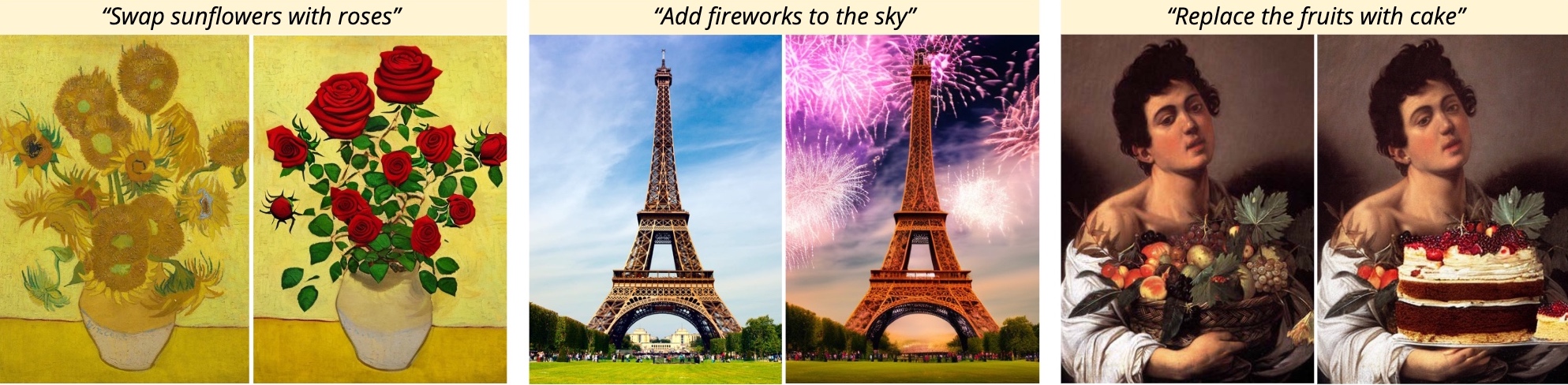
_Figure taken from ["Prompt-to-Prompt Image Editing with Cross-Attention Control"](https://prompt-to-prompt.github.io)_
### Personalization
Personalization refers to techniques used to customize text-to-image models. We introduce new subjects or concepts to the model, which the model can then generate when we refer to them with a text prompt.
For example, you can use these techniques to generate images of your dog in imaginary settings, after you have taught the model using a few reference images of the subject (or just one in some cases). Teaching the model a new concept can be achieved through fine-tuning, or by using training-free techniques.
## Inference
You can use diffusers pipelines to infer with `text-to-image` models.
```python
from diffusers import StableDiffusionPipeline, EulerDiscreteScheduler
model_id = "stabilityai/stable-diffusion-2"
scheduler = EulerDiscreteScheduler.from_pretrained(model_id, subfolder="scheduler")
pipe = StableDiffusionPipeline.from_pretrained(model_id, scheduler=scheduler, torch_dtype=torch.float16)
pipe = pipe.to("cuda")
prompt = "a photo of an astronaut riding a horse on mars"
image = pipe(prompt).images[0]
```
You can use [huggingface.js](https://github.com/huggingface/huggingface.js) to infer text-to-image models on Hugging Face Hub.
```javascript
import { InferenceClient } from "@huggingface/inference";
const inference = new InferenceClient(HF_TOKEN);
await inference.textToImage({
model: "stabilityai/stable-diffusion-2",
inputs: "award winning high resolution photo of a giant tortoise/((ladybird)) hybrid, [trending on artstation]",
parameters: {
negative_prompt: "blurry",
},
});
```
## Useful Resources
### Model Inference
- [Hugging Face Diffusion Models Course](https://github.com/huggingface/diffusion-models-class)
- [Getting Started with Diffusers](https://huggingface.co/docs/diffusers/index)
- [Text-to-Image Generation](https://huggingface.co/docs/diffusers/using-diffusers/conditional_image_generation)
- [Using Stable Diffusion with Core ML on Apple Silicon](https://huggingface.co/blog/diffusers-coreml)
- [A guide on Vector Quantized Diffusion](https://huggingface.co/blog/vq-diffusion)
- [🧨 Stable Diffusion in JAX/Flax](https://huggingface.co/blog/stable_diffusion_jax)
- [Running IF with 🧨 diffusers on a Free Tier Google Colab](https://huggingface.co/blog/if)
- [Introducing Würstchen: Fast Diffusion for Image Generation](https://huggingface.co/blog/wuerstchen)
- [Efficient Controllable Generation for SDXL with T2I-Adapters](https://huggingface.co/blog/t2i-sdxl-adapters)
- [Welcome aMUSEd: Efficient Text-to-Image Generation](https://huggingface.co/blog/amused)
- Image Editing Demos: [LEDITS++](https://huggingface.co/spaces/editing-images/leditsplusplus), [Turbo Edit](https://huggingface.co/spaces/turboedit/turbo_edit), [InstructPix2Pix](https://huggingface.co/spaces/timbrooks/instruct-pix2pix), [CosXL](https://huggingface.co/spaces/multimodalart/cosxl)
- Training free Personalization Demos: [Face-to-All](https://huggingface.co/spaces/multimodalart/face-to-all), [InstantStyle](https://huggingface.co/spaces/InstantX/InstantStyle), [RB-modulation](https://huggingface.co/spaces/fffiloni/RB-Modulation), [Photomaker v2](https://huggingface.co/spaces/TencentARC/PhotoMaker-V2)
### Model Fine-tuning
- [Finetune Stable Diffusion Models with DDPO via TRL](https://huggingface.co/blog/pref-tuning)
- [LoRA training scripts of the world, unite!](https://huggingface.co/blog/sdxl_lora_advanced_script)
- [Using LoRA for Efficient Stable Diffusion Fine-Tuning](https://huggingface.co/blog/lora)
- LoRA fine tuning Spaces: [FLUX.1 finetuning](https://huggingface.co/spaces/autotrain-projects/train-flux-lora-ease), [SDXL finetuning](https://huggingface.co/spaces/multimodalart/lora-ease)
This page was made possible thanks to the efforts of [Ishan Dutta](https://huggingface.co/ishandutta), [Enrique Elias Ubaldo](https://huggingface.co/herrius) and [Oğuz Akif](https://huggingface.co/oguzakif).