@hmk_codeweb88/useglobalstate
Version:
Super minimal global state hook for React without context.
223 lines (156 loc) • 5.32 kB
Markdown
## 🌍 useGlobalState — React Global State in 1 Line
> Zero-config, lightweight, and blazing fast global state management for React using hooks.
> No context. No boilerplate. No Redux. Now with optional localStorage persistence!
## 🚀 Why useGlobalState?
✅ No setup required
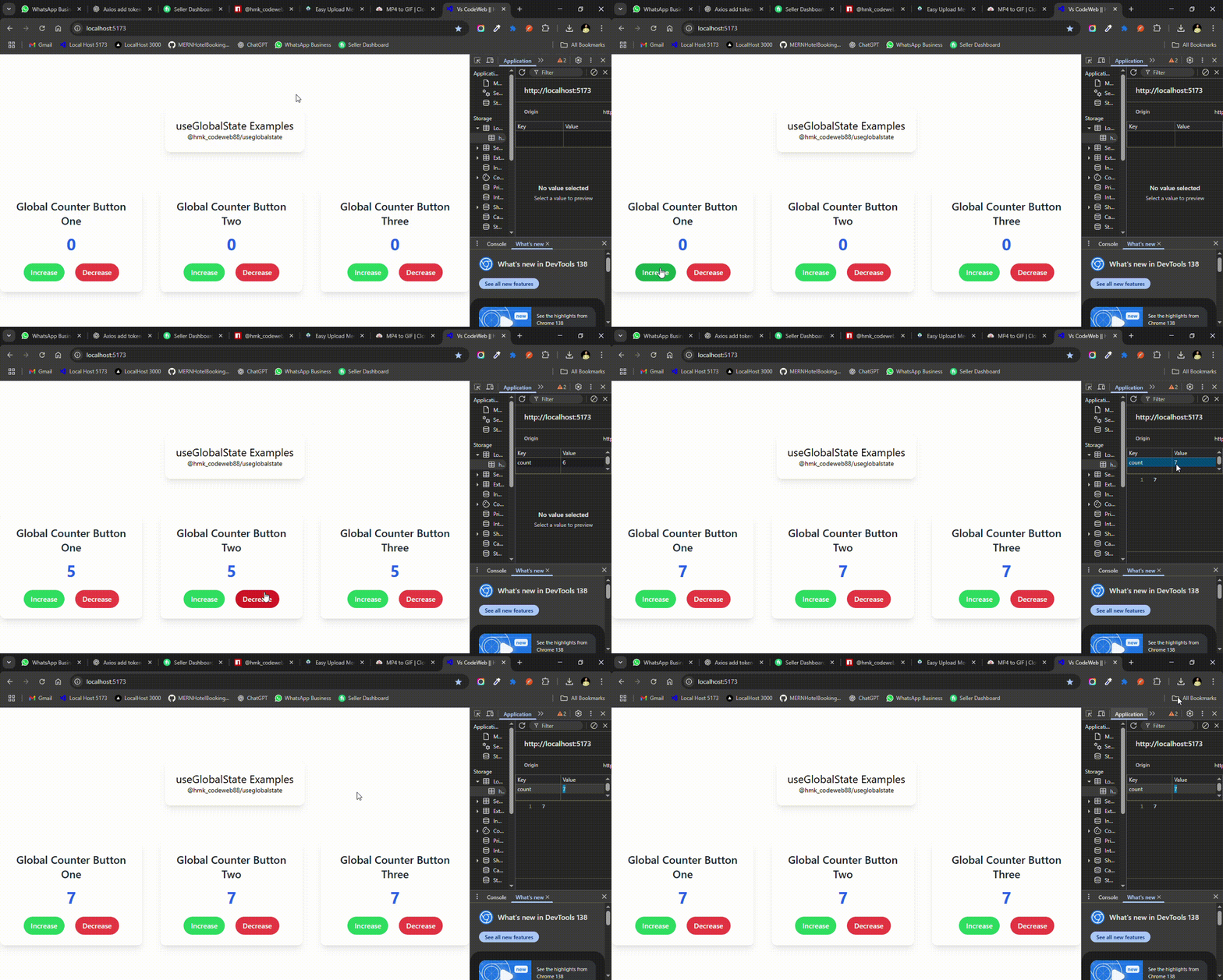
✅ Share state between components instantly
✅ Works without Context API
✅ Only 1 import to rule them all
✅ Less than 1KB gzipped
✅ Now supports localStorage persistence!
## Live Demo
## 📦 Installation
```bash
# Using npm
npm install @hmk_codeweb88/useglobalstate
# OR using yarn
yarn add @hmk_codeweb88/useglobalstate
```
## ⚙️ Basic Usage
### ✅ Create a global variable in any component:
```js
import { useGlobalState } from "@hmk_codeweb88/useglobalstate";
function ComponentA() {
const [count, setCount] = useGlobalState("count", 0); // "count" is key, 0 is initial value
return (
<div>
<h2>Component A</h2>
<p>Count: {count}</p>
<button onClick={() => setCount(count + 1)}>Increment</button>
</div>
);
}
```
### ✅ Access the same state in another component:
```js
import { useGlobalState } from "@hmk_codeweb88/useglobalstate";
function ComponentB() {
const [count] = useGlobalState("count");
return (
<div>
<h2>Component B</h2>
<p>Global Count from Component A: {count}</p>
</div>
);
}
```
🧠 **No need to pass props or use context** — state is shared automatically using an internal map.
## 💾 Persistent Global State (localStorage)
Want your value to survive page refresh? Add `{ persist: true }`:
```js
const [theme, setTheme] = useGlobalState("theme", "light", { persist: true });
<button onClick={() => setTheme(theme === "dark" ? "light" : "dark")}>
Toggle Theme
</button>;
```
✔️ Automatically saves and restores from `localStorage`.
✔️Perfect for saving theme, language, or user preferences.
## 🧩 Full Example (Copy-Paste Ready)
```jsx
// App.js
import React from "react";
import ComponentA from "./ComponentA";
import ComponentB from "./ComponentB";
export default function App() {
return (
<div>
<ComponentA />
<ComponentB />
</div>
);
}
```
```jsx
// ComponentA.js
import { useGlobalState } from "@hmk_codeweb88/useglobalstate";
export default function ComponentA() {
const [value, setValue] = useGlobalState("sharedMessage", "Hello from A!", {
persist: true,
});
return (
<div>
<h2>Component A</h2>
<input value={value} onChange={(e) => setValue(e.target.value)} />
</div>
);
}
```
```jsx
// ComponentB.js
import { useGlobalState } from "@hmk_codeweb88/useglobalstate";
export default function ComponentB() {
const [value] = useGlobalState("sharedMessage");
// const [value, setValue] = useGlobalState("sharedMessage", "", { persist: true }); if you want to update the value of count and also save it into localStorage permanently You must pass { persist: true } in any component where you want to update and persist the value.(Just accessing it without setValue doesn’t require it.) then you can use setValue to update the value in localStorage.
return (
<div>
<h2>Component B</h2>
<p>Received: {value}</p>
</div>
);
}
```
## ⚡ Advanced Usage
### ✅ Update value using a function:
```js
const [count, setCount] = useGlobalState("count", 0);
setCount((prev) => prev + 5); // Works like useState
```
## 🧠 How It Works
Internally, this library uses:
- A global `Map` to store key-value pairs
- `Set` of listener functions to trigger re-renders
- React `useEffect` + `useState` to subscribe/unsubscribe to changes
- Optionally, `localStorage` for persistence
That’s it. No Provider. No Context. No headaches.
## ❓ FAQ
**Q: Do I need a Context Provider?**
A: Nope. It works completely without React context.
**Q: Is it reactive? Will it update automatically?**
A: Yes! Any component using the same key will auto-update.
**Q: What happens on page refresh?**
A: If `persist: true` is enabled, it restores value from `localStorage`.
**Q: What if I access the same key in 10 components?**
A: All 10 components stay in sync — automatically.
## 🧪 Roadmap
- [x] Basic key-value global store
- [x] Persistence via localStorage
- [ ] Devtools logging
- [ ] TypeScript support
- [ ] Custom reset/clear method
## 🙏 GitHub Repe
```
Link this idea please give star ⭐ on [GitHub](https://github.com/hassaanhaider88/useGloablState)
```
## 🛡️ 5. Add a “Security Tip” for localStorage
### This is good practice:
```
⚠️ Security note: Data saved via localStorage is visible in the browser and should not be used to store sensitive user info like tokens or passwords.
```
## 🧑💻 Author
Built with ❤️ by [Hassaan Haider](https://hassaan-haider.netlify.app/)
Have suggestions or ideas? PRs and issues are welcome!
## 📜 License
MIT © [Hassaan Haider](https://github.com/hassaanhaider88)