@heleneb1/ts-errors
Version:
Lightweight TypeScript library to create, manage and log typed, structured errors for Node.js, Express, and JavaScript apps.
354 lines (244 loc) • 9.55 kB
Markdown
<p align="center">
<img src="https://raw.githubusercontent.com/Heleneb1/ts-errors/main/assets/banner.png" alt="ts-errors banner" />
</p>
# 🧱 ts-errors
**ts-errors est une librairie TypeScript légère pour créer des erreurs structurées et typées avec style. Compatible avec TypeScript, Node.js, Express et les applications JavaScript.**
[](https://www.npmjs.com/package/@heleneb1/ts-errors)
[](https://www.npmjs.com/package/@heleneb1/ts-errors)
[](https://www.npmjs.com/package/@heleneb1/ts-errors)
[](https://www.npmjs.com/package/@heleneb1/ts-errors)
[](https://github.com/Heleneb1/ts-errors)
[](https://github.com/Heleneb1/ts-errors)
📘 Ce README existe aussi en [🇬🇧 English](README.md).
> Gère tes erreurs HTTP sans douleur — avec élégance, typage strict et un soupçon d’emoji ✨
Une **librairie TypeScript minimaliste** pour créer, formater et gérer tes erreurs HTTP avec **style, structure et expressivité**.
Compatible **JavaScript**, **Express**, et les **loggers externes** (`winston`, `pino`, etc.).
## 💡 Pourquoi ts-errors ?
Parce que les erreurs méritent mieux qu’un simple `throw new Error("Oops")`.
`ts-errors` te permet de :
- Donner du sens à tes erreurs (catégories, détails, typage)
- Les afficher avec clarté (console, logs, API)
- Les intégrer facilement dans ton stack (Express, Winston, etc.)
**Requirements:** Node >= 18, TypeScript >= 5
[NPM](https://www.npmjs.com/package/ts-errors) | [GitHub](https://github.com/Heleneb1/ts-errors)
## ✨ Fonctionnalités
- ✅ Classe `CustomError` extensible avec `emoji`, `statusCode`, `category`, `details`
- 🎯 Erreurs prêtes à l’emploi (`NotFoundError`, `UnauthorizedError`, etc.)
- 🎨 Affichage formaté : compact, colorisé ou tabulaire
- ⚙️ Middleware Express intégré
- 🔌 Support des loggers externes (`winston`, `pino`, etc.)
- 📦 Zéro dépendance externe
- 🧠 Typage strict + autocomplétion JS/TS
## 🚀 Installation
```bash
# Avec npm
npm install @heleneb1/ts-errors
# Ou avec yarn
yarn add @heleneb1/ts-errors
```
### 👀 Démo
Regarde directement la démo de la lib ci-dessous :
<div align="center">
<img src="https://raw.githubusercontent.com/Heleneb1/ts-errors/main/assets/demo_compressed.gif" alt="Demo" width="600">
<br><br>
<a href="https://raw.githubusercontent.com/Heleneb1/ts-errors/main/assets/demo_compressed.gif">
📹 <em>Cliquez ici pour voir la démo en plein écran</em>
</a>
</div>
## ⚙️ Utilisation rapide
### TypeScript
```ts
import { NotFoundError } from "@heleneb1/ts-errors";
throw NotFoundError("User not found", { userId: 42 });
```
### JavaScript
```js
const { NotFoundError } = require("@heleneb1/ts-errors");
throw NotFoundError("User not found", { userId: 42 });
```
## 🧩 Exemple avec `CustomError`
```ts
import { CustomError } from "@heleneb1/ts-errors";
throw new CustomError("Something went wrong", 500, {
context: "DB connection",
});
```
### ⚠️ Créer un `CustomError` correctement
## L’ordre des arguments compte !
💡 **Signature** :
```ts
new CustomError(
message: string, // texte de l’erreur
statusCode?: number, // code HTTP (par défaut 500)
details?: Record<string, any> // infos supplémentaires
)
```
✅ Exemple correct :
```ts
throw new CustomError("Joke not found", 404, {
info: `Joke with id ${id} not found 😔`, // Ici texte libre
});
```
❌ Exemple à éviter :
```ts
// Mauvais ordre → le statusCode sera remplacé par l’objet details
throw new CustomError("Joke not found", { jokeId: id }, 404);
```
💡 Astuce :
Tu peux aussi passer directement un objet si tu veux :
```ts
throw new CustomError({
message: "Joke not found",
statusCode: 404,
details: { jokeId: id },
});
```
## 🧰 Middleware Express
```ts
import express from "express";
import { errorMiddleware, NotFoundError } from "@heleneb1/ts-errors";
const app = express();
app.get("/user/:id", (req, res, next) => {
next(NotFoundError("User not found", { id: req.params.id }));
});
app.use(errorMiddleware);
```
> Le middleware `errorMiddleware` gère automatiquement la sérialisation et la réponse JSON côté client.
```ts
import express from "express";
import { errorMiddleware, NotFoundError } from "@heleneb1/ts-errors";
const app = express();
app.get("/test", (req, res, next) => next(NotFoundError("Test error")));
app.use(errorMiddleware);
app.listen(3000, () => console.log("Server running on :3000"));
```
## ⚙️ Configuration Globale
```ts
import { CustomError } from "@heleneb1/ts-errors";
CustomError.settings = {
showEmoji: false,
defaultCompact: true,
colorize: false,
};
CustomError.config({ showEmoji: true, colorize: true });
CustomError.setLogger(myWinstonLogger, "error");
```
## 🔌 Intégration avec un Logger Externe
```ts
import { CustomError } from "@heleneb1/ts-errors";
import winston from "winston";
const logger = winston.createLogger({
/* config */
});
CustomError.setLogger(logger, "error");
```
## 🖼️ Affichage Formaté
```ts
try {
throw NotFoundError("Page not found", { url: "/404" });
} catch (err) {
if (err instanceof CustomError) {
err.log(); // Affiche l’erreur formatée dans la console
}
}
```
### 🗃️ Accès au tableau ou au JSON
Chaque CustomError peut être affichée en tableau dans la console avec log() ou récupérée au format JSON avec toJSON().
```ts
import { NotFoundError, CustomError } from "@heleneb1/ts-errors";
try {
throw NotFoundError(undefined, { userId: 42 });
} catch (err) {
if (err instanceof CustomError) {
// Affichage en tableau dans la console
err.log();
// Récupérer l'objet JSON pour l'API ou autre usage
console.log(err.toJSON());
}
}
```
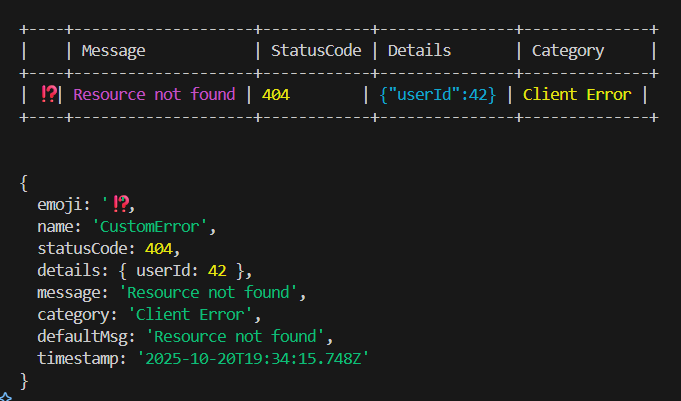
### Exemple de sortie console
```
+----+----------------+------------+----------------+--------------+
| | Message | StatusCode | Details | Category |
+----+----------------+------------+----------------+--------------+
| ⁉️ | Page not found | 404 | {"url":"/404"} | Client Error |
+----+----------------+------------+----------------+--------------+
```
_Dans ton terminal._

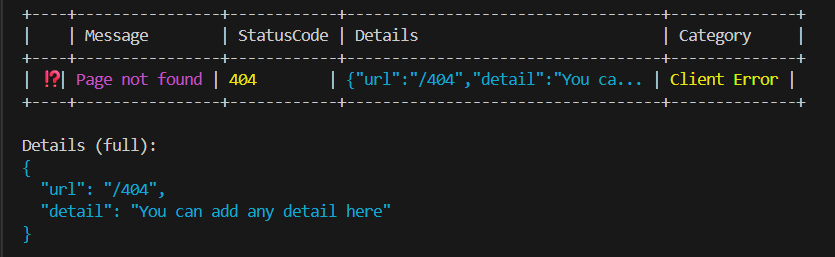
_Avec les détails complets ci-dessous._
```
+----+----------------+------------+-----------------------------------+--------------+
| | Message | StatusCode | Details | Category |
+----+----------------+------------+-----------------------------------+--------------+
| ⁉️ | Page not found | 404 | {"url":"/404","detail":"You ca... | Client Error |
+----+----------------+------------+-----------------------------------+--------------+
Details (full):
{
"url": "/404",
"detail": "You can add any detail here"
}
```
_Dans ton terminal._
## ⚡ Erreurs disponibles
- BadRequestError
- UnauthorizedError
- ForbiddenError
- NotFoundError
- ConflictError
- UnprocessableEntityError
- TooManyRequestsError
- InternalServerError
- ServiceUnavailableError
- GatewayTimeoutError
## 📚 API `CustomError`
| Propriété | Type | Description |
| ------------ | ------------------------- | ------------------------------------ |
| `message` | `string` | Message d’erreur |
| `statusCode` | `number` | Code HTTP |
| `emoji` | `string` | Emoji associé |
| `category` | `string` | `"Client Error"` ou `"Server Error"` |
| `details` | `Record<string, unknown>` | Données supplémentaires |
### Méthodes
- `log()` — affiche l’erreur formatée
- `formattedMessage(compact, showEmoji, colorize)` — retourne une version stylée du message
- `toJSON()` — sérialise l’erreur pour une réponse API
## 🧱 Structure du package
```ts
export * from "./CustomError";
export * from "./createError";
export * from "./errorHelpers";
export * from "./middlewares/errorMiddleware";
```
## 🧪 Tests
```bash
npm run test
```
## 📝 Changelog
- 1.0.0 — Initial release
## 🛡️ Licence
MIT — voir [LICENSE](LICENSE) pour plus de détails.
- libre à toi de l’utiliser, l’adapter et l’améliorer.
## ✨ Auteur
Made with ❤️ & TypeScript by **HeleneB1** — creative technologist & digital art director.