@google-apps/chat
Version:
Google Chat API client for Node.js
881 lines • 227 kB
TypeScript
import type * as gax from 'google-gax';
import type { Callback, CallOptions, Descriptors, ClientOptions, PaginationCallback } from 'google-gax';
import { Transform } from 'stream';
import * as protos from '../../protos/protos';
/**
* Enables developers to build Chat apps and
* integrations on Google Chat Platform.
* @class
* @memberof v1
*/
export declare class ChatServiceClient {
private _terminated;
private _opts;
private _providedCustomServicePath;
private _gaxModule;
private _gaxGrpc;
private _protos;
private _defaults;
private _universeDomain;
private _servicePath;
private _log;
auth: gax.GoogleAuth;
descriptors: Descriptors;
warn: (code: string, message: string, warnType?: string) => void;
innerApiCalls: {
[name: string]: Function;
};
pathTemplates: {
[name: string]: gax.PathTemplate;
};
chatServiceStub?: Promise<{
[name: string]: Function;
}>;
/**
* Construct an instance of ChatServiceClient.
*
* @param {object} [options] - The configuration object.
* The options accepted by the constructor are described in detail
* in [this document](https://github.com/googleapis/gax-nodejs/blob/main/client-libraries.md#creating-the-client-instance).
* The common options are:
* @param {object} [options.credentials] - Credentials object.
* @param {string} [options.credentials.client_email]
* @param {string} [options.credentials.private_key]
* @param {string} [options.email] - Account email address. Required when
* using a .pem or .p12 keyFilename.
* @param {string} [options.keyFilename] - Full path to the a .json, .pem, or
* .p12 key downloaded from the Google Developers Console. If you provide
* a path to a JSON file, the projectId option below is not necessary.
* NOTE: .pem and .p12 require you to specify options.email as well.
* @param {number} [options.port] - The port on which to connect to
* the remote host.
* @param {string} [options.projectId] - The project ID from the Google
* Developer's Console, e.g. 'grape-spaceship-123'. We will also check
* the environment variable GCLOUD_PROJECT for your project ID. If your
* app is running in an environment which supports
* {@link https://cloud.google.com/docs/authentication/application-default-credentials Application Default Credentials},
* your project ID will be detected automatically.
* @param {string} [options.apiEndpoint] - The domain name of the
* API remote host.
* @param {gax.ClientConfig} [options.clientConfig] - Client configuration override.
* Follows the structure of {@link gapicConfig}.
* @param {boolean} [options.fallback] - Use HTTP/1.1 REST mode.
* For more information, please check the
* {@link https://github.com/googleapis/gax-nodejs/blob/main/client-libraries.md#http11-rest-api-mode documentation}.
* @param {gax} [gaxInstance]: loaded instance of `google-gax`. Useful if you
* need to avoid loading the default gRPC version and want to use the fallback
* HTTP implementation. Load only fallback version and pass it to the constructor:
* ```
* const gax = require('google-gax/build/src/fallback'); // avoids loading google-gax with gRPC
* const client = new ChatServiceClient({fallback: true}, gax);
* ```
*/
constructor(opts?: ClientOptions, gaxInstance?: typeof gax | typeof gax.fallback);
/**
* Initialize the client.
* Performs asynchronous operations (such as authentication) and prepares the client.
* This function will be called automatically when any class method is called for the
* first time, but if you need to initialize it before calling an actual method,
* feel free to call initialize() directly.
*
* You can await on this method if you want to make sure the client is initialized.
*
* @returns {Promise} A promise that resolves to an authenticated service stub.
*/
initialize(): Promise<{
[name: string]: Function;
}>;
/**
* The DNS address for this API service.
* @deprecated Use the apiEndpoint method of the client instance.
* @returns {string} The DNS address for this service.
*/
static get servicePath(): string;
/**
* The DNS address for this API service - same as servicePath.
* @deprecated Use the apiEndpoint method of the client instance.
* @returns {string} The DNS address for this service.
*/
static get apiEndpoint(): string;
/**
* The DNS address for this API service.
* @returns {string} The DNS address for this service.
*/
get apiEndpoint(): string;
get universeDomain(): string;
/**
* The port for this API service.
* @returns {number} The default port for this service.
*/
static get port(): number;
/**
* The scopes needed to make gRPC calls for every method defined
* in this service.
* @returns {string[]} List of default scopes.
*/
static get scopes(): string[];
getProjectId(): Promise<string>;
getProjectId(callback: Callback<string, undefined, undefined>): void;
/**
* Creates a message in a Google Chat space. For an example, see [Send a
* message](https://developers.google.com/workspace/chat/create-messages).
*
* Supports the following types of
* [authentication](https://developers.google.com/workspace/chat/authenticate-authorize):
*
* - [App
* authentication](https://developers.google.com/workspace/chat/authenticate-authorize-chat-app)
* with the authorization scope:
* - `https://www.googleapis.com/auth/chat.bot`
* - [User
* authentication](https://developers.google.com/workspace/chat/authenticate-authorize-chat-user)
* with one of the following authorization scopes:
* - `https://www.googleapis.com/auth/chat.messages.create`
* - `https://www.googleapis.com/auth/chat.messages`
* - `https://www.googleapis.com/auth/chat.import` (import mode spaces
* only)
*
* Chat attributes the message sender differently depending on the type of
* authentication that you use in your request.
*
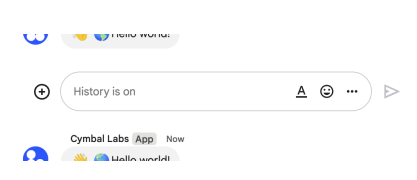
* The following image shows how Chat attributes a message when you use app
* authentication. Chat displays the Chat app as the message
* sender. The content of the message can contain text (`text`), cards
* (`cardsV2`), and accessory widgets (`accessoryWidgets`).
*
* 
*
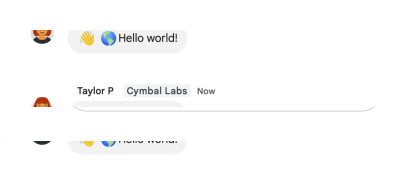
* The following image shows how Chat attributes a message when you use user
* authentication. Chat displays the user as the message sender and attributes
* the Chat app to the message by displaying its name. The content of message
* can only contain text (`text`).
*
* 
*
* The maximum message size, including the message contents, is 32,000 bytes.
*
* For
* [webhook](https://developers.google.com/workspace/chat/quickstart/webhooks)
* requests, the response doesn't contain the full message. The response only
* populates the `name` and `thread.name` fields in addition to the
* information that was in the request.
*
* @param {Object} request
* The request object that will be sent.
* @param {string} request.parent
* Required. The resource name of the space in which to create a message.
*
* Format: `spaces/{space}`
* @param {google.chat.v1.Message} request.message
* Required. Message body.
* @param {string} [request.threadKey]
* Optional. Deprecated: Use
* {@link protos.google.chat.v1.Thread.thread_key|thread.thread_key} instead. ID for the
* thread. Supports up to 4000 characters. To start or add to a thread, create
* a message and specify a `threadKey` or the
* {@link protos.google.chat.v1.Thread.name|thread.name}. For example usage, see [Start or
* reply to a message
* thread](https://developers.google.com/workspace/chat/create-messages#create-message-thread).
* @param {string} [request.requestId]
* Optional. A unique request ID for this message. Specifying an existing
* request ID returns the message created with that ID instead of creating a
* new message.
* @param {google.chat.v1.CreateMessageRequest.MessageReplyOption} [request.messageReplyOption]
* Optional. Specifies whether a message starts a thread or replies to one.
* Only supported in named spaces.
*
* When [responding to user
* interactions](https://developers.google.com/workspace/chat/receive-respond-interactions),
* this field is ignored. For interactions within a thread, the reply is
* created in the same thread. Otherwise, the reply is created as a new
* thread.
* @param {string} [request.messageId]
* Optional. A custom ID for a message. Lets Chat apps get, update, or delete
* a message without needing to store the system-assigned ID in the message's
* resource name (represented in the message `name` field).
*
* The value for this field must meet the following requirements:
*
* * Begins with `client-`. For example, `client-custom-name` is a valid
* custom ID, but `custom-name` is not.
* * Contains up to 63 characters and only lowercase letters, numbers, and
* hyphens.
* * Is unique within a space. A Chat app can't use the same custom ID for
* different messages.
*
* For details, see [Name a
* message](https://developers.google.com/workspace/chat/create-messages#name_a_created_message).
* @param {object} [options]
* Call options. See {@link https://googleapis.dev/nodejs/google-gax/latest/interfaces/CallOptions.html|CallOptions} for more details.
* @returns {Promise} - The promise which resolves to an array.
* The first element of the array is an object representing {@link protos.google.chat.v1.Message|Message}.
* Please see the {@link https://github.com/googleapis/gax-nodejs/blob/master/client-libraries.md#regular-methods | documentation }
* for more details and examples.
* @example <caption>include:samples/generated/v1/chat_service.create_message.js</caption>
* region_tag:chat_v1_generated_ChatService_CreateMessage_async
*/
createMessage(request?: protos.google.chat.v1.ICreateMessageRequest, options?: CallOptions): Promise<[
protos.google.chat.v1.IMessage,
protos.google.chat.v1.ICreateMessageRequest | undefined,
{} | undefined
]>;
createMessage(request: protos.google.chat.v1.ICreateMessageRequest, options: CallOptions, callback: Callback<protos.google.chat.v1.IMessage, protos.google.chat.v1.ICreateMessageRequest | null | undefined, {} | null | undefined>): void;
createMessage(request: protos.google.chat.v1.ICreateMessageRequest, callback: Callback<protos.google.chat.v1.IMessage, protos.google.chat.v1.ICreateMessageRequest | null | undefined, {} | null | undefined>): void;
/**
* Returns details about a membership. For an example, see
* [Get details about a user's or Google Chat app's
* membership](https://developers.google.com/workspace/chat/get-members).
*
* Supports the following types of
* [authentication](https://developers.google.com/workspace/chat/authenticate-authorize):
*
* - [App
* authentication](https://developers.google.com/workspace/chat/authenticate-authorize-chat-app)
* with one of the following authorization scopes:
* - `https://www.googleapis.com/auth/chat.bot`
* - `https://www.googleapis.com/auth/chat.app.memberships` (requires
* [administrator approval](https://support.google.com/a?p=chat-app-auth))
*
* - [User
* authentication](https://developers.google.com/workspace/chat/authenticate-authorize-chat-user)
* with one of the following authorization scopes:
* - `https://www.googleapis.com/auth/chat.memberships.readonly`
* - `https://www.googleapis.com/auth/chat.memberships`
* - User authentication grants administrator privileges when an
* administrator account authenticates, `use_admin_access` is `true`, and
* one of the following authorization scopes is used:
* - `https://www.googleapis.com/auth/chat.admin.memberships.readonly`
* - `https://www.googleapis.com/auth/chat.admin.memberships`
*
* @param {Object} request
* The request object that will be sent.
* @param {string} request.name
* Required. Resource name of the membership to retrieve.
*
* To get the app's own membership [by using user
* authentication](https://developers.google.com/workspace/chat/authenticate-authorize-chat-user),
* you can optionally use `spaces/{space}/members/app`.
*
* Format: `spaces/{space}/members/{member}` or `spaces/{space}/members/app`
*
* You can use the user's email as an alias for `{member}`. For example,
* `spaces/{space}/members/example@gmail.com` where `example@gmail.com` is the
* email of the Google Chat user.
* @param {boolean} [request.useAdminAccess]
* Optional. When `true`, the method runs using the user's Google Workspace
* administrator privileges.
*
* The calling user must be a Google Workspace administrator with the
* [manage chat and spaces conversations
* privilege](https://support.google.com/a/answer/13369245).
*
* Requires the `chat.admin.memberships` or `chat.admin.memberships.readonly`
* [OAuth 2.0
* scopes](https://developers.google.com/workspace/chat/authenticate-authorize#chat-api-scopes).
*
* Getting app memberships in a space isn't supported when using admin access.
* @param {object} [options]
* Call options. See {@link https://googleapis.dev/nodejs/google-gax/latest/interfaces/CallOptions.html|CallOptions} for more details.
* @returns {Promise} - The promise which resolves to an array.
* The first element of the array is an object representing {@link protos.google.chat.v1.Membership|Membership}.
* Please see the {@link https://github.com/googleapis/gax-nodejs/blob/master/client-libraries.md#regular-methods | documentation }
* for more details and examples.
* @example <caption>include:samples/generated/v1/chat_service.get_membership.js</caption>
* region_tag:chat_v1_generated_ChatService_GetMembership_async
*/
getMembership(request?: protos.google.chat.v1.IGetMembershipRequest, options?: CallOptions): Promise<[
protos.google.chat.v1.IMembership,
protos.google.chat.v1.IGetMembershipRequest | undefined,
{} | undefined
]>;
getMembership(request: protos.google.chat.v1.IGetMembershipRequest, options: CallOptions, callback: Callback<protos.google.chat.v1.IMembership, protos.google.chat.v1.IGetMembershipRequest | null | undefined, {} | null | undefined>): void;
getMembership(request: protos.google.chat.v1.IGetMembershipRequest, callback: Callback<protos.google.chat.v1.IMembership, protos.google.chat.v1.IGetMembershipRequest | null | undefined, {} | null | undefined>): void;
/**
* Returns details about a message.
* For an example, see [Get details about a
* message](https://developers.google.com/workspace/chat/get-messages).
*
* Supports the following types of
* [authentication](https://developers.google.com/workspace/chat/authenticate-authorize):
*
* - [App
* authentication](https://developers.google.com/workspace/chat/authenticate-authorize-chat-app)
* with the authorization scope:
* - `https://www.googleapis.com/auth/chat.bot`
*
* - [User
* authentication](https://developers.google.com/workspace/chat/authenticate-authorize-chat-user)
* with one of the following authorization scopes:
* - `https://www.googleapis.com/auth/chat.messages.readonly`
* - `https://www.googleapis.com/auth/chat.messages`
*
* Note: Might return a message from a blocked member or space.
*
* @param {Object} request
* The request object that will be sent.
* @param {string} request.name
* Required. Resource name of the message.
*
* Format: `spaces/{space}/messages/{message}`
*
* If you've set a custom ID for your message, you can use the value from the
* `clientAssignedMessageId` field for `{message}`. For details, see [Name a
* message]
* (https://developers.google.com/workspace/chat/create-messages#name_a_created_message).
* @param {object} [options]
* Call options. See {@link https://googleapis.dev/nodejs/google-gax/latest/interfaces/CallOptions.html|CallOptions} for more details.
* @returns {Promise} - The promise which resolves to an array.
* The first element of the array is an object representing {@link protos.google.chat.v1.Message|Message}.
* Please see the {@link https://github.com/googleapis/gax-nodejs/blob/master/client-libraries.md#regular-methods | documentation }
* for more details and examples.
* @example <caption>include:samples/generated/v1/chat_service.get_message.js</caption>
* region_tag:chat_v1_generated_ChatService_GetMessage_async
*/
getMessage(request?: protos.google.chat.v1.IGetMessageRequest, options?: CallOptions): Promise<[
protos.google.chat.v1.IMessage,
protos.google.chat.v1.IGetMessageRequest | undefined,
{} | undefined
]>;
getMessage(request: protos.google.chat.v1.IGetMessageRequest, options: CallOptions, callback: Callback<protos.google.chat.v1.IMessage, protos.google.chat.v1.IGetMessageRequest | null | undefined, {} | null | undefined>): void;
getMessage(request: protos.google.chat.v1.IGetMessageRequest, callback: Callback<protos.google.chat.v1.IMessage, protos.google.chat.v1.IGetMessageRequest | null | undefined, {} | null | undefined>): void;
/**
* Updates a message. There's a difference between the `patch` and `update`
* methods. The `patch`
* method uses a `patch` request while the `update` method uses a `put`
* request. We recommend using the `patch` method. For an example, see
* [Update a
* message](https://developers.google.com/workspace/chat/update-messages).
*
* Supports the following types of
* [authentication](https://developers.google.com/workspace/chat/authenticate-authorize):
*
* - [App
* authentication](https://developers.google.com/workspace/chat/authenticate-authorize-chat-app)
* with the authorization scope:
* - `https://www.googleapis.com/auth/chat.bot`
*
* - [User
* authentication](https://developers.google.com/workspace/chat/authenticate-authorize-chat-user)
* with one of the following authorization scopes:
* - `https://www.googleapis.com/auth/chat.messages`
* - `https://www.googleapis.com/auth/chat.import` (import mode spaces
* only)
*
* When using app authentication, requests can only update messages
* created by the calling Chat app.
*
* @param {Object} request
* The request object that will be sent.
* @param {google.chat.v1.Message} request.message
* Required. Message with fields updated.
* @param {google.protobuf.FieldMask} request.updateMask
* Required. The field paths to update. Separate multiple values with commas
* or use `*` to update all field paths.
*
* Currently supported field paths:
*
* - `text`
*
* - `attachment`
*
* - `cards` (Requires [app
* authentication](/chat/api/guides/auth/service-accounts).)
*
* - `cards_v2` (Requires [app
* authentication](/chat/api/guides/auth/service-accounts).)
*
* - `accessory_widgets` (Requires [app
* authentication](/chat/api/guides/auth/service-accounts).)
* @param {boolean} [request.allowMissing]
* Optional. If `true` and the message isn't found, a new message is created
* and `updateMask` is ignored. The specified message ID must be
* [client-assigned](https://developers.google.com/workspace/chat/create-messages#name_a_created_message)
* or the request fails.
* @param {object} [options]
* Call options. See {@link https://googleapis.dev/nodejs/google-gax/latest/interfaces/CallOptions.html|CallOptions} for more details.
* @returns {Promise} - The promise which resolves to an array.
* The first element of the array is an object representing {@link protos.google.chat.v1.Message|Message}.
* Please see the {@link https://github.com/googleapis/gax-nodejs/blob/master/client-libraries.md#regular-methods | documentation }
* for more details and examples.
* @example <caption>include:samples/generated/v1/chat_service.update_message.js</caption>
* region_tag:chat_v1_generated_ChatService_UpdateMessage_async
*/
updateMessage(request?: protos.google.chat.v1.IUpdateMessageRequest, options?: CallOptions): Promise<[
protos.google.chat.v1.IMessage,
protos.google.chat.v1.IUpdateMessageRequest | undefined,
{} | undefined
]>;
updateMessage(request: protos.google.chat.v1.IUpdateMessageRequest, options: CallOptions, callback: Callback<protos.google.chat.v1.IMessage, protos.google.chat.v1.IUpdateMessageRequest | null | undefined, {} | null | undefined>): void;
updateMessage(request: protos.google.chat.v1.IUpdateMessageRequest, callback: Callback<protos.google.chat.v1.IMessage, protos.google.chat.v1.IUpdateMessageRequest | null | undefined, {} | null | undefined>): void;
/**
* Deletes a message.
* For an example, see [Delete a
* message](https://developers.google.com/workspace/chat/delete-messages).
*
* Supports the following types of
* [authentication](https://developers.google.com/workspace/chat/authenticate-authorize):
*
* - [App
* authentication](https://developers.google.com/workspace/chat/authenticate-authorize-chat-app)
* with the authorization scope:
* - `https://www.googleapis.com/auth/chat.bot`
*
* - [User
* authentication](https://developers.google.com/workspace/chat/authenticate-authorize-chat-user)
* with one of the following authorization scopes:
* - `https://www.googleapis.com/auth/chat.messages`
* - `https://www.googleapis.com/auth/chat.import` (import mode spaces
* only)
*
* When using app authentication, requests can only delete messages
* created by the calling Chat app.
*
* @param {Object} request
* The request object that will be sent.
* @param {string} request.name
* Required. Resource name of the message.
*
* Format: `spaces/{space}/messages/{message}`
*
* If you've set a custom ID for your message, you can use the value from the
* `clientAssignedMessageId` field for `{message}`. For details, see [Name a
* message]
* (https://developers.google.com/workspace/chat/create-messages#name_a_created_message).
* @param {boolean} [request.force]
* Optional. When `true`, deleting a message also deletes its threaded
* replies. When `false`, if a message has threaded replies, deletion fails.
*
* Only applies when [authenticating as a
* user](https://developers.google.com/workspace/chat/authenticate-authorize-chat-user).
* Has no effect when [authenticating as a Chat app]
* (https://developers.google.com/workspace/chat/authenticate-authorize-chat-app).
* @param {object} [options]
* Call options. See {@link https://googleapis.dev/nodejs/google-gax/latest/interfaces/CallOptions.html|CallOptions} for more details.
* @returns {Promise} - The promise which resolves to an array.
* The first element of the array is an object representing {@link protos.google.protobuf.Empty|Empty}.
* Please see the {@link https://github.com/googleapis/gax-nodejs/blob/master/client-libraries.md#regular-methods | documentation }
* for more details and examples.
* @example <caption>include:samples/generated/v1/chat_service.delete_message.js</caption>
* region_tag:chat_v1_generated_ChatService_DeleteMessage_async
*/
deleteMessage(request?: protos.google.chat.v1.IDeleteMessageRequest, options?: CallOptions): Promise<[
protos.google.protobuf.IEmpty,
protos.google.chat.v1.IDeleteMessageRequest | undefined,
{} | undefined
]>;
deleteMessage(request: protos.google.chat.v1.IDeleteMessageRequest, options: CallOptions, callback: Callback<protos.google.protobuf.IEmpty, protos.google.chat.v1.IDeleteMessageRequest | null | undefined, {} | null | undefined>): void;
deleteMessage(request: protos.google.chat.v1.IDeleteMessageRequest, callback: Callback<protos.google.protobuf.IEmpty, protos.google.chat.v1.IDeleteMessageRequest | null | undefined, {} | null | undefined>): void;
/**
* Gets the metadata of a message attachment. The attachment data is fetched
* using the [media
* API](https://developers.google.com/workspace/chat/api/reference/rest/v1/media/download).
* For an example, see
* [Get metadata about a message
* attachment](https://developers.google.com/workspace/chat/get-media-attachments).
*
* Requires [app
* authentication](https://developers.google.com/workspace/chat/authenticate-authorize-chat-app)
* with the [authorization
* scope](https://developers.google.com/workspace/chat/authenticate-authorize#chat-api-scopes):
*
* - `https://www.googleapis.com/auth/chat.bot`
*
* @param {Object} request
* The request object that will be sent.
* @param {string} request.name
* Required. Resource name of the attachment, in the form
* `spaces/{space}/messages/{message}/attachments/{attachment}`.
* @param {object} [options]
* Call options. See {@link https://googleapis.dev/nodejs/google-gax/latest/interfaces/CallOptions.html|CallOptions} for more details.
* @returns {Promise} - The promise which resolves to an array.
* The first element of the array is an object representing {@link protos.google.chat.v1.Attachment|Attachment}.
* Please see the {@link https://github.com/googleapis/gax-nodejs/blob/master/client-libraries.md#regular-methods | documentation }
* for more details and examples.
* @example <caption>include:samples/generated/v1/chat_service.get_attachment.js</caption>
* region_tag:chat_v1_generated_ChatService_GetAttachment_async
*/
getAttachment(request?: protos.google.chat.v1.IGetAttachmentRequest, options?: CallOptions): Promise<[
protos.google.chat.v1.IAttachment,
protos.google.chat.v1.IGetAttachmentRequest | undefined,
{} | undefined
]>;
getAttachment(request: protos.google.chat.v1.IGetAttachmentRequest, options: CallOptions, callback: Callback<protos.google.chat.v1.IAttachment, protos.google.chat.v1.IGetAttachmentRequest | null | undefined, {} | null | undefined>): void;
getAttachment(request: protos.google.chat.v1.IGetAttachmentRequest, callback: Callback<protos.google.chat.v1.IAttachment, protos.google.chat.v1.IGetAttachmentRequest | null | undefined, {} | null | undefined>): void;
/**
* Uploads an attachment. For an example, see
* [Upload media as a file
* attachment](https://developers.google.com/workspace/chat/upload-media-attachments).
*
* Requires user
* [authentication](https://developers.google.com/workspace/chat/authenticate-authorize-chat-user)
* with one of the following [authorization
* scopes](https://developers.google.com/workspace/chat/authenticate-authorize#chat-api-scopes):
*
* - `https://www.googleapis.com/auth/chat.messages.create`
* - `https://www.googleapis.com/auth/chat.messages`
* - `https://www.googleapis.com/auth/chat.import` (import mode spaces only)
*
* You can upload attachments up to 200 MB. Certain file types aren't
* supported. For details, see [File types blocked by Google
* Chat](https://support.google.com/chat/answer/7651457?&co=GENIE.Platform%3DDesktop#File%20types%20blocked%20in%20Google%20Chat).
*
* @param {Object} request
* The request object that will be sent.
* @param {string} request.parent
* Required. Resource name of the Chat space in which the attachment is
* uploaded. Format "spaces/{space}".
* @param {string} request.filename
* Required. The filename of the attachment, including the file extension.
* @param {object} [options]
* Call options. See {@link https://googleapis.dev/nodejs/google-gax/latest/interfaces/CallOptions.html|CallOptions} for more details.
* @returns {Promise} - The promise which resolves to an array.
* The first element of the array is an object representing {@link protos.google.chat.v1.UploadAttachmentResponse|UploadAttachmentResponse}.
* Please see the {@link https://github.com/googleapis/gax-nodejs/blob/master/client-libraries.md#regular-methods | documentation }
* for more details and examples.
* @example <caption>include:samples/generated/v1/chat_service.upload_attachment.js</caption>
* region_tag:chat_v1_generated_ChatService_UploadAttachment_async
*/
uploadAttachment(request?: protos.google.chat.v1.IUploadAttachmentRequest, options?: CallOptions): Promise<[
protos.google.chat.v1.IUploadAttachmentResponse,
protos.google.chat.v1.IUploadAttachmentRequest | undefined,
{} | undefined
]>;
uploadAttachment(request: protos.google.chat.v1.IUploadAttachmentRequest, options: CallOptions, callback: Callback<protos.google.chat.v1.IUploadAttachmentResponse, protos.google.chat.v1.IUploadAttachmentRequest | null | undefined, {} | null | undefined>): void;
uploadAttachment(request: protos.google.chat.v1.IUploadAttachmentRequest, callback: Callback<protos.google.chat.v1.IUploadAttachmentResponse, protos.google.chat.v1.IUploadAttachmentRequest | null | undefined, {} | null | undefined>): void;
/**
* Returns details about a space. For an example, see
* [Get details about a
* space](https://developers.google.com/workspace/chat/get-spaces).
*
* Supports the following types of
* [authentication](https://developers.google.com/workspace/chat/authenticate-authorize):
*
* - [App
* authentication](https://developers.google.com/workspace/chat/authenticate-authorize-chat-app)
* with one of the following authorization scopes:
* - `https://www.googleapis.com/auth/chat.bot`
* - `https://www.googleapis.com/auth/chat.app.spaces` with [administrator
* approval](https://support.google.com/a?p=chat-app-auth)
*
* - [User
* authentication](https://developers.google.com/workspace/chat/authenticate-authorize-chat-user)
* with one of the following authorization scopes:
* - `https://www.googleapis.com/auth/chat.spaces.readonly`
* - `https://www.googleapis.com/auth/chat.spaces`
* - User authentication grants administrator privileges when an
* administrator account authenticates, `use_admin_access` is `true`, and
* one of the following authorization scopes is used:
* - `https://www.googleapis.com/auth/chat.admin.spaces.readonly`
* - `https://www.googleapis.com/auth/chat.admin.spaces`
*
* App authentication has the following limitations:
*
* - `space.access_settings` is only populated when using the
* `chat.app.spaces` scope.
* - `space.predefind_permission_settings` and `space.permission_settings` are
* only populated when using the `chat.app.spaces` scope, and only for
* spaces the app created.
*
* @param {Object} request
* The request object that will be sent.
* @param {string} request.name
* Required. Resource name of the space, in the form `spaces/{space}`.
*
* Format: `spaces/{space}`
* @param {boolean} [request.useAdminAccess]
* Optional. When `true`, the method runs using the user's Google Workspace
* administrator privileges.
*
* The calling user must be a Google Workspace administrator with the
* [manage chat and spaces conversations
* privilege](https://support.google.com/a/answer/13369245).
*
* Requires the `chat.admin.spaces` or `chat.admin.spaces.readonly` [OAuth 2.0
* scopes](https://developers.google.com/workspace/chat/authenticate-authorize#chat-api-scopes).
* @param {object} [options]
* Call options. See {@link https://googleapis.dev/nodejs/google-gax/latest/interfaces/CallOptions.html|CallOptions} for more details.
* @returns {Promise} - The promise which resolves to an array.
* The first element of the array is an object representing {@link protos.google.chat.v1.Space|Space}.
* Please see the {@link https://github.com/googleapis/gax-nodejs/blob/master/client-libraries.md#regular-methods | documentation }
* for more details and examples.
* @example <caption>include:samples/generated/v1/chat_service.get_space.js</caption>
* region_tag:chat_v1_generated_ChatService_GetSpace_async
*/
getSpace(request?: protos.google.chat.v1.IGetSpaceRequest, options?: CallOptions): Promise<[
protos.google.chat.v1.ISpace,
protos.google.chat.v1.IGetSpaceRequest | undefined,
{} | undefined
]>;
getSpace(request: protos.google.chat.v1.IGetSpaceRequest, options: CallOptions, callback: Callback<protos.google.chat.v1.ISpace, protos.google.chat.v1.IGetSpaceRequest | null | undefined, {} | null | undefined>): void;
getSpace(request: protos.google.chat.v1.IGetSpaceRequest, callback: Callback<protos.google.chat.v1.ISpace, protos.google.chat.v1.IGetSpaceRequest | null | undefined, {} | null | undefined>): void;
/**
* Creates a space. Can be used to create a named space, or a
* group chat in `Import mode`. For an example, see [Create a
* space](https://developers.google.com/workspace/chat/create-spaces).
*
* Supports the following types of
* [authentication](https://developers.google.com/workspace/chat/authenticate-authorize):
*
* - [App
* authentication](https://developers.google.com/workspace/chat/authenticate-authorize-chat-app)
* with [administrator approval](https://support.google.com/a?p=chat-app-auth)
* and one of the following authorization scopes:
* - `https://www.googleapis.com/auth/chat.app.spaces.create`
* - `https://www.googleapis.com/auth/chat.app.spaces`
*
* - [User
* authentication](https://developers.google.com/workspace/chat/authenticate-authorize-chat-user)
* with one of the following authorization scopes:
* - `https://www.googleapis.com/auth/chat.spaces.create`
* - `https://www.googleapis.com/auth/chat.spaces`
* - `https://www.googleapis.com/auth/chat.import` (import mode spaces
* only)
*
* When authenticating as an app, the `space.customer` field must be set in
* the request.
*
* When authenticating as an app, the Chat app is added as a member of the
* space. However, unlike human authentication, the Chat app is not added as a
* space manager. By default, the Chat app can be removed from the space by
* all space members. To allow only space managers to remove the app from a
* space, set `space.permission_settings.manage_apps` to `managers_allowed`.
*
* Space membership upon creation depends on whether the space is created in
* `Import mode`:
*
* * **Import mode:** No members are created.
* * **All other modes:** The calling user is added as a member. This is:
* * The app itself when using app authentication.
* * The human user when using user authentication.
*
* If you receive the error message `ALREADY_EXISTS` when creating
* a space, try a different `displayName`. An existing space within
* the Google Workspace organization might already use this display name.
*
* @param {Object} request
* The request object that will be sent.
* @param {google.chat.v1.Space} request.space
* Required. The `displayName` and `spaceType` fields must be populated. Only
* `SpaceType.SPACE` and `SpaceType.GROUP_CHAT` are supported.
* `SpaceType.GROUP_CHAT` can only be used if `importMode` is set to true.
*
* If you receive the error message `ALREADY_EXISTS`,
* try a different `displayName`. An existing space within the Google
* Workspace organization might already use this display name.
*
*
* The space `name` is assigned on the server so anything specified in this
* field will be ignored.
* @param {string} [request.requestId]
* Optional. A unique identifier for this request.
* A random UUID is recommended.
* Specifying an existing request ID returns the space created with that ID
* instead of creating a new space.
* Specifying an existing request ID from the same Chat app with a different
* authenticated user returns an error.
* @param {object} [options]
* Call options. See {@link https://googleapis.dev/nodejs/google-gax/latest/interfaces/CallOptions.html|CallOptions} for more details.
* @returns {Promise} - The promise which resolves to an array.
* The first element of the array is an object representing {@link protos.google.chat.v1.Space|Space}.
* Please see the {@link https://github.com/googleapis/gax-nodejs/blob/master/client-libraries.md#regular-methods | documentation }
* for more details and examples.
* @example <caption>include:samples/generated/v1/chat_service.create_space.js</caption>
* region_tag:chat_v1_generated_ChatService_CreateSpace_async
*/
createSpace(request?: protos.google.chat.v1.ICreateSpaceRequest, options?: CallOptions): Promise<[
protos.google.chat.v1.ISpace,
protos.google.chat.v1.ICreateSpaceRequest | undefined,
{} | undefined
]>;
createSpace(request: protos.google.chat.v1.ICreateSpaceRequest, options: CallOptions, callback: Callback<protos.google.chat.v1.ISpace, protos.google.chat.v1.ICreateSpaceRequest | null | undefined, {} | null | undefined>): void;
createSpace(request: protos.google.chat.v1.ICreateSpaceRequest, callback: Callback<protos.google.chat.v1.ISpace, protos.google.chat.v1.ICreateSpaceRequest | null | undefined, {} | null | undefined>): void;
/**
* Creates a space and adds specified users to it. The calling user is
* automatically added to the space, and shouldn't be specified as a
* membership in the request. For an example, see
* [Set up a space with initial
* members](https://developers.google.com/workspace/chat/set-up-spaces).
*
* To specify the human members to add, add memberships with the appropriate
* `membership.member.name`. To add a human user, use `users/{user}`, where
* `{user}` can be the email address for the user. For users in the same
* Workspace organization `{user}` can also be the `id` for the person from
* the People API, or the `id` for the user in the Directory API. For example,
* if the People API Person profile ID for `user@example.com` is `123456789`,
* you can add the user to the space by setting the `membership.member.name`
* to `users/user@example.com` or `users/123456789`.
*
* To specify the Google groups to add, add memberships with the
* appropriate `membership.group_member.name`. To add or invite a Google
* group, use `groups/{group}`, where `{group}` is the `id` for the group from
* the Cloud Identity Groups API. For example, you can use [Cloud Identity
* Groups lookup
* API](https://cloud.google.com/identity/docs/reference/rest/v1/groups/lookup)
* to retrieve the ID `123456789` for group email `group@example.com`, then
* you can add the group to the space by setting the
* `membership.group_member.name` to `groups/123456789`. Group email is not
* supported, and Google groups can only be added as members in named spaces.
*
* For a named space or group chat, if the caller blocks, or is blocked
* by some members, or doesn't have permission to add some members, then
* those members aren't added to the created space.
*
* To create a direct message (DM) between the calling user and another human
* user, specify exactly one membership to represent the human user. If
* one user blocks the other, the request fails and the DM isn't created.
*
* To create a DM between the calling user and the calling app, set
* `Space.singleUserBotDm` to `true` and don't specify any memberships. You
* can only use this method to set up a DM with the calling app. To add the
* calling app as a member of a space or an existing DM between two human
* users, see
* [Invite or add a user or app to a
* space](https://developers.google.com/workspace/chat/create-members).
*
* If a DM already exists between two users, even when one user blocks the
* other at the time a request is made, then the existing DM is returned.
*
* Spaces with threaded replies aren't supported. If you receive the error
* message `ALREADY_EXISTS` when setting up a space, try a different
* `displayName`. An existing space within the Google Workspace organization
* might already use this display name.
*
* Requires [user
* authentication](https://developers.google.com/workspace/chat/authenticate-authorize-chat-user)
* with one of the following [authorization
* scopes](https://developers.google.com/workspace/chat/authenticate-authorize#chat-api-scopes):
*
* - `https://www.googleapis.com/auth/chat.spaces.create`
* - `https://www.googleapis.com/auth/chat.spaces`
*
* @param {Object} request
* The request object that will be sent.
* @param {google.chat.v1.Space} request.space
* Required. The `Space.spaceType` field is required.
*
* To create a space, set `Space.spaceType` to `SPACE` and set
* `Space.displayName`. If you receive the error message `ALREADY_EXISTS` when
* setting up a space, try a different `displayName`. An existing space
* within the Google Workspace organization might already use this display
* name.
*
* To create a group chat, set `Space.spaceType` to
* `GROUP_CHAT`. Don't set `Space.displayName`.
*
* To create a 1:1 conversation between humans,
* set `Space.spaceType` to `DIRECT_MESSAGE` and set
* `Space.singleUserBotDm` to `false`. Don't set `Space.displayName` or
* `Space.spaceDetails`.
*
* To create an 1:1 conversation between a human and the calling Chat app, set
* `Space.spaceType` to `DIRECT_MESSAGE` and
* `Space.singleUserBotDm` to `true`. Don't set `Space.displayName` or
* `Space.spaceDetails`.
*
* If a `DIRECT_MESSAGE` space already exists, that space is returned instead
* of creating a new space.
* @param {string} [request.requestId]
* Optional. A unique identifier for this request.
* A random UUID is recommended.
* Specifying an existing request ID returns the space created with that ID
* instead of creating a new space.
* Specifying an existing request ID from the same Chat app with a different
* authenticated user returns an error.
* @param {number[]} [request.memberships]
* Optional. The Google Chat users or groups to invite to join the space. Omit
* the calling user, as they are added automatically.
*
* The set currently allows up to 49 memberships (in addition to the caller).
*
* For human membership, the `Membership.member` field must contain a `user`
* with `name` populated (format: `users/{user}`) and `type` set to
* `User.Type.HUMAN`. You can only add human users when setting up a space
* (adding Chat apps is only supported for direct message setup with the
* calling app). You can also add members using the user's email as an alias
* for {user}. For example, the `user.name` can be `users/example@gmail.com`.
* To invite Gmail users or users from external Google Workspace domains,
* user's email must be used for `{user}`.
*
* For Google group membership, the `Membership.group_member` field must
* contain a `group` with `name` populated (format `groups/{group}`). You
* can only add Google groups when setting `Space.spaceType` to `SPACE`.
*
* Optional when setting `Space.spaceType` to `SPACE`.
*
* Required when setting `Space.spaceType` to `GROUP_CHAT`, along with at
* least two memberships.
*
* Required when setting `Space.spaceType` to `DIRECT_MESSAGE` with a human
* user, along with exactly one membership.
*
* Must be empty when creating a 1:1 conversation between a human and the
* calling Chat app (when setting `Space.spaceType` to
* `DIRECT_MESSAGE` and `Space.singleUserBotDm` to `true`).
* @param {object} [options]
* Call options. See {@link https://googleapis.dev/nodejs/google-gax/latest/interfaces/CallOptions.html|CallOptions} for more details.
* @returns {Promise} - The promise which resolves to an array.
* The first element of the array is an object representing {@link protos.google.chat.v1.Space|Space}.
* Please see the {@link https://github.com/googleapis/gax-nodejs/blob/master/client-libraries.md#regular-methods | documentation }
* for more details and examples.
* @example <caption>include:samples/generated/v1/chat_service.set_up_space.js</caption>
* region_tag:chat_v1_generated_ChatService_SetUpSpace_async
*/
setUpSpace(request?: protos.google.chat.v1.ISetUpSpaceRequest, options?: CallOptions): Promise<[
protos.google.chat.v1.ISpace,
protos.google.chat.v1.ISetUpSpaceRequest | undefined,
{} | undefined
]>;
setUpSpace(request: protos.google.chat.v1.ISetUpSpaceRequest, options: CallOptions, callback: Callback<protos.google.chat.v1.ISpace, protos.google.chat.v1.ISetUpSpaceRequest | null | undefined, {} | null | undefined>): void;
setUpSpace(request: protos.google.chat.v1.ISetUpSpaceRequest, callback: Callback<protos.google.chat.v1.ISpace, protos.google.chat.v1.ISetUpSpaceRequest | null | undefined, {} | null | undefined>): void;
/**
* Updates a space. For an example, see
* [Update a
* space](https://developers.google.com/workspace/chat/update-spaces).
*
* If you're updating the `displayName` field and receive the error message
* `ALREADY_EXISTS`, try a different display name.. An existing space within
* the Google Workspace organization might already use this display name.
*
* Supports the following types of
* [authentication](https://developers.google.com/workspace/chat/authenticate-authorize):
*
* - [App
* authentication](https://developers.google.com/workspace/chat/authenticate-authorize-chat-app)
* with [administrator approval](https://support.google.com/a?p=chat-app-auth)
* and one of the following authorization scopes:
* - `https://www.googleapis.com/auth/chat.app.spaces`
*
* - [User
* authentication](https://developers.google.com/workspace/chat/authenticate-authorize-chat-user)
* with one of the following authorization scopes:
* - `https://www.googleapis.com/auth/chat.spaces`
* - `https://www.googleapis.com/auth/chat.import` (import mode spaces
* only)
* - User authentication grants administrator privileges when an
* administrator account authenticates, `use_admin_access` is `true`, and
* the following authorization scopes is used:
* - `https://www.googleapis.com/auth/chat.admin.spaces`
*
* App authentication has the following limitations:
*
* - To update either `space.predefined_permission_settings` or
* `space.permission_settings`, the app must be the space creator.
* - Updating the `space.access_settings.audience` is not supported for app
* authentication.
*
* @param {Object} request
* The request object that will be sent.
* @param {google.chat.v1.Space} request.space
* Required. Space with fields to be updated. `Space.name` must be
* populated in the form of `spaces/{space}`. Only fields
* specified by `update_mask` are updated.
* @param {google.protobuf.FieldMask} request.updateMask
* Required. The updated field paths, comma separated if there are
* multiple.
*
* You can update the following fields for a space:
*
* `space_details`: Updates the space's description. Supports up to 150
* charac