@godspeedsystems/plugins-express-as-http
Version:
Godspeed event source plugin for express as http server
343 lines (268 loc) • 15.2 kB
Markdown
# Godspeed Express Plugin
Welcome to the [Godspeed](https://www.godspeed.systems/) Express Plugin! 🚀
## Introduction
The Godspeed Express Plugin is an integral part of the Godspeed framework, designed to facilitate the integration of event-driven and serverless functionalities into your projects. This plugin leverages the popular Express.js framework to handle HTTP events, making it easy to define event subscriptions and process incoming events.
## How to Use
- Create a godspeed project from the CLI and by default the Express plugin is integrated into your project if not, add the plugin from the CLI and select the `@godspeedsystems/plugins-express-as-http` to integrate the plugin.
```
> godspeed plugin add
,_, ╔════════════════════════════════════╗
(o,o) ║ Welcome to Godspeed ║
({___}) ║ World's First Meta Framework ║
" " ╚════════════════════════════════════╝
? Please select godspeed plugin to install: (Press <space> to select, <Up and Down> to move rows)
┌────┬───────────────────────────────────┬─────────────────────────────────────────────────────────────────┐
│ │ Name │ Description │
├────┼───────────────────────────────────┼─────────────────────────────────────────────────────────────────┤
│ ❯◯ │ express-as-http │ Godspeed event source plugin for express as http server │
├────┼───────────────────────────────────┼─────────────────────────────────────────────────────────────────┤
│ ◯ │ aws-as-datasource │ aws as datasource plugin for Godspeed Framework │
├────┼───────────────────────────────────┼─────────────────────────────────────────────────────────────────┤
│ ◯ │ mailer-as-datasource │ mailer as datasource plugin for Godspeed Framework │
├────┼───────────────────────────────────┼─────────────────────────────────────────────────────────────────┤
│ ◯ │ excel-as-datasource │ excel as datasource plugin for Godspeed Framework │
├────┼───────────────────────────────────┼─────────────────────────────────────────────────────────────────┤
│ ◯ │ kafka-as-datasource-as-eventsource│ kafka as datasource-as-eventsource plugin for Godspeed Framework│
└────┴───────────────────────────────────┴─────────────────────────────────────────────────────────────────┘
```
- You will find the files in your project related to the Express plugin at `src/eventsources/types/express.ts` and `src/eventsources/http.yaml`.
### express.ts
```typescript
import { ExpressEventSource } from '@godspeedsystems/plugins-express-as-http';
export default ExpressEventSource;
```
### Express config (src/eventsources/http.yaml)
```yaml
type: express
port: 3000
```
### Express event (src/events/sample.yaml)
```yaml
http.get./sample_api:
fn: sample #redirects to src/functions/sample.yaml
body:
content:
application/json:
schema:
type: object
properties:
name:
type: string
message:
type: string
params:
- in: query
name: user
required: true
schema:
type: string
responses:
200:
content:
application/json:
schema:
type: string
```
```yaml
http.<method>./<endpoint_url>:
fn: <function_yaml>
body:
params:
responses:
```
- The event YAML defines properties for handling specific HTTP requests within the Express app. In the YAML, `<method>` should be replaced with actual HTTP methods such as `GET, POST, PUT, or DELETE`, specifying how the app handles those requests. The `<endpoint_url>` field should contain the API URL for the respective HTTP route.
- A function will be triggered on sending a request to the respective url. The functions are created under `src/functions/`.
### Function to be called (src/functions/sample.yaml)
```yaml
summary:
description:
tasks:
- id: example
fn: com.gs.return #its an inbuilt function
args: |
<%"Hello "+inputs.query.user+". This is a message from body "+inputs.body.message%>
```
## How It Helps
The Godspeed Express Plugin provides the following benefits:
1. **Express Integration:** The plugin abstracts away the complexities of setting up an Express.js application, making it effortless to define routes and handlers for incoming HTTP events.
2. **Event Subscription:** Developers can easily subscribe to specific HTTP events by defining routes and handlers using a uniform API.
3. **Customizable Configuration:** The plugin allows for easy configuration of Express settings, such as port, request body limits, and file size limits.
4. **Integration with Godspeed Core:** The plugin works seamlessly with the Godspeed Core library, enabling the processing of cloud events and facilitating event-driven architecture.
5. **File upload feature:** The Express plugin allows you to upload your files using postman.
6. **Authenticating users using oauth2:** This will allow your users to sign in to your application using their existing Google/Linkedin/GitHub credentials.
## How OAuth2 Feature works
### Configuring oauth2 authentication
You can configure oauth2 settings within the eventsources/http.yaml. Here's an example of such a configuration:
```
type: express
authn:
oauth2:
github:
client_id: <% process.env.GITHUB_CLIENT_ID %>
client_secret: <% process.env.GITHUB_CLIENT_SECRET %>
callback_url: <% process.env.GITHUB_CALLBACK_URL %>
callback_route: <% process.env.GITHUB_CALLBACK_ROUTE %>
auth_route: <% process.env.GITHUB_AUTH_ROUTE %>
success_redirect: <% process.env.GITHUB_SUCCESS_REDIRECT_URL %>
failure_redirect: <% process.env.GITHUB_FAILURE_REDIRECT_URL %>
linkedin:
client_id: <% process.env.LINKEDIN_CLIENT_ID %>
client_secret: <% process.env.LINKEDIN_CLIENT_SECRET %>
callback_url: <% process.env.LINKEDIN_CALLBACK_URL %>
callback_route: <% process.env.LINKEDIN_CALLBACK_ROUTE %>
auth_route: <% process.env.LINKEDIN_AUTH_ROUTE %>
success_redirect: <% process.env.LINKEDIN_SUCCESS_REDIRECT_URL %>
failure_redirect: <% process.env.LINKEDIN_FAILURE_REDIRECT_URL %>
google:
client_id: <% process.env.GOOGLE_CLIENT_ID %>
client_secret: <% process.env.GOOGLE_CLIENT_SECRET %>
callback_url: <% process.env.GOOGLE_CALLBACK_URL %>
callback_route: <% process.env.GOOGLE_CALLBACK_ROUTE %>
auth_route: <% process.env.GOOGLE_AUTH_ROUTE %>
success_redirect: <% process.env.GOOGLE_SUCCESS_REDIRECT_URL %>
failure_redirect: <% process.env.GOOGLE_FAILURE_REDIRECT_URL %>
```
### Set up your session secret as:
```
session:
secret: <% process.env.SESSION_SECRET %>
```
### Add your oauth2 app credentials in .env file as
```
.env
# GitHub OAuth2 Credentials
GITHUB_CLIENT_ID= your_client_id
GITHUB_CLIENT_SECRET= your_client_secret
GITHUB_CALLBACK_URL= your_callback_url e.g http://localhost:4000/auth/github/callback
GITHUB_AUTH_ROUTE = /auth/github
GITHUB_CALLBACK_ROUTE = /auth/github/callback
GITHUB_SUCCESS_REDIRECT_URL = /verify/user
GITHUB_FAILURE_REDIRECT_URL = /error
# LinkedIn OAuth2 Credentials
LINKEDIN_CLIENT_ID=your_linkedin_client_id
LINKEDIN_CLIENT_SECRET=your_linkedin_client_secret
LINKEDIN_CALLBACK_URL=http://localhost:4000/auth/linkedin/callback
LINKEDIN_AUTH_ROUTE=/auth/linkedin
LINKEDIN_CALLBACK_ROUTE=/auth/linkedin/callback
LINKEDIN_SUCCESS_REDIRECT_URL=/verify/user
LINKEDIN_FAILURE_REDIRECT_URL=/error
# Google OAuth2 Credentials
GOOGLE_CLIENT_ID=your_google_client_id
GOOGLE_CLIENT_SECRET=your_google_client_secret
GOOGLE_CALLBACK_URL=http://localhost:4000/auth/google/callback
GOOGLE_AUTH_ROUTE=/auth/google
GOOGLE_CALLBACK_ROUTE=/auth/google/callback
GOOGLE_SUCCESS_REDIRECT_URL=/verify/user
GOOGLE_FAILURE_REDIRECT_URL=/error
# Session Secret
SESSION_SECRET = mysecret
```
## Configuring jwt
You can configure JWT settings within the eventsources/http.yaml. Here's an example of such a configuration:
```
type: express
jwt:
issuer: <#config.issues#> # must be equal to the key iss in your jwt token
audience: <#config.audience#> #must be equal to the key aud in your jwt token
secretOrKey: <#config.secret#>
```
## Accessing User Information
Once the user has authenticated through Google, GitHub, or LinkedIn, you can access the authenticated user’s information via the req.user object in your godspeed application.
## How file upload feature works
### Uploading file
The Express plugin allows you to upload your files
### Steps to use fileupload feature
Framework will give you below folder structure.
```
.
├── src
├── datasources
│ ├── types
│ | └── axios.ts
| |
│ └── api.yaml
│
├── events
| |
│ └── helloworld.yaml
|
├── eventsources
│ ├── types
│ | └── express.ts
| |
│ └── http.yaml
|
└── functions
|
└── helloworld.yaml
```
The default file size accepted is 50MB. If you wish to specify a custom file size, you can modify the value in `"./src/eventsources/http.yaml`".
### Configuration( src/eventsources/http.yaml )
```yaml
type: express
port: 3003
request_body_limit: 3000000
file_size_limit : 3000000
docs:
```
- The file size may vary from the original size and could potentially increase in kilobytes(KB) after uploading. Please take this into consideration when setting your file size.
### Example Event
```yaml
http.post./helloworld:
fn: helloworld
body:
content:
multipart/form-data:
schema:
type: object
properties:
fileName:
type: string
format: binary
responses:
200:
content:
application/json:
schema:
type: object
```
### Example workflow
```yaml
summary: Returning a file
tasks:
- id: first_task
fn: com.gs.return
args: <% inputs.files.name %>
```
### Example success response
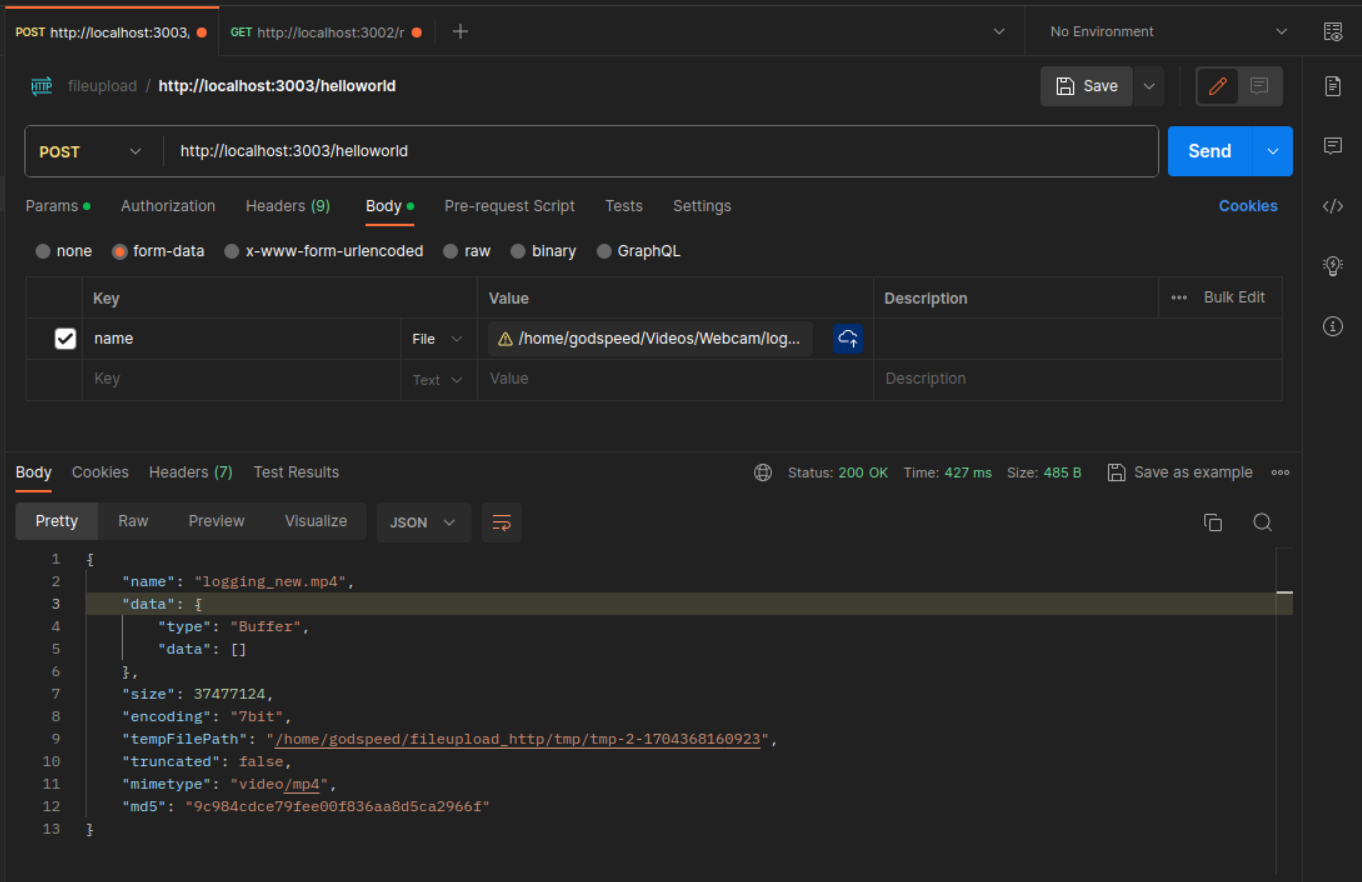
- Upon successful upload of the file in Postman, an autogenerated "tmp" folder is created within the scaffolding directory, containing the uploaded file.
## Setting Base Url:
- The base url is set in datasources/api.yaml
```
type: axios
base_url: https://httpbin.org
```
## Plugin Explanation
This plugin is designed to integrate with the Godspeed framework and provides functionality related to event sources using Express.js, a popular Node.js web application framework. It allows you to create event sources that can listen for incoming HTTP requests and trigger actions based on those requests.
## Plugin Components
The plugin consists of several key components:
### 1. `EventSource` Class
- This class extends `GSEventSource`, a base class provided by the Godspeed framework for creating event sources.
- It initializes an Express.js server to listen for incoming HTTP requests based on the provided configuration options.
- The `subscribeToEvent` method is used to define how the plugin should respond to specific HTTP routes. It maps incoming HTTP requests to Godspeed Cloud Events, processes them using a provided function, and sends a response.
- The `createGSEvent` static method is used to create a Godspeed Cloud Event from an incoming Express.js request.
### 2. Constants
- `SourceType`: A constant representing the source type of the plugin, which is 'ES' (event source).
- `Type`: A constant representing the loader file of the plugin. The final loader file will be located in the 'types' directory and named `${Type.js}`, where `Type` is 'express' in this case.
- `CONFIG_FILE_NAME`: In the context of an event source, this constant also serves as the event identifier. For a data source, it works as the data source name. In this plugin, it is set to 'http'.
- `DEFAULT_CONFIG`: A default configuration object with options like the port number for the Express.js server.
## Conclusion
Our Express plugin is a powerful addition to the Godspeed framework, allowing you to seamlessly integrate and manage event sources within your applications. With this plugin, you can effortlessly handle HTTP requests, define routes, and trigger actions, making it an essential tool for building robust and responsive applications.
We value your feedback and contributions. If you have questions, suggestions, or encounter any issues while using the plugin, please don't hesitate to reach out to us. Your insights and ideas can help us improve and enhance this plugin for the entire community.
We're excited to see what you'll create with the Express plugin, and we look forward to collaborating with you to make your projects even more successful. Happy coding!
### Get in Touch
- [Discord](https://discord.com/invite/mjBa3RvTP5)
- [Plugin Repository](https://github.com/godspeedsystems/gs-plugins/tree/main/plugins/express-as-http)
- [Issue Tracker](https://github.com/godspeedsystems/gs-plugins/issues)
## Thank You For Using Godspeed