@globetrotte/altimeter
Version:
68 lines (44 loc) • 1.94 kB
Markdown
# @globetrotte/altimeter - Altimeter
A simple cli for generating preview image of a given url(s) with [Playwright](https://playwright.dev/).
## Getting started
Create a simple config json file like below.
```json
{
"baseURL": "https://globetrotte.com",
"dir": "doc/preview"
}
```
Name the file something like `config.json` then run it with altimeter.
```sh
> altimeter config.json
Generated doc/preview/base.jpg
```
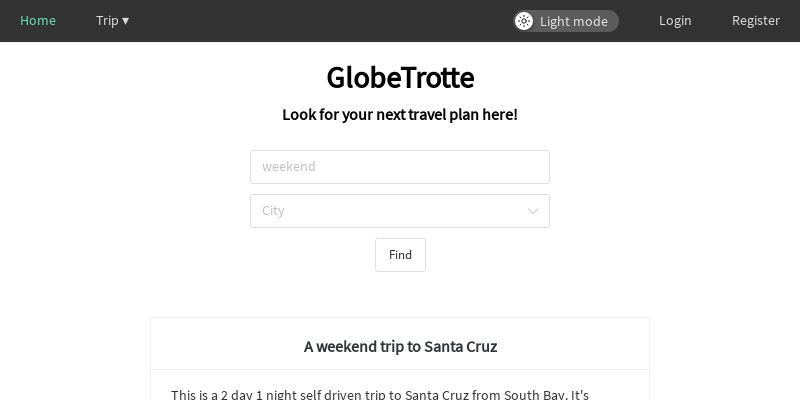
Open up the `doc/preview` directory, aaand tadaa! there's an image called `base.jpg` that looks like this in there!
## Config
Here's a list of things that can be set with the config file.
### **browser**
- Type: `BrowserTypes` (`"chromium" | "firefox" | "webkit"`)
- Default: `"chromium"`
Browser type to use for generating the screenshots.
### **baseURL** (required)
- Type: `string` (eg. `"https://globetrotte.com"`)
- Default: `undefined`
This is basically the base URL of the site you want to take screenshots of.
### **destURLs**
- Type: `AltimeterDestination[]` (eg. `{"name": "trip_search", "url": "trip/search"}`)
- Default: `[]`
`name` field here is used for the name of the screenshot image. With the example of `"trip_search"`, the image would be called `trip_search.jpg`. `url` field here is the path on top of the `baseURL` field. With the example of `"trip/search"` (and `"https://globetrotte.com"` as baseURL), it would then take the screenshot of `https://globetrotte.com/trip/search`.
If this is empty, it would take a screenshot of the base url and save it as `base.jpg`.
### **dir**
- Type: `string`
- Default: `"altimeter"`
Directory where all the preview images should be saved to.
### **width**
- Type: `number`
- Default: `1200`
Width of the preview images.
### **height**
- Type: `number`
- Default: `600`
Height of the preview images.