@genart-api/core
Version:
Platform-independent extensible API for browser-based generative art
1,240 lines (968 loc) • 54.1 kB
Markdown
# Platform independent API for generative art
[](https://www.npmjs.com/package/@genart-api/core)

[](https://mastodon.thi.ng/@toxi)
- [Status](#status)
- [About](#about)
- [Goals](#goals)
- [Non-goals](#non-goals)
- [Core API](#core-api)
- [Definitions / terminology](#definitions--terminology)
- [Architecture overview](#architecture-overview)
- [Lifecycle](#lifecycle)
- [State machine](#state-machine)
- [Message types](#message-types)
- [Message handling](#message-handling)
- [API documentation](#api-documentation)
- [Parameters](#parameters)
- [Static parameter types](#static-parameter-types)
- [BigInt](#bigint-parameter)
- [Binary](#binary-parameter)
- [Choice](#choice-parameter)
- [Color](#color-parameter)
- [Date](#date-parameter)
- [Datetime](#datetime-parameter)
- [Image](#image-parameter)
- [List](#list-parameter)
- [Range](#range-parameter)
- [Text](#text-parameter)
- [Time](#time-of-day-parameter)
- [Toggle](#toggle-parameter)
- [Vector](#vector-parameter)
- [Weighted choice](#weighted-choice-parameter)
- [XY](#xy-parameter)
- [Dynamic parameter types](#dynamic-parameter-types)
- [Ramp](#ramp-parameter)
- [Custom parameter types](#custom-parameter-types)
- [Example: Oscillator parameter type](#example-oscillator-parameter-type)
- [Composite parameter types](#composite-parameter-types)
- [Traits](#traits)
- [Platform adapters](#platform-adapters)
- [Parameter sourcing](#parameter-sourcing--initialization)
- [Parameter updates](#parameter-updates)
- [Determinism & PRNG provision](#determinism--prng-provision)
- [Screen configuration](#screen-configuration)
- [Handling dynamic resizing](#handling-dynamic-resizing)
- [Thumbnail/preview generation](#thumbnailpreview-generation)
- [Time providers](#time-providers)
- [Existing time provider implementations](#existing-time-provider-implementations)
- [RAF](#raf)
- [Offline](#offline)
- [FPS overlay](#fps-overlay)
- [WebAssembly bindings](#webassembly-bindings)
- [Getting started](#getting-started)
- [Existing adapter implementations](#existing-adapter-implementations)
- [Examples projects](#example-projects)
- [Project template](#project-template)
- [Installion as package](#installion-as-package)
- [Manual installation](#manual-installation)
- [Use in your own projects: Artist's Hello world](#use-in-your-own-projects-an-artists-hello-world)
- [Creating a basic PlatformAdapter](#platforms)
- [Build information](#build-information)
- [Building core API files](#building-core-api-files)
- [Building examples](#build-information)
- [Parameter editors](#parameter-editors)
- [License](#license)
## Status
**ALPHA** — Work in progress... **Welcoming feedback!** 🙏
[Projects updates on Mastodon](https://mastodon.thi.ng/@toxi/tagged/GenArtAPI)
Please also see RFCs and open questions in the [issue
tracker](https://github.com/thi-ng/genart-api/issues). Thanks!
> [!NOTE]
> In the future this repo might be moved to a standalone GitHub org to emphasize
> that this project is **not** directly related to other
> [thi.ng](https://thi.ng) projects and instead is intended for **any browser
> based generative art** projects and related tooling.
>
> tl;dr Jump to the [Getting started section](#getting-started).
## About
Over the past years, generative/computational art has experienced a surge in
popularity because of the availability of online art platforms for publishing
these works. The number of these platforms keeps on mushrooming, each one
defining their own ad hoc solutions to deal with common aspects (e.g. [handling
of parameters](#parameters) to customize pieces/variations, generating previews,
etc.). Often, this means artists have to either already decide on which platform
to publish a new piece before they work on it and/or spend a considerable amount
of time reworking key aspects (like parameter, [screen
resolution](#screen-configuration) or [time handling](#time-providers)) when
repurposing a piece for a different use (e.g. creating hires print versions,
high-quality video assets, or displaying the piece in a gallery with different
configurations or requirements). Since online platforms/startups usually only
optimize for their own uses and neglecting the needs of artists regarding asset
preparation, adaptation and re-use, we must take it upon ourselves to address
these workflow issues more efficiently.
To improve this situation, this project proposes an API layer and a message
protocol addressing recurring issues artists encounter when publishing and
repurposing browser-based generative artworks — be it for diverse online
platforms, environments (incl. offline, galleries, installations), but also
aforementioned aspects of media production (for example helping to deal with
realtime/non-realtime rendering when recording image sequences for video
production, and do so in an unintrusive & externally controlled manner).

Schematic overview of the proposed architecture
The primary purpose of this API is to decouple key aspects commonly used for
most generative/computational artworks, to deduplicate feature implementations
and reduce the time & effort required for adapting browser-based artworks for
different uses/environments. These benefits are not _only_ in the interest of
artists, but also simplify how online art platforms can use this API layer to
reduce effort on their end, simplify providing customization features for such
generative artworks (and even re-use tooling).
Another positive side effect of adapting the system proposed here: The emergence
of secondary re-usable tooling to manage parameters and variations, for example:
tooling to generate GUI controls for editing params, creating/storing/retrieving
parameter presets/collections (aka variations), asset downloaders, transcoding
tools. Even at this stage, some of these are existing already and actively being
worked on...
In this document & repository we describe the approach, the proposed
architecture and provide a TypeScript-based reference implementation, including
fully documented interfaces & types, and some example test cases to demonstrate
(and validate!) the approach and its benefits.
### Goals
- Decouple artworks from presentation platform:
- artworks can be authored without direct knowledge of which platform(s)
they're being displayed or published at
- Straightforward repurposing/integration of artworks into diverse environments:
- Online art platforms
- Personal websites/portfolios
- Offline, museums, galleries...
- Non-realtime use cases (high-res video/frame recording)
- Any platform-specifics can be injected via small plugin adapters which can
be added to an artwork's HTML wrapper without any code changes required
- Examples of platform-specifics:
- Handling parameter and/or feature declarations exposed by the artwork
- Handling parameter value overrides, param value decoding/encoding
- Handling thumbnail/preview generation
- Defining/forcing display size & densities
- Provide an extensible, platform-independent parameter system with a set of
commonly used parameter types
- Parameter type-specific validation, coercion, randomization
- Composite parameter types
- Randomized parameter lookups (per individual read)
- Timebased parameters (e.g. [ramps](#ramp-parameter))
- Built-in support for custom parameter types and their implementation
- Define a messaging/event system for notification of state & param changes
- For time-based works
- Transport control (aka start/stop/resume)
- Provide choice of time provider plugins:
- Real-time (i.e. `requestAnimationFrame()`-based animation) and/or
- Offline (non-realtime, with configurable fixed time base)
- Enable re-usable secondary tooling:
- Auto-generated GUIs for param controls/overrides
- Variation/snapshot/preset creation/selection
- Asset export (w/ param metadata)
### Non-goals
This API aims to **remain as minimal as possible** and will not directly support
every feature of every platform, which would cause feature creep, bloat and
unsustainable maintenance effort.
Artworks requiring or relying on advanced integrations with a specific platform
are naturally highly dependent on those platform features, and so would not
benefit from a more platform-independent approach in any way. Therefore, we
consider these use cases as out-of-scope.
However, the proposed system is designed to enable platform-specific extensions
in several ways, which can highly benefit all parties involved when adopted and
can be supported unintrusively. For example, a platform/device can provide
sensor input and expose it through a custom parameter type, allowing a mock
implementation to be provided when running elsewhere.
## Core API
### Definitions / terminology
- **Artwork**: A browser-based art piece running in a standard HTML
environment
- **Platform**: The host website, application, or system in which the
artwork's HMTL wrapper will be deployed and which might provide parameter
customizations, PRNG seeds, control playback behavior, handle preview
generation etc.
- **Platform adpater**: A software plugin for the proposed GenArt API which
handles and/or translates all platform specifics
- **Time provider**: A software plugin for the proposed GenArt API which is
used to provide animation time information and schedule animation frames,
all controlled by the main GenArt API layer.
### Architecture overview
#### Lifecycle
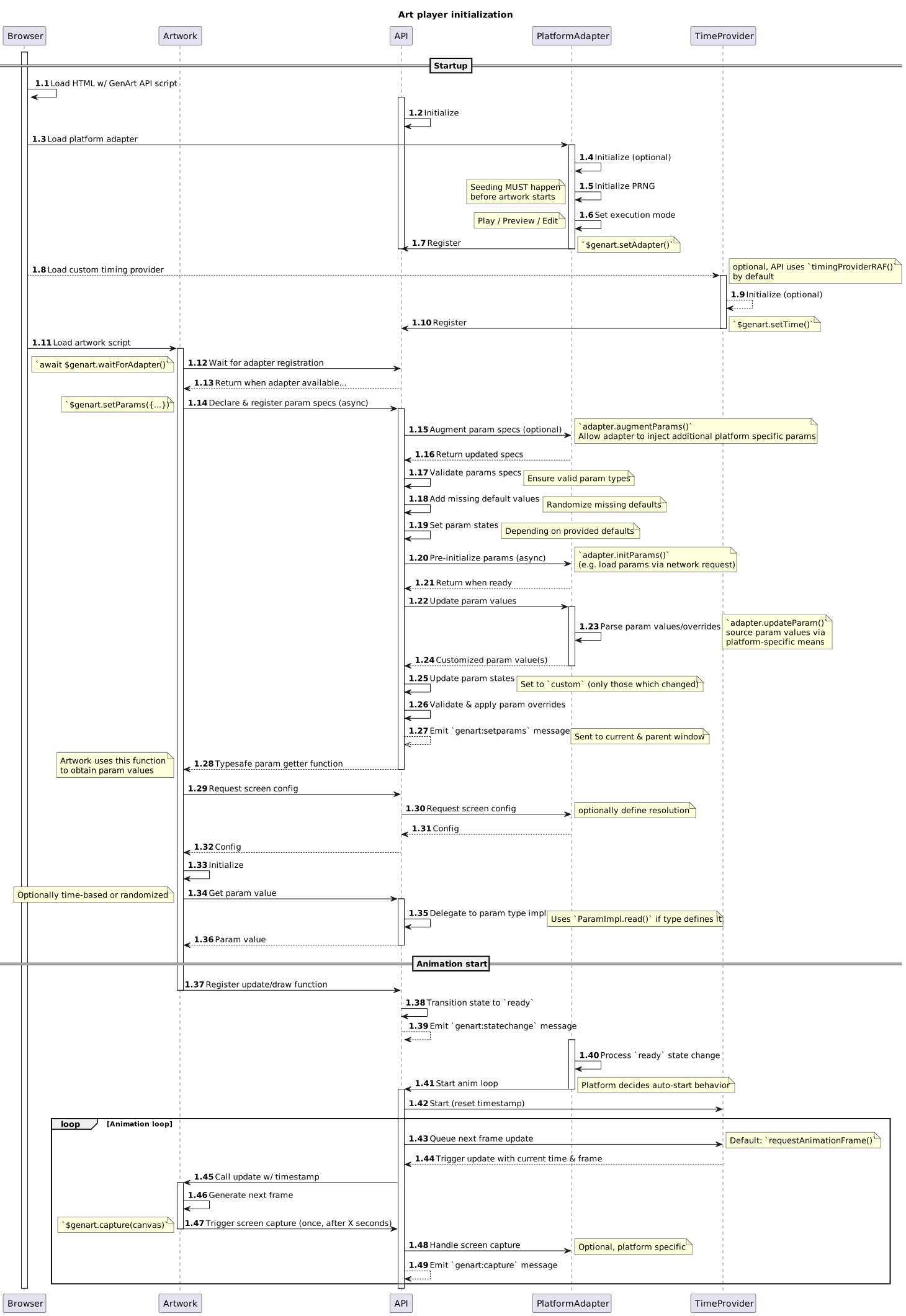
[Diagram source code](https://github.com/thi-ng/genart-api/blob/main/diagrams/lifecycle.puml)
#### State machine
The API implements a finite state machine with the following possible states:
- `init`: Initial state until the [platform adapter](#platform-adapters), [time
provider](#time-providers) and the artwork's update function have been
registered or an error occurred during any init steps
- `ready`: All init steps have been completed and playback of the artwork can
commence
- `play`: API is currently running the animation loop, ruuning the artwork
- `stop`: Animation loop has been paused/stopped
- `error`: API is in an unrecoverable error state
#### Message types
> [!IMPORTANT]
> Message names have been updated in recent versions and are partially
> incompatible with older versions. Please see [commit
> details](https://github.com/thi-ng/genart-api/commit/35b627d7380bad75d280cc1e051ec7ed23aa8995)
> for what has changed and why, and what (might) need to be changed in your
> projects.
>
> **At this stage of the project, the [parameter editors](#parameter-editors)
> are only compatible with artworks using the current version of the GenArtAPI
> reference implementation.**
The API also defines and uses a message protocol to communicate certain
lifecycle events, state changes and requests to both internal & external
participants. Please see links for descriptions of each message type.
- `genart:capture`: [CaptureMessage](https://docs.thi.ng/genart-api/core/interfaces/CaptureMessage.html)
- `genart:configure`: [ConfigureMessage](https://docs.thi.ng/genart-api/core/interfaces/ConfigureMessage.html)
- `genart:frame`: [AnimFrameMessage](https://docs.thi.ng/genart-api/core/interfaces/AnimFrameMessage.html)
- `genart:get-info`: [GetInfoMessage](https://docs.thi.ng/genart-api/core/interfaces/GetInfoMessage.html)
- `genart:info`: [InfoMessage](https://docs.thi.ng/genart-api/core/interfaces/InfoMessage.html)
- `genart:params`: [ParamsMessage](https://docs.thi.ng/genart-api/core/interfaces/ParamsMessage.html)
- `genart:param-change`: [ParamChangeMessage](https://docs.thi.ng/genart-api/core/interfaces/ParamChangeMessage.html)
- `genart:param-error`: [ParamErrorMessage](https://docs.thi.ng/genart-api/core/interfaces/ParamErrorMessage.html)
- `genart:randomize-param`: [RandomizeParamMessage](https://docs.thi.ng/genart-api/core/interfaces/RandomizeParamMessage.html)
- `genart:resize`: [ResizeMessage](https://docs.thi.ng/genart-api/core/interfaces/ResizeMessage.html)
- `genart:resume`: [ResumeMessage](https://docs.thi.ng/genart-api/core/interfaces/ResumeMessage.html)
- `genart:set-param-value`: [SetParamValueMessage](https://docs.thi.ng/genart-api/core/interfaces/SetParamValueMessage.html)
- `genart:start`: [StartMessage](https://docs.thi.ng/genart-api/core/interfaces/StartMessage.html)
- `genart:state-change`: [StateChangeMessage](https://docs.thi.ng/genart-api/core/interfaces/StateChangeMessage.html)
- `genart:stop`: [StopMessage](https://docs.thi.ng/genart-api/core/interfaces/StopMessage.html)
- `genart:traits`: [TraitsMessage](https://docs.thi.ng/genart-api/core/interfaces/TraitsMessage.html)
#### Message handling
Messages received via the browser's
[`postMessage()`](https://developer.mozilla.org/en-US/docs/Web/API/MessagePort/postMessage)
mechanism will only be processed by `GenArtAPI` if the [`apiDI`]() included in
the message matches, or if it's the wildcard ID `"*"`. The latter can be used to
broadcast messages to **all** currently active/receiving `GenArtAPI` instances.
Use cases for the wildcard ID (`"*"`) are related to handling multiple artworks
running in multiple iframes, for example:
- Detection/registration of all currently running `GenArtAPI` instances by
broadcasting a
[GetInfoMessage](https://docs.thi.ng/genart-api/core/interfaces/GetInfoMessage.html),
to which each instance then responds with a
[InfoMessage](https://docs.thi.ng/genart-api/core/interfaces/InfoMessage.html)
(which then also includes each instance's actual configured `id`)
- Starting/stopping all currently running `GenArtAPI` instances via single
message, e.g. `postMessage({ type: "genart:start", apiID: "*"}, "*")`.
TODO — for now please also see the following links for more messaging related information:
- [.emit()](https://docs.thi.ng/genart-api/core/interfaces/GenArtAPI.html#emit)
- [.on()](https://docs.thi.ng/genart-api/core/interfaces/GenArtAPI.html#on)
- [.id](https://docs.thi.ng/genart-api/core/interfaces/GenArtAPI.html#id)
- [.setParams()](https://docs.thi.ng/genart-api/core/interfaces/GenArtAPI.html#setparams)
- [.setTraits()](https://docs.thi.ng/genart-api/core/interfaces/GenArtAPI.html#settraits)
- [.setUpdate()](https://docs.thi.ng/genart-api/core/interfaces/GenArtAPI.html#setupdate)
- [.start()](https://docs.thi.ng/genart-api/core/interfaces/GenArtAPI.html#start)
- [.stop()](https://docs.thi.ng/genart-api/core/interfaces/GenArtAPI.html#stop)
### API documentation
In addition to the detailed API docs, this readme, the source code and the
[example projects](#example-projects) are the best reference.
- [@genart-api/core](https://docs.thi.ng/genart-api/core/)
- [@genart-api/adapter-editart](https://docs.thi.ng/genart-api/adapter-editart/)
- [@genart-api/adapter-fxhash](https://docs.thi.ng/genart-api/adapter-fxhash/)
- [@genart-api/adapter-layer](https://docs.thi.ng/genart-api/adapter-layer/)
- [@genart-api/adapter-urlparams](https://docs.thi.ng/genart-api/adapter-urlparams/)
- [@genart-api/time-fps-overlay](https://docs.thi.ng/genart-api/time-fps-overlay/)
## Parameters
Almost all generative artworks use parameters and randomization to produce
numerous variations. Exposing some of these parameters to the outside world can
allow people/agents to have more participation and direct control over the
generative outcomes.
The API supports an extensible set of parameters types with a selection of
commonly used types supplied as built-ins (described below).
Each parameter declared by the artwork is a simple vanilla JS object and any
param value changes are being handled by the API and the param type’s
[registered
implementation](https://docs.thi.ng/genart-api/core/interfaces/ParamImpl.html)
(a set of functions dealing with validation, coercion, updating and reading
param values). For convenience & type safety, the API provides factory functions
for all built-in parameter types.
The following parameter types are available, but other custom ones can be
registered, making the entire system extensible. Each declared param spec is a
simple JS object, and the API provides factory functions for all built-in types,
helping to fill in any default options.
**IMPORTANT**: All param declarations must include a `desc` (brief description).
There's also the option to define `default` values for most parameter types. If
no default value is provided, a randomized value will be chosen within the
constraints of the param.
### Static parameter types
Generally speaking, parameters can be grouped into static & dynamic parameters
with the former providing the same values each time they're read/evaluated and
the latter being used for time-based values obtained from otherwise dynamic
sources (e.g. sensors).
This section describes the set of _static_ param types:
#### Bigint parameter
- [API docs](https://docs.thi.ng/genart-api/core/interfaces/BigIntParam.html)
- [Factory function](https://docs.thi.ng/genart-api/core/interfaces/ParamFactories.html#bigint)
TODO example
#### Binary parameter
- [API docs](https://docs.thi.ng/genart-api/core/interfaces/BinaryParam.html)
- [Factory function](https://docs.thi.ng/genart-api/core/interfaces/ParamFactories.html#binary)
TODO example
#### Choice parameter
- [API docs](https://docs.thi.ng/genart-api/core/interfaces/ChoiceParam.html)
- [Factory function](https://docs.thi.ng/genart-api/core/interfaces/ParamFactories.html#choice)
This enum-like param can only take on values from a fixed list of options. For
simplicity values are always strings, but optionally can also define labels
(only used for display purposes by external tooling).
```ts
// options
$genart.params.choice({
name: "Test param",
desc: "Shape size preset",
options: ["s", "m", "l"],
default: "m",
});
// ...or using options with labels
$genart.params.choice({
name: "Test param",
desc: "Shape size preset",
options: [
["s", "Small"],
["m", "Medium"],
["l", "Large"],
],
options: "m",
});
```
##### Recommended GUI widget
- Drop-down menu
- Radio buttons
#### Color parameter
- [API docs](https://docs.thi.ng/genart-api/core/interfaces/ColorParam.html)
- [Factory function](https://docs.thi.ng/genart-api/core/interfaces/ParamFactories.html#color)
CSS hex color value (6 digits only). Other/newer color types (e.g. `oklch()`)
might be supported later, but currently omitted due to lack of native browser
widgets for editing these colors...
```ts
$genart.params.color({
name: "Test param",
desc: "Background color",
default: "#aabbcc",
});
```
##### Recommended GUI widget
- Color picker
#### Date parameter
- [API docs](https://docs.thi.ng/genart-api/core/interfaces/DateParam.html)
- [Factory function](https://docs.thi.ng/genart-api/core/interfaces/ParamFactories.html#date)
JS `Date` value in precision of full days only (UTC midnight).
```ts
$genart.params.date({
name: "Test param",
desc: "Best before date",
// default can be given as Date or string in this format
default: "2024-09-05",
});
```
##### Recommended GUI widget
- Date & time chooser
- Numeric range slider (UNIX epoch)
#### Datetime parameter
- [API docs](https://docs.thi.ng/genart-api/core/interfaces/DateTimeParam.html)
- [Factory function](https://docs.thi.ng/genart-api/core/interfaces/ParamFactories.html#datetime)
JS `Date` value.
```ts
$genart.params.datetime({
name: "Test param",
desc: "Date and time",
// default can be given as Date or string in ISO8601 format
default: "2024-09-05T12:34:56+02:00",
});
```
##### Recommended GUI widget
- Date & time chooser
- Numeric range slider (UNIX epoch)
#### Image parameter
- [API docs](https://docs.thi.ng/genart-api/core/interfaces/ImageParam.html)
- [Factory function](https://docs.thi.ng/genart-api/core/interfaces/ParamFactories.html#image)
Image parameters are used to provide spatially varied param values (e.g.
gradient maps, masks etc.) by allowing the artwork to read pixel values from
different points in the image.
An image param has a pixel array as `value`, alongside `width`, `height` and
`format`, which can be:
- `gray` (8 bits)
- `rgba` (packed int, 32 bits, channels in MSB order: A,R,G,B)
The `format` is only used as hint for platform adapters and external tooling
(e.g. GUI param editors) to optimize their handling of the image data. I.e. an
image with mode `gray` can be encoded as byte sequence vs. `rgba` requiring 4
bytes per pixel. Likewise a param editor allowing image uploads/customizations
is responsible to resize an image to the expected dimensions and provide its
data in the expected format.
[Related example](https://github.com/thi-ng/genart-api/tree/main/examples/param-image)
> [!IMPORTANT]
> Note to artists: Ensure to keep your image size requirements as low as
> possible! Storing image data in URL parameters (as done by most platforms) has
> hard browser-defined limits and this param type is not (yet?) supported by any
> of the major online art platforms.
The [reference implementation platform
adapter](#existing-adapter-implementations) encodes image data using gzip
compression and base64 encoding.
#### List parameter
For simplicity, only lists of numeric or string values are supported by default:
> ![IMPORTANT]
> These param types are fully functioning, but please see [editor
> support](#parameter-editors) for implementation progress to allow user
> customizations.
##### Numeric list
- [API docs](https://docs.thi.ng/genart-api/core/interfaces/NumListParam.html)
- [Factory function](https://docs.thi.ng/genart-api/core/interfaces/ParamFactories.html#numlist)
```ts
$genart.params.numlist({
name: "test",
desc: "List of numbers",
default: [1, 2, 3],
});
```
##### String list
- [API docs](https://docs.thi.ng/genart-api/core/interfaces/StringListParam.html)
- [Factory function](https://docs.thi.ng/genart-api/core/interfaces/ParamFactories.html#strlist)
```ts
$genart.params.strlist({
name: "test",
desc: "List of strings",
default: ["a", "b", "c"],
});
```
#### Range parameter
- [API docs](https://docs.thi.ng/genart-api/core/interfaces/RangeParam.html)
- [Factory function](https://docs.thi.ng/genart-api/core/interfaces/ParamFactories.html#range)
Numeric value from a closed range/interval (defined by `min`/`max`, defaulting
to [0, 100]). If `step` is given, the value will be rounded to multiples of
`step` (always clamped to min/max).
```ts
$genart.params.range({
name: "Test param",
desc: "Pick a multiple of 5 between 0-100",
min: 0,
max: 100,
step: 5,
});
```
##### Recommended GUI widget
- number dial/slider with value label
- number input field
#### Text parameter
- [API docs](https://docs.thi.ng/genart-api/core/interfaces/TextParam.html)
- [Factory function](https://docs.thi.ng/genart-api/core/interfaces/ParamFactories.html#text)
Single or multi-line text, optionally with `minLength`/`maxLength` and/or
`match` regexp pattern validation.
```ts
$genart.params.text({
name: "Test param",
desc: "Seed phrase",
maxLength: 256,
match: "^[a-z ]+$",
multiline: true,
});
```
##### Recommended GUI widget
- Single or multiline text input field
#### Time parameter
- [API docs](https://docs.thi.ng/genart-api/core/interfaces/TimeParam.html)
- [Factory function](https://docs.thi.ng/genart-api/core/interfaces/ParamFactories.html#time)
Time-of-day parameter with values as `[hour, minute, second]`-tuples in 24h format.
##### Recommended GUI widget
- HMS time chooser
- HMS dropdown menus
- HMS text input fields
#### Toggle parameter
- [API docs](https://docs.thi.ng/genart-api/core/interfaces/ToggleParam.html)
- [Factory function](https://docs.thi.ng/genart-api/core/interfaces/ParamFactories.html#toggle)
On/off switch (boolean) parameter.
##### Recommended GUI widget
- checkbox
#### Vector parameter
- [API docs](https://docs.thi.ng/genart-api/core/interfaces/VectorParam.html)
- [Factory function](https://docs.thi.ng/genart-api/core/interfaces/ParamFactories.html#vector)
n-dimensional vector parameter.
- `size` defines vector size (number of dimensions)
- `min` / `max` / `step` can be given as scalars or vectors
- `labels` are only mandatory for `size > 4`, otherwise default to XYZW
If `step` is given, each vector component value will be rounded to multiples of
`step` (always clamped to min/max).
```ts
$genart.params.vector({
name: "Test param",
desc: "3D vector",
size: 3, // dimensions, mandatory
min: 0,
max: 1,
step: 0.01,
labels: ["X", "Y", "Z"],
default: [0.1, 0.2, 0.3],
});
```
##### Recommended GUI widget
- per-component slider/dial
#### Weighted choice parameter
- [API docs](https://docs.thi.ng/genart-api/core/interfaces/WeightedChoiceParam.html)
- [Factory function](https://docs.thi.ng/genart-api/core/interfaces/ParamFactories.html#weighted)
Similar to the [Choice parameter type](#choice), but here each option also
has an associated weight/importance. When randomizing this parameter, a new
value is chosen based on the probability distribution defined by the relative
weights given to each option.
Note: The options can be given in any order and their weights are always only
treated relative to each other. The `$genart.params.weighted()` factory function
is automatically sorting these options by weight and pre-computes their total
weight.
If no default value is given, it will be picked randomly (using the weights, as
described above).
```ts
// define color options with these probabilities:
// - black: 8/15th (53%)
// - cyan: 4/15th (27%)
// - magenta: 2/15th (13%)
// - yellow: 1/15th (7%)
$genart.params.weighted({
name: "Test param",
desc: "Controlled randomness",
options: [
// format: [weight, value]
[8, "black"],
[4, "cyan"],
[2, "magenta"],
[1, "yellow"],
],
});
// optionally, labels can be provided for each option
$genart.params.weighted({
name: "Test param",
desc: "With labels",
options: [
// format: [weight, value, label]
[8, "#000", "black"],
[4, "#0ff", "cyan"],
[2, "#f0f", "magenta"],
[1, "#ff0", "yellow"],
],
});
```
##### Recommended GUI widget
- Drop-down menu
- Radio buttons
#### XY parameter
- [API docs](https://docs.thi.ng/genart-api/core/interfaces/XYParam.html)
- [Factory function](https://docs.thi.ng/genart-api/core/interfaces/ParamFactories.html#xy)
A 2D dimensional tuple for values in the [0,0] .. [1,1] range. Useful to control
two co-dependent parameters using an XY controller/touchpad...
```ts
$genart.params.xy({
name: "Test param",
desc: "Bottom-left: [dark,dry] / Top-right: [bright,wet]",
default: [0.5, 0.5],
});
```
##### Recommended GUI widget
- XY pad controller
- Pair of sliders (X & Y individually)
### Dynamic parameter types
Dynamic parameters are either time-based (using a abstract notion of "time") or
otherwise produce values which could change each time a parameter is being
read/evaluated by the artwork (e.g. sensor inputs).
Unlike [static param types](#static-parameter-types), these parameters have **no
default value** and their actual value is always computed.
#### Ramp parameter
- [API docs](https://docs.thi.ng/genart-api/core/interfaces/RampParam.html)
- [Factory function](https://docs.thi.ng/genart-api/core/interfaces/ParamFactories.html#ramp)
A ramp defines a one-dimensional curve/gradient via a number of stops/keyframes,
from which then an actual value will be derived by sampling the curve at a
specific position. Ramp are different to other parameter types in that they're
mostly intended for time-based parameters whose value should evolve over time
(rather than being a static quantity).
Ramps support any number of stops/keyframes (though, at least 2 are required!)
and by default the API supports the following interpolation modes:
- `linear`: linear interpolation (default)
- `exp`: exponential interpolation
- `smooth`: smoothstep
**Recommended GUI widget:**
- [Curve editor](https://github.com/thi-ng/umbrella/tree/develop/examples/ramp-synth)
```ts
$genart.params.ramp({
name: "Test param",
desc: "Brightness over time",
stops: [
[0, 0.1],
[0.9, 1],
[1, 0],
],
mode: "smooth",
});
```
### Custom parameter types
The system supports registering custom parameter types and their implementation
via
[`$genart.registerParamType()`](https://docs.thi.ng/genart-api/core/interfaces/GenArtAPI.html#registerparamtype).
These can be useful to provide additional app-specific or platform-specific
parameters (e.g. values obtained from arbitrary hardware sensors to which an
artwork might respond dynamically).
- [`ParamImpl` interface definition](https://docs.thi.ng/genart-api/core/interfaces/ParamImpl.html)
- [`registerParamType()`](https://docs.thi.ng/genart-api/core/interfaces/GenArtAPI.html#registerparamtype)
The `registerParamType()` allows overriding of existing param type
implementations, but doing so will print a warning. When an artwork or platform
registers its own types, it SHOULD consider namespacing the type name, e.g.
`platformname:customtype`.
#### Example: Oscillator parameter type
The following example shows how to implement, register and then use a sine wave
oscillator parameter type, providing time-based values. A more advanced version
is shown in the [param-custom
example](https://github.com/thi-ng/genart-api/blob/main/examples/param-custom).
```ts
// define a new param type with given name and implementation.
interface OscParam extends Param<number> {
type: "user:sinosc";
freq: number;
amp: number;
offset: number;
}
// this implementation does not allow any customizations or value randomization
// (the latter is common to all dynamic params, since the value is ALWAYS computed)
$genart.registerParamType("user:sinosc", {
// for brevity we decide this param cannot be customized (once defined)
valid: (spec, key, value) => false,
// the read function is called each time this param is evaluated,
// here to provide a time-based value
read: (spec, t) => {
const { freq, amp, offset } = <OscParam>spec;
return Math.sin(t * freq * Math.PI * 2) * amp + offset;
},
});
// register parameter
const param = $genart.setParams({
sine: {
type: "user:sinosc", // param type (should be unique)
freq: 0.25, // frequency in Hz
amp: 5, // amplitude
offset: 5, // center offset
default: 0, // ignored
},
});
$genart.setUpdate((t) => {
// current time in seconds
t *= 0.001;
// evaluate param
console.log(t, param("sine", t));
// keep on animating
return true;
});
```
### Composite parameter types
Composite parameter types contain child parameters to allow the main param be
configured in more detailed/complex ways. Usually, a composite parameter type
will define a
[`.read()`](https://docs.thi.ng/genart-api/core/interfaces/ParamImpl.html#read)
method to dynamically produce values, based on the current configuration
of its child params.
An example of such a composite parameter type is an extended version of the
oscillator described in the [previous
section](#example-oscillator-parameter-type).
TODO
Please see the [param-custom
example](https://github.com/thi-ng/genart-api/blob/main/examples/param-custom)
for reference...
## Traits
Some platforms support the concept of artist-defined metadata, commonly called
"traits" or "features". In most cases, this metadata is a key-value dictionary,
where the keys are arbitrarily defined criteria the artist wants to expose, and
usually, the values are derived from the current parameter configuration of a
particular variation.
This API principally supports this use case via the `$genart.setTraits()`
function, but it's the platform adapter's responsibility to deal with this
information provided, i.e. declaring traits has zero impact on any other
workings or state of the API layer.
The value of a single trait can be a number, string or boolean.
```ts
// declare a single param
const param = await $genart.setParams({
bright: $genart.params.range({
name: "brightness",
desc: "overall brightness",
min: 0,
max: 100,
}),
});
// internal random param
const density = $genart.random.rnd();
// declare traits to outside world
$genart.setTraits({
brightness: param("bright") < 50 ? "dark" : "light",
density: Math.floor(density * 100) + "%",
});
```
## Platform adapters
TODO This section will describe the role(s) of adapters responsible for
providing (deployment) platform-specific functionality and interop features.
- [`PlatformAdapter` interface documentation](https://docs.thi.ng/genart-api/core/interfaces/PlatformAdapter.html)
### Parameter sourcing & initialization
Artwork parameters can be defined via the
[`$genart.setParams()`](https://docs.thi.ng/genart-api/core/interfaces/GenArtAPI.html#setParams)
async function. Each parameter spec _can_ define a default value which will be
used if the platform doesn't provide a customized value for this param. For many
types of params it makes sense to specify these, but there're also siturations
where an artist might want to allow the system to choose randomized defaults,
**unless** a param has been customized. Therefore, if no default is given (by
the artist/artwork) as part of a parameter spec, then `GenArtAPI` will use the
platform provided PRNG to choose a random valid default value within the param's
configured ranges/constraints.
The effects of this behavior are:
- Ensures each param has a valid value when
[`$genart.setParams()`](https://docs.thi.ng/genart-api/core/interfaces/GenArtAPI.html#setParams)
returns
- Removes boilerplate to require artist producing (valid) randomized default
values as part of the param specs (only constraints need to be given).
- [Determinism is still guaranteed](#determinism--prng-provision) and solely
dependent on the platform-provided seed. If the platform doesn't use (or
currently provide) a pre-configured seed (usually for development or in
sandboxes), then this can be used for rapid exploration of randomized
versions (in which case
[`$genart.seed`](https://docs.thi.ng/genart-api/core/interfaces/GenArtAPI.html#seed)
can be used for information)
- Make param preset storage more compact by only having to store manually
configured/customized params
- Each param has a
[`ParamState`](https://docs.thi.ng/genart-api/core/types/ParamState.html)
which can be queried by both the artwork and editor tooling
### Parameter updates
TODO write docs
### Determinism & PRNG provision
Platform adapters are responsible to provide a **seedable and resettable**,
deterministic pseudo-random number generator which the artwork can access via
[`$genart.random`](https://docs.thi.ng/genart-api/core/interfaces/GenArtAPI.html#random).
Usually, the adapter just has to wrap the PRNG provided by the respective
platform.
- [PRNG interface definition](https://docs.thi.ng/genart-api/core/interfaces/PRNG.html)
- [Example implementation in a platform adapter](https://github.com/thi-ng/genart-api/blob/main/packages/adapter-urlparams/index.ts)
For cases where a platform does not provide its own PRNG or the adapter doesn't
want to use it, the API core package provides the widely used SFC32 PRNG
implementation, which can be used by an adapter (or artwork):
- [SFC32](https://github.com/thi-ng/genart-api/blob/main/packages/core/src/prng.ts)
### Screen configuration
Platform adapters are responsible to provide screen/canvas dimensions (and pixel
density information) to the artwork, and the latter MUST use the
[`$genart.screen`](https://docs.thi.ng/genart-api/core/interfaces/GenArtAPI.html#screen)
accessor to obtain this information (rather than directly querying
`window.innerWidth` etc.). This accessor returns a [`ScreenConfig`
object](https://docs.thi.ng/genart-api/core/interfaces/ScreenConfig.html).
This approach gives the platform full control to define fixed dimensions,
irrespective of actual window dimensions and also be in charge of resizing
behavior.
#### Handling dynamic resizing
Similar to the above, artwork which aims to be responsive to changing screen
configurations MUST NOT listen to `window` resize events directly, but MUST add
a listener for `genart:resize` messages, like so:
```ts
// resize events contain the new screen config
$genart.on("genart:resize", ({ screen }) => {
console.log("new screen info:", screen.width, screen.height, screen.dpr);
});
```
If an artwork is unable to dynamically respond to resize events, it should at
least implement a handler which reloads the window on resize, like so:
```ts
$genart.on("genart:resize", () => location.reload());
```
### Thumbnail/preview generation
TODO
## Time providers
A time provider is a further decoupling mechanism to allow artists (or
platforms) to re-purpose an artwork in different media production or asset
management contexts. Common scenarios include: an artist (or platform) might
want to produce high-res outputs or high-quality video assets which can only be
created by running the piece at a much lower frame rate (or a frame rate
controlled via external events/triggers). In order to protect the artwork code
from having to be adjusted for these use cases, the API uses pluggable timing
providers which are merely responsible to schedule the next animation frame and
provide a related timestamp and frame number.
The API defaults to using a [`requestAnimationFrame()`-based
provider](https://github.com/thi-ng/genart-api/blob/main/packages/core/src/time/raf.ts),
but this one can be replaced by loading an alternative implementation via
another `<script>` tag, like so:
```html
<!-- main GenArtAPI script -->
<script src="./lib/genart.js"></script>
<!--
optional: use custom time provider (e.g. for non-realtime rendering of image sequences)
configure API to use offline time (new frame every 250 ms, time base: 60 fps)
IMPORTANT: MUST be loaded AFTER the main genart script!
-->
<script>
$genart.setTimeProvider($genart.time.offline(250, 60));
</script>
```
### Existing time provider implementations
The following [time providers are
included](https://docs.thi.ng/genart-api/core/interfaces/TimeProviders.html)
in the API reference implementation:
#### RAF
Default TimeProvider, requestAnimationFrame()-based. Start time & frame offsets
can be provided (both defaulting to zero).
[Source](https://github.com/thi-ng/genart-api/blob/main/packages/core/src/time/raf.ts)
#### Offline
A time provider for fixed frame rates, offline (aka non-realtime) animation use
cases, e.g. recording image sequences. Supports arbitrary delays between frames
(default: 250ms) and reference frame rates (default: 60fps).
[Source](https://github.com/thi-ng/genart-api/blob/main/packages/core/src/time/offline.ts)
#### FPS overlay
> [!IMPORTANT]
> Since v0.22.0 this time provider is distributed as separate package
> [`@genart-api/time-fps-overlay`](https://github.com/thi-ng/genart-api/blob/main/packages/time-fps-overlay)
Similar to the [RAF time provider](#raf), but also collects FPS samples and
injects a canvas overlay to visualize recent frame rates and compute moving min,
max and average. The visualization can be configured via provided
[options](https://docs.thi.ng/genart-api/time-fps-overlay/interfaces/FPSOverlayOpts.html).
[Source](https://github.com/thi-ng/genart-api/blob/main/packages/time-fps-overlay/src/index.ts)
## WebAssembly bindings
Altough the main `GenArtAPI` project is a JavaScript-centric GenArt API
workflow/setup, we also want to provide integrations for other languages, e.g.
via WebAssembly.
The [@genart-api/wasm
package](https://github.com/thi-ng/genart-api/blob/main/packages/wasm/) provides
WASM bindings for `GenArtAPI` and is designed as an API module/plugin for the
[thi.ng/wasm-api](https://thi.ng/wasm-api) toolchain, and includes polyglot
bindings code for both [Zig](https://ziglang.org) & TypeScript/JavaScript.
## Getting started
> [!NOTE]
> The reference implementation of the API provided has no dependencies.
### Example projects
This repo contains several examples used for testing and evaluating the
reference API implementation. These are all separate projects/packages located
in the [/examples](https://github.com/thi-ng/genart-api/tree/main/examples)
directory. Please ensure you read their README instructions, since a certain
build order must be used in some situations:
| **Project** | **Live demo w/ editor** | **Description** |
| -------------------------------------------------------------------------------------- | ------------------------------------------------------------------------------------------------------ | ------------------------------------------------------ |
| [p5-basic](https://github.com/thi-ng/genart-api/tree/main/examples/p5-basic/) | [Demo](https://demo.thi.ng/genart-api/param-editors/?url=https://demo.thi.ng/genart-api/p5-basic/) | Basic p5.js example |
| [param-test](https://github.com/thi-ng/genart-api/tree/main/examples/param-test/) | [Demo](https://demo.thi.ng/genart-api/param-editors/?url=https://demo.thi.ng/genart-api/param-test/) | Minimal "art" example using various parameter types |
| [param-image](https://github.com/thi-ng/genart-api/tree/main/examples/param-image/) | [Demo](https://demo.thi.ng/genart-api/param-editors/?url=https://demo.thi.ng/genart-api/param-image/) | Example using an image map parameter |
| [param-custom](https://github.com/thi-ng/genart-api/tree/main/examples/param-custom/) | [Demo](https://demo.thi.ng/genart-api/param-editors/?url=https://demo.thi.ng/genart-api/param-custom/) | Custom & composite parameter type example |
| [param-editors](https://github.com/thi-ng/genart-api/tree/main/examples/param-custom/) | [Demo](https://demo.thi.ng/genart-api/param-editors/) | Reference [editor implementations](#parameter-editors) |
| [zig-test](https://github.com/thi-ng/genart-api/tree/main/examples/zig-test/) | [Demo](https://demo.thi.ng/genart-api/param-editors/?url=https://demo.thi.ng/genart-api/zig-test/) | Zig/WebAssembly API wrapper example (WIP) |
### Existing adapter implementations
> [!NOTE]
> Please refer or contribute to issue [#2: List of art platforms we should
> provide adapters for](https://github.com/thi-ng/genart-api/issues/2)
The following art platforms are already supported and projects can be easily
adapted by merely installing and switching to a different platform adapter.
Please refer to the readme's of the individual adapter packages for further
details about handling any platform specifics:
| **Package** | **Art platform** | **Description** |
| -------------------------------------------------------------------------------------------------------------------- | ------------------------------ | ------------------------------------------------------------------------------------------------ |
| [@genart-api/adapter-editart](https://github.com/thi-ng/genart-api/blob/main/packages/adapter-editart/README.md) | [EditArt](https://editart.xyz) | Adapter for the EditArt platform |
| [@genart-api/adapter-fxhash](https://github.com/thi-ng/genart-api/blob/main/packages/adapter-fxhash/README.md) | [fx(hash)](https://fxhash.xyz) | Adapter for the fx(hash) art platform |
| [@genart-api/adapter-layer](https://github.com/thi-ng/genart-api/blob/main/packages/adapter-layer/README.md) | Layer.com | Adapter for the Layer art platform |
| [@genart-api/adapter-urlparams](https://github.com/thi-ng/genart-api/blob/main/packages/adapter-urlparams/README.md) | | Reference implementation (used for the [param editors](#parameter-editors) bundled in this repo) |
### Project template
This repo contains an empty project template as starting point for new projects.
The template uses TypeScript & Vite, but can be _very_ easily adapted to other
tooling (eg. there's hardly any code, so switching to JavaScript requires just
renaming the source file).
- TODO move template to own repo for easier use
```bash
git clone https://github.com/thi-ng/genart-api.git
# copy template to new directory
cp -R genart-api/project-template my-new-art-project
# install dependencies (genart api, typescript, vite)
cd my-new-art-project
yarn install
```
### Installion as package
The [@genart-api/core package](https://www.npmjs.com/@genart-api/core) contains
the pre-built release files & type declarations, but it's **not** an ESM module
which can (or even should) be imported via `import` syntax. The API is always
provided as singleton via the global `$genart` variable.
Instead, the JS file(s) should be copied to your project's `/lib` dir (or
similar) to be referenced by a `<script>` tag in your HTML wrapper (see below):
```bash
yarn add @genart-api/core
# you'll also need a platform adapter, for example
yarn add @genart-api/adpater-urlparams
# create dest dir
mkdir -p lib
# copy files
cp node_modules/@genart-api/core/*.js lib
cp node_modules/@genart-api/adapter-urlparams/*.js lib
```
If you're a TypeScript user, you'll also want to add the `@genart-api/core`
package to the `types` field in your `tsconfig.json`:
tsconfig.json:
```json
{
"compilerOptions": {
"types": ["@genart-api/core"]
}
}
```
...or add a type declaration file with the following content to your `/src`
directory...
/src/types.d.ts:
```ts
/// <reference types="@genart-api/core" />
```
Then you should be ready to go to [the next
step](#use-in-your-own-projects-an-artists-hello-world)...
### Manual installation
If you don't want to use a package manager, the
[/dist](https://github.com/thi-ng/genart-api/tree/main/dist) directory contains
all pre-built release files and type declarations which you should copy to your
project directory (e.g. in a `/lib` dir or similar).
If you're a TypeScript user, you'll also want to add a declaration file with the
following content to your `/src` directory:
/src/types.d.ts:
```ts
/// <reference types="../lib/genart.d.ts" />
```
### Use in your own projects: An artist's "Hello world"
This section explains the basic approach to create a `GenArtAPI` conformant art
project and assumes you have installed the API files/types via one of the ways
described above.
```html
<script src="./lib/genart.min.js"></script>
```
#### Reference platform adapter
The repo provides a basic [platform adapter](#platform-adapters) for sourcing
parameters via URL query string (aka
[`URLSearchParams`](https://developer.mozilla.org/en-US/docs/Web/API/URLSearchParams)).
This adapter can be useful during local development, or used as basis for other
use cases:
```html
<script src="./lib/adapter-urlparams.min.js"></script>
```
- [TypeScript source code](https://github.com/thi-ng/genart-api/blob/main/packages/adapter-urlparams/src/index.ts)
#### Example files
<details><summary>HTML example wrapper (click to expand)</summary>
```html
<!DOCTYPE html>
<html lang="en">
<head>
<meta name="viewport" content="width=device-width, initial-scale=1.0" />
<title>Hello GenArtAPI</title>
<!-- main GenArtAPI script -->
<script src="./lib/genart.js"></script>
<!-- platform adapter -->
<script src="./lib/adapter-urlparams.js"></script>
<style>
body {
margin: 0;
overflow: hidden;
}
</style>
</head>
<body>
<!--
optional: use custom time provider (e.g. for non-realtime rendering of image sequences)
configure API to use offline time (new frame every 250 ms, time base: 60 fps)
-->
<script>
// $genart.setTimeProvider($genart.time.offline(250, 60));
</script>
<!-- User artwork script -->
<script type="module" src="/src/index.js"></script>
</body>
</html>
```
</details>
<details><summary>Minimal example artwork script (click to expand)</summary>
```js
// index.js
(async () => {
// ensure platform adapter is ready
await $genart.waitForAdapter();
// declare parameters
const param = await $genart.setParams({
bgColor: $genart.params.color({
name: "Bg color", // mandatory human readable name
desc: "Canvas background color", // mandatory brief description
doc: "Optional extended documentation or usage hints",
default: "#0000ff", // default value (if omitted, will be initialized to random...)
update: "reload", // trigger r