@folo/values
Version:
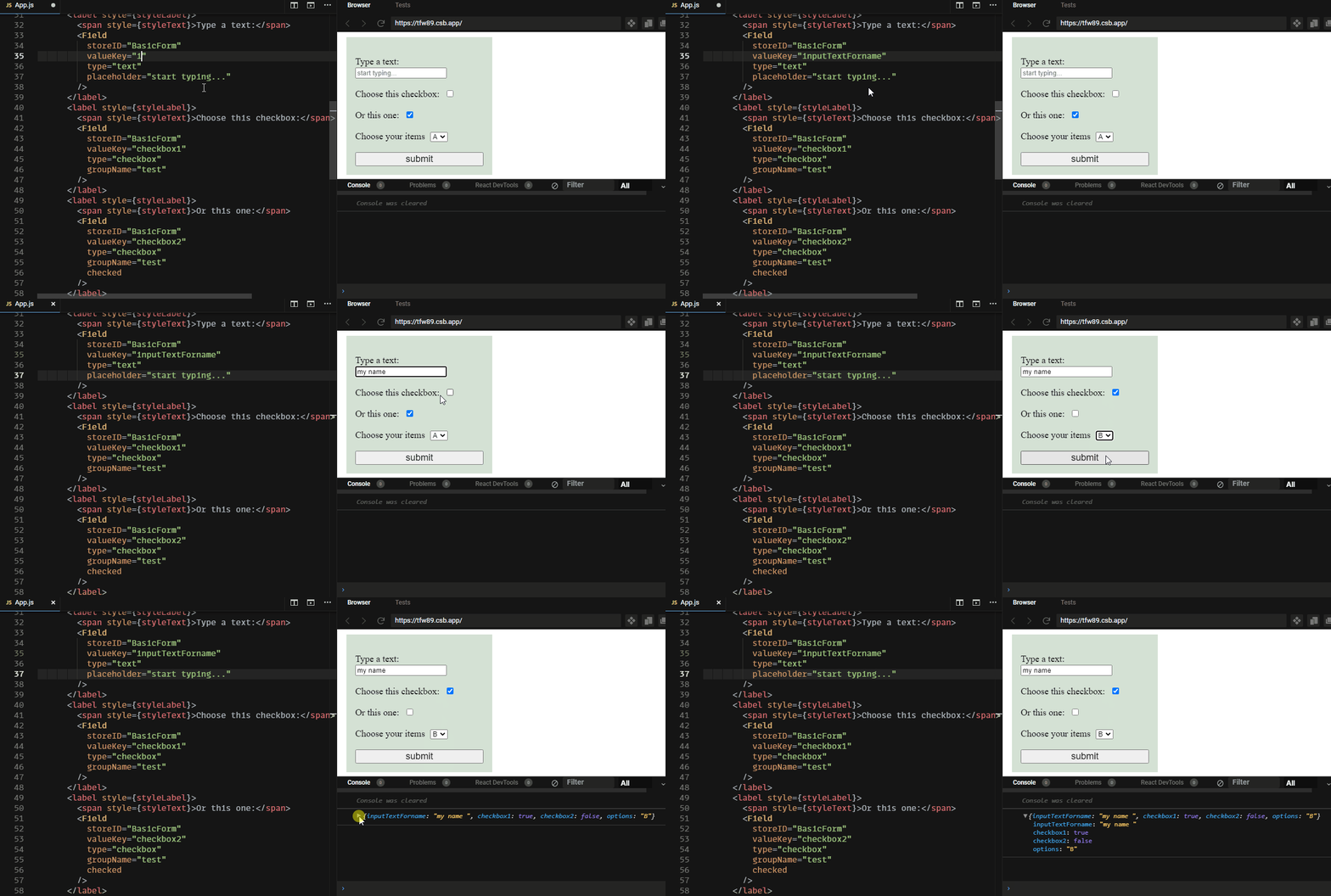
> A from store returns input values with zero config
130 lines (98 loc) • 5.83 kB
Markdown
# 📋 /values
> A from store returns input values with zero config
<!-- gif made by: https://github.com/NickeManarin/ScreenToGif/wiki/help -->
<!-- prettier-ignore-start -->
[](https://www.npmjs.com/package/@folo/values)
[](https://www.npmjs.com/package/@folo/values)
[](https://www.npmjs.com/package/@folo/values)
[](https://www.npmjs.com/package/@folo/values)
[](https://github.com/jalal246/folo/blob/master/packages/folo-values/LICENSE)
[](https://github.com/jalal246/folo/tree/master)
[](https://codecov.io/gh/jalal246/folo)
<!-- prettier-ignore-end -->
## Installation
```sh
npm install /values
```
- ☑️ A simple, lightweight package, comes with two components connected to global
JavaScript store. That's it. No complexity, no unnecessary code.
- ☑️ Instead of implementing your own store, `/values` can do it for you with a
store that holds inputs and knows exactly when to trigger connected components
to re-render.
- ☑️ Doesn't require using Redux/Mobx/Context. While these technologies are
amazing it always comes with a cost. That's why every update that happens in `Folo`
happens locally. The store is just the Maestro.
- ☑️ You can add multiple forms connect them to the store or create branches
yourself. It's all about `StoreID` my friends.
- ☑️ Friendly code. What you do for a form written in JS, Can do it here. No
external API. No external functionality. `onSubmit`, `onChange` are still here and
not going anywhere.
- ☑️ It's well tested code, with nearly 100% of code coverage 🥳
## Usage
```js
import { Form, Field } from "@folo/values";
const MyComponent = ({ onSubmit }) => (
<Form onSubmit={onSubmit} storeID="example1">
<label>
username:
<Field valueKey="myName" type="text" storeID="example1" />
</label>
<label>
password:
<Field valueKey="myPass" type="password" storeID="example1" />
</label>
<label>
choose:
<Field valueKey="alphabet" type="select" storeID="example1">
<option valueKey="a">A</option>
<option valueKey="b">B</option>
<option valueKey="c">C</option>
</Field>
</label>
<button type="submit">submit</button>
</Form>
);
// submit function will return: (event, {myName: "" myPass: "", alphabet:""})
```
## Available Components
```js
import { Form, Field } from "@folo/values";
```
All components accept custom props + children which is required in all except `Field`
### Form
| property | type | description | default |
| ----------- | ------------------ | ---------------------------------------------------------------- | -------------- |
| `component` | HTMLElement/string | custom render-component | `form` |
| `onSubmit` | function | submit function returns values in all cells (event, {...values}) | `() {}` |
| `storeID` | string | unique id shared with form and fields | `unrecognized` |
### Field
Essential to register values in the store, returns its value when submit.
Accepts all events handlers.
| property | type | description | default |
| ----------- | ------------------ | ---------------------------------------- | ------------------- |
| `component` | HTMLElement/string | custom render-component | `div` |
| `storeID` | string | unique id shared with form and fields | `unrecognized` |
| `valueKey` | string | key used to store value in values object | `id` or `timestamp` |
| `value` | string | Initial value if type is not a button | `""` |
| `checked` | Boolean | Initial value if type is a button | `false` |
| `type` | string | Input type | `text` |
| `groupName` | string | only for button toggle group | `null` |
## Examples
You can clone all the examples used in these packages
[here](https://github.com/jalal246/folo/tree/master/packages/folo-values/examples).
With an example for [Simple
Form](https://jalal246.github.io/folo/?path=/story/forms-forms-with-submit--simple-form)
Or a [Custom
Form](https://jalal246.github.io/folo/?path=/story/forms-forms-with-submit--custom-components)
built with custom components. It includes All [Available
fields](https://jalal246.github.io/folo/?path=/story/forms-available-fields--default-input)
and examples that show you how to [handle toggle button groups](https://jalal246.github.io/folo/?path=/story/forms-toggle-groups--group-toggle-no-init-value).
## Test
```sh
yarn test folo-values
```
## Contribution 😇
If you have ideas or issues don't hesitate. You are always welcome.
## License
This project is licensed under the [MIT License](https://github.com/jalal246/folo/blob/master/packages/folo-values/LICENSE)