@favware/syntax-highlighter-core
Version:
A lightweight, easy-to-use and framework agnostic syntax highlighter for your code snippets.
265 lines (193 loc) • 10.8 kB
Markdown
<div align="center">
<a href="https://favware.tech/syntaxhighlighter"><img style="height: 200px" src="https://cdn.favware.tech/img/syntax-highlighter.png" height="200" alt="logo"/></a>
# @favware/syntax-highlighter-core
**A lightweight, easy-to-use and framework agnostic syntax highlighter for your code examples(snippets) in web applications**
[](https://github.com/favware/syntax-highlighter/blob/main/LICENSE.md)
[](https://depfu.com/github/favware/syntax-highlighter?project_id=21396)
[](https://donate.favware.tech/patreon)
[](https://www.npmjs.com/package/@favware/syntax-highlighter-core)
[](https://stenciljs.com)
[](https://join.favware.tech)
</div>
---
**_Table of Contents_**
- [Why yet another code highlighter?](#why-yet-another-code-highlighter)
- [Features](#features)
- [Installation](#installation)
- [Install Package](#install-package)
- [Usage](#usage)
- [Framework Integration](#framework-integration)
- [Angular](#angular)
- [Including the Custom Element Schema](#including-the-custom-element-schema)
- [Calling defineCustomElements](#calling-definecustomelements)
- [Edge and IE11 polyfills](#edge-and-ie11-polyfills)
- [Accessing components using ViewChild and ViewChildren](#accessing-components-using-viewchild-and-viewchildren)
- [React](#react)
- [Vue](#vue)
- [No Framework](#no-framework)
- [Supported Languages](#supported-languages)
- [Screenshots](#screenshots)
- [Dark Mode](#dark-mode)
- [Light Mode](#light-mode)
## Why yet another code highlighter?
> There are many syntax highlighters available already but most of those are either complex to setup or front end framework specific. `@favware/syntax-highlighter-core` is built using StencilJS. You can use it everywhere, i.e. Angular, React, Vue, any framework, No Framework!
>
> **This is an adaptation of [snippet-highlight] from [rahulbhooteshwar]**
## Features
- Uses [PrismJS] for syntax highlighting
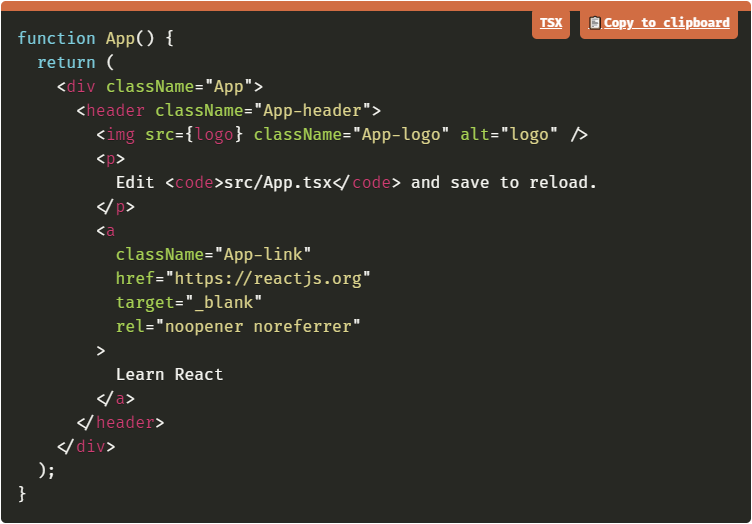
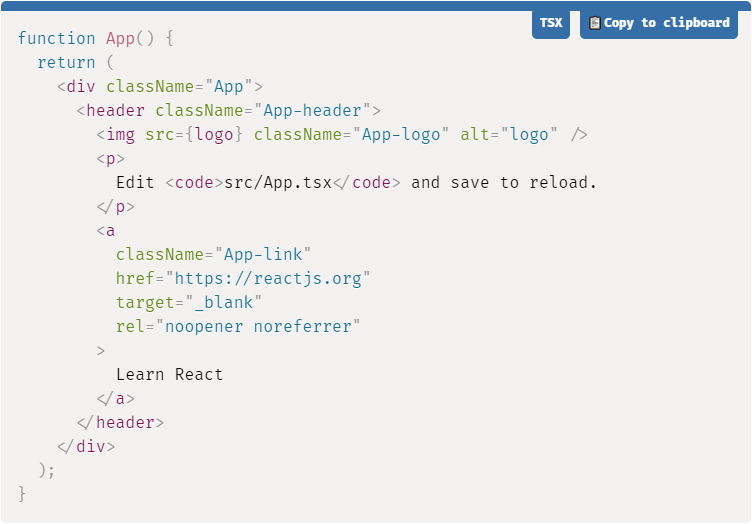
- Light and Dark mode supported
- Copy code support
- Supports many languages, see [Supported Languages](#supported-languages)
- Will default to using [Fira Code][] as font family
- The library first falls back to popular fonts such as [Cascadia Code][] and [Meslo NGF][] if it isn't available. If these are also not available it will go through various more popular coding fonts, ending in `monospace`
## Installation
### Install Package
```bash
yarn add @favware/syntax-highlighter-core
# or npm install @favware/syntax-highlighter-core
```
### Usage
The syntax is kept fairly simple. Here's a basic example of a regular conversation:
```html
<syntax-highlighter theme="dark" language="javascript" content="import { SyntaxHighlighter } from @favware/syntax-highlighter-react" />
```
### Framework Integration
#### Angular
[](https://codesandbox.io/s/syntax-highlighter-angular-0qb8k)
##### Including the Custom Element Schema
Including the `CUSTOM_ELEMENTS_SCHEMA` in the module allows the use of the web components in the HTML markup without the compiler producing errors. This code should be added into the `AppModule` and in every other modules that use your custom elements. Here is an example of adding it to `AppModule`:
```ts
import { CUSTOM_ELEMENTS_SCHEMA, NgModule } from '@angular/core';
import { BrowserModule } from '@angular/platform-browser';
import { AppComponent } from './app.component';
@NgModule({
declarations: [AppComponent],
imports: [BrowserModule],
providers: [],
bootstrap: [AppComponent],
schemas: [CUSTOM_ELEMENTS_SCHEMA]
})
export class AppModule {}
```
The `CUSTOM_ELEMENTS_SCHEMA` needs to be included in any module that uses custom elements.
##### Calling defineCustomElements
A component collection built with Stencil includes a main function that is used to load the components in the collection. That function is called `defineCustomElements()` and it needs to be called once during the bootstrapping of your application. One convenient place to do this is in `main.ts` as such:
```ts
import { enableProdMode } from '@angular/core';
import { platformBrowserDynamic } from '@angular/platform-browser-dynamic';
import { defineCustomElements } from '@favware/syntax-highlighter-core/loader';
import { AppModule } from './app/app.module';
import { environment } from './environments/environment';
if (environment.production) {
enableProdMode();
}
platformBrowserDynamic()
.bootstrapModule(AppModule)
.catch((err) => console.error(err));
// Loading @favware/syntax-highlighter-core
defineCustomElements();
```
##### Edge and IE11 polyfills
If you want your custom elements to be able to work on older browsers, you should add the `applyPolyfills()` that surround the `defineCustomElements()` function.
```ts
import { applyPolyfills, defineCustomElements } from '@favware/syntax-highlighter-core/loader';
applyPolyfills().then(() => {
defineCustomElements();
});
```
##### Accessing components using ViewChild and ViewChildren
If you would like to dynamically set the content of syntax highlighted codeblock you can do so by leveraging `ViewChild` and `ViewChildren` as in the following example:
```ts
// app.component.ts
import { Component, ElementRef, ViewChild } from '@angular/core';
import '@favware/syntax-highlighter-core';
@Component({
selector: 'app-root',
templateUrl: './app.component.html',
styleUrls: []
})
export class AppComponent {
@ViewChild('codeblock') syntaxCodeblock: ElementRef<HTMLSyntaxHighlighterElement>;
async onAction() {
this.syntaxCodeblock.nativeElement.content = "import '@favware/syntax-highlighter-core';";
this.syntaxCodeblock.nativeElement.language = 'typescript';
}
}
```
```html
<!-- app.component.html -->
<!-- Values can be passed similar to the normal usage -->
<syntax-highlighter #codeblock theme="dark" language="typescript" content="import '@favware/syntax-highlighter-core';"></syntax-highlighter>
```
#### React
[](https://codesandbox.io/s/syntax-highlighter-react-bb90c)
See [@favware/syntax-highlighter-react]
#### Vue
[](https://codesandbox.io/s/syntax-highlighter-vue-z815p)
In order to use the custom element library within the Vue app, the application must be modified to define the custom elements and to inform the Vue compiler which elements to ignore during compilation. This can all be done within the `main.js` file. For example:
```tsx
import Vue from 'vue';
import App from './App.vue';
import { applyPolyfills, defineCustomElements } from '@favware/syntax-highlighter-core/loader';
Vue.config.productionTip = false;
// Tell Vue to ignore all components defined in the @favware/syntax-highlighter-core package.
Vue.config.ignoredElements = [/syntax-highlighter\w*/];
// Bind the custom elements to the window object
applyPolyfills().then(() => {
defineCustomElements();
});
new Vue({
render: (h) => h(App)
}).$mount('#app');
```
The components should then be available in any of the Vue templates
```html
<template>
<syntax-highlighter
theme="dark"
language="javascript"
content="
<div id='app'>
Hello World!
</div>
"
/>
</template>
<script>
export default {
name: 'App'
};
</script>
```
#### No Framework
If you're want to use the browser build, you can pull it in via unpkg.
```html
<script src="https://unpkg.com/browse/@favware/syntax-highlighter-core"></script>
```
## Supported Languages
To limit the size of this library a selection has been made from all langauges supported by PrismJS. The chosen languages are those that we consider the most popular / common. If you want to see another languages supported you're always free to open [an issue]
`javascript`, `typescript`, `asciidoc`, `autohotkey`, `autoit`, `bash`, `batch`,
`c`, `clike`, `clojure`, `coffeescript`, `cpp`, `csharp`, `csp`, `css`, `dart`,
`diff`, `docker`, `elixir`, `gherkin`, `git`, `go`, `graphql`, `groovy`, `http`,
`ini`, `java`, `json`, `jsx`, `kotlin`, `less`, `lua`, `makefile`, `markdown`,
`nginx`, `objectivec`, `powershell`, `python`, `ruby`, `rust`, `sass`, `scala`,
`scss`, `sql`, `swift`, `tsx`, `vim`, `visual-basic`, `wasm`, `wiki`, `yaml`
## Screenshots
### Dark Mode
### Light Mode
<!-- LINK DUMP -->
[snippet-highlight]: https://github.com/rahulbhooteshwar/snippet-highlight
[rahulbhooteshwar]: https://github.com/rahulbhooteshwar
[prismjs]: https://prismjs.com/
[fira code]: https://github.com/tonsky/FiraCode
[cascadia code]: https://github.com/microsoft/cascadia-code
[meslo ngf]: https://github.com/romkatv/powerlevel10k#meslo-nerd-font-patched-for-powerlevel10k
[an issue]: https://github.com/favware/syntax-highlighter/issues/new
[@favware/syntax-highlighter-react]: https://yarnpkg.com/package/@favware/syntax-highlighter-react