@engr-lukman/vue-secure-pin
Version:
A secure PIN input component for Vue.js applications with virtual keyboard and PIN masking, designed for financial applications
291 lines (223 loc) • 8.71 kB
Markdown
# Vue Secure PIN
A secure PIN input component for Vue.js applications with a virtual keyboard and PIN masking, specifically designed for financial applications.
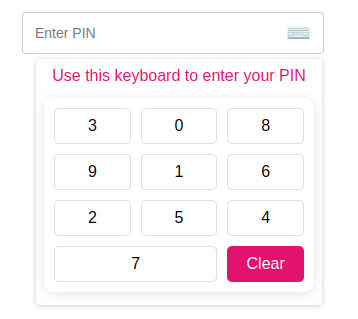
## Demo
Check out the [interactive Storybook demo](https://engr-lukman.github.io/npm-packages/?path=/story/components-secure-pin-vue-js--default) to see the component in action.
## Features
- **Secure PIN Entry**: Automatically masks PIN input for privacy
- **Virtual Keyboard**: Prevents keylogging and enhances security
- **Shuffle Option**: Randomizes keypad numbers for added security
- **TypeScript Support**: Full type definitions and type safety
- **Customizable**: Easy to style and adapt to your application's design
- **Simple API**: Straightforward props and events
## Requirements
- Vue.js 3.0 or higher
- Node.js 20.0 (LTS) or higher
- TypeScript 4.5+ (for TypeScript users)
## Installation
```bash
# Using npm
npm install -lukman/vue-secure-pin
# Using yarn
yarn add -lukman/vue-secure-pin
# Using pnpm
pnpm add -lukman/vue-secure-pin
```
## Usage
### Register as a Plugin (Global)
```typescript
// main.ts
import { createApp } from "vue";
import App from "./App.vue";
import SecurePinPlugin from "@engr-lukman/vue-secure-pin";
const app = createApp(App);
app.use(SecurePinPlugin);
app.mount("#app");
```
### Import Component Directly
```typescript
// In your Vue component with script setup
import { SecurePin } from "@engr-lukman/vue-secure-pin";
// For Vue 3 script setup syntax
// No further registration needed
```
### TypeScript Usage Example
```vue
<template>
<div>
<SecurePin
:max-length="5"
:is-error="hasError"
:error-message="errorMessage"
:is-enable-shuffle="true"
-event="handlePinChange"
/>
</div>
</template>
<script setup lang="ts">
import { ref } from 'vue';
import { SecurePin } from "@engr-lukman/vue-secure-pin";
import type { PinEventPayload } from "@engr-lukman/vue-secure-pin";
const hasError = ref<boolean>(false);
const errorMessage = ref<string>("");
const handlePinChange = (payload: PinEventPayload): void => {
// Get the actual and masked PIN values
const { pin, pinMasked } = payload;
// Example validation
if (pin === "12345") {
hasError.value = false;
} else if (pin.length === 5) {
hasError.value = true;
errorMessage.value = "Invalid PIN. Please try again.";
}
};
</script>
// For Vue 3 Options API or Vue 2
export default {
components: {
SecurePin
}
}
```
### Basic Example with Form Validation
```vue
<template>
<div class="form-group">
<label>{{ $t("pin.label") }}</label>
<secure-pin
:max-length="5"
:is-error="v$.pinMasked.$error"
:error-message="v$.pinMasked.$errors[0]?.$message"
:placeholder="$t('pin.placeholder')"
:is-enable-shuffle="true"
:show-keyboard="true"
:title="$t('keyboard.title')"
:clear-label="$t('keyboard.clear')"
-event="onPinHandler"
/>
</div>
</template>
<script setup lang="ts">
import useVuelidate from "@vuelidate/core";
import { helpers, required } from "@vuelidate/validators";
import { reactive } from "vue";
import { useI18n } from "vue-i18n";
// Import the SecurePin component and its types
import { SecurePin } from "@engr-lukman/vue-secure-pin";
import type { PinEventPayload } from "@engr-lukman/vue-secure-pin";
const { t } = useI18n();
// Define validation rules
const rules = {
pin: { required: helpers.withMessage(t("pin.required"), required) },
pinMasked: {
required: helpers.withMessage(t("pin.required"), required),
policy: helpers.withMessage(
t("pin.validation"),
helpers.regex(/^[\d*]{4,5}$/)
),
},
};
// Type-safe reactive form payload
interface PinPayload {
pin: string;
pinMasked: string;
}
const payload = reactive<PinPayload>({
pin: "",
pinMasked: "",
});
const v$ = useVuelidate(rules, payload, { $autoDirty: true });
// Type-safe callback handler
const onPinHandler = (event: PinEventPayload): void => {
const { pin, pinMasked } = event;
console.log("Actual PIN:", pin); // Shows "12345" (the actual PIN)
console.log("Masked PIN:", pinMasked); // Shows "*****"
payload.pin = pin;
payload.pinMasked = pinMasked;
};
</script>
```
## Component Architecture
The Secure PIN component consists of:
1. **SecurePin.vue**: Main component that provides the input field and keyboard functionality
2. **NumericKeyboard.vue**: Virtual keyboard with shuffle capability for enhanced security
3. **useSecurePin.ts**: TypeScript composable function that manages PIN state and masking
4. **constants.ts**: TypeScript types and default configuration values
## Props
| Prop | Type | Default | Description |
| --------------- | --------- | ------------------------------------- | ------------------------------------------------ |
| maxLength | `number` | 5 | Maximum PIN length |
| isError | `boolean` | false | Shows error styling when true |
| errorMessage | `string` | "" | Error message to display |
| placeholder | `string` | "Enter PIN" | Placeholder text when empty |
| isEnableShuffle | `boolean` | true | Randomize keypad numbers for additional security |
| showKeyboard | `boolean` | true | Show keyboard when component loads |
| title | `string` | "Use this keyboard to enter your PIN" | Title above virtual keyboard |
| clearLabel | `string` | "Clear" | Label for the clear button |
## Events
| Event | Payload Type | Description |
| ------------- | ----------------- | ---------------------------------------- |
| callbackEvent | `PinEventPayload` | Emitted when PIN value changes or clears |
```typescript
// PinEventPayload interface
interface PinEventPayload {
pin: string; // Actual PIN value (e.g. "1234")
pinMasked: string; // Masked PIN value (e.g. "****")
}
```
## Security Features
1. **PIN Masking**: PIN is automatically masked with asterisks to protect sensitive information
2. **Virtual Keyboard**: Prevents keylogging attacks by using an on-screen keyboard
3. **Keyboard Shuffling**: Option to randomize numbers on the keypad for enhanced security
4. **No DOM Storage**: PIN values are kept in memory and not stored in the DOM
5. **Click Outside Detection**: Keyboard automatically closes when clicking outside the component
## Customization
The component uses BEM-based CSS classes which you can target for styling. Below are the key CSS selectors you can customize:
### Key CSS Classes for Customization
#### SecurePin Component
- `.pin__field` - The main input field container
- `.pin__field--error` - Error state styling
- `.pin__error` - Error message text
- `.pin__display` - PIN display area
#### NumericKeyboard Component
- `.numeric-keyboard` - Main keyboard container
- `.numeric-keyboard__button` - Individual number keys
- `.numeric-keyboard__button--clear` - Clear button
### Using Scoped Styles in Vue Component
When using the component in Vue files with scoped styles, remember to use the `:deep()` selector (Vue 3) to target the component's internal elements.
```vue
<style scoped>
/* Target the pin field container */
:deep(.pin__field) {
border-color: #3498db;
}
/* Target the keyboard buttons */
:deep(.numeric-keyboard__button) {
background-color: #f8f9fa;
}
</style>
```
## TypeScript Support
This package includes full TypeScript support with:
- Type definitions for all props, events, and methods
- Type-safe component usage
- Exported interfaces for payload objects
- Complete IDE autocompletion
- Optimized for Node.js 20 LTS and modern TypeScript features
```typescript
// Example of importing types
import { SecurePin } from '-lukman/vue-secure-pin';
import type {
SecurePinProps,
PinEventPayload,
SecurePinExpose
} from '-lukman/vue-secure-pin';
// Type-safe component ref
const pinComponent = ref<InstanceType<typeof SecurePin> | null>(null);
// Access exposed methods with proper types
const clearPin = () => {
pinComponent.value?.clearHandler();
};
```
## License
MIT © 2025 Mohammad Lukman Hussain