@eko-ai/eko-nodejs
Version:
Empowering language to transform human words into action.
205 lines (152 loc) • 7.09 kB
Markdown
<h1 align="center">
<a href="https://github.com/FellouAI/eko" target="_blank">
<img src="https://github.com/user-attachments/assets/55dbdd6c-2b08-4e5f-a841-8fea7c2a0b92" alt="eko-logo" width="200" height="200">
</a>
<br>
<small>Eko - Build Production-ready Agentic Workflow with Natural Language</small>
</h1>
[](LICENSE) [](https://example.com/build-status) [](https://eko.fellou.ai/docs/release/versions/)
Eko (pronounced like 'echo') is a production-ready JavaScript framework that enables developers to create reliable agents, **from simple commands to complex workflows**. It provides a unified interface for running agents in both **computer and browser environments**.
## News
- **2025-11:** Eko 4.0 supports chat conversations & optimizes agent logic.
- **2025-09:** Eko 3.0 introduces dependency-aware parallel agent execution.
- **2025-09:** New pause, resume, and interrupt controls with `task_snapshot` workflow recovery.
- **2025-09:** Monorepo tooling migrated to pnpm for consistent workspace management.
## Upgrading to Eko 4.0
Follow these steps when moving an existing Eko 3.x project to 4.0:
1. Update dependencies with `pnpm up @eko-ai/eko @eko-ai/eko-nodejs @eko-ai/eko-web @eko-ai/eko-extension`.
2. Regenerate saved workflows or exported plans so they use the v3 schema and dependency graph format.
3. Clean and reinstall using pnpm (`rm -rf node_modules && pnpm install`), then rebuild any browser or desktop bundles.
4. Re-run automated demos and update documentation to reflect the new pause/interrupt APIs and parallel agent behavior.
## Framework Comparison
| Feature | Eko | Langchain | Browser-use | Dify.ai | Coze |
|--------------------------------------|-------|------------|--------------|----------|--------|
| **Supported Platform** | **All platform** | Server side | Browser | Web | Web |
| **One sentence to multi-step workflow** | ✅ | ❌ | ✅ | ❌ | ❌ |
| **Intervenability** | ✅ | ✅ | ❌ | ❌ | ❌ |
| **Task Parallel** | ✅ | ❌ | ❌ | ❌ | ❌ |
| **Development Efficiency** | **High** | Low | Middle | Middle | Low |
| **Task Complexity** | **High** | High | Low | Middle | Middle | Middle |
| **Open-source** | ✅ | ✅ | ✅ | ✅ | ❌ |
| **Access to private web resources** | ✅ | ❌ | ❌ | ❌ | ❌ |
## Features
- [x] Pure JavaScript: Built for browsers and Node.js.🚀
- [x] Multi-Agent: Unleash power with multiple Agents in one task.📈
- [x] Agent/Tool Flexibility: Customize new Agents and Tools in just one line.🎉
- [x] Native MCP: Connects seamlessly with [Awesome MCP Servers](https://mcpservers.org/).🔗
- [x] Dynamic LLM: Balance speed and performance with flexible model choices.⚙️
- [x] Human-in-the-loop: Intervene when it matters most.🤝
- [x] Stream Planning: Dynamic rendering made easy.🎨
- [x] Loop & Listener Tasks: Automate any repetitive task.🤖
- [ ] Observable Chain: *Coming soon*
- [ ] Native A2A: *Coming soon*
## Quickstart
> **Note**: Please refer to the [Eko Quickstart guide](https://eko.fellou.ai/docs/getting-started/quickstart/) guide for full instructions on how to run it.
> **Security Warning**
>
> DO NOT use API Keys in browser/frontend code!
>
> This will expose your credentials and may lead to unauthorized usage.
>
> Best Practices: Configure backend API proxy request through baseURL and request headers.
>
> Please refer to the link: https://eko.fellou.ai/docs/getting-started/configuration#web-environment
```typescript
const llms: LLMs = {
default: {
provider: "anthropic",
model: "claude-sonnet-4-5-20250929",
apiKey: "your-api-key"
},
gemini: {
provider: "google",
model: "gemini-2.5-pro",
apiKey: "your-api-key"
},
openai: {
provider: "openai",
model: "gpt-5",
apiKey: "your-api-key"
},
// OpenAI-compatible models (Qwen, Doubao, etc.)
qwen: {
provider: "openai",
model: "qwen-plus",
apiKey: "your-qwen-api-key",
config: {
baseURL: "https://dashscope-intl.aliyuncs.com/compatible-mode/v1"
}
},
doubao: {
provider: "openai", // Use OpenAI provider for compatibility
model: "doubao-seed-1-6-250615", // or other Doubao model
apiKey: "your-volcengine-api-key",
config: {
baseURL: "https://ark.cn-beijing.volces.com/api/v3" // Volcengine endpoint
}
}
};
let agents: Agent[] = [new BrowserAgent(), new FileAgent()];
let eko = new Eko({ llms, agents });
let result = await eko.run("Search for the latest news about Musk, summarize and save to the desktop as Musk.md");
```
```bash
$ pnpm install @eko-ai/eko
```
## Example Projects
The repository ships with three workspace examples under the `example/` folder.
### Prerequisites
Before running any example, install dependencies and build the core packages from the root directory:
```bash
pnpm install
pnpm build
```
### Browser Extension (`example/extension`)
```bash
cd example/extension
pnpm install
pnpm run build
```
Load the generated `dist` directory via `chrome://extensions` → Developer Mode → Load unpacked.
Configure your API key in the extension options before running the automation task.
### Node.js Automation (`example/nodejs`)
```bash
cd example/nodejs
pnpm install
pnpm playwright install # first time only, installs browsers
pnpm run build
OPENAI_API_KEY=... ANTHROPIC_API_KEY=... pnpm run start
```
The Node.js demo drives Playwright through Eko; provide at least one model API key before running it.
### Web Login Demo (`example/web`)
```bash
cd example/web
pnpm install
pnpm run start
```
This starts a React dev server on the default port with a simple login flow that you can automate
with the browser or web agents.
## Use Cases
- Browser automation and web scraping
- System file and process management
- Workflow automation
- Data processing and organization
- GUI automation
- Multi-step task orchestration
## Documentation
Visit our [documentation site](https://eko.fellou.ai/docs) for:
- Getting started guide
- API reference
- Usage examples
- Best practices
- Configuration options
## Development Environments
Eko can be used in multiple environments:
- Browser Extension
- Web Applications
- Node.js Applications
## Community and Support
- Report issues on [GitHub Issues](https://github.com/FellouAI/eko/issues)
[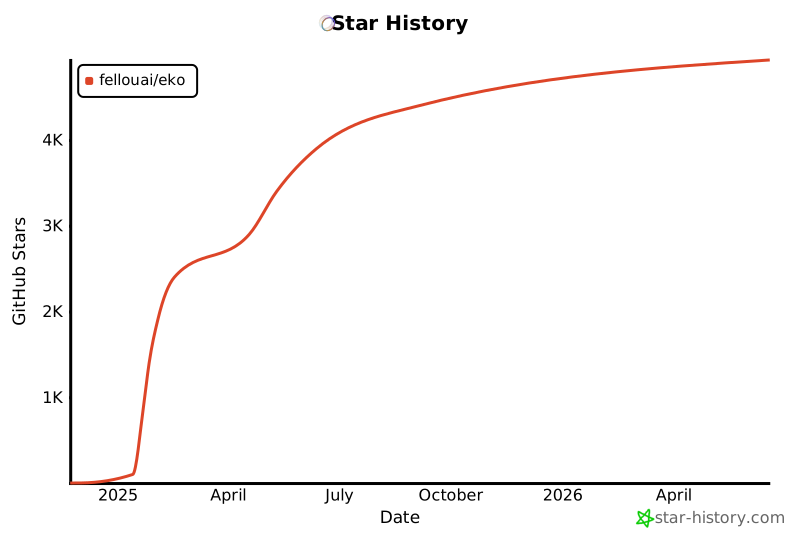](https://star-history.com/#FellouAI/eko&Date)
## License
Eko is released under the MIT License. See the [LICENSE](LICENSE) file for details.