@eagleoutice/flowr
Version:
Static Dataflow Analyzer and Program Slicer for the R Programming Language
248 lines (181 loc) • 11.1 kB
JavaScript
"use strict";
Object.defineProperty(exports, "__esModule", { value: true });
exports.WikiOverview = void 0;
const doc_maker_1 = require("./wiki-mk/doc-maker");
const doc_files_1 = require("./doc-util/doc-files");
const shell_1 = require("../r-bridge/shell");
const graph_1 = require("../dataflow/graph/graph");
const flowr_analyzer_1 = require("../project/flowr-analyzer");
/**
* https://github.com/flowr-analysis/flowr/wiki/Overview
*/
class WikiOverview extends doc_maker_1.DocMaker {
constructor() {
super('wiki/Overview.md', module.filename, 'modules');
}
text({ ctx }) {
return `
First of all, if you have never used _flowR_ before,
please refer to the ${ctx.linkPage('wiki/Setup')} wiki page first,
for instructions on how to install _flowR_.
<!-- TOC -->
- [_flowR_'s Modules](#flowrs-modules)
- [Using _flowR_ from the outside](#using-flowr-from-the-outside)
- [The Read-Eval-Print Loop (REPL)](#the-read-eval-print-loop-repl)
- [The Server](#the-server)
- [Calling the Scripts Directly](#calling-the-scripts-directly)
- [Generate Static Slices](#generate-static-slices)
- [Benchmark the Slicer](#benchmark-the-slicer)
- [Summarizing the Benchmark Results](#summarizing-the-benchmark-results)
- [Generate Usage Statistics of R Code](#generate-usage-statistics-of-r-code)
<!-- TOC -->
## _flowR_'s Modules
[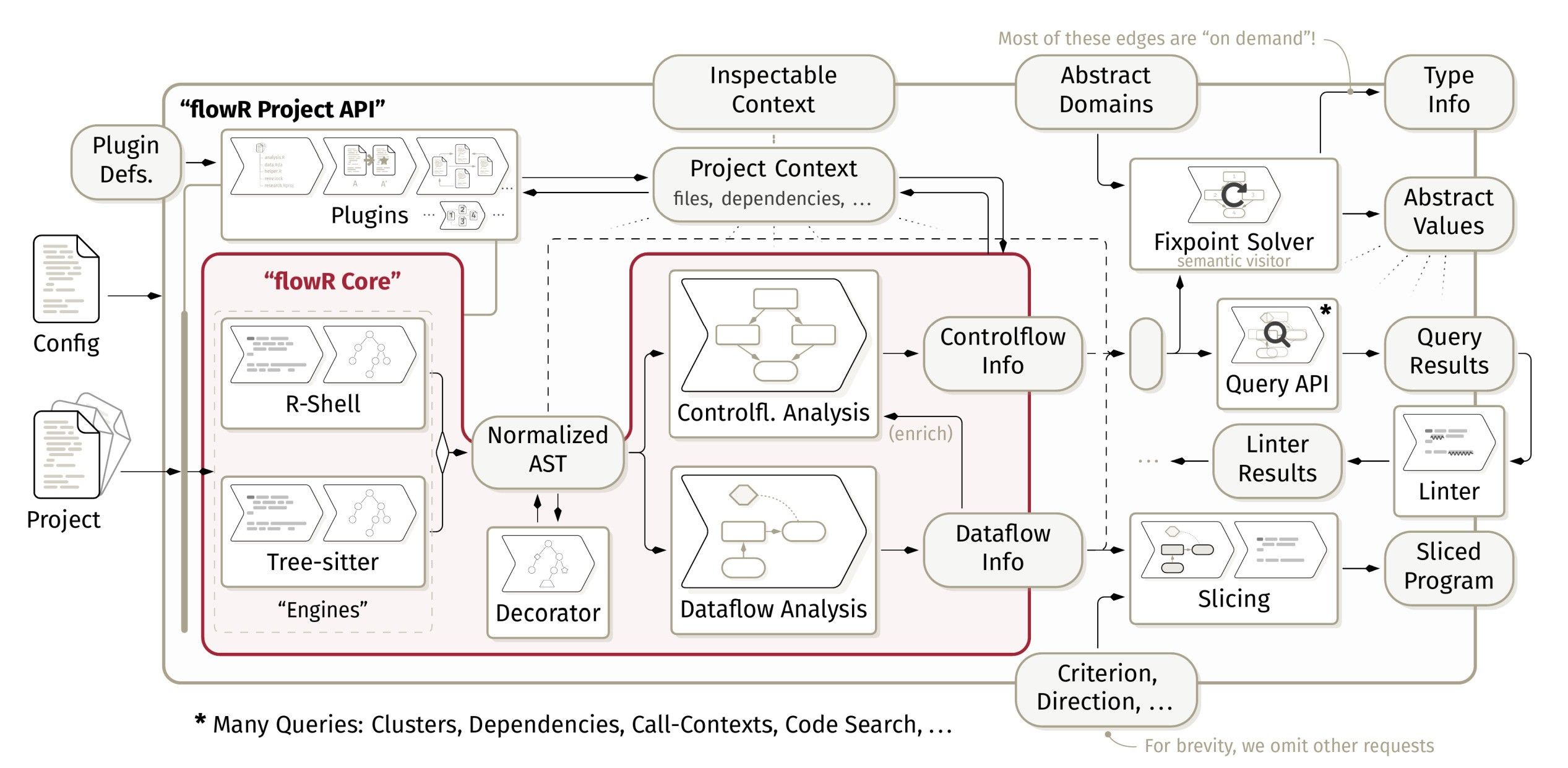](${doc_files_1.FlowrGithubBaseRef}/flowr/wiki)
Primarily, _flowR_ provides a dataflow analysis framework for the [*R*](https://www.r-project.org/) programming language.
Its subcomponents (like the custom ${ctx.link(shell_1.RShell)}) or the internals of the static ${ctx.link(graph_1.DataflowGraph)})
are not important if you simply wish to use _flowR_.
If you wish to use _flowR_, check out one of its extensions (e.g., the [VS Code extension](${doc_files_1.FlowrVsCode})),
the [REPL and server interfaces](#using-_flowr_-from-the-outside) or its coding API with the
${ctx.link(flowr_analyzer_1.FlowrAnalyzer)}.
The benchmark module is only of interest if you want to benchmark/measure the runtime performance and reduction of the slicer.
It is available with the [\`benchmark\`](#benchmark-the-slicer) script.
The statistics module is mostly independent of the slicer and can be used to analyze R files regarding their use of function definitions, assignments, and more. It is used to identify common patterns in R code and is available with the [\`statistics\`](#generate-usage-statistics-of-r-code) script.
The [core](https://github.com/flowr-analysis/flowr/tree/main/src/core) module contains _flowR_'s read-eval-print loop (REPL) and
_flowR_'s server. Furthermore, it contains the root definitions of how _flowR_ slices (see the ${ctx.linkPage('wiki/Interface')} wiki page for more information).
The [utility](https://github.com/flowr-analysis/flowr/tree/main/src/util) module is of no further interest for the usage of _flowR_
The following sections explain how to use these features.
## Using _flowR_ from the outside
_flowR_ itself has two main ways to operate:
- as a [**server**](#the-server) which processes analysis and slicing requests (${ctx.cliOption('flowr', 'server')} option)
- as a [**read-eval-print loop** (REPL)](#the-read-eval-print-loop-repl) that can be accessed directly from the command line (default option)
Besides these two ways, there is a [Visual Studio Code extension](${doc_files_1.FlowrVsCode}) that allows you to use _flowR_ directly from within the editor (it is available on [open-vsx](${doc_files_1.FlowrPositron}) as well).
Similarly, we offer an [Addin for RStudio](${doc_files_1.FlowrRStudioAddin}), as well as an [R package](${doc_files_1.FlowrRAdapter}).
🐳️ If you use the docker-version, simply starting the docker container in interactive mode drops you right into the REPL (\`docker run -it --rm eagleoutice/flowr:latest\`), while launching with the ${ctx.cliOption('flowr', 'server')} argument starts the server (\`docker run -it --rm eagleoutice/flowr:latest --server\`).\\
⚒️ If you compile the _flowR_ sources yourself, you can access _flowR_ by the main script \`npm run flowr\` or in the development mode \`npm run main-dev\`.
Independent of your way of launching *flowr*, we will write simply \`flowr\` for either (🐳️) \`docker run -it --rm eagleoutice/flowr:latest\` or (⚒️) \`npm run flowr\`.
See the ${ctx.linkPage('wiki/Setup')} wiki page for more information on how to get _flowR_ running.
### The Read-Eval-Print Loop (REPL)
Once you launched _flowR_, you should see a small \`R>\` prompt. Use \`:help\` to receive instructions on how to use the REPL and what features are available (most prominently, you can access all [scripts](#calling-the-scripts-directly) simply by adding a colon before them).
In general, all commands start with a colon (\`:\`), everything else is interpreted as a R expression which is directly evaluated by the underlying R shell
(however, due to security concerns, you need to start _flowR_ with ${ctx.cliOption('flowr', 'r-session-access')} and use the \`r-shell\` ${ctx.linkPage('wiki/Engines', 'engine')} to allow this).
See the ${ctx.linkPage('wiki/Interface')} wiki page for more information on usage and the available commands.
The following GIF showcases a simple example session:

<!--
# Use https://github.com/charmbracelet/vhs
Output repl-demo-opt.gif
Set FontSize 30
Set Width 1600
Set Height 850
Set WindowBar Colorful
Set CursorBlink false
Set PlaybackSpeed 3.0
Set TypingSpeed 0.15
Type "docker run -it --rm eagleoutice/flowr"
Sleep 200ms
Enter
Sleep 4000ms
Type ":slicer -c '11@prod' demo.R --diff"
Sleep 400ms
Enter
Sleep 500ms
Type ":quit"
Sleep 400ms
Enter
Sleep 20000ms
-->
### The Server
Instead of the REPL, you can start _flowR_ in "([TCP](https://de.wikipedia.org/wiki/Transmission_Control_Protocol)) server-mode" using \`flowr --server\` (write \`flowr --help\` to find out more). Together with the server option, you can configure the port with ${ctx.cliOption('flowr', 'port')}.
The supported requests are documented alongside the internal documentation, see the ${ctx.linkPage('wiki/Interface')} wiki page for more information.
<details>
<summary>Small demonstration using netcat</summary>

<details>
<summary>Used <a href="https://github.com/charmbracelet/vhs">vhs</a> code</summary>
\`\`\`vhs
Output demo.gif
Set FontSize 40
Set Width 1800
Set Height 750
Set WindowBar Colorful
Set TypingSpeed 0.05s
Set CursorBlink true
Type "netcat 127.0.0.1 1042"
Sleep 200ms
Enter
Sleep 600ms
Type '{"type":"request-file-analysis","filetoken":"x","filename":"example-input","content":"2 - x"}'
Sleep 200ms
Enter
Sleep 2s
Type '{"type":"request-slice","filetoken":"x","criterion":["1@x"]}'
Sleep 200ms
Enter
Sleep 8s
Ctrl+C
Sleep 200ms
\`\`\`
</details>
</details>
The server allows accessing the REPL as well
(see the ${ctx.linkPage('wiki/Interface')} wiki page for more information).
## Calling the Scripts Directly
This describes the old way of using _flowR_ by creating and calling the respective scripts directly.
Although this is no longer necessary, the scripts still remain, fully integrated into the REPL of _flowR_ (you can access them simply by adding a colon \`:\` before the name).
### Generate Static Slices
To generate a slice, you need to provide two things:
1. A [slicing criterion](https://github.com/flowr-analysis/flowr/wiki/Terminology#slicing-criterion): the location of a single variable or several variables of interest to slice for, like "\`12@product\`"
2. The path to an R file that should be sliced.
For example, from the \`cli\` directory, you can run
\`\`\`shell
npm run slicer -- --criterion "12@product" "test/testfiles/example.R"
\`\`\`
This slices for the first use of the variable \`product\` in line 12 of the source file at \`test/testfiles/example.R\` (see the [slicing criterion](https://github.com/flowr-analysis/flowr/wiki/Terminology#slicing-criterion) definition for more information).
By default, the resulting slice is output to the standard output.
For more options, run the following from the \`cli\` directory:
\`\`\`shell
npm run slicer -- --help
\`\`\`
Now, the following alternative is to be preferred:
\`\`\`shell
flowr -e ":slicer --help"
\`\`\`
### Benchmark the Slicer
Within the original [thesis](https://github.com/flowr-analysis/flowr/wiki/Thesis), I conducted a benchmark of the slicer, measuring:
1. The required time of each step of the slicing process, and
2. The achieved reductions in the size of the slice.
The corresponding _benchmark_ script ultimately allows doing the same thing as the _slicing_ script, but 1) parallel for many files and 2) for a wider selection of slicing points.
By default, it starts by collecting all variables in a script, producing a slice for each of them.
For example, to run the benchmark on 500 randomly picked files of the folder \`<folder>\` using 8 threads and writing the output to \`<output.json>\`, you can run this from the \`cli\` directory:
\`\`\`shell
npm run benchmark -- --limit 500 --parallel 8 --output "<output.json>" "<folder>"
\`\`\`
For more options, run the following from the \`cli\` directory:
\`\`\`shell
npm run benchmark -- --help
\`\`\`
#### Summarizing the Benchmark Results
The resulting JSON file can be rather larger (starting off with a couple of hundred megabytes). Therefore, you probably want to summarize the results of the benchmark.
For this, you can make use of the _summarizer_ script from within the \`cli\` directory like this:
\`\`\`shell
npm run summarizer -- "<output.json>"
\`\`\`
Please note that the summarizer may require a long time as it parses, normalizes, and analyzes _each_ slice produced, to calculate the reduction numbers. Therefore, it actually executes two steps:
1. For each file, it calculates the reduction, required time, and other information, written to \`<output-summary.json>\`
2. Calculate the "ultimate" summary by aggregating the intermediate results for each file
As the ultimate summary is much quicker, you can re-run it by specifically adding the \`--ultimate-only\` flag (although this is only really of use if you modify what should be summarized within the source code of _flowR_).
For more options, run the following from the \`cli\` directory:
\`\`\`shell
npm run summarizer -- --help
\`\`\`
### Generate Usage Statistics of R Code
If you want to reproduce the statistics as presented in the original [master's thesis](http://dx.doi.org/10.18725/OPARU-50107), see the corresponding [wiki page](https://github.com/flowr-analysis/flowr/wiki/Thesis#how-to-reproduce-the-statistics-from-the-masters-thesis).
For more information, run the following from the \`cli\` directory:
\`\`\`shell
npm run stats -- --help
\`\`\`
`.trim();
}
}
exports.WikiOverview = WikiOverview;
//# sourceMappingURL=wiki-overview.js.map