@eagleoutice/flowr
Version:
Static Dataflow Analyzer and Program Slicer for the R Programming Language
300 lines (242 loc) • 18.3 kB
JavaScript
;
Object.defineProperty(exports, "__esModule", { value: true });
exports.DocReadme = void 0;
const doc_files_1 = require("./doc-util/doc-files");
const doc_code_1 = require("./doc-util/doc-code");
const doc_cli_option_1 = require("./doc-util/doc-cli-option");
const doc_benchmarks_1 = require("./doc-util/doc-benchmarks");
const numbers_1 = require("../util/numbers");
const html_hover_over_1 = require("../util/html-hover-over");
const doc_structure_1 = require("./doc-util/doc-structure");
const doc_repl_1 = require("./doc-util/doc-repl");
const doc_auto_gen_1 = require("./doc-util/doc-auto-gen");
const doc_general_1 = require("./doc-util/doc-general");
const doc_dfg_1 = require("./doc-util/doc-dfg");
const doc_query_1 = require("./doc-util/doc-query");
const doc_issue_1 = require("./doc-util/doc-issue");
const strings_1 = require("../util/text/strings");
const doc_maker_1 = require("./wiki-mk/doc-maker");
const PublicationsMain = [
{
header: 'Statically Analyzing the Dataflow of R Programs (OOPSLA \'25)',
description: 'Please cite this paper if you are using flowR in your research.',
doi: 'https://doi.org/10.1145/3763087',
bibtex: String.raw `@article{10.1145/3763087,
author = {Sihler, Florian and Tichy, Matthias},
title = {Statically Analyzing the Dataflow of R Programs},
year = {2025},
issue_date = {October 2025},
publisher = {Association for Computing Machinery},
address = {New York, NY, USA},
volume = {9},
number = {OOPSLA2},
url = {https://doi.org/10.1145/3763087},
doi = {10.1145/3763087},
abstract = {The R programming language is primarily designed for statistical computing and mostly used by researchers without a background in computer science. R provides a wide range of dynamic features and peculiarities that are difficult to analyze statically like dynamic scoping and lazy evaluation with dynamic side effects. At the same time, the R ecosystem lacks sophisticated analysis tools that support researchers in understanding and improving their code. In this paper, we present a novel static dataflow analysis framework for the R programming language that is capable of handling the dynamic nature of R programs and produces the dataflow graph of given R programs. This graph can be essential in a range of analyses, including program slicing, which we implement as a proof of concept. The core analysis works as a stateful fold over a normalized version of the abstract syntax tree of the R program, which tracks (re-)definitions, values, function calls, side effects, external files, and a dynamic control flow to produce one dataflow graph per program. We evaluate the correctness of our analysis using output equivalence testing on a manually curated dataset of 779 sensible slicing points from executable real-world R scripts. Additionally, we use a set of systematic test cases based on the capabilities of the R language and the implementation of the R interpreter and measure the runtimes well as the memory consumption on a set of 4,230 real-world R scripts and 20,815 packages available on R’s package manager CRAN. Furthermore, we evaluate the recall of our program slicer, its accuracy using shrinking, and its improvement over the state of the art. We correctly analyze almost all programs in our equivalence test suite, preserving the identical output for 99.7\% of the manually curated slicing points. On average, we require 576ms to analyze the dataflow and around 213kB to store the graph of a research script. This shows that our analysis is capable of analyzing real-world sources quickly and correctly. Our slicer achieves an average reduction of 84.8\% of tokens indicating its potential to improve program comprehension.},
journal = {Proc. ACM Program. Lang.},
month = oct,
articleno = {309},
numpages = {29},
keywords = {Dataflow Analysis, R Programming Language, Static Analysis}
}`
},
{
header: 'flowR: A Static Program Slicer for R (ASE \'24, Tool)',
description: `This refers to the tool-demonstration of the <a href="${doc_files_1.FlowrVsCode}">VS Code Extension</a>.`,
doi: 'https://doi.org/10.1145/3691620.3695359',
bibtex: `@inproceedings{DBLP:conf/kbse/SihlerT24,
author = {Florian Sihler and
Matthias Tichy},
editor = {Vladimir Filkov and
Baishakhi Ray and
Minghui Zhou},
title = {flowR: {A} Static Program Slicer for {R}},
booktitle = {Proceedings of the 39th {IEEE/ACM} International Conference on Automated
Software Engineering, {ASE} 2024, Sacramento, CA, USA, October 27
- November 1, 2024},
pages = {2390--2393},
publisher = {{ACM}},
year = {2024},
url = {https://doi.org/10.1145/3691620.3695359},
doi = {10.1145/3691620.3695359},
timestamp = {Mon, 03 Mar 2025 21:16:51 +0100},
biburl = {https://dblp.org/rec/conf/kbse/SihlerT24.bib},
bibsource = {dblp computer science bibliography, https://dblp.org}
}`
},
{
header: 'On the Anatomy of Real-World R Code for Static Analysis (MSR \'24)',
description: 'This paper lays the foundation for flowR by analyzing the characteristics of real-world R code.',
doi: 'https://doi.org/10.1145/3643991.3644911',
bibtex: `
@inproceedings{DBLP:conf/msr/SihlerPSTDD24,
author = {Florian Sihler and
Lukas Pietzschmann and
Raphael Straub and
Matthias Tichy and
Andor Diera and
Abdelhalim Hafedh Dahou},
editor = {Diomidis Spinellis and
Alberto Bacchelli and
Eleni Constantinou},
title = {On the Anatomy of Real-World {R} Code for Static Analysis},
booktitle = {21st {IEEE/ACM} International Conference on Mining Software Repositories,
{MSR} 2024, Lisbon, Portugal, April 15-16, 2024},
pages = {619--630},
publisher = {{ACM}},
year = {2024},
url = {https://doi.org/10.1145/3643991.3644911},
doi = {10.1145/3643991.3644911},
timestamp = {Sun, 19 Jan 2025 13:31:27 +0100},
biburl = {https://dblp.org/rec/conf/msr/SihlerPSTDD24.bib},
bibsource = {dblp computer science bibliography, https://dblp.org}
}`
}
];
const OtherWorksUsingFlowr = [
{ name: 'Computational Reproducibility of R Code Supplements on OSF', doi: 'https://doi.org/10.36190/2025.49' },
{ name: 'Multi-View Structural Graph Summaries', doi: 'https://doi.org/10.1109/WI-IAT62293.2024.00037' }
];
function printPublications() {
return PublicationsMain.map(pub => {
return `
* [${pub.header}](${pub.doi})
${pub.description}
<details><summary>BibTeX</summary>
${(0, doc_general_1.prefixLines)((0, doc_code_1.codeBlock)('bibtex', pub.bibtex), ' ')}
</details>
`.trim();
}).join('\n\n') + '\n\n Works using flowR include:\n' +
(0, strings_1.joinWithLast)(OtherWorksUsingFlowr.map(pub => `[${pub.name}](${pub.doi})`)) + '.\n';
}
/**
* https://github.com/flowr-analysis/flowr/blob/main/README.md
*/
class DocReadme extends doc_maker_1.DocMaker {
constructor() {
super('README.md', module.filename, 'flowR README', false);
}
async text({ treeSitter, ctx }) {
const dateOptions = { year: 'numeric', month: 'short', day: 'numeric' };
return `
[](${doc_files_1.FlowrGithubBaseRef}/flowr/wiki)\\
[](${doc_files_1.FlowrGithubBaseRef}/flowr/actions/workflows/qa.yaml)
[](https://codecov.io/gh/flowr-analysis/flowr)
[](${doc_files_1.FlowrDockerRef})
[](${doc_files_1.FlowrGithubBaseRef}/flowr/releases/latest)
[](${doc_files_1.FlowrVsCode})
[](${doc_files_1.FlowrPositron})
[](https://zenodo.org/doi/10.5281/zenodo.13319290)
_flowR_ is a sophisticated, static [dataflow analyzer](https://en.wikipedia.org/wiki/Data-flow_analysis) for the [R programming language](https://www.r-project.org/),
available for [VSCode](${doc_files_1.FlowrVsCode}), [Positron](${doc_files_1.FlowrPositron}), [RStudio](${doc_files_1.FlowrGithubBaseRef}/rstudio-addin-flowr),
and [Docker](${doc_files_1.FlowrDockerRef}).
It offers a wide variety of features, for example:
* 🐞 **code linting**\\
Analyze your R scripts for common issues and potential bugs (see the [wiki page](${doc_files_1.FlowrGithubBaseRef}/flowr/wiki/Linter) for more information on the currently supported linters).
${(0, doc_general_1.prefixLines)((0, doc_structure_1.details)('Example: Linting code with flowR', `To lint your code, you can use the [REPL](${doc_files_1.FlowrWikiBaseRef}/Interface#using-the-repl) or the [Visual Studio Code extension](${doc_files_1.FlowrVsCode}) (see [vscode-flowr#283](https://github.com/flowr-analysis/vscode-flowr/pull/283)).
${await (async () => {
const code = 'read.csv("/root/x.txt")';
const res = await (0, doc_query_1.showQuery)(treeSitter, code, [{ type: 'linter' }], { showCode: false, collapseQuery: true, collapseResult: false });
return await (0, doc_repl_1.documentReplSession)(treeSitter, [{
command: `:query @linter ${JSON.stringify(code)}`,
description: `
The linter will analyze the code and return any issues found.
Formatted more nicely, this returns:
${res}
`
}]);
})()}
`), ' ')}
* 🍕 **program slicing**\\
Given a point of interest like the visualization of a plot, _flowR_ reduces the program to just the parts which are relevant
for the computation of the point of interest.
${(0, doc_general_1.prefixLines)((0, doc_structure_1.details)('Example: Slicing with flowR', `
The simplest way to retrieve slices is with flowR's [Visual Studio Code extension](${doc_files_1.FlowrVsCode}).
However, you can slice using the [REPL](${doc_files_1.FlowrWikiBaseRef}/Interface#using-the-repl) as well.
This can help you if you want to reuse specific parts of an existing analysis within another context or if you want to understand
what is happening in the code.
For this, let's have a look at the example file, located at ${(0, doc_files_1.linkFlowRSourceFile)('test/testfiles/example.R')}:
${(0, doc_code_1.codeBlock)('r', (0, doc_files_1.getFileContentFromRoot)('test/testfiles/example.R'))}
Let's suppose we are interested only in the \`sum\` which is printed in line 11.
To get a slice for this, you can use the following command:
${await (0, doc_repl_1.documentReplSession)(treeSitter, [{
command: ':query @static-slice (11@sum) file://test/testfiles/example.R',
description: ''
}])}
`), ' ')}
* 📚 **dependency analysis**\\
Given your analysis project, flowR offers a plethora of so-called ${ctx.linkPage('wiki/Query API', 'queries')} to get more information about your code.
An important query is the [dependencies query](${doc_files_1.FlowrWikiBaseRef}/Query-API#dependencies-query), which shows you the library your project needs,
the data files it reads, the scripts it sources, and the data it outputs.
${(0, doc_general_1.prefixLines)((0, doc_structure_1.details)('Example: Dependency Analysis with flowR', `
The following showcases the dependency view of the [Visual Studio Code extension](${doc_files_1.FlowrVsCode}):
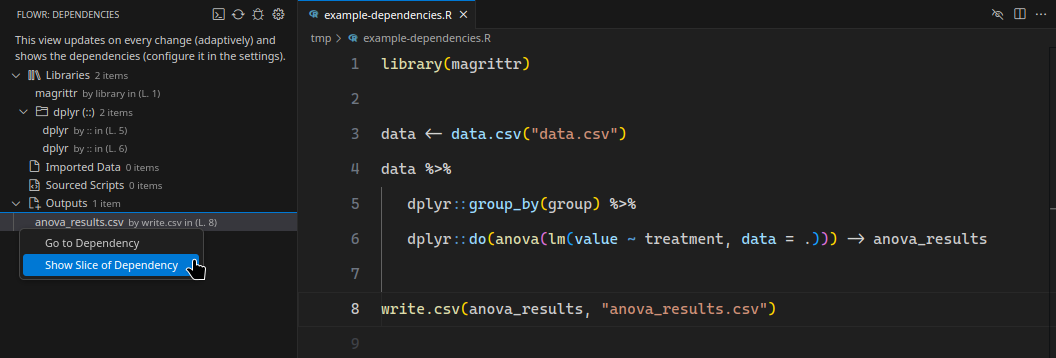
`), ' ')}
* 🚀 **fast call-graph, data-, and control-flow graphs**\\
Within just [${'<i>' + (0, html_hover_over_1.textWithTooltip)((0, numbers_1.roundToDecimals)(await (0, doc_benchmarks_1.getLatestDfAnalysisTime)('"social-science" Benchmark Suite (tree-sitter)'), 1) + ' ms', 'This measurement is automatically fetched from the latest benchmark!') + '</i>'} (as of ${new Date(await (0, doc_benchmarks_1.getLastBenchmarkUpdate)()).toLocaleDateString('en-US', dateOptions)})](${doc_files_1.FlowrSiteBaseRef}/wiki/stats/benchmark),
_flowR_ can analyze the data- and control-flow of the average real-world R script. See the ${ctx.linkPage('flowr:benchmarks', 'benchmarks')} for more information,
and consult the ${ctx.linkPage('wiki/Dataflow Graph', 'wiki pages')} for more details on the ${ctx.linkPage('wiki/Dataflow Graph', 'dataflow graphs')} as well as ${ctx.linkPage('wiki/Dataflow Graph', 'call graphs', 'perspectives-cg')}.
${(0, doc_general_1.prefixLines)((0, doc_structure_1.details)('Example: Generating a dataflow graph with flowR', `
You can investigate flowR's analyses using the [REPL](${doc_files_1.FlowrWikiBaseRef}/Interface#using-the-repl).
Commands like ${(0, doc_cli_option_1.getReplCommand)('dataflow*')} allow you to view a ${ctx.linkPage('wiki/Dataflow Graph', 'dataflow graph')} for a given R script.
Let's have a look at the following example:
${(0, doc_code_1.codeBlock)('r', (0, doc_files_1.getFileContentFromRoot)('test/testfiles/example.R'))}
To get the ${ctx.linkPage('wiki/Dataflow Graph', 'dataflow graph')} for this script, you can use the following command:
${await (0, doc_repl_1.documentReplSession)(treeSitter, [{
command: ':dataflow* test/testfiles/example.R',
description: `
Following the link output should show the following:
${await (0, doc_dfg_1.printDfGraphForCode)(treeSitter, (0, doc_files_1.getFileContentFromRoot)('test/testfiles/example.R'), { showCode: false })}`
}])}
`), ' ')}
If you want to use flowR and the features it provides, feel free to check out the:
- [Visual Studio Code](${doc_files_1.FlowrVsCode})/[Positron](${doc_files_1.FlowrPositron}): provides access to flowR directly in VS Code and Positron (or [vscode.dev](https://vscode.dev/))
- [RStudio Addin](${doc_files_1.FlowrGithubBaseRef}/rstudio-addin-flowr): integrates flowR into [RStudio](https://posit.co/downloads/)
- [R package](${doc_files_1.FlowrGithubBaseRef}/flowr-r-adapter): use flowR in your R scripts
- [Docker image](${doc_files_1.FlowrDockerRef}): run flowR in a container, this also includes [flowR's server](${doc_files_1.FlowrWikiBaseRef}/Interface#communicating-with-the-server)
- [NPM package](${doc_files_1.FlowrNpmRef}): include flowR in your TypeScript and JavaScript projects
If you are already using flowR and want to give feedback, please consider filling out our [feedback form](https://docs.google.com/forms/d/e/1FAIpQLScKFhgnh9LGVU7QzqLvFwZe1oiv_5jNhkIO-G-zND0ppqsMxQ/viewform).
## ⭐ Getting Started
To get started with _flowR_ and its features, please check out the ${ctx.linkPage('wiki/Overview')} wiki page.
The ${ctx.linkPage('wiki/Setup')} wiki page explains how you can download and setup _flowR_ on your system.
With docker 🐳️, the following line should be enough (and drop you directly into the read-eval-print loop):
${(0, doc_code_1.codeBlock)('shell', 'docker run -it --rm eagleoutice/flowr')}
You can enter ${(0, doc_cli_option_1.getReplCommand)('help')} to gain more information on its capabilities.
<details>
<summary>Example REPL session</summary>

If you want to use the same commands:
1. First this runs \`docker run -it --rm eagleoutice/flowr\` in a terminal to start the REPL.
2. In the REPL, it runs \`:slicer -c '11@prod' demo.R --diff\` to slice the example file \`demo.R\` for the print statement in line 11.
Please note that the \`11\` refers to the 11th line number to slice for!
</details>
## 📜 More Information
For more details on how to use _flowR_ please refer to the ${ctx.linkPage('flowr:wiki', 'wiki pages')},
as well as the deployed ${ctx.linkPage('flowr:docs', 'code documentation')}.
To cite flowR, please check out the publications below. To specifically refer to the source code,
please check out flowR's ${ctx.linkPage('flowr:zenodo', 'Zenodo archive')}.
## 📃 Publications on flowR
If you are interested in the theoretical background of _flowR_,
please check out the following publications (if you find that a paper is missing here, please open [a new issue](${doc_issue_1.NewIssueUrl})):
${printPublications()}
## 🚀 Contributing
We welcome every contribution! Please check out the ${ctx.linkPage('wiki/Onboarding', 'developer onboarding')} section in the wiki for all the information you will need.
### Contributors
<a href="https://github.com/flowr-analysis/flowr/graphs/contributors">
<img src="https://contrib.rocks/image?repo=flowr-analysis/flowr" alt="flowR Contributors"/>
</a>
----
*flowr* is actively developed by [Florian Sihler](https://eagleoutice.github.io/portfolio/) and (since October 1st 2025) [Oliver Gerstl](https://www.linkedin.com/in/oliver-gerstl) under the
[GPLv3 License](LICENSE).\\
It is partially supported by the German Research Foundation (DFG) under the grant [504226141](https://gepris.dfg.de/gepris/projekt/504226141) ("CodeInspector")
and received an unrestricted gift from [Posit](https://posit.co/), the open-source data science company.
----
### Generation Notice
Please notice that this file was generated automatically using the file ${(0, doc_auto_gen_1.fileNameForGenHeader)(module.filename)} as a source.\\
If you want to make changes please edit the source file (the CI will take care of the rest).
In fact, many files in the [wiki](${doc_files_1.FlowrWikiBaseRef}) are generated, so make sure to check for the source file if you want to make changes.
`.trim();
}
}
exports.DocReadme = DocReadme;
//# sourceMappingURL=doc-readme.js.map