@dreamerhyde/aitools
Version:
Essential CLI toolkit for Vibe Coding - keep your AI-assisted development flow smooth by managing processes and optimizing your coding environment
342 lines (261 loc) • 10 kB
Markdown
# AI Tools CLI
> Essential toolkit for Vibe Coding - Keep your AI-assisted development flow smooth by managing processes, monitoring code health, and maintaining optimal performance when pair programming with AI assistants.
## Why AI Tools?
When you're in the flow with Claude Code, GitHub Copilot, or Cursor, the last thing you need is:
- **Stuck hooks** - Your AI assistant freezes because git hooks are hanging
- **Zombie processes** - Old Claude Code sessions eating up CPU and memory
- **Mystery costs** - No idea how much you're spending on Claude API calls
- **Bloated files** - AI assistants struggle with files over 500 lines
- **Lost context** - Switching between terminal commands breaks your flow
AI Tools solves these problems instantly with simple commands like `ai fix`, `ai cost`, and `ai hooks clean`. Keep coding, let AI Tools handle the housekeeping.
## ✓ Key Features
- **Process Management**: Smart detection and cleanup of stuck hooks and runaway processes
- **Code Health Monitoring**: Identify files needing refactoring with AI-ready prompts
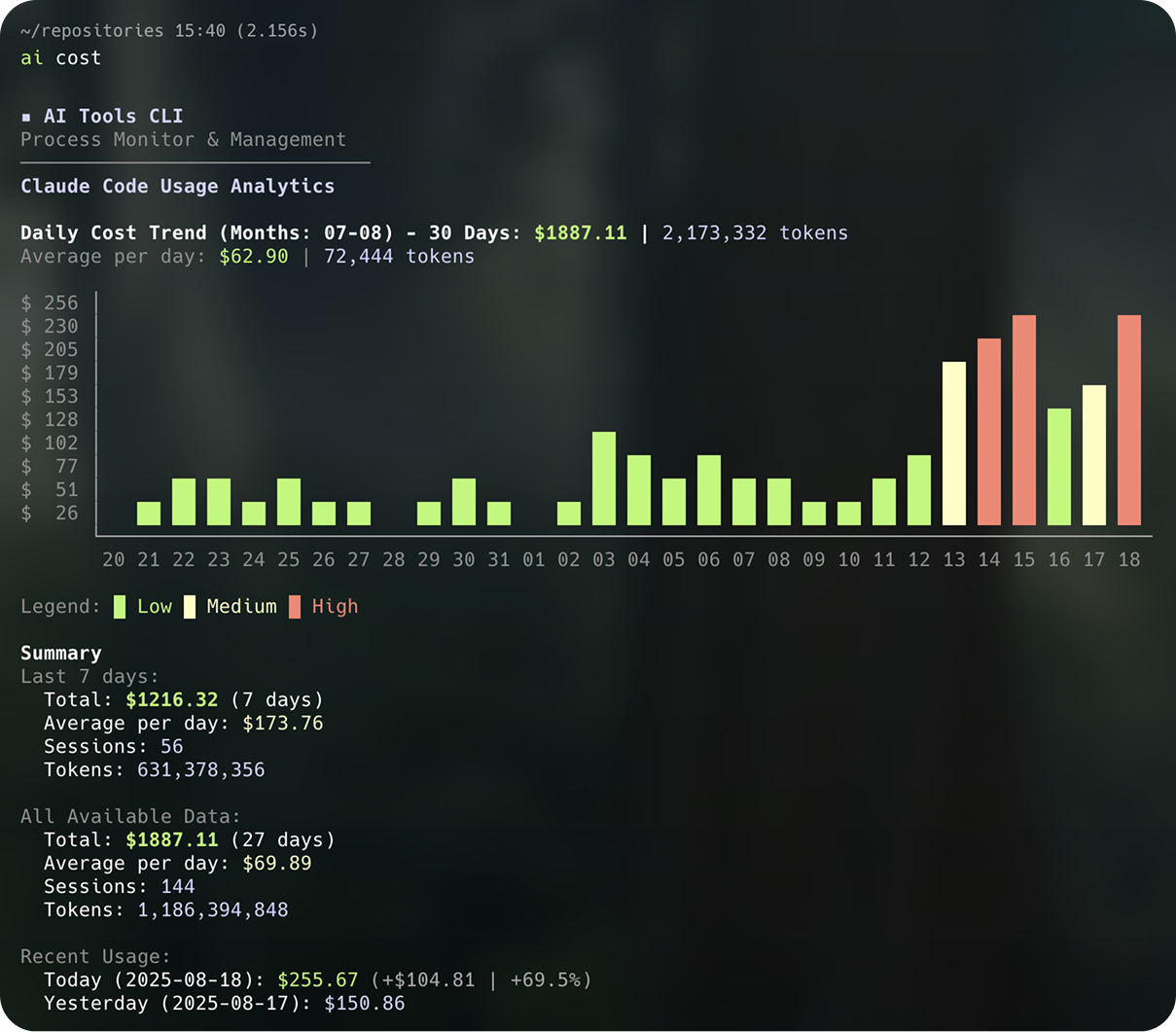
- **Claude Code Analytics**: Track usage, costs, and token consumption with visual charts
- **System Optimization**: Real-time CPU/memory monitoring with automatic issue resolution
- **Shell Completion**: Tab completion support for all commands and options
- **Clean CLI Design**: Professional interface without emoji, following international standards
- **Auto-Updates**: Stay current with automatic version checking
## Installation
### Quick Start (Recommended)
```bash
# Run directly without installation (auto-updates)
bunx @dreamerhyde/aitools status
# Or use the short alias
bunx @dreamerhyde/aitools ai status
```
### Global Installation
```bash
# Using Bun (Fastest)
bun install -g @dreamerhyde/aitools
# Using npm
npm install -g @dreamerhyde/aitools
# After installation, you can use either command:
aitools status # Full command
ai status # Short alias (recommended)
```
### Shell Completion (Optional)
```bash
# Install tab completion for your shell
ai completion --install # Auto-detect and install
# Or manually for specific shells
ai completion --shell bash --install
ai completion --shell zsh --install
ai completion --shell fish --install
```
### Development
```bash
git clone https://github.com/dreamerhyde/aitools.git
cd aitools
bun install
bun run build
```
## Core Commands
### System Health
```bash
# Quick system overview
ai status # Check AI development environment health
```
### Process Management
```bash
# View processes with subcommands
ai ps # List all processes
ai ps --hooks # Show only hook-related processes
ai ps --cpu 10 # Filter by CPU usage >10%
ai ps clean # Clean critical abnormal processes (red circles)
ai ps clean -y # Skip confirmation
# Manage hooks specifically
ai hooks # View all active hooks
ai hooks -i # Interactive hook management
ai hooks -k # Terminate all hooks
ai hooks clean # Clean abnormal hooks only
# Terminate processes
ai kill -p 1234 # Kill by PID
ai kill --pattern node # Kill by pattern match
ai kill -i # Interactive selection
```
### Code Health Analysis
```bash
# Check code quality
ai check # Analyze files >500 lines
ai check -t 300 # Custom threshold (300 lines)
ai check -p ./src # Specific directory
ai check --ignore "*.test.ts" # Additional ignore patterns
# Output includes:
# - Health score (0-100)
# - Files needing attention
# - Copy-paste ready AI prompts for refactoring
```
### Quick Fixes
```bash
# Automatic issue resolution
ai fix # Standard fix for common issues
ai fix --aggressive # More thorough cleanup
ai fix --dry-run # Preview without executing
```
### Claude Code Usage Analytics
```bash
# View Claude Code usage and costs
ai cost # Show 30-day chart and 7-day summary
ai cost detail # Show detailed daily table for all days
# Features:
# - Visual cost chart for last 30 days
# - Daily/monthly cost tracking
# - Token usage statistics
# - Automatic cost calculation with latest pricing
# - Today vs yesterday comparison
```
### Git Statistics
```bash
# View git changes and statistics
ai git # Show changes since last commit
ai diff # Same as 'ai git' (alias)
ai g # Short alias
ai d # Shortest alias
# Shows:
# - Last commit info (hash, author, date, message)
# - Total changes overview:
# • Files changed with inline breakdown (modified, added, new, deleted)
# • Total lines added/deleted with counts from ALL files
# • Visual progress bar showing add/delete ratio
# - Files grouped by change type:
# • Modified Files - with stage indicators (● staged, ○ unstaged)
# • New Files - includes both added and untracked with line counts
# • Deleted Files - with deletion counts
# • Renamed Files - if any
# - Summary with action hints (ready to commit, need staging)
```
### Self-Management
```bash
# Updates and configuration
ai upgrade # Upgrade to latest version
ai upgrade --check # Check for updates only
ai config --disable-updates # Disable automatic update checks
ai config --enable-updates # Enable automatic update checks
```
## Code Health Feature
The `ai check` command provides comprehensive code analysis:
### Supported Languages
- JavaScript/TypeScript (`.js`, `.jsx`, `.ts`, `.tsx`)
- Python (`.py`)
- Go (`.go`)
- Java (`.java`)
- C#/NET (`.cs`)
- C/C++ (`.c`, `.cpp`)
- Rust (`.rs`)
- Swift (`.swift`)
- Kotlin (`.kt`)
### Automatic Exclusions
```
node_modules/ # JavaScript dependencies
__pycache__/ # Python cache
venv/, .venv/ # Python virtual environments
vendor/ # Go dependencies
target/ # Rust/Java build
bin/, obj/ # C# build
Pods/, Carthage/ # iOS dependencies
.git/, .idea/ # Version control and IDE
```
### Example Output
```
Overall Health Score
────────────────────────
Score: 72/100
Files analyzed: 118
Files needing attention: 5
Files Needing Attention
────────────────────────
● app/components/analytics.tsx
Lines: 785 Size: 37.6KB Complexity: 31
→ Copy-Paste Ready AI Prompt:
━━━━━━━━━━━━━━━━━━━━━━━━━━━━
[Complete refactoring prompt ready to paste to AI]
━━━━━━━━━━━━━━━━━━━━━━━━━━━━
```
## Common Workflows
### When Claude Code gets stuck
```bash
ai status # Check system health
ai hooks # View problematic hooks
ai fix # Auto-fix issues
```
### Maintain code quality for AI collaboration
```bash
ai check # Identify large files
# Copy the generated prompt
# Paste to Claude/ChatGPT/Copilot for refactoring
```
### Clean up after intense coding session
```bash
ai ps clean -y # Remove all abnormal processes
ai hooks clean -y # Clean stuck hooks
```
### Debug high CPU usage
```bash
ai ps --cpu 20 # List high CPU processes
ai kill -i # Select and terminate
```
## Process Status Indicators
- `●` Red circle: Critical/abnormal process (sleeping with high CPU)
- `○` Yellow circle: Warning state (high resource usage)
- `○` Gray circle: Normal idle process
- `●` Green circle: Normal active process
## Advanced Usage
### Process Filtering
```bash
ai ps --sort memory # Sort by memory usage
ai ps --sort time # Sort by runtime
ai ps --limit 20 # Limit output rows
```
### Code Health Options
```bash
ai check --format detailed # Detailed analysis
ai check --format json # JSON output for automation
```
## Development
```bash
# Setup
bun install
# Development commands
bun run dev [command] # Run in development mode
bun run build # Build distribution
bun run typecheck # TypeScript checking
bun run lint # ESLint checking
# Testing
./dist/cli.js [command] # Test built version
```
## Architecture
- **Runtime**: Bun for fast execution
- **Language**: TypeScript with strict typing
- **CLI Framework**: Commander.js
- **UI Components**: Chalk (colors), Table (formatting), Ora (spinners)
- **Platform**: Optimized for macOS with fallback support
## Project Structure
```
src/
├── cli.ts # Main entry point
├── cli/ # Command modules
│ ├── ps-command.ts # Process commands
│ ├── hooks-command.ts # Hook management
│ └── basic-commands.ts # Core utilities
├── commands/ # Command implementations
├── utils/ # Shared utilities
│ ├── process-monitor.ts # Process detection
│ ├── ui.ts # UI helpers
│ └── health-display.ts # Code health formatting
└── types/ # TypeScript definitions
```
## Contributing
Contributions welcome! This tool evolves with the AI development ecosystem.
### Guidelines
- Follow existing code style
- Maintain English documentation
- No emoji in code or output
- Test with multiple AI tools
- Update README for new features
## License
MIT
## Acknowledgments
Created for developers who live in the flow state with AI pair programmers. Keep your vibe high and your processes responsive.
> "Clean code, clear mind, continuous vibe" - The AI Tools Philosophy