@dovca/fp
Version:
Minimal functional programming in JavaScript
382 lines (298 loc) • 13.2 kB
Markdown
## What is FP-JS about?
The goal of this package is to provide a set of functions whose combinations can be used to write any synchronous JS logic. These functions are written _without any keywords; builtin objects; string, number or array literals; external dependencies_ using as few JS operators as possible.
JavaScript operators currently used: `~`, `+`, `<`, `=`, `()`, `===`.
Which is only **10.17%** of [all the operators](https://developer.mozilla.org/en-US/docs/Web/JavaScript/Reference/Operators/Operator_Precedence#Table) that Javascript offers! Moreover, operators `~`, `+`, `<`, `===` are each used only once in the whole code.
FP-JS does not depend on a browser environment, you can use it with Node.js.
## How do I use it?
1. Download and install the package
```bash
npm i --save /fp
```
1. Require the functions in your script
```js
const {$,_,a,b,c,d,e,f,g,h,i,j,k,l,m,n,o,p,q,r,s,t,u,v,w,x,y,z} = require('/fp');
```
## What does it contain?
This package provides 28 single-letter-named functions:
### `$` - Wrap
This function has two signatures and behaviors:
* `$(A)`
If called with only one argument , `$(A)` returns a function that returns the value `A`.
* `$(F, ...A)`
If called with more than one argument, `$(F, ...A)` returns a function that returns the value of arguments `...A` passed through function `F`, that is `F(...A)`.
Examples:
```js
$() // -> () => undefined
$(42) // -> () => 42
$((A, B) => A.concat(B), 'foo', 'bar') // -> () => 'foo'.concat('bar')
```
### `_` - Identity
`_(A)` returns whatever was passed into it, that means `_(A) === A`.
Examples:
```js
_() // -> undefined
_(42) // -> 42
const a = {foo: 'bar'};
_(a) // -> {foo: 'bar'} which is strictly equal to `a`
```
### `a` - Add
`a(A, B)` returns the sum of its arguments. If argument `A` is omitted, it defaults to 0. If argument `B` is omitted, it defaults to 1.
Examples:
```js
a() // -> 1
a(42) // -> 43
a(2, 3) // -> 5
a(10, -1) // -> 9
```
### `b` - Subtract
`b(A, B)` subtracts `B` from `A` and returns the result. If argument `A` is omitted, it defaults to 0. If argument `B` is omitted, it defaults to 1.
Examples:
```js
b() // -> -1
b(5) // -> 4
b(5, 3) // -> 2
b(1, -1) // -> 2
```
### `c` - Count
`c(A)` returns:
* The number of items in array `A` before the first undefined item or empty index if `A` is an array
* The number of characters in string `A` if `A` is a string
Examples:
```js
c([]) // -> 0
c(['foo', 'bar']) // -> 2
c([, , 42]) // -> 0
c([1, 1, , , 3, 3]) // -> 2
c('') // -> 0
c('donkey') // -> 6
```
### `d` - Double
`d(A)` returns the value of `A` multiplied by 2. If argument `A` is omitted, it defaults to 1.
Examples:
```js
d() // -> 2
d(42) // -> 84
d(-10) // -> -20
```
### `e` - Compare equal
`e(A, B)` returns `true` _iff_ `A` is strictly equal to `B`, that is `A === B`. See this [MDN page](https://developer.mozilla.org/en-US/docs/Web/JavaScript/Reference/Operators/Comparison_Operators#Identity) for details.
Examples:
```js
e() // -> true (both arguments are undefined, thus equal to each other)
e(1, 1) // -> true
e(1, '1') // -> false
e({foo: 'bar'}, {foo: 'bar'}) // -> false (actually different objects that just look the same)
```
### `f` - Filter
`f(F, ...A)` returns an array filled with elements `X` from `...A` for which `F(X)` returns a [truthy](https://developer.mozilla.org/en-US/docs/Glossary/Truthy) value. The returned elements are in the same relative order. If no elements are given, an empty array is returned.
Examples:
```js
f((X) => true) // -> [] (no elements to filter, no elements returned)
f((X) => X > 10, 4, 7, 20, 12, 3, 50, 4, 7, 98) // -> [20, 12, 50, 98]
f((X) => X % 2 === 0, 1, 2, 3, 4, 5, 6) // -> [2, 4, 6]
f((X) => X.length > 5, 'foo', 'bar', 'hello', 'donkey') // -> ['donkey']
```
### `g` - Compose
`g(...F)` returns a composition of functions `...F`, that means `g(A, B, C)` returns `(X) => A(B(C(X)))`.
Examples:
```js
g(d, a, d, a)(9) // -> 42 (equals to (((9+1)*2)+1)*2 using functions `a` and `d` from this package)
g((A) => A.shift(), (A) => A.reverse(), (A) => A.split(''))('foobar') // -> 'r'
```
### `h` - Switch
`h(...C)` behaves similarly to the native `switch` statement. Each argument must be an array of two functions `[E, B]`, where `E` is the _case expression_ and `B` is the _case body_. A case expression must return a [truthy](https://developer.mozilla.org/en-US/docs/Glossary/Truthy) value in order for its case body to be executed. Only one and the first of all case bodies is executed. After doing so, any further case expressions are left unevaluated and the function `h` returns. The value returned from `h()` is the return value of the executed case body or `undefined` if no case body has been executed.
Examples:
```js
const value = 42;
h(
[() => value < 0, () => 'negative'],
[() => value > 0, () => 'positive'],
[() => true, () => 'zero'], //default case
) // -> 'positive'
```
### `i` - If/else
`i(C, T, F)` behaves like the native `if/else` statement. It calls function `T` if the call `C()` returns a [truthy](https://developer.mozilla.org/en-US/docs/Glossary/Truthy) value. If not, function `F` is called instead. The call to function `i` returns whatever `T()` or `F()` returns. If argument `F` is omitted, it defaults to a function that returns `undefined`.
Examples:
```js
i(() => true, () => 'foo', () => 'bar') // -> 'foo'
const password = 'donkey';
i(() => password.length > 8, () => 'Good.', () => 'Too short.') // -> 'Too short.'
i(() => 69 < 42, () => 420) // -> undefined (no false branch supplied)
```
### `j` - Create object
`j(...P)` constructs an object from key-value pairs defined by arguments `...P`. Each argument must be an array `[K, V]` where `K` is a valid object key name and `V` is the value to be associated with key `K`. If no arguments are given, the call `j()` returns an empty object.
Examples:
```js
j() // -> {}
j(['foo', 'bar']) // -> {foo: 'bar'}
j([1, 2], ['a-b-c', [1, 2, 3]]) // -> {1: 2, 'a-b-c': [1, 2, 3]}
```
### `k` - If/else not empty
`k(A, T, F)` is a specialized version of the [function i](#i---ifelse) from this package. It calls `T` or `F` if the array or string `A` is (non-)empty respectively.
**Note:** Due to the very limited resources used in this package, `k([undefined], () => true, () => false)` unexpectedly returns `false` even if the array is obviously not empty.
Examples:
```js
k([], () => 'foo', () => 'bar') // -> 'bar'
k([10, 20, 30], () => true, () => false) // -> true
k('', () => 'bar', () => 'baz') // -> 'baz'
k('hello world', () => 'hello', () => 'world') // -> 'hello'
```
### `l` - Compare less
`l(A, B)` returns `true` if `A` is smaller than `B`, `false` otherwise. If argument `B` is omitted, it defaults to 0.
Examples:
```js
l() // -> false (undefined is not smaller than 0)
l(0) // -> false
l(-5) // -> true
l(42) // -> false
l(1, 2) // -> true
l(2, 1) // -> false
```
### `m` - Map
`m(F, ...A)` returns an array of arguments `...A` passed through function `F` each individually.
Examples:
```js
m((X) => X + 1, 0, 1, 2, 3) // -> [1, 2, 3, 4]
m(d, 1, 2, 3) // -> [2, 4, 6] (using function `d` from this package)
m(l, -4, 1, -10, 42) // -> [true, false, true, false] (using function `l` from this package)
```
### `n` - Logical negation
`n(A)` returns the logical negation of `A`. Only works with numbers, booleans, `undefined` and `null`
Examples:
```js
n() // -> true (negation of undefined)
n(true) // -> false
n(33) // -> false
n(-10) // -> false
n(0) // -> true
n(null) // -> true
```
### `o` - Logical OR
`o(A, B)` returns `A` OR `B`. If argument `B` is omitted, it defaults to `A`
Examples:
```js
o() // -> false (undefined converted to boolean)
o(42) // -> true
o(true, false) // -> true
o(false, false) // -> false
o(-5, 20) // -> true
```
### `p` - Pipe
`p(...F)` returns a composition of functions `...F` in reversed order, that means `p(A, B, C)` returns ` (X) => C(B(A(X)))`.
Examples:
```js
p(d, a, d, a)(9) // -> 39 (equals to (((9*2)+1)*2)+1 using functions `a` and `d` from this package)
p((A) => A.split(''), (A) => A.reverse(), (A) => A.shift())('foobar') // -> 'r'
```
### `q` - Dequeue
`q(A)` returns a copy of array `A` with the first element removed.
Examples:
```js
q([1, 2, 3]) // -> [2, 3]
q(['foo']) // -> []
q([]) // -> []
```
### `r` - Reduce
`r(F, ...A)` applies a function against an accumulator and each value of the array (from right-to-left) to reduce it to a single value. Last element of `...A` is the initial accumulator value. If `...A` contains only a single value, it is returned unmodified and `F` is not called. If `...A` is empty, `undefined` is returned.
Examples:
```js
r(a, 1, 2, 3, 4, 5) // -> 15 (using function `a` from this package)
r((S, V) => Math.max(S, V), -2, 0, 15, -9, 42, 8, -40) // -> 42 (finds the largest value)
r((A, B) => `${A} ${B}`, 'foo', 'bar', 'baz'); // -> 'foo bar baz'
r(a, 3) // -> 3 (nothing to reduce, this only initialized the accumulator)
r(a) // -> undefined (the accumulator wasn't even initialized)
r() // -> undefined (duh...)
```
### `s` - String
`s(...A)` returns all arguments concatenated in a single string. If no arguments are given, `s()` returns an empty string.
Examples:
```js
s() // -> ''
s('abc') // -> 'abc'
s(1, 2, 3) // -> '123'
s(true, 'foo', null, 3, 'bar') // -> 'truefoonull3bar'
```
### `t` - Concatenate
`t(A, ...B)` returns a copy of array `A` with elements `...B` appended to it.
Examples:
```js
t([]) // -> []
t([1]) // -> [1]
t([1], 10) // -> [1, 10]
t([1, 2], 3, 4) // -> [1, 2, 3, 4]
t([1, 2], [3, 4]) // -> [1, 2, [3, 4]]
```
### `u` - Curry
`u(F, N)` returns a [curried](https://en.wikipedia.org/wiki/Currying) `N`-ary function `F`. If argument `N` is omitted, it defaults to 2 making it easy to curry binary functions.
Examples:
```js
const add = u((A, B) => A + B); // -> (A) => (B) => A + B
add(1)(2) // -> 3
add(12)(34) // -> 46
const addTwo = add(2); // -> (B) => 2 + B
addTwo(1) // -> 3
addTwo(42) // -> 44
const xyz = u((X, Y, Z) => X + Y * Z, 3);
xyz(2)(3)(4) // -> 14
xyz(2)(3)(10) // -> 32
const x2y3z = xyz(2)(3) // -> (Z) => 2 + 3 * Z
// even though Y * Z has priority in the curried function and should evaluate first, x2y3z can exist without Z)
x2y3z(4) // -> 14
x2y3z(10) // -> 32
```
### `v` - Reverse
`v(...A)` returns an array filled with values of `...A` in reversed order.
Examples:
```js
v() // -> []
v(0) // -> [0]
v(1, 2, 3) // -> [3, 2, 1]
v('donkey') // -> ['donkey']
v(...'donkey').join('') // -> 'yeknod'
```
### `w` - While
`w(C, F, R)` calls function `F` repeatedly as long as `C()` returns a [truthy](https://developer.mozilla.org/en-US/docs/Glossary/Truthy) value. `w()` returns the return value of the last call to `F`. In each iteration, both calls to `C` and `F` are passed the return value of `F()` from the previous iteration. In the first iteration, this value is equal to `R`. If argument `R` is omitted, it defaults to 0. If `F` hasn't been called at all, the return value of `w()` is `R`.
Examples:
```js
let A = 0, B = 0;
w(() => false, () => (console.log('foo'), 'bar')) // -> 0 (and nothing is logged)
w(() => true, () => console.log('donkey')) // -> throws RangeError: Maximum call stack size exceeded (this will print so many donkeys though...)
w(() => A < 5, () => (console.log(A), A++)) // -> 4 (and logs 0, 1, 2, 3, 4)
w(() => B < 5, () => (console.log(B), ++B)) // -> 5 (and logs 0, 1, 2, 3, 4)
w((C) => C < 5, (C) => (console.log(C), ++C)) // -> 5 (and logs 0, 1, 2, 3, 4)
w((V) => c(V), ([A, ...B]) => (console.log(A), B), [1, 2, 3]) // -> [] (and logs 1, 2, 3)
```
### `x` - Extract
`x(A, B)` returns property `A` of `B`. `B` can be either an array, string or object and `A` must be a valid property name for the respective data type.
Examples:
```js
x(0, [10, 20, 30]) // -> 10
x(3, 'donkey') // -> 'k'
x('foo', {foo: 'bar'}) // -> 'bar'
```
### `y` - Create array
`y(...A)` return an array filled with values of `...A`.
Examples:
```js
y() // -> []
y(1) // -> [1]
y(0, 7, 42, 69, 88, 420, 1337, 9001) // -> [0, 7, 42, 69, 88, 420, 1337, 9001]
y(...'donkey') // -> ['d', 'o', 'n', 'k', 'e', 'y']
```
### `z` - Zero
`z(A)` returns `A` converted to number. This only works for numbers, booleans, `null` and `undefined`. If argument `A` is omitted, it defaults to `false`, thus returning 0.
Examples:
```js
z() // -> 0
z(true) // -> 1
z(-5) // -> -5
z(5) // -> 5
z(null) // -> 0
```
## How does it work?
Each function provides very straightforward and simple logic. Through combinations of these functions, we can create more complex functions that can grow very powerful in only a few steps. This is the function dependency graph:
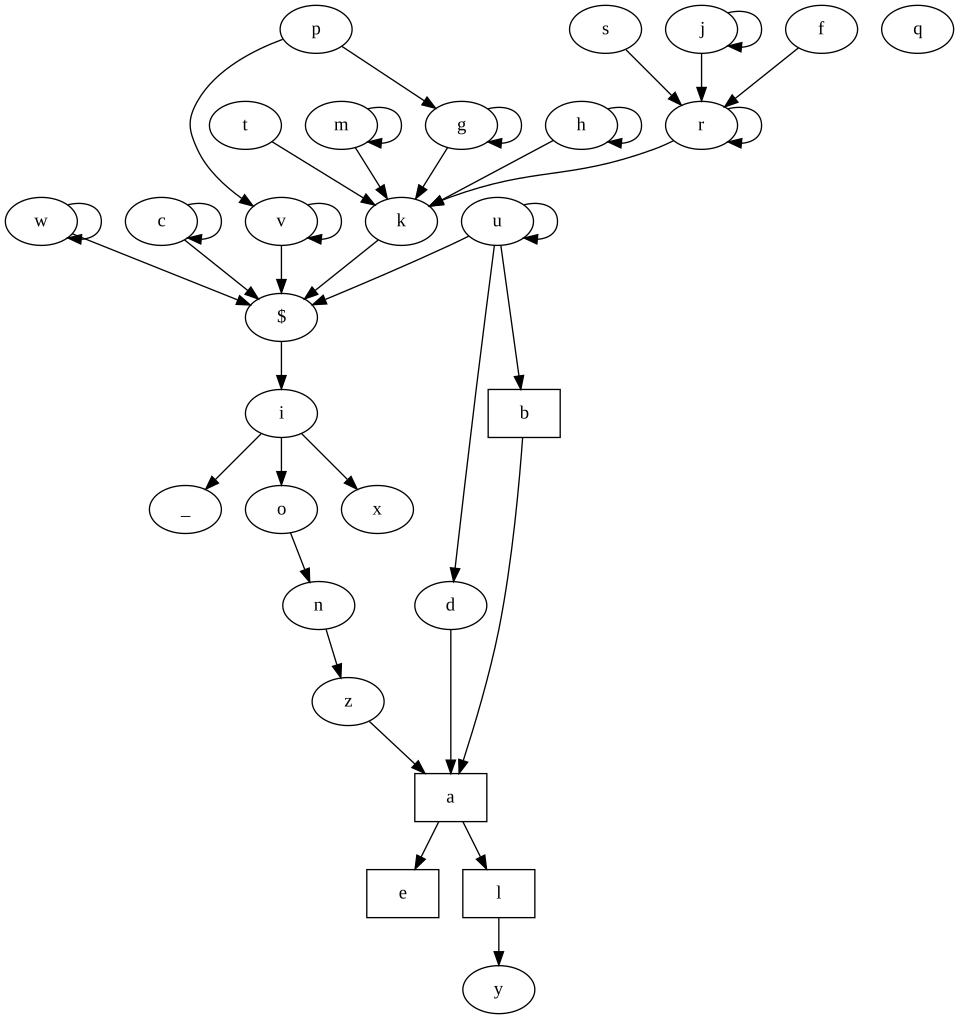
Functions with rectangular nodes use operators that could possibly be removed or refactored. Clone the project and open the graph locally in your browser for bonus interactivity!
## How does it differ from JSFuck?
[JSFuck](http://www.jsfuck.com/) works differently and has different goals. It basically tries to construct a JS code string from its 6 characters and then pass it to `eval()`.
FP-JS doesn't need to use `eval()`.