@digitallyhappy/backstrap
Version:
Free Bootstrap 4 Admin Panel HTML Template
136 lines (99 loc) • 7.03 kB
Markdown
# BackStrap - Free HTML Admin Template, using Bootstrap 4
[](https://opensource.org/licenses/MIT)
We've added our learnings from 10+ years of building admins to the [CoreUI HTML template](https://github.com/coreui/coreui-free-bootstrap-admin-template) (which we considered the best starting point for admin panel HTML in 2019). Now, we can build good-looking admin panels using Bootstrap 4, just by copy-pasting HTML blocks.
Uses:
- CoreUI
- Bootstrap 4
- jQuery
Can be used inside [Backpack for Laravel v4](https://backpackforlaravel.com) (due July 2019), or outside of it.
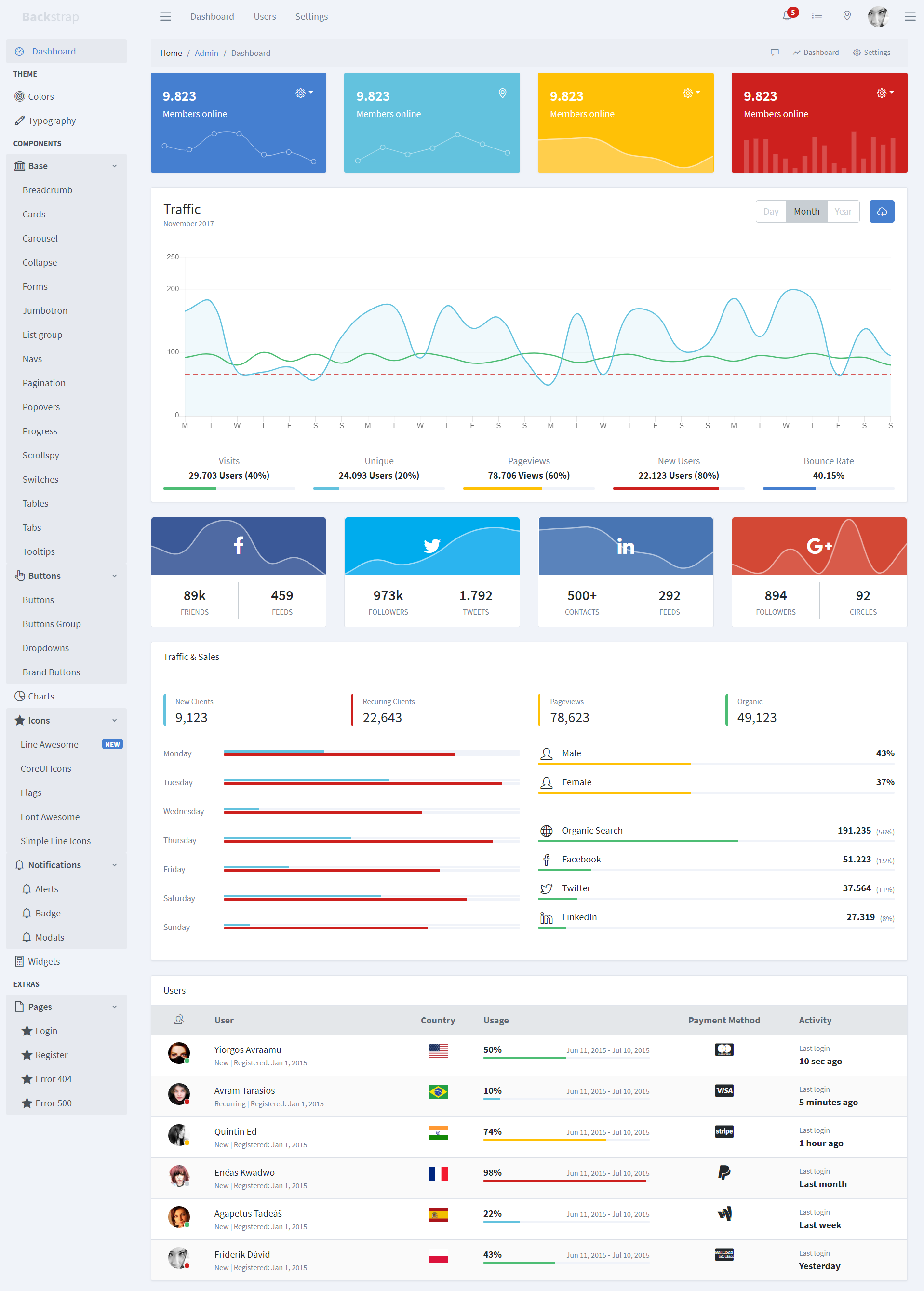
## Preview
You can see all page components on [backstrap.net](https://backstrap.net)
## How to Use
If you don't think you'll need to customize its look&feel, we recommend you use our minified files directly. **Click Download** and use our files in your HTML:
```html
<html lang="en">
<head>
<meta charset="utf-8">
<meta http-equiv="X-UA-Compatible" content="IE=edge">
<meta name="viewport" content="width=device-width, initial-scale=1.0, shrink-to-fit=no">
<title>Your Page Title</title>
<!-- Icons-->
<link href="https://maxcdn.icons8.com/fonts/line-awesome/1.1/css/line-awesome-font-awesome.min.css" rel="stylesheet">
<link href="../node_modules/@coreui/icons/css/coreui-icons.min.css" rel="stylesheet">
<link href="../node_modules/flag-icon-css/css/flag-icon.min.css" rel="stylesheet">
<link href="../node_modules/simple-line-icons/css/simple-line-icons.css" rel="stylesheet">
<!-- CoreUI styles-->
<link href="css/style.css" rel="stylesheet">
<link href="vendors/pace-progress/css/pace.min.css" rel="stylesheet">
<!-- Backpack style on top-->
<link href="css/backstrap.css" rel="stylesheet">
</head>
<body class="app aside-menu-fixed sidebar-lg-show">
<!-- YOUR CONTENT HERE -->
<!-- CoreUI and necessary plugins-->
<script src="../node_modules/jquery/dist/jquery.min.js"></script>
<script src="../node_modules/popper.js/dist/umd/popper.min.js"></script>
<script src="../node_modules/bootstrap/dist/js/bootstrap.min.js"></script>
<script src="../node_modules/pace-progress/pace.min.js"></script>
<script src="../node_modules/perfect-scrollbar/dist/perfect-scrollbar.min.js"></script>
<script src="../node_modules/@coreui/coreui/dist/js/coreui.min.js"></script>
<!-- Plugins and scripts required by this view-->
<script src="../node_modules/chart.js/dist/Chart.min.js"></script>
<script src="../node_modules/@coreui/coreui-plugin-chartjs-custom-tooltips/dist/js/custom-tooltips.min.js"></script>
<script src="js/main.js"></script>
</body>
</html>
```
## Installation
> Only if you need to change the design. If you're happy with our look & feel, read _How to use_ above.
If you want to change how it looks or works, install the theme on your machine, change whatever you want, then re-compile it.
``` bash
# clone the repo
$ git clone https://github.com/digitallyhappy/BackStrap.git custom-backstrap
# go into app's directory
$ cd custom-backstrap
# install app's dependencies (make sure you are using node v15 - eg. nvm use 15)
$ npm install
# serve with hot reload at localhost:3000.
$ npm run serve
# build for production with minification
$ npm run build
```
Within the download you'll find the following directories and files, logically grouping common assets and providing both compiled and minified variations. You'll see something like this:
```
backstrap/
├── build/
├── dist/ --> DON'T CHANGE; this is just a copy of the "src/" folder, to be used in production; don't make changes here - they will be overwritten by the build process; this folder will only show up after npm run build;
├── pug/ --> YES CHANGE; this is where the preview file code lives; these files get turned into the HTML files inside the "src/" folder one runs npm run pug;
├── src/ --> YES CHANGE; this is where the actual source code lies, and where changes should be made;
│ ├── css/ --> DON'T CHANGE; these files are generated; modify the SCSS files instead;
│ ├── img/
│ ├── js/
│ ├── scss/ --> YES CHANGE; this is where you'll want to make CSS changes; these files get bundled and compiled, and inserted automatically inside the "src/css" folder; then the build process will copy all "src" contents inside the "dist/css" folder, so in the end your changes inside the "src/scss" folder will end up in "dist/css";
│ ├── vendors/
│ ├── ...
│ ├── index.html --> DON'T CHANGE; the HTML files are only used for previewing the template; they get generated from the "pug" folder, so don't modify them directly, your changes will get overwritten by the build process; modify the pug files instead;
│ └── ...
└── package.json
```
After you've run ```npm run build``` you'll also find a ```dist``` folder in the root. That's the one you should copy to your project, to use what's inside it.
## Documentation
TODO: soon
Until then, you can check out the documentation for the CoreUI Free Bootstrap Admin Template, which is what this HTML template uses underneath. It's hosted at their website [CoreUI](https://coreui.io/)
## Contributing
If you encounter any bugs that are NOT design-related, please [submit a ticket to the CoreUI repository](https://github.com/coreui/coreui-free-bootstrap-admin-template). We regularly merge their new releases. So all fixes there will shortly be pulled into BackStrap.
The way this works is that:
- preview (HTML) changes should be done inside the ```pug``` directory; then run ```npm run pug``` to turn those PUG files into HTML files inside the ```src``` folder;
- design (CSS) changes should be done inside the ```src/scss``` directory;
- after you're happy with the changes you've made, you should run ```npm run build``` to compile the changes you've made inside the ```src``` folder to the ```dist``` folder, which includes the files people actually use in production;
Process for the maintainer to publish a new version to NPM:
- bump the package version inside ```package.json```;
- commit the changes to git;
- push the changes to the master branch;
- ```npm publish```
## Support Development
This HTML Template is just a layer on top of [CoreUI](https://coreui.io/), that customizes how it looks & feels. They've done the heavy lifting, so your and I don't have to. To show your gratitude for this free HTML template, please consider:
- buying [CoreUI Pro](https://coreui.io/pro/) or [donating through PayPal](https://www.paypal.me/holeczek) to holeczek, the creator of CoreUI;
- buying a [Backpack for Laravel](https://backpackforlaravel.com/) license;