@devix-tecnologia/directus-extension-inframe
Version:
DEPRECATED: Use 'directus-extension-inframe' instead. This package is no longer maintained.
142 lines (92 loc) • 3.99 kB
Markdown
# Directus Extension - inFrame Module
[](https://badge.fury.io/js/%40devix-tecnologia%2Fdirectus-extension-inframe)
[](https://opensource.org/licenses/MIT)
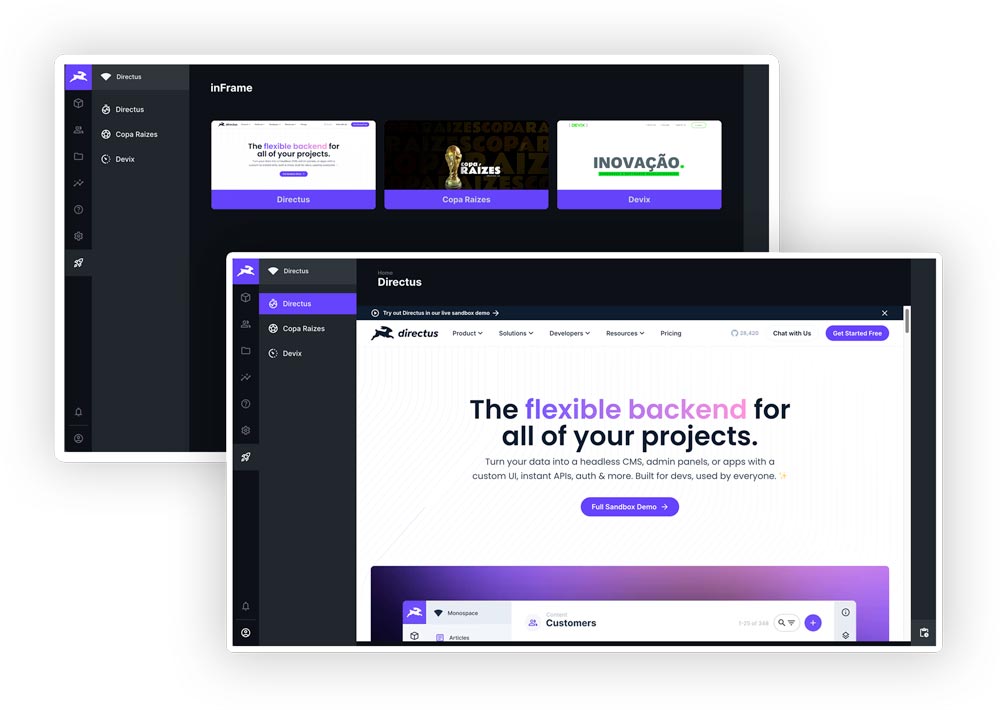
View and manage external content through iframes directly in the Directus admin panel.
## 🎯 Why use it?
- **📊 External dashboards**: Integrate Power BI, Tableau, Metabase or any BI tool
- **📈 Real-time reports**: View updated data without leaving Directus
- **🔗 Organized links**: Centralize access to external tools in one place
- **🌍 Multilingual support**: Automatic translations for multiple languages
- **⚡ Zero configuration**: Plug-and-play installation with automatic setup
## ✨ Features
### 🚀 Automatic Setup
The extension **automatically** creates all necessary collections, fields and relations upon installation!
**No manual configuration required:**
- ✅ `inframe` collection to manage content
- ✅ `languages` collection for languages
- ✅ `inframe_translations` collection for translations
- ✅ Folder system for organization
- ✅ All fields and relations configured
**How it works:**
1. Install the extension
2. Restart Directus
3. Done! Start using immediately
### 🔄 Navigation Persistence
Resume exactly where you left off:
- 💾 Automatically saves your last view
- 🔖 Restores state when returning to the module
- 🚀 Works even after closing/reopening browser
- ⚡ Zero performance impact
## 📦 Installation
### Via NPM
```bash
npm install directus-extension-inframe
```
### Via PNPM
```bash
pnpm add directus-extension-inframe
```
### After installation
1. Restart the Directus server
2. Access the admin panel
3. The "Reports" module will be available in the sidebar
## 💡 How to Use
### 1. Access the module
In the Directus sidebar, click "Reports" (document icon).
### 2. Create a new item
1. Click "Create new"
2. Fill in the fields:
- **URL**: Link to the content to be displayed in the iframe
- **Status**: Published, Draft or Archived
- **Icon**: Choose a Material Design icon
- **Thumbnail**: Preview image (optional)
3. Add translations for different languages (optional)
4. Save
### 3. View
The content will be displayed in the iframe within the Directus panel, allowing direct interaction.
## ⚙️ Docker Configuration (Optional)
If you use Docker, configure CSP to allow iframes:
```yaml
environment:
CONTENT_SECURITY_POLICY_DIRECTIVES__FRAME_SRC: "'self' https://your-domain.com"
```
> [!WARNING] Avoid using `'*'` in production. Specify only trusted domains.
## 🔒 Security
- Configure CSP (Content Security Policy) properly
- List only trusted domains for iframes
- Use HTTPS in production
- Review user permissions in Directus
## 🌍 Compatibility
Tested and compatible with:
- **Directus 9.x**: 9.22.4, 9.23.1, 9.24.0
- **Directus 10.x**: 10.8.3
- **Directus 11.x**: 11.13.1 and newer versions
## 🐛 Known Issues
- Some websites block iframe display by policy (X-Frame-Options)
- HTTPS content cannot be displayed in HTTP Directus
## 🤝 Contributing
Contributions are welcome! See our [Contributing Guide](CONTRIBUTING.md) for details about:
- How to set up the development environment
- Running tests
- Submitting Pull Requests
- Code standards
## 📝 License
This project is licensed under the MIT License - see the [LICENSE](LICENSE) file for details.
## 👥 Authors
- **Sidarta Veloso** - [GitHub](https://github.com/sidartaveloso) |
[LinkedIn](https://www.linkedin.com/in/sidartaveloso)
- **Fernando Gatti** - [GitHub](https://github.com/gattifernando) |
[LinkedIn](https://www.linkedin.com/in/gattifernando/)
## 🏢 Organization
[Devix Tecnologia Ltda.](https://github.com/devix-tecnologia)