@cutos/core
Version:
The CUTOS (CUT Operating System) Core API is a JavaScript library that provides essential functionalities for LWA (Local Web Application) edge computing and communication in the CUTOS ecosystem.
1,557 lines (1,137 loc) • 29.4 kB
Markdown
# Introduction
The CUTOS (CUT Operating System) Core API is a JavaScript library that provides essential functionalities for LWA (Local Web Application) edge computing and communication in the CUTOS ecosystem. The module is designed to facilitate communication between edge devices, edge gateways, and the cloud. Key features include platform information accessing, edge database operations, IPC (Inter-Process Communication), logging, heartbeat monitoring, and device management, etc. The API is designed to be modular and extensible.
## Core API Modules Components
### Platform
- The CoreAPI class is the main entry point for interacting with the CUTOS Core API.
- It provides methods for connecting to the platform, accessing information, and obtaining instances of other classes such as Database, IPC, Logger, etc.
### IPC Implementation
- IPC (Inter-Process Communication) is implemented for communication between processes on the same machine or between processes on different machines within the same network segment.
- The IPC class allows sending messages to a specific channel and registering listeners for incoming messages.
### Database Operations
- The Database class facilitates database operations, including table creation, insertion, updating, querying, and synchronization.
- Provides a structured interface for managing edge databases.
### Device and Driver Management
- The Device and Driver classes represent edge devices and drivers, respectively. The Device can also refer to external devices or modules, such as NFC, fingerprint modules, ID card readers, printers, sensors, GPIO and so on.
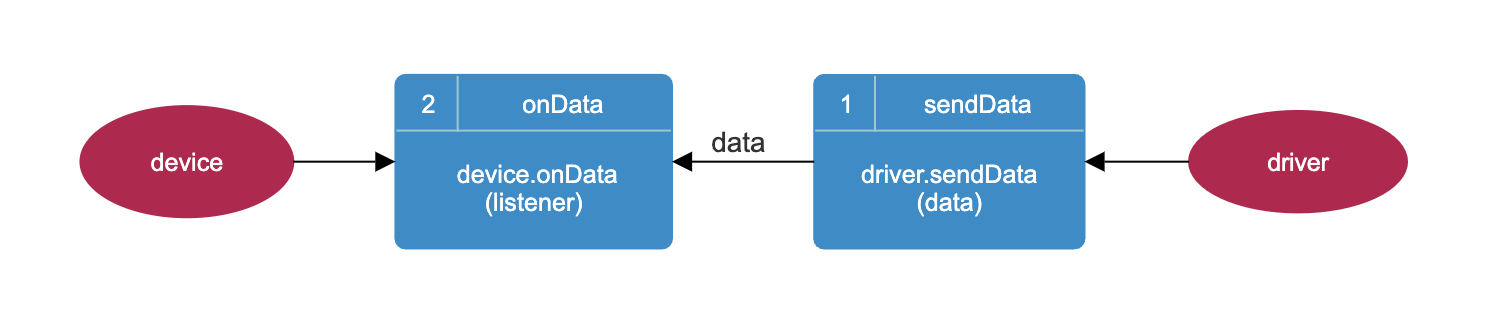
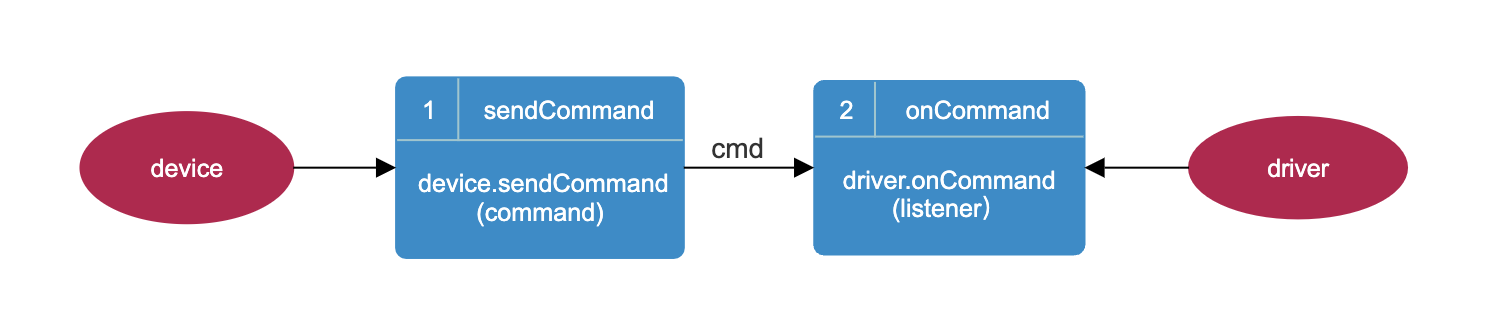
- Devices and drivers communicate for data transmission, command reception, and status updates.
- Heartbeat monitoring is implemented for drivers to ensure continuous communication.
### Notification
- The Notification class provides functionality for registering, unregistering, and emitting events.
### Logging
- The Logger class enables logging of information, warnings, errors, and debug messages.
- Logs are sent and saved to the CUTOS Cloud. In the CUSOS Cloud administration web page, the logs can be queried for a specified device.
# Conclusion
The CUTOS Core API provides a comprehensive set of classes for interacting with the CUTOS platform. Developers can use these classes to build applications, manage databases, communicate with devices, and handle various aspects of the CUTOS ecosystem. The modular design allows for flexibility and extensibility, making it suitable for a wide range of use cases within the IoT and smart device domain.
# Table of Contents
1.[Quick Start](#quick-start)
2.[PlatformAPI](#platform-api)
- Version
- Platform Information
- Configuration
- Box Information
- Device Information
- Http Proxy
- Volume Control
- Shell Command Execution
3.[IPC](#ipc-api)
4.[Database](#database-api)
5.[Device & Driver](#devicediver-api)
6.[Notification](#notification-api)
7.[Logger](#logger-api)
# Quick Start
### Install
`
npm install @cutos/core
`
### Initialize
```js
CoreAPI.init(host, callback);
```
* host: CUTOS address. When host is equal to null, it takes the value 'localhost'. During development, it can be changed
to the target address (the device address where CUTOS is installed), such as: '192.168.1.11'
* callback: callback function. The callback function will receive two parameters: result (String) and error (Object).
Among them, error.name is the error name, and error.message is the specific error message.
##### Example:
```js
import { CoreAPI } from '@cutos/core';
CoreAPI.init('192.168.1.11', (result, error) => {
if (!error) {
console.log(result)
} else {
console.error('init failed' + error.message)
}
})
```
- Return result example:
```json
{
"result": "CUTOS CORE connected."
}
```
# Platform API
### CoreAPI.getVersion
Get platform version information
```js
CoreAPI.getVersion();
```
- Return result example:
```
"3.4.0"
```
### CoreAPI.getPlatform
Get platform information
```js
CoreAPI.getPlatform(callback);
```
- callback: callback function
##### Example:
```js
CoreAPI.getPlatform(result => {
console.log(result)
});
```
- Return result example:
```json
{
"arch": "x64",
"platform": "win32",
"type": "Windows_NT",
"release": "10.0.19045"
}
```
### CoreAPI.getConfig
Get configuration information
```js
CoreAPI.getConfig(callback);
```
- callback: callback function
##### Example:
```js
CoreAPI.getConfig(result => {
console.log(result)
});
```
- Return result example:
```json
{
"srvAddress": "www.cut-os.com",
"srvRestProtocol": "https",
"enableTimeSync": true,
"playReport": false,
"language": "Chinese",
"debug": false
}
```
### CoreAPI.getBoxInfo
Get host information
```js
CoreAPI.getBoxInfo(callback);
```
- callback: callback function
##### Example:
```js
CoreAPI.getBoxInfo(result => {
console.log(result)
})
```
- Return result example:
```json
{
"id": 1016,
"macAddress": "00-F1-F5-2A-8E-8C",
"ipAddress": "192.168.1.127",
"masterIpAddress": "",
"osVersion": "3.2.0"
}
````
- `id`: Host ID
- `macAddress`: Host MAC address
- `ipAddress`: host IP address
- `masterIpAddress`: Master IP address, used when multiple hosts form a host group
- `osVersion`: CUTOS Player Version
### CoreAPI.getDeviceInfo
Get device information
```js
CoreAPI.getDeviceInfo(callback);
```
- callback: callback function
##### Example:
```js
CoreAPI.getDeviceInfo(result => {
console.log(result)
})
```
- Return result example:
```json
{
"id": 1234,
"name": "sipTimes office",
"shortName": "",
"groupId": 0,
"groupName": null,
"department": null,
"description": null,
"gwi": "9E1E3B67-...101B",
"gwUrl": "ws://127.0.0.1:61614",
"ext": null,
"token": "D+yIxq1d3...BTgjK....."
}
```
- `id`: device ID
- `name`: device name
- `shortName`: device short name
- `groupId`: device group ID
- `groupName`: device group name
- `department`: department
- `description`: description
- `gwi`: gateway ID
- `gwUrl`: gateway address
- `ext`: extended information
- `token`: token
### CoreAPI.getVolume
Get the volume
```js
CoreAPI.getVolume(callback);
```
- callback: callback function
##### Example:
```js
CoreAPI.getVolume(result => {
console.log(result)
})
```
- Return result example:
```js
"10"
```
### CoreAPI.setVolume
Set the volume
```js
CoreAPI.setVolume(value, callback)
```
- value: volume (0-100)
- callback: callback function
##### Example:
```js
CoreAPI.setVolume(70, (result, error) => {
if (!error) {
console.log(result)
}
})
```
- Return result example:
```json
{
"result": 70
}
```
### CoreAPI.setHttpProxy
Set proxy to solve LWA cross-domain problem
```js
CoreAPI.setHttpProxy(api, target, callback)
```
- api: interface name
- target: target address
- callback: callback function. The callback function returns result if successful and error if failed.
##### Example:
```js
CoreAPI.setHttpProxy('api', 'https://www.cut-os.com', (result, error) => {
if (!error) {
console.log(result)
}
})
```
- Return result example:
```json
{
"path": "proxy/api",
"target": "https://www.cut-os.com"
}
```
* path: Request address prefix
* target: target address
##### Actual interface call example
```js
fetch(`http://localhost:3000/proxy/api/rest/sv/system/runtime/ping`)
```
##### The actual request address
```js
fetch(`https://www.cut-os.com/rest/sv/system/runtime/ping`)
```
### CoreAPI.shell
Shell command execution
```js
CoreAPI.shell(command, callback)
```
- command: command
- callback: callback function
##### Example:
```js
CoreAPI.shell('pwd', (result, error) => {
if (!error) {
console.log(result)
}
})
```
- Return result example:
```
"/home/linaro"
```
# IPC API
### Installation
`
npm install @cutos/core
`
### Introduce dependencies
```js
import {CoreAPI} from '@cutos/core';
```
### CoreAPI.getIPC
Get IPC instance object
```js
let ipc = CoreAPI.getIPC([destAddress]);
```
* destAddress: Optional parameter, target IP address, used for inter-device process communication
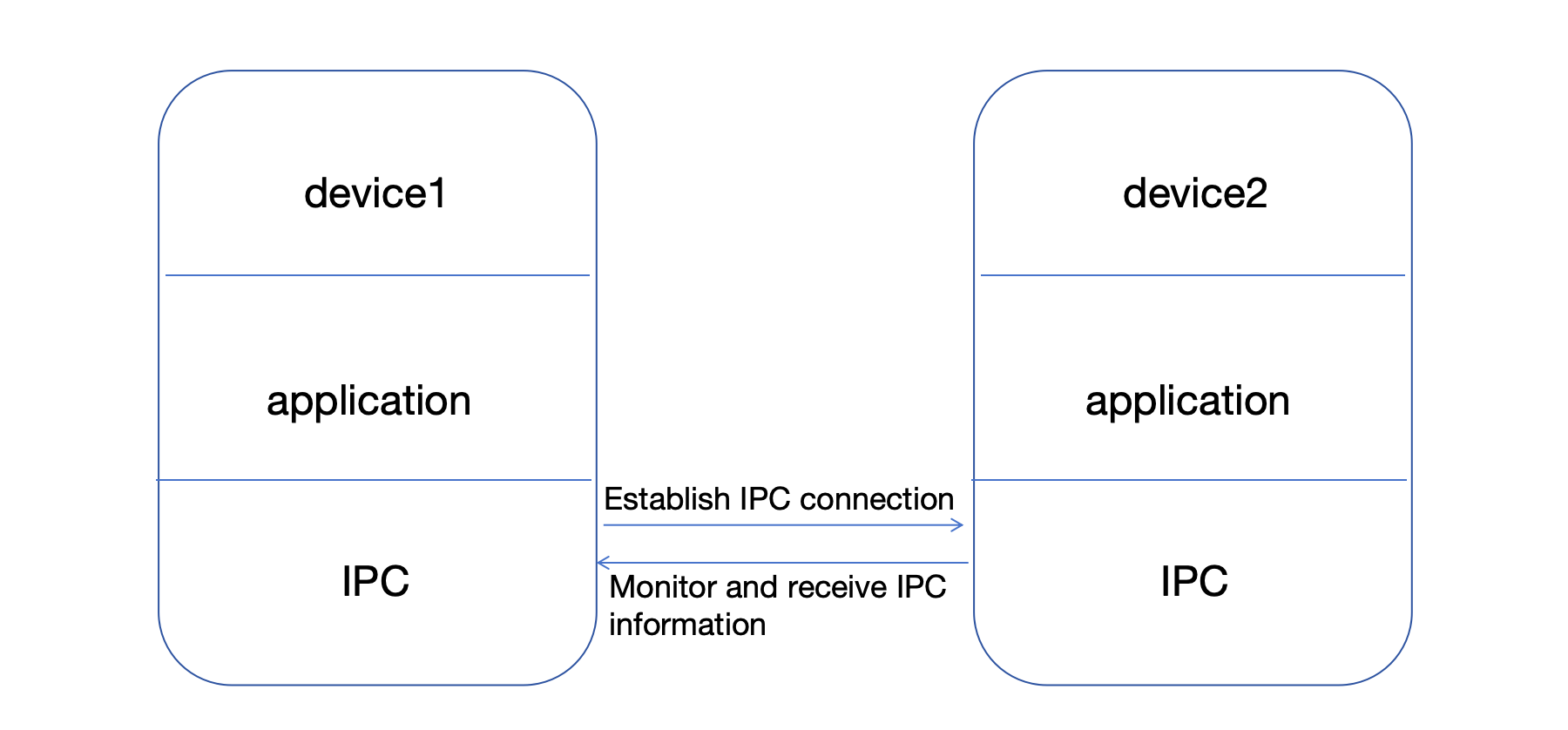
### ipc.sendTo
Send IPC information
```js
ipc.sendTo(channel, args, callback = null);
```
* channel: channel name
* args: information to be sent
* callback: callback function
### ipc.on
Monitor IPC
```js
ipc.on(channel, listener);
```
* channel: channel name
* listener: listener function (args, respond)
##### Local device communication example:
##### Example 1 (without return value):
```js
import {CoreAPI} from '@cutos/core';
CoreAPI.init();
let channel1 = 'channel1';
let ipc = CoreAPI.getIPC();
//Listen for IPC information
ipc.on(channel1, (args) => {
console.log('on', channel1, 'received', args);
})
//Send IPC information
ipc.sendTo(channel1, 'no callback');
```
- Return result example:
```
on channel1 received: "no callback"
```
##### Example 2 (with return value):
```js
import {CoreAPI} from '@cutos/core';
CoreAPI.init();
let channel2 = 'channel2';
let ipc = CoreAPI.getIPC();
//Monitor IPC information
ipc.on(channel2, (args, respond) => {
console.log('on ' + channel2 + ' received: ' + JSON.stringify(args));
respond({sum: args.opt1 + args.opt2})
})
//Sending IPC information
ipc.sendTo(channel2, {opt1: 2, opt2: 2}, (result) => {
console.log('on ' + channel2 + ' callback: ' + JSON.stringify(result))
});
```
- Return result example:
```
on channel2 received: {"opt1":2,"opt2":2}
on channel2 callback: {"sum":4}
```
##### Example of inter-device process communication:
##### Sender (IP: 192.168.1.136)
```js
import {CoreAPI} from '@cutos/core';
CoreAPI.init();
let channel1 = 'channel1';
//Destination IP: 192.168.1.149
let ipc = CoreAPI.getIPC("192.168.1.149");
//Send IPC information
ipc.sendTo(channel1, 'no callback');
```
##### Receiver (IP: 192.168.1.149)
```js
import {CoreAPI} from '@cutos/core';
CoreAPI.init();
let channel1 = 'channel1';
let ipc = CoreAPI.getIPC();
//Listen for IPC information
let ipcListener = function (args) {
console.log('on', channel1, 'received', args);
}
ipc.on(channel1, ipcListener);
```
- Return result example:
```
on channel1 received: "no callback"
```
# Database API
The basic table structure of CUTOS database is in Key-Value format, and Value can be any json object. The advantage of
this design is that the database does not need to be upgraded to modify the Value field, but the disadvantage is that it
cannot be accessed as flexibly as traditional databases. If you need more flexible database access functions, you can
use the SQL fully compatible interface provided by CUTOS.
CUTOS basic table structure (default primary key name is `id`, data type is `INTEGER`):
| **Field** | **Data type** | **Description** |
|:---------:|:-------------:|:------------------------------------------------------:|
| id | INTEGER | Primary key |
| value | TEXT | Data |
| tid | TEXT | Foreign key, transaction id |
| sync | INTEGER | Synchronization flag: 0-unsynchronized, 1-synchronized |
| timestamp | INTEGER | Last modified timestamp |
### Database
Constructor
```js
let database = new Database(db);
```
- db: database name, default is lwa.db if name is not passed
### Database.connect
Connect to database
```js
database.connect(callback)
```
- callback: callback function
##### Example:
```js
let database = database.connect((result, error) => {
if (!error) {
console.log(result)
}
})
```
- Return result example:
```json
{
"dbPath": "/home/linaro/.config/dios/data/lwa.db"
}
```
### Database.run
Run sql
```js
database.run(sql, callback)
```
- sql: execute sql statement
- callback: callback function
##### Example:
```js
database.run('select * from device', (result, error) => {
if (!error) {
console.log(result)
}
})
```
- Return result example:
```json
[
{
"id": 1,
"value": "{\"type\":\"printer\",\"name\":\"HP-1\"}",
"tid": "tra-001",
"sync": 0,
"timestamp": 1691401911678
},
{
"id": 2,
"value": "{\"type\":\"printer\",\"name\":\"HP-2\"}",
"tid": "tra-002",
"sync": 0,
"timestamp": 1691401911681
}
]
```
### Database.Table
Constructor
```js
let table = new Database.Table(name, db);
```
- name: table name
- db: database instance
##### Example:
```js
let table = new Database.Table('device', database);
```
### Table.create
Create a database table
```js
table.create([opts], callback)
```
- opts: optional parameters, including 3 attributes:
* retentionTime: retention time, in hours; if not passed, it will be retained forever by default
* keyName: name, if not passed, it will be 'id' by default
* keyType: type, including 2 types 'TEXT' and 'INTEGER', if not passed, it will be 'INTEGER' by default
- callback: callback function
##### Example:
```js
table.create((result, error) => {
if (!error) {
console.log(result)
}
});
```
- Return result example:
```json
[]
```
### Table.insert
Insert data
```js
table.insert(value, [opts], callback);
```
- value: Insert data
- opts: optional parameters
* tid: foreign key id, used to establish relationships between multiple records
- callback: callback function
##### Example:
```js
let tid = "tra-001";
table.insert({type: "printer", name: "NEC"}, {tid: tid}, (result, error) => {
if (!error) {
console.log(result)
}
});
```
- Return result example:
```json
{
"status": true,
"row": 1
}
```
### table.insertById
Insert data by id
```js
table.insertById(id, value, [opts], callback)
```
- id: data id
- value: insert data
- opts: optional parameters
* tid: Foreign key id, used to establish relationships between multiple records
- callback: callback function
##### Example:
```js
let tid = "tra-001";
table.insertById(1, {type: "printer", name: "NEC"}, {tid: tid}, (result, error) => {
if (!error) {
console.log(result)
}
});
```
- Return result example:
```json
{
"status": true,
"row": 1
}
```
### Table.update
Update data
```js
table.update(id, value, callback);
```
- id: data id
- value: update data
- callback: callback function
##### Example:
```js
table.update(row, {type: "printer", name: "HP-2"}, (result, error) => {
if (!error) {
console.log(result)
}
});
```
- Return result example:
```json
{
"status": true,
"msg": 0
}
```
### table.delete
Delete data
```js
table.delete(id, callback)
```
- id: data id
- callback: callback function
### Table.query
Query data
```js
table.query(id, callback);
```
- id: data id
- callback: callback function
##### Example:
```js
deviceTable.query(row, (result, error) => {
if (!error) {
console.log(result)
}
});
```
- Return result example:
```json
[
{
"id": 2,
"value": "{\"type\":\"printer\",\"name\":\"HP-2\"}",
"tid": "tra-001",
"sync": 0,
"timestamp": 1691401911681
}
]
```
### Table.sync
Synchronize data
```js
table.sync(id, callback);
```
- id: data id
- callback: callback function
##### Example:
```js
deviceTable.sync(row, (result, error) => {
if (!error) {
console.log(result)
}
});
```
- Return result example:
```json
{
"status": true,
"msg": 0
}
```
### Table.queryUnsynced
Query unsynchronized data
```js
table.queryUnsynced([opts], callback);
```
- opts: optional parameters
- callback: callback function
##### Example:
```js
deviceTable.queryUnsynced((result, error) => {
if (!error) {
console.log(result)
}
});
```
- Return result example:
```json
[
{
"id": 1,
"value": "{\"type\":\"printer\",\"name\":\"NEC\"}",
"tid": "tra-001",
"sync": 0,
"timestamp": 1691402230172
}
]
```
### Table.queryByTid
Query data by foreign key
```js
table.queryByTid(tid, callback);
```
- tid: foreign key id
- callback: callback function
##### Example:
```js
deviceTable.queryByTid("tra-001", (result, error) => {
if (!error) {
console.log(result)
}
});
```
- Return result example:
```json
[
{
"id": 2,
"value": "{\"type\":\"printer\",\"name\":\"HP-2\"}",
"tid": "tra-001",
"sync": 0,
"timestamp": 1691401911681
}
]
```
### Table.queryAll
Query all data
```js
table.queryAll(callback);
```
- callback: callback function
##### Example:
```js
deviceTable.queryAll((result, error) => {
if (!error) {
console.log(result)
}
});
```
- Return result example:
```json
[
{
"id": 1,
"value": "{\"type\":\"printer\",\"name\":\"HP-1\"}",
"tid": "tra-001",
"sync": 0,
"timestamp": 1691401911678
},
{
"id": 2,
"value": "{\"type\":\"printer\",\"name\":\"HP-2\"}",
"tid": "tra-002",
"sync": 0,
"timestamp": 1691401911681
}
]
```
# Device&Diver API
## Driver
### Driver
Constructor
```js
const driver = new Driver(name = 'default-driver-name', type = cutosAPI.DEVICE.DEFAULT, counter = 10)
```
- name: driver name, default is 'default-driver-name'
- type: device type, default is cutosAPI.DEVICE.DEFAULT
- counter: heartbeat interval, default is 10s
### Driver.sendData
Send data to the device
```js
driver.sendData(data)
```
- data: data
### Driver.onCommand
Receive device commands
```js
driver.onCommand(listener)
```
- listener: function listener(command, respond), call respond after processing command
- command: command, example: {cmd: "connect", args: ""}
- respond: used to send data back to Device.sendCommand's callback function
## SDK
### Device
Constructor
```js
const device = new (name = 'default-device-name', type = cutosAPI.DEVICE.DEFAULT)
```
* name: device name, default is 'default-device-name'
* type: device type, default is cutosAPI.DEVICE.DEFAULT
### Device.init
Device initialization
```js
device.init([opts], callback)
```
* opts: optional parameters, passed to the driver loading process, refer
to [Driver Template](#download-project-template)
* callback: function(result, error)
##### Example:
```js
device.init((result, error) => {
if (error) {
console.log(error)
return;
}
console.log(result)
});
```
### Device.sendCommand
Send a command to the driver
```js
device.sendCommand(command, callback)
```
- command: command, example: command = {cmd: "connect", args: ""}
- callback: function callback(result), used to receive the response from driver
##### Example:
```js
device.sendCommand({cmd: "connect", args: ""}, Listener(msg))
```
### Device.onData
Receive data sent by the driver
```js
device.onData(listener)
```
- listener: function listener(data)
## Device driver relationship
##### 1. onData and sendData
##### 2. sendCommand (without callback function) and onCommand
##### 3. sendCommand (with callback function) and onCommand

## Device driver management template
### Download project template
| <span style="white-space:nowrap;">Name </span> | Description | Download |
|:-----------------------------------------------|:----------------------:|:-----------------------------------------------------------------------------------:|
| driver-template | Device driver template | [Download](https://oss.cut-os.com/resources/developer/template/driver-template.zip) |
##### Project structure
```
├── driver/ # Driver
│ ├── src/ # Driver source directory
│ ├── config.json # Configuration file, configure related parameters
│ ├── driver-template.js # Driver template
│ ├── driver-template-def.js # Device driver data definition (same as in SDK)
│ ├── index.js # Driver loading file
│ ├── test/ # Test directory
│ ├── main.js # Test entry file, simulate cutos, create a driver service
│ ├── package.json # Configuration information for this project
│ ├── gulpfile.js # Packaging file
│ ├── readme.txt # Instructions
├── sdk/ # Interface SDK
│ ├── src/ # Source code directory
│ ├── driver-template.js # Device template
│ ├── driver-template-def.js # Device driver data definition (same as in driver)
│ ├── test/ # Test directory
│ ├── main.js # Test entry file
│ ├── package.json # Configuration information for this project
│ ├── gulpfile.mjs # Packaging file
│ ├── readme.txt # Instructions
```
### Installation dependencies
> Note: node version >= 16
```
cd driver-template/driver
npm install
```
```
cd driver-template/sdk
npm install
```
[//]: # (### Template-based development)
### Project startup
You need to start the driver first, then start the SDK.
```
npm start
```
If the startup is successful, the console will return the following content
* driver
```
CUTOS CORE connected.
CUTOS Simulator started and listening on port 1883
drvDefault onCommand
{
"cmd":"init",
"args":{"name":"driver-template","type":"driver-template","development":true},
"topicResponse":"device-channel-driver-template-response"
}
connect: received.
cmd: custom-cmd received.
cmd: unknown is unsupported.
```
* SDK
```
CUTOS CORE connected.
driver template init true
connect: { msg: 'return success.', status: true }
```
### Packaging and Release
##### Packaging Driver
```
cd driver-template/driver
npm run build
```
```
├── driver/
│ ├── dist/ # Packaging directory
│ ├── driver-template-v1.0.1.drv # Packaging file
```
##### Release the driver
Upload the package file to https://www.cut-os.com/ and publish
Hardware/Driver--Add
##### Packaged Device SDK
```
cd driver-template/sdk
npm run build
```
```
├── sdk/
│ ├── dist/ # Packaging directory
│ ├── driver-template-sdk-v1.0.2.zip # Packaging files
```
##### Note:
> 1.The template device-template.js references TYPE, CMD exported in device-template-def.js
>
> `import {CMD, TYPE} from './device-template-def.js';`
> * Device type (TYPE):
>
- Type constant: key "TEMPLATE", value "Device template".
> - Indicates the template type, identifying the category of the device.
>* Command type (CMD):
>
- CMD constant with two pairs:
>
- CONNECT: 'connect' represents the connection command.
> - CUSTOM_CMD: "custom-cmd" represents a custom command for a specific device.
> 2.Configuration requirements: Keep the TYPE parameter 3 in the template consistent so that the driver matches the
> corresponding SDK.
>
> ```let device = new DeviceTemplate('device-template',callback)``` //device-template.js
>
> ``` const TYPE = 'device-template';```//device-template-def.js
>
> ```{"name": "device-template",...}```//config.json
## Review
The complete code is as follows:
### driver
```js
// driver/src/driver-template.js
const {CoreDefine, CoreClass} = require('@cutos/core');
const {TYPE, CMD} = require('./driver-template-def.js');
const config = require('./config.json');
class DriverTemplate extends CoreClass.Driver {
constructor(args) {
// check
if (TYPE !== config.type) {
throw "Error: the 'type' value in config.js and *-def.js MUST be identical.";
}
super(args.name, TYPE);
this.startBeat();
this.updateStatusInfo(CoreDefine.HEARTBEAT_STATUS.ALIVE, "alive");
this.onCommand(({cmd, args}, respond) => {
// Listen to the messages sent by the device SDK, process the different commands in the message body,
// and respond back to the device SDK through the callback function.
switch (cmd) {
case CMD.CONNECT:
this.connect(args, respond);
break;
case CMD.CUSTOM_CMD:
this.customCmd(cmd, args);
break;
default:
this.unsupported(cmd, args, respond);
break;
}
});
}
unsupported(cmd, args, respond) {
let result = {};
result.msg = "cmd: " + cmd + " is unsupported.";
result.status = false;
console.log(result.msg);
respond(result);
}
connect(args, respond) {
console.log("connect: received.");
let result = {};
result.msg = "return success.";
result.status = true;
respond(result);
}
// no response
customCmd(cmd, args) {
console.log("cmd: " + cmd + args, " received.");
// process cmd below
}
sendCustomData() {
let data = {};
data.type = "custom-type"; // custom defined data type
data.values = {}; // values from template driver
data.values.val = "any value";
data.values.timeStamp = Date.now();
this.sendData(data);
}
}
module.exports = DriverTemplate;
```
### SDK
```js
// sdk/src/driver-template.js
import {CoreClass} from '@cutos/core';
import {CMD, TYPE} from './driver-template-def.js';
class DriverTemplate extends CoreClass.Device {
constructor(name, callback, opts = {development: true}) {
super(name, TYPE, callback, opts);
this.onData((data) => {
console.log("on data", data)
});
}
connect(callback) {
let cmdMessage = {cmd: CMD.CONNECT};
this.sendCommand(cmdMessage, callback);
}
customCmd() {
let cmdMessage = {cmd: CMD.CUSTOM_CMD, args: ""};
this.sendCommand(cmdMessage);
}
}
export {DriverTemplate};
```
```js
// sdk/test/main.js
import {CoreAPI} from '@cutos/core';
import {DriverTemplate} from '../src/driver-template.js';
CoreAPI.init(null, () => {
let device = new DriverTemplate('driver-template')
console.log("driver template init", result, msg ? " error:" + msg : "");
device.init((result, error) => {
device.onData((data) => {
console.log("on data", data)
});
device.connect((result) => {
console.log("connect: ", result)
});
device.customCmd();
device.sendCommand({cmd: "unknown", args: ""});
});
});
```
# Notification API
### CoreAPI.getNotification
Get notification information instance object
```js
let notification = CoreAPI.getNotification();
```
### notification.register
Register notification listener function
```js
notification.register(listener)
```
* listener: listener function
##### Example:
```js
notification.register((data) => {
console.log(data);
})
```
- Return result example:
```json
{
"event": "networkConnection",
"msg": true
}
```
* event: event name
* msg: event content
### notification.unregister
Unregister, used to cancel the registration of `notification.register`
```js
notification.unregister()
```
### notification.emit
Cancel registration, used to cancel the registration of `notification.register`
```js
notification.emit(event, msg)
```
* event: event name
* msg: event content
##### Example:
```js
import {CoreAPI} from '@cutos/core';
CoreAPI.init();
let notification = CoreAPI.getNotification();
notification.register((data) => {
console.log(data);
})
notification.emit('notification-1', 'msg-1')
```
- Return result example:
```json
{
"event": "notification-1",
"msg": "msg-1"
}
```
### System notification
##### Network status notification
```json
{
"event": "networkConnection",
"msg": true
}
```
* networkConnection: Network status notification
* true: online; false: offline
# Logger API
### CoreAPI.getLogger
Get the log instance object
```js
let logger = CoreAPI.getLogger();
```
### logger.info
Information
```js
logger.info(remark, content, type = "LWA")
```
* remark: remark;
* content: content;
* type: type, default is LWA if not passed.
##### Example:
```js
logger.info('face-api', 'success')
```
* Return result log file example:
```json
{
"dateTime": 1709891709950,
"status": "The server is alive!"
}
```
### logger.warning
Warning
```js
logger.warning(remark, content, type = "LWA")
```
* remark: remark;
* content: content;
* type: type, default is LWA if not passed.
##### Example:
```js
logger.warning('face-api', 'warning-content')
```
* Return result log file example:
```json
{
"type": "LWA",
"level": "warning",
"remark": "face-api",
"content": "warning-content"
}
```
### logger.error
Error
```js
logger.error(remark, content, type = "LWA")
```
* remark: remark;
* content: content;
* type: type, default is LWA if not passed.
##### Example:
```js
logger.error('face-api', 'fatal-content')
```
* Example of returned result log file:
```
AxiosError: Network Error
```
### logger.debug
Debug
```js
logger.debug(remark, content, type = "LWA")
```
* remark: remark;
* content: content;
* type: type, default is LWA if not passed.
##### Example:
```js
logger.debug('face-api', 'debug-content')
```
* Example of returned result log file:
```json
{
"type": "LWA",
"level": "debug",
"remark": "face-api",
"content": "debug-content"
}
```