@cto.ai/ops
Version:
💻 CTO.ai Ops - The CLI built for Teams 🚀
299 lines (189 loc) • 10.2 kB
Markdown
# CTO.ai Ops CLI
This Op was generated with `ops init`. Have a look at [`demo.js`](./demo.js) and the examples below to see how you can leverage the `@cto.ai/sdk` to build ops.
## Table of Contents
1. [Documentation](#documentation)
1. [Installation](#installation)
2. [Methods](#methods)
1. [Prompt](#prompt)
2. [Colors](#color)
3. [Spinners](#spinner)
4. [Wait](#wait)
5. [Url](#url)
6. [Annotation](#annotation)
7. [Table](#table)
8. [Tree](#tree)
9. [ProgressBar](#progress-bar)
10. [Notify](#notify)
## [Documentation](#documentation)
<a name="documentation"></a>
### Installation
<a name="installation"></a>
```shell
npm install @cto.ai/sdk
```
```javascript
const { sdk, ux } from '@cto.ai/sdk';
```
# Methods
<a name="methods"></a>
## ux.prompt
<a name="prompt"></a>
Launch the prompt interface
```typescript
const answers = await ux.prompt(questions);
```
Question
A question object is a hash containing question related values:
### Question
<a name="questions"></a>
A question object is a `hash` containing question related values:
- **type**: (String) Type of the prompt. Defaults: `input` - Possible values: `input`, `number`, `confirm`,
`list`, `rawlist`, `expand`, `checkbox`, `password`, `editor`, `datetime`, `autocomplete`, `checkbox-plus`, `fuzzy-path`, `emoji`
- **name**: (String) The name to use when storing the answer in the answers hash. If the name contains periods, it will define a path in the answers hash.
- **message**: (String|Function) The question to print. If defined as a function, the first parameter will be the current inquirer session answers. Defaults to the value of `name` (followed by a colon).
- **default**: (String|Number|Boolean|Array|Function) Default value(s) to use if nothing is entered, or a function that returns the default value(s). If defined as a function, the first parameter will be the current inquirer session answers.
- **choices**: (Array|Function) Choices array or a function returning a choices array. If defined as a function, the first parameter will be the current inquirer session answers.
Array values can be simple `strings`, or `objects` containing a `name` (to display in list), a `value` (to save in the answers hash) and a `short` (to display after selection) properties. The choices array can also contain [a `Separator`](#separator).
- **validate**: (Function) Receive the user input and answers hash. Should return `true` if the value is valid, and an error message (`String`) otherwise. If `false` is returned, a default error message is provided.
- **filter**: (Function) Receive the user input and return the filtered value to be used inside the program. The value returned will be added to the _Answers_ hash.
- **transformer**: (Function) Receive the user input, answers hash and option flags, and return a transformed value to display to the user. The transformation only impacts what is shown while editing. It does not modify the answers hash.
- **when**: (Function, Boolean) Receive the current user answers hash and should return `true` or `false` depending on whether or not this question should be asked. The value can also be a simple boolean.
- **pageSize**: (Number) Change the number of lines that will be rendered when using `list`, `rawList`, `expand` or `checkbox`.
- **prefix**: (String) Change the default _prefix_ message.
- **suffix**: (String) Change the default _suffix_ message.
- **afterMessage**: (String) replaces `message` after question is answered.
for more information: https://github.com/SBoudrias/Inquirer.js#documentation
### Prompt types
---
> **Note:**: _allowed options written inside square brackets (`[]`) are optional. Others are required._
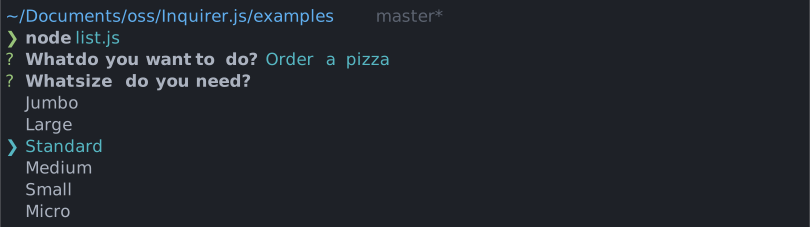
#### List - `{type: 'list'}`
Take `type`, `name`, `message`, `choices`[, `default`, `filter`] properties. (Note that
default must be the choice `index` in the array or a choice `value`)
---
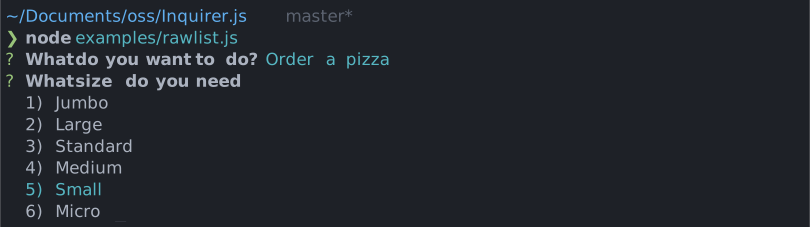
#### Raw List - `{type: 'rawlist'}`
Take `type`, `name`, `message`, `choices`[, `default`, `filter`] properties. (Note that
default must be the choice `index` in the array)
---
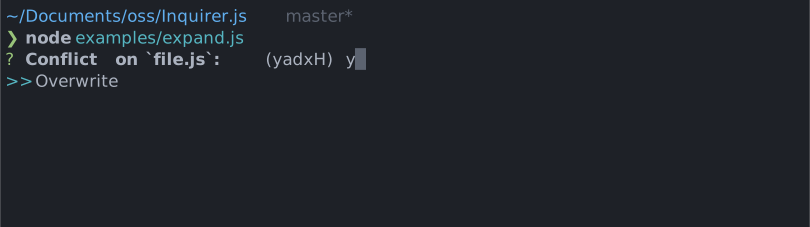
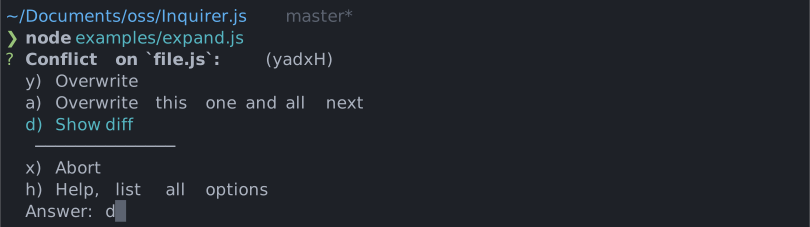
#### Expand - `{type: 'expand'}`
Take `type`, `name`, `message`, `choices`[, `default`] properties. (Note that
default must be the choice `index` in the array. If `default` key not provided, then `help` will be used as default choice)
Note that the `choices` object will take an extra parameter called `key` for the `expand` prompt. This parameter must be a single (lowercased) character. The `h` option is added by the prompt and shouldn't be defined by the user.
See `examples/expand.js` for a running example.
---
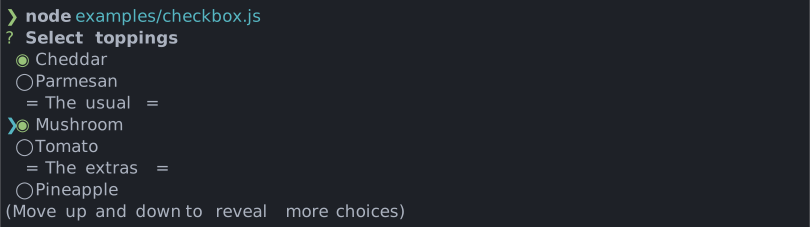
#### Checkbox - `{type: 'checkbox'}`
Take `type`, `name`, `message`, `choices`[, `filter`, `validate`, `default`] properties. `default` is expected to be an Array of the checked choices value.
Choices marked as `{checked: true}` will be checked by default.
Choices whose property `disabled` is truthy will be unselectable. If `disabled` is a string, then the string will be outputted next to the disabled choice, otherwise it'll default to `"Disabled"`. The `disabled` property can also be a synchronous function receiving the current answers as argument and returning a boolean or a string.
---
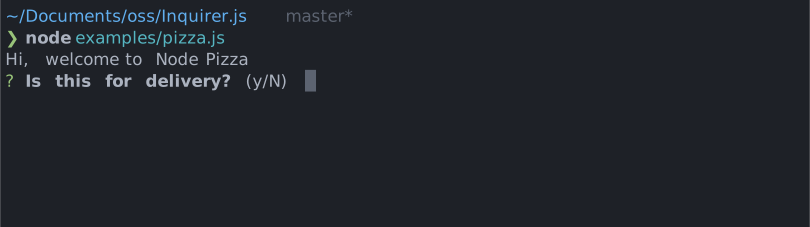
#### Confirm - `{type: 'confirm'}`
Take `type`, `name`, `message`, [`default`] properties. `default` is expected to be a boolean if used.
---
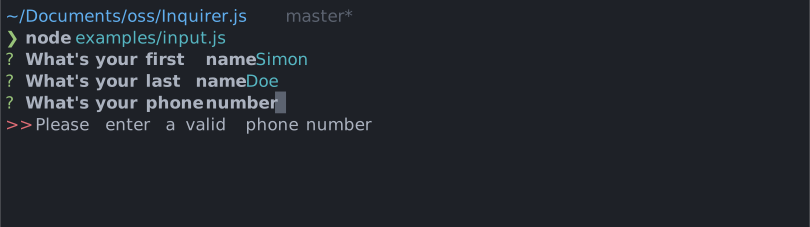
#### Input - `{type: 'input'}`
Take `type`, `name`, `message`[, `default`, `filter`, `validate`, `transformer`] properties.
---
#### Input - `{type: 'number'}`
Take `type`, `name`, `message`[, `default`, `filter`, `validate`, `transformer`] properties.
---
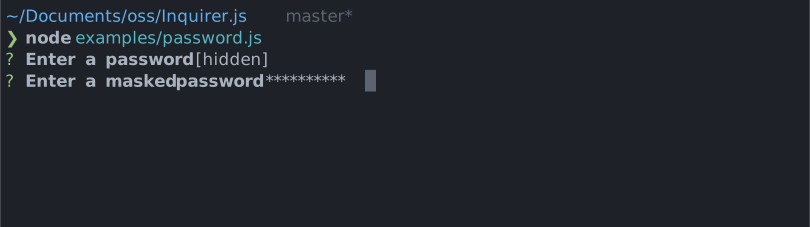
#### Password - `{type: 'password'}`
Take `type`, `name`, `message`, `mask`,[, `default`, `filter`, `validate`] properties.
---
Note that `mask` is required to hide the actual user input.
#### Editor - `{type: 'editor'}`
Take `type`, `name`, `message`[, `default`, `filter`, `validate`] properties
Launches an instance of the users preferred editor on a temporary file. Once the user exits their editor, the contents of the temporary file are read in as the result. The editor to use is determined by reading the $VISUAL or $EDITOR environment variables. If neither of those are present, notepad (on Windows) or vim (Linux or Mac) is used.
#### Checkbox with autocomplete - `{type: 'checkbox-plus'}`
Takes `type`, `name`, `message`, `source` [, `filter`, `validate`, `default`, `pageSize`, `highlight`, `searchable`, `enablebackspace`, `answer`, `footer`, `header`, `keypress`, `searching`, `noresult`] properties.


for example and more information: https://github.com/yviscool/inquirer-checkbox-plus
#### Fuzzy path - `{type: 'fuzzypath'}`
Take `type`, `name`, `message` [, `excludePath`, `itemType`, `rootPath`, `suggestOnly`]


for example and more information: https://github.com/adelsz/inquirer-fuzzy-path
#### Emoji - `{type: 'emoji'}`
Take `type`, `name`, `message`
for example and more information: https://github.com/tannerntannern/inquirer-emoji

## ux.colors
<a name="colors"></a>
```typescript
ux.colors.green('Green text');
ux.colors.red('Red text');
```
for more information: https://github.com/chalk/chalk#usage
## ux.spinner
<a name="spinner"></a>
Shows a spinner
```typescript
// start the spinner
ux.spinner.start('starting a process');
// show on stdout instead of stderr
ux.spinner.start('starting a process', { stdout: true });
// stop the spinner
ux.spinner.stop(); // shows 'starting a process... done'
ux.spinner.stop('custom message'); // shows 'starting a process... custom message'
```
## ux.wait
<a name="wait"></a>
Waits for 1 second or given milliseconds
```typescript
await cli.wait();
await cli.wait(3000);
```
## ux.url
<a name="url"></a>
Create a hyperlink (if supported in the terminal)
```typescript
await ux.url('sometext', 'https://google.com');
// shows sometext as a hyperlink in supported terminals
// shows https://google.com in unsupported terminals
```
## ux.annotation
<a name="annotation"></a>
Shows an iterm annotation
```typescript
cli.annotation('sometest', 'annotated with this text');
```
## ux.table
<a name="table"></a>
Displays tabular data
```typescript
ux.table(data, columns, options);
```
for more information: https://github.com/oclif/cli-ux#clitable
## ux.tree
<a name="tree"></a>
Generate a tree and display it
```typescript
let tree = cli.tree();
tree.insert('foo');
tree.insert('bar');
let subtree = cli.tree();
subtree.insert('qux');
tree.nodes.bar.insert('baz', subtree);
tree.display();
```
Outputs:
```shell
├─ foo
└─ bar
└─ baz
└─ qux
```
## sdk.track
<a name="track"></a>
Send a track event to cto.ai api
```typescript
sdk.track(tags, metadata)
```
- **tags**: (String || String[]) Tags for the event you want to track
- **metaData**: (Object) Data you want to be tracked