@broadcaster/core
Version:
Cross window serverless messaging system based on BroadcastChannel API. Allows to send messages and keep track about instances between browsing contexts (tabs, windows, workers, etc..)
261 lines (208 loc) • 13.5 kB
Markdown
# Broadcaster: Cross Window Serverless Messaging System
[](https://badge.fury.io/js/@broadcaster%2Fcore)
Small, zero-dependency package for managing communication between different
[browsing contexts](https://developer.mozilla.org/en-US/docs/Glossary/Browsing_context), like tabs, windows, iFrames, workers, etc..
It adds extra layer over BroadcastChannel with unified error management and context awareness.
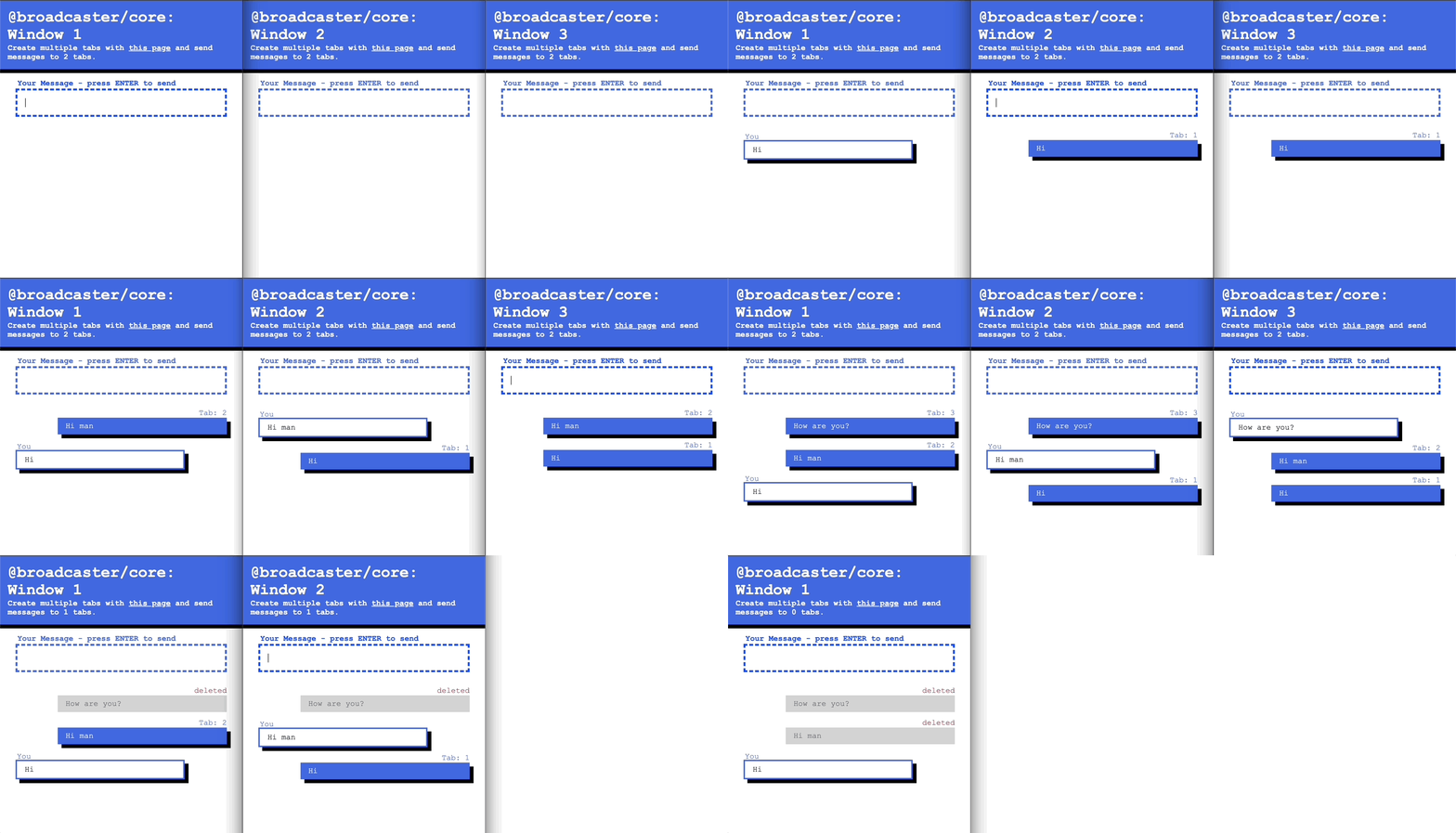
This package not only sends messages to different browser windows or tabs, but it keeps track about all Broadcaster instances across
browsing context. In every moment you can see current instance state of any Broadcaster. You can also enhance state with your own metadata.
Under the hood, it utilizes the [BroadcastChannel API](https://developer.mozilla.org/en-US/docs/Web/API/Broadcast_Channel_API),
yet it can be easily replaced with any alternative communication strategy.
## Key Features
* 🚌 **BUS between browsing contexts**
Allows to send messages between different browsing contexts and sync Broadcaster instances state.
* **Serverless**
By default, the Broadcaster employs the [BroadcastChannel API](https://developer.mozilla.org/en-US/docs/Web/API/Broadcast_Channel_API)
as its primary bridge interface. This API enables fundamental communication between different browsing contexts such
as windows and tabs, eliminating the necessity for a server.
* 📝 **Context aware**
Each instance of the Broadcaster maintains awareness of other instances throughout their lifecycle.
It retains essential information and metadata, making this data accessible to every Broadcaster instance
subscribed to the same channel.
* 💪 **Accessible on most modern browsers and Node.JS**
In 2023 all main browsers supports BroadcastChannel API (Most recently Safari v 15.4) -
[see caniuse](https://caniuse.com/?search=BroadcastChannel)
* ⚙️⚙️⚙️ **Modular**
Given Broadcaster's significant dependence on the BroadcastChannel API, users have the flexibility
to alter the communication protocol by simply replacing the Bridge instance.
* **Resilient**
Errors identified during the broadcasting phase are transferred into a separate error stream,
allowing the channel to remain open for additional incoming messages.
## Quick-start
### Installation
#### NPM
```npm i --save /core```
#### Yarn
```yarn add /core```
### Creating and Destroying Broadcaster Instance
```ts
import { Broadcaster } from "@broadcaster/core";
// Custom Broadcaster message shape
export type Message = {
type: "greetings" | "goodbye";
sentence: string;
};
// Custom Broadcaster metadata shape
export type Metadata = {
your: string;
metadata?: boolean;
};
/**
* It is recommended to have only one Broadcaster instance per system per
* channel. Create Broadcaster instance in a root of you App.
*/
export const broadcaster = new Broadcaster<Message, Metadata>({
// All broadcaster with same channel name will be able to communicate.
channel: "YOUR_CHANNEL_NAME",
metadata: {
your: "your",
metadata: false,
},
on: {
init: (broadcasterInstance) => {
// called when broadcaster is initialized
},
close: (broadcasterInstance) => {
// called when broadcaster is closed
}
}
// For more settings check Broadcaster Constructor Settings section down below
});
const destroyBroadcaster = (broadcasterInstance: Broadcaster) => {
// notifies other instances, that this instance is not active anymore
// and disconnects
broadcasterInstance.close();
}
```
### Sending and Receiving a Message
```ts
// from previous example
import { broadcaster } from "path/to/instance";
// subscribe to a message channel to receive messages
const messageSubscription = broadcaster.subscribe.message(
// message handle
(message) => {
// Message owner id
console.log(message.from);
// Message payload
console.log(message.payload, message.payload.type, message.payload.sentence);
},
);
// later, when we want to unsubscribe
messageSubscription.unsubscribe();
// sends a greeting message to all broadcaster
// instances in different browsing contexts
broadcaster.postMessage({
type: "greetings",
sentence: "Hello World",
});
```
### Getting Broadcaster Instance State and Update Metadata
Each Broadcaster instance has it's inner state, which will be shared with other instances. Each Broadcaster instance
keeps synced list of all broadcaster instances with their current state and metadata.
```ts
// from previous example
import { broadcaster } from "path/to/instance";
// subscribe to a message channel to receive messages
const broadcastersSubscription = broadcaster.subscribe.broadcasters(
(broadcasters) => {
// iterate through broadcasters
// and print its current state
broadcasters.map((instance) => {
// broadcaster id
console.log(instance.id);
// date when Broadcaster broadcaster was created
console.log(instance.createdAt);
// current metadata
console.log(instance.metadata, instance.metadata.your, instance.metadata.metadata);
});
},
);
// later, when we want to unsubscribe
broadcastersSubscription.unsubscribe();
// updates metadata and notifies all broadcaster instances about it
broadcaster.updateMetadata({
your: "some data",
metadata: true,
});
// alternative approach with callback
broadcaster.updateMetadata((currentMetadata) => ({
your: currentMetadata.your,
state: true,
}));
```
### Error Handling
All errors which are identified during broadcasting phase are transferred into separate error stream, to prevent
blocking original channel with unexpected result.
```ts
// from previous example
import { broadcaster } from "path/to/instance";
// subscribe to a error channel to receive all unexpected errors during broadcasting phase
const broadcastersSubscription = broadcaster.subscribe.errors(
(error) => {
// BroadcasterError as an extension of an Error class
console.log(error);
},
);
```
## Garbage Collector - Window closure detection
Window closure detection is hard. It is in theory possible
to use `beforeunload` event but it is inconsistent. It can trigger unwanted prompt, the event can be 'hijacked' by other listener, or it can be canceled by user. For this reason we introduced Garbage Collector.
Each broadcaster instance sends periodical health status to others.
When some instance does not response for specified amount of time,
it is considered dead and will be garbage collected.
**Garbage Collector performs soft deletion. It means even when instance is removed, it can reappear in a list in case new health status is send later on. In fact Garbage Collector only assumes, that browsing context was closed, even tho it can be blocked by other process.**
It is still possible to use old fashion approach with `beforeunload`,
but it needs to be implemented manually like this:
```ts
const broadcaster = new Broadcaster({
channel: "YOUR_CHANNEL_NAME",
metadata: {
your: "your",
metadata: false,
},
on: {
init: (broadcasterInstance) => {
window.addEventListener("beforeunload", destroyBroadcaster);
},
close: (broadcasterInstance) => {
window.removeEventListener("beforeunload", destroyBroadcaster);
}
}
})
```
## Broadcaster Constructor Settings
For more detailed info, please see [BroadcasterSettings type](https://github.com/pavelstencl/broadcasterJS/blob/main/packages/core/src/types.ts)
| Property | Value | Required | Default | Description |
|-------------------------|--------------------------------------------------------------------------------------------------------------------------|----------|--------------------------------------------------------------------------------------------------------------------------------------|------------------------------------------------------------------------------------------------------------------------------|
| bridge | [BroadcasterBridge instance](https://github.com/pavelstencl/broadcasterJS/blob/main/packages/core/src/bridges/Bridge.ts) | optional | [BroadcastChannelBridge](https://github.com/pavelstencl/broadcasterJS/blob/main/packages/core/src/bridges/BroadcastChannelBridge.ts) | Allows to change communication strategy to a custom one. |
| channel | string | required | - | All broadcaster with same channel name will be able to communicate. |
| disableGarbageCollector | boolean | optional | false | disables garbage collector. In that case you need to detect windows closure manually and trigger broadcaster.close() method. |
garbageCollectorThresholdTimer | number | optional | 1500 [ms] | time of inactivity after which broadcaster instance will be considered dead and will be removed |
| garbageCollectorTimer | number | optional | 500 [ms] | loop time of garbage collector |
| healthBeaconTimer | number | optional | 500 [ms] | Sets an interval in which the health status message will be beamed to all broadcasters |
| metadata | object | required | - | Initial metadata object. Will be broadcasted to audience. |
| middlewares | object | optional | - | Set of middlewares, which can modify message before broadcasting and right after receiving a message |
| on | object | optional | - | Set of lifecycle events. |
## FAQ
### What type of messages can i send?
BroadcasterChannel API allows to send anything, which is supported by
[structured clone](https://developer.mozilla.org/en-US/docs/Web/API/Web_Workers_API/Structured_clone_algorithm)
algorithm. If you have custom message bearer incompatible with algorithm (like class wrapper), you can use
`before` and `after` middlewares to serialize and deserialize message.
### What is metadata object good for?
Metadata object is packed to Broadcaster instance state and broadcasted to all Broadcasters registered in a channel.
You can add extra information about broadcasting context, where Broadcaster was instantiated and utilize
this information in other browsing contexts.
### Can I use Broadcaster as shared state management system?
Yes, but not natively. Broadcaster was never intended to replace shared state managers like Redux.
Basically you have two options, how to achieve this goal with Broadcaster:
* You can use Broadcaster messages as action bearer for state changes (for example Redux actions).
But you have to be careful, because it can lead to race condition situation due to message asynchronicity
and multiple sources of truth.
* Better solution would be to use
[SharedWorker](https://developer.mozilla.org/en-US/docs/Web/API/SharedWorker) as a single source of truth and state manager.
From worker you can use Broadcast messages to pass data to other browsing contexts.
### Can I use different messaging bridge?
It is possible to create custom Bridge and register it to a Broadcaster. You can check how Bridge and BroadcastChannelBridge are implemented
[here](https://github.com/pavelstencl/broadcasterJS/tree/main/packages/core/src/bridges)