@bencapp3/react-native-static-server
Version:
Embedded HTTP server for React Native
1,079 lines (911 loc) • 54.5 kB
Markdown
# React Native Static Server
<!-- Status Badges & Important Links -->
[](https://www.npmjs.com/package/@dr.pogodin/react-native-static-server)
[](https://www.npmjs.com/package/@dr.pogodin/react-native-static-server)
[](https://app.circleci.com/pipelines/github/birdofpreyru/react-native-static-server)
[](https://github.com/birdofpreyru/react-native-static-server)
[](https://dr.pogodin.studio/docs/react-native-static-server)
<!-- Misc references -->
[@dr.pogodin/react-native-fs]: https://www.npmjs.com/package/@dr.pogodin/react-native-fs
[copyFileAssets()]: https://github.com/birdofpreyru/react-native-fs?tab=readme-ov-file#copyfileassets
[Error]: https://developer.mozilla.org/en-US/docs/Web/JavaScript/Reference/Global_Objects/Error
[Example App]: https://github.com/birdofpreyru/react-native-static-server/tree/master/example
[Expo Example App #1]: https://github.com/jole141/expo-examples/tree/react-native-static-server
[jole141]: https://github.com/jole141
[Expo Example App #2]: https://github.com/benjaminkomen/expo-static-server
[benjaminkomen]: https://github.com/benjaminkomen
[Expo]: https://expo.dev
[getDeviceType()]: https://www.npmjs.com/package/react-native-device-info#getDeviceType
[Issue#8]: https://github.com/birdofpreyru/react-native-static-server/issues/8
[Lighttpd]: https://www.lighttpd.net
[MainBundlePath]: https://www.npmjs.com/package/@dr.pogodin/react-native-fs#mainbundlepath
[mod_access]: https://redmine.lighttpd.net/projects/lighttpd/wiki/Mod_access
[mod_alias]: https://redmine.lighttpd.net/projects/lighttpd/wiki/Mod_alias
[mod_dirlisting]: https://redmine.lighttpd.net/projects/lighttpd/wiki/Mod_dirlisting
[mod_evhost]: https://redmine.lighttpd.net/projects/lighttpd/wiki/Mod_evhost
[mod_expire]: https://redmine.lighttpd.net/projects/lighttpd/wiki/Mod_expire
[mod_fastcgi]: https://redmine.lighttpd.net/projects/lighttpd/wiki/Mod_fastcgi
[mod_indexfile]: https://redmine.lighttpd.net/projects/lighttpd/wiki/Mod_indexfile
[mod_redirect]: https://redmine.lighttpd.net/projects/lighttpd/wiki/Mod_redirect
[mod_rewrite]: https://redmine.lighttpd.net/projects/lighttpd/wiki/Mod_rewrite
[mod_scgi]: https://redmine.lighttpd.net/projects/lighttpd/wiki/Mod_scgi
[mod_setenv]: https://redmine.lighttpd.net/projects/lighttpd/wiki/Mod_setenv
[mod_simple_vhost]: https://redmine.lighttpd.net/projects/lighttpd/wiki/Mod_simple_vhost
[mod_staticfile]: https://redmine.lighttpd.net/projects/lighttpd/wiki/Mod_staticfile
[mod_webdav]: https://redmine.lighttpd.net/projects/lighttpd/wiki/Mod_webdav
[Promise]: https://developer.mozilla.org/en-US/docs/Web/JavaScript/Reference/Global_Objects/Promise
[react-native-device-info]: https://www.npmjs.com/package/react-native-device-info
[React Native]: https://reactnative.dev
[TemporaryDirectoryPath]: https://github.com/birdofpreyru/react-native-fs?tab=readme-ov-file#temporarydirectorypath
[WebDAV]: https://en.wikipedia.org/wiki/WebDAV
<!-- The regular README content starts here -->
Embedded HTTP server for [React Native] applications for Android, iOS, Mac (Catalyst),
and Windows platforms; powered by [Lighttpd] server.
[](https://github.com/sponsors/birdofpreyru)
### Sponsored By:
<table>
<tr>
<td width="150px">
<img
alt="Luna4 Enterprises Inc."
width="100%"
height="auto"
src="https://raw.githubusercontent.com/birdofpreyru/react-native-static-server/master/.README/logo-luna4.png"
>
</td>
<td>
<strong>Luna4 Enterprises Inc.</strong> — The support for Windows
and Mac Catalyst systems would not happen any time soon without their
interest and financial contribution.
</td>
</tr>
<tr>
<td width="150px">
<a href="https://github.com/digitalfabrik/integreat-app">
<img
alt="Integreat App"
src="https://raw.githubusercontent.com/birdofpreyru/react-native-static-server/master/.README/logo-integreat.svg"
width="100%"
height="auto"
>
</a>
</td>
<td>
<a href="https://github.com/digitalfabrik/integreat-app">Integreat</a>
— Kindly sponsored the support of older Android SDKs (23–27).
</td>
</tr>
</table>
[<img width=72 src="https://avatars.githubusercontent.com/u/95426957?v=4&s=72" />](https://chipster.org)
[<img width=36 src="https://avatars.githubusercontent.com/u/71085569?s=36" />](https://github.com/Lumentric)
### [Contributors](https://github.com/birdofpreyru/react-native-static-server/graphs/contributors)
[<img width=36 src="https://avatars.githubusercontent.com/u/62563469?s=36&v=4" />](https://github.com/jole141)
[<img width=36 src="https://avatars.githubusercontent.com/u/10153413?s=36&v=4" />](https://github.com/exotexot)
[<img width=36 src="https://avatars.githubusercontent.com/u/10667346?s=36&v=4" />](https://github.com/rafalzawadzki)
[<img width=36 src="https://avatars.githubusercontent.com/u/20144632?s=36&v=4" />](https://github.com/birdofpreyru)
## Content
- [Getting Started](#getting-started)
- [Bundling-in Server Assets Into an App Statically]
- [Support of Lighttpd Modules]
- [Core and Built-in Modules]
- [mod_access](#mod_access) — it is used to deny access to files.
- [mod_alias](#mod_alias) — it is used to specify a special document
root for a given url-subset.
- [mod_dirlisting](#mod_dirlisting) — creates an HTML page listing
the contents of the target directory.
- [mod_evhost](#mod_evhost) — builds the document-root based on
a pattern which contains wildcards.
- [mod_expire](#mod_expire) — controls the Cache-Control: max-age
response header in HTTP/1.1 or later, and Expires response header in
HTTP/1.0.
- [mod_fastcgi](#mod_fastcgi) — an interface to external programs
that support the FastCGI interface.
- [mod_indexfile](#mod_indexfile) — list of files to try when
an HTTP request is for a directory.
- [mod_redirect](#mod_redirect) — it is used to specify redirects
for a set of URLs.
- [mod_rewrite](#mod_rewrite) — internal redirects, url rewrite.
- [mod_scgi](#mod_scgi) — provides SCGI interface.
- [mod_setenv](#mod_setenv) — modifies request headers (from
clients), response headers (to clients), and the environment (for CGI).
- [mod_simple_vhost](#mod_simple_vhost) — allows to host multiple
domain names on a single server.
- [mod_staticfile](#mod_staticfile) — is used to serve files.
- [Other Modules]
- [mod_webdav](#mod_webdav) — provides [WebDAV], a set of HTTP
extensions that provides a framework allowing to create, change,
and move documents on the server. Essentially an easy way to enable
`POST`, `PUT`, _etc._ functionality for selected routes.
- [Connecting to an Active Server in the Native Layer]
- [API Reference](#api-reference)
- [Server] — Represents a server instance.
- [constructor()] — Creates a new [Server] instance.
- [.addStateListener()] — Adds state listener to the server instance.
- [.removeAllStateListeners()] — Removes all state listeners from this
server instance.
- [.removeStateListener()] — Removes specified state listener from this
server instance.
- [.start()] — Launches the server.
- [.stop()] — Stops the server.
- [.errorLog] — Holds `errorLog` configuration.
- [.fileDir] — Holds absolute path to static assets on target device.
- [.hostname] — Holds the hostname used by server.
- [.id] — Hold unique ID of the server instance.
- [.nonLocal] — Holds `nonLocal` value provided to [constructor()].
- [.origin] — Holds server origin.
- [.port] — Holds the port used by server.
- [.state] — Holds the current server state.
- [.stopInBackground] — Holds `stopInBackground` value provided to
[constructor()].
- ~~[extractBundledAssets()] — Extracts bundled assets into a regular folder
(Android-specific).~~
- [getActiveServer()] — Gets the currently active, starting, or stopping
server instance, if any, according to the TS layer data.
- [getActiveServerId()] — Gets ID of the currently active, starting, or
stopping server instance, if any, according to the Native layer data.
- [getActiveServerSet()] — Gets a set of currently active, starting,
or stopping server instances, if any, according to the TS layer data.
- [resolveAssetsPath()] — Resolves relative paths for bundled assets.
- [ERROR_LOG_FILE] — Location of the error log file.
- [STATES] — Enumerates possible states of [Server] instance.
- [UPLOADS_DIR] — Location for uploads.
- [WORK_DIR] — Location of the working files.
- [ErrorLogOptions] — Options for error logging.
## Getting Started
[Getting Started]: #getting-started
[CMake]: https://cmake.org
[Homebrew]: https://brew.sh
- **Note:**
- This library's repository includes [Example App].
Have a look, try to build it, in addition to following the instructions
below.
- The following host / build platforms are not currently supported officially,
and they won't be unless the support is provided or sponsored by somebody:
- Building for Android target on Windows host
([open issues](https://github.com/birdofpreyru/react-native-static-server/issues?q=is%3Aissue+is%3Aopen+label%3A%22Windows+-%3E+Android%22)).
Prefer building for Android on macOS or Ubuntu host.
- [Expo] ([open issues](https://github.com/birdofpreyru/react-native-static-server/issues?q=is%3Aissue+is%3Aopen+label%3AExpo)).
Though, presumably, the library in its current state works just fine
with [Expo] — see [Issue#8] and the following example apps:
- [Expo Example App #1] by [jole141];
- [Expo Example App #2] by [benjaminkomen].
- [tvOS](https://developer.apple.com/tvos) ([open issues](https://github.com/birdofpreyru/react-native-static-server/issues?q=is%3Aissue+is%3Aopen+label%3AtvOS)).
- [CMake] is required on the build host.
- When building for **Android**, [CMake] should be installed as a part of your
_Android SDK_ (open _SDK Manager_, and look for [CMake] within
the _SDK Tools_ tab).
- On **MacOS** you want to install [CMake] _via_ [Homebrew].
Beware, many recent [CMake] versions caused different build issues
on **MacOS**, and required additional manual actions after install
to make it work, in particular:
- [Homebrew] should have added `eval "$(/opt/homebrew/bin/brew shellenv)"'`
command to your `.zshrc` or `.bashrc`. Although this works for interactive terminals,
it might not work for sessions inside of other apps, such as XCode, therefore you might need to
manually create symbolic links:
```shell
$ sudo ln -s $(which cmake) /usr/local/bin/cmake
$ sudo ln -s $(which pkg-config) /usr/local/bin/pkg-config
```
For details read: https://earthly.dev/blog/homebrew-on-m1,
and [Issue#29](https://github.com/birdofpreyru/react-native-static-server/issues/29).
- [**CMake v3.30.0** broke the library build for iOS](https://github.com/birdofpreyru/react-native-static-server/issues/111)
because of a regression on CMake side, and for this reason it was marked as
unsupported on all platforms.
- It looks like with CMake v3.31.6–v3.31.7 it is also necessary to
sym-link `/usr/local/share/cmake` to point to the `share/cmake` folder of
the [Homebrew]-installed [CMake], like so:
```sh
$ sudo ln -s /opt/homebrew/Cellar/cmake/3.31.6/share/cmake /usr/local/share/cmake
```
otherwise the build will fail with
> _CMake Error: Could not find CMAKE_ROOT !!!_
See [Issue #130](https://github.com/birdofpreyru/react-native-static-server/issues/130) for details.
- The latest [CMake] v4.0.1 seems to work fine with the latest Xcode 16.3,
without the need of sym-linking mentioned under the previous point.
- On **MacOS**, the `pkg-config` dependency is also needed. You can install both via [Homebrew],
by executing:
```shell
$ brew install cmake pkg-config
```
- Install the package and its peer dependencies:
```shell
npx install-peerdeps @dr.pogodin/react-native-static-server
```
**Note:** _In case you prefer to install this library from its source code
(i.e. directly from its GitHub repo, or a local folder), mind that it depends
on several Git sub-modules, which should be clonned and checked out by this
command in the library's codebase root:
`$ git submodule update --init --recursive`. Released NPM packages of
the library have correct versions of the code from these sub-modules bundled
into the package, thus no need to clone and check them out after installation
from NPM._
- For **Android**:
- Android SDK 28 and above
[forbids Cleartext / Plaintext HTTP](https://developer.android.com/privacy-and-security/risks/cleartext)
by default. Thus, to access locally running server over HTTP from within
your app, you should either allow all uses of HTTP in your app by adding
`android:usesCleartextTraffic="true"` attribute to `<application>` element
in the `AndroidManifest.xml`
([see how it is done in the example app](https://github.com/birdofpreyru/react-native-static-server/blob/master/example/android/app/src/main/AndroidManifest.xml));
or alternatively you should use
[network security configuration](https://developer.android.com/privacy-and-security/security-config)
to permit cleartext HTTP for selected domains only.
- For **iOS**:
- After installing the package, enter `ios` folder of the app's codebase
and execute
```shell
$ pod install
```
- For [Expo]:
It is not supported officially, but it is said to work with some additional
setup — see [Issue#8] and the following example apps:
- [Expo Example App #1] by [jole141];
- [Expo Example App #2] by [benjaminkomen].
- For **Mac Catalyst**:
- Disable Flipper in your app's Podfile.
- Add _Incoming Connections (Server)_ entitlement to the _App Sandbox_
(`com.apple.security.network.server` entitlement).
- If you bundle inside your app the assets to serve by the server,
keep in mind that in Mac Catalyst build they'll end up in a different
path, compared to the regular iOS bundle (see [Example App]): \
iOS: "[MainBundlePath]`/webroot`"; \
Mac Catalyst: "[MainBundlePath]`/Content/Resources/webroot`".
Also keep in mind that `Platform.OS` value equals `"iOS"` both for the normal
iOS and for the Mac Catalyst builds, and you should use different methods
to distinguish them; for example relying on [getDeviceType()] method of
[react-native-device-info] library, which returns `"Desktop"` in case of
Catalyst build.
- For **Windows**:
- Add _Internet (Client & Server)_, _Internet (Client)_,
and _Private Networks (Client & Server)_ capabilities to your app.
NOTE: _It seems, the core server functionality is able to work without these
capabilities, however some functions might be affected, and the error reporting
in the current Windows implementation probably won't make it clear that something
failed due to the lack of declared capabilities._
- Create and run a server instance:
```jsx
import { useEffect, useState } from 'react';
import { Text, View } from 'react-native';
import Server from '@dr.pogodin/react-native-static-server';
// We assume no more than one instance of this component is mounted in the App
// at any given time; otherwise some additional logic will be needed to ensure
// no more than a single server instance can be launched at a time.
//
// Also, keep in mind, the call to "server.stop()" without "await" does not
// guarantee that the server has shut down immediately after that call, thus
// if such component is unmounted and immediately re-mounted again, the new
// server instance may fail to launch because of it.
export default function ExampleComponent() {
const [origin, setOrigin] = useState('');
useEffect(() => {
let server = new Server({
// See further in the docs how to statically bundle assets into the App,
// alernatively assets to serve might be created or downloaded during
// the app's runtime.
fileDir: '/path/to/static/assets/on/target/device',
});
(async () => {
// You can do additional async preparations here; e.g. on Android
// it is a good place to extract bundled assets into an accessible
// location.
// Note, on unmount this hook resets "server" variable to "undefined",
// thus if "undefined" the hook has unmounted while we were doing
// async operations above, and we don't need to launch
// the server anymore.
if (server) setOrigin(await server.start());
})();
return () => {
setOrigin('');
// No harm to trigger .stop() even if server has not been launched yet.
server.stop();
server = undefined;
}
}, []);
return (
<View>
<Text>Hello World!</Text>
<Text>Server is up at: {origin}</Text>
</View>
);
}
```
### Bundling-in Server Assets Into an App Statically
[Bundling-in Server Assets Into an App Statically]: #bundling-in-server-assets-into-an-app-statically
The assets to be served by the server may come to the target device in different
ways, for example, they may be generated during the app's runtime, or downloaded
to the device by the app from a remote location. They also may be statically
bundled-in into the app's bundle at the build time, and it is this option
covered in this section.
Let's assume the assets to be served by the server are located in the app's
codebase inside the folder `assets/webroot` (the path relative to the codebase
root), outside `android`, `ios`, and `windows` project folders, as we presumably want
to reuse the same assets in both projects, thus it makes sense to keep them
outside platform-specific sub-folders.
- **Android**
- Inside `android/app/build.gradle` file look for `android.sourceSets`
section, or create one if it does no exist. To bundle-in our assets for
server, it should look like this (note, this way we'll also bundle-in all
other content of our `assets` folder, if there is anything beside `webroot`
subfolder).
```gradle
android {
sourceSets {
main {
assets.srcDirs = [
'../../assets'
// This array may contain additional asset folders to bundle-in.
// Paths in this array are relative to "build.gradle" file, and
// should be comma-separated.
]
}
}
// ... Other stuff.
}
```
- On Android the server cannot access bundled assets as regular files, thus
before starting the server to serve them, these assets should be extracted
into a folder accessible to the server (_e.g._ app's document folder).
You can use [copyFileAssets()] function from [@dr.pogodin/react-native-fs]
library (v2.24.1 and above):
```jsx
// TODO: To be updated, see a better code inside the example app.
import { Platform } from 'react-native';
import {
copyFileAssets,
DocumentDirectoryPath,
exists,
resolveAssetsPath,
unlink,
} from '@dr.pogodin/react-native-fs';
async function prepareAssets() {
if (Platform.OS !== 'android') return;
const targetWebrootPathOnDevice = resolveAssetsPath('webroot');
// It is use-case specific, but in general if target webroot path exists
// on the device, probably these assets have been extracted in a previous
// app launch, and there is no need to extract them again. However, in most
// locations these extracted files won't be delected automatically on
// the apps's update, thus you'll need to check it and act accordingly,
// which is abstracted as needsOverwrite() function in the condition.
const alreadyExtracted = await exists(targetWebrootPathOnDevice);
// TODO: Give an example of needsOverwrite(), relying on app version
// stored in local files. Maybe we should provide with the library
// an utility function which writes to disk a version fingerprint of
// the app, thus allowing to detect app updates. For now, have
// a look at the example project in the repo, which demonstrates more
// realistic code.
if (!alreadyExtracted || needsOverwrite()) {
// TODO: Careful here, as on platforms different from Android we do not
// need to extract assets, we also should not remove them, thus we need
// a guard when entering this clean-up / re-extract block.
if (alreadyExtracted) await unlink(targetWebrootPathOnDevice);
// This function is a noop on other platforms than Android, thus no need
// to guard against the platform.
await copyFileAssets('webroot', targetWebrootPathOnDevice);
}
// "webroot" assets have been extracted into the target folder, which now
// can be served by the server.
}
```
- **iOS**
- Open you project's workspace in XCode.
- In the «_Project Navigator_» panel right-click on the project
name and select «_Add Files to "YOUR-PROJECT-NAME"..._»
(alternatively, you can find this option in the XCode head menu under _Files
> Add Files to "YOUR-PROJECT-NAME"..._).
- In the opened menu do:
- Uncheck «_Copy items if needed_»;
- Select «_Create folder references_»
for «_Added folders_» switch;
- Select our `webroot` folder within the file system view;
- Press «_Add_» button to add "webroot" assets
to the project target.
Here is how the dialog & options look, just before pressing
«_Add_» button, when adding `assets/webroot` folder
to the Xcode project of our [Example App].
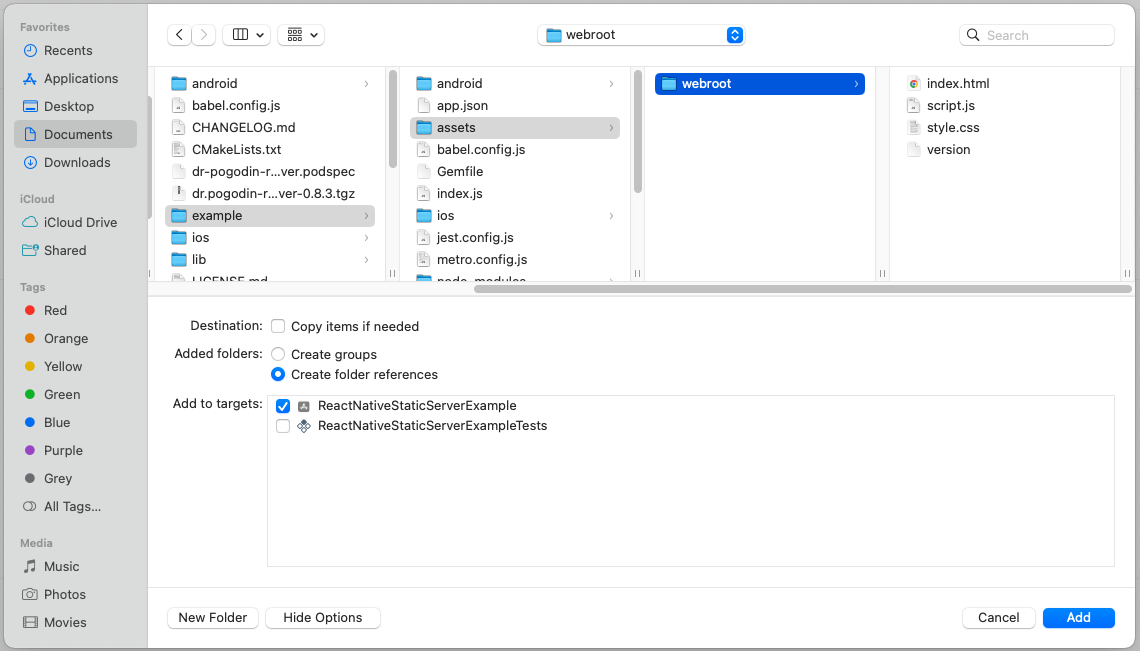
- The absolute path of `webroot` folder on the device, when added this way,
can be obtained as [`resolveAssetsPath('webroot')`][resolveAssetsPath()].
- **Mac Catalyst**
- The bundling for iOS explained above also bundles assets for Mac Catalyst;
beware, however, the bundled assets end up in a slightly different location
inside the bundle in this case (see details earlier in the [Getting Started]
section).
- **Windows**
- Edit `PropertySheet.props` file inside your app's
`windows/YOUR_PROJECT_NAME` folder, adding the following nodes into its root
`<Project>` element:
```xml
<ItemGroup>
<_CustomResource Include="..\..\assets\webroot\**\*">
<Link>webroot\%(RecursiveDir)%(FileName)%(Extension)</Link>
<DeploymentContent>true</DeploymentContent>
</_CustomResource>
</ItemGroup>
<Target Name="_CollectCustomResources" BeforeTargets="AssignTargetPaths">
<Message Text="Adding resource: %(_CustomResource.Identity) -> %(_CustomResource.Link)" />
<ItemGroup>
<None Include="@(_CustomResource)" />
</ItemGroup>
</Target>
```
### Support of Lighttpd Modules
[Support of Lighttpd Modules]: #support-of-lighttpd-modules
Much of the [Lighttpd]'s functionality is split into dedicated modules that should
be explicitly loaded and configured, as per
[Lighttpd documentation](https://redmine.lighttpd.net/projects/lighttpd/wiki/Docs_ConfigurationOptions).
Support of these modules within this library varies:
#### Core and Built-in Modules
[Core and Built-in Modules]: #core-and-built-in-modules
**BEWARE:** _The following listing of supported modules should be valid for
Android, iOS, and macOS target platforms; but most probably it is wrong for
Windows, as only `mod_dirlisting.dll` and `mod_webdav.dll` are currently
build and explicitly packed with the library. At the moment of writing this,
I do not remember in details, how exactly the Windows build of the library
and its modules is set up, and do not have an immediate interest to revisit it._
There are three core modules that [Lighttpd] loads by default, and that can be
further configured using the `extraConfig` option of [Server]'s [constructor()]:
- <span id="mod_dirlisting" />[mod_dirlisting] — creates an HTML page
listing the contents of the target directory.
- <span id="mod_indexfile" />[mod_indexfile] — list of files to try when
an HTTP request is for a directory.
- <span id="mod_staticfile" />[mod_staticfile] — is used to serve files.
For the following, built-in modules, the `extraConfig` option should be used
to both load (by listing them within the `server.modules` array), and configure
them:
- <span id="mod_access" />[mod_access] — it is used to deny access
to files.
- <span id="mod_alias" />[mod_alias] — it is used to specify a special
document root for a given url-subset; for example:
```ts
extraConfig: `
server.modules += ("mod_alias")
alias.url = ("/sample/url" => "/special/root/path")
`,
```
- <span id="mod_evhost" />[mod_evhost] — builds the document-root based on
a pattern which contains wildcards.
- <span id="mod_expire" />[mod_expire] — controls the Cache-Control:
max-age response header in HTTP/1.1 or later, and Expires response header in
HTTP/1.0.
- <span id="mod_fastcgi" />[mod_fastcgi] — provides an interface
to external programs that support the FastCGI interface.
- <span id="mod_redirect" />[mod_redirect] — it is used to specify
redirects for a set of URLs.
- <span id="mod_rewrite" />[mod_rewrite] — it can be used for interal
redirects, URL rewrites by the server, for example:
```ts
extraConfig: `
server.modules += ("mod_rewrite")
url.rewrite-once = ("/some/path/(.*)" => "/$1")
`,
// With such configuration, for example, a request
// GET "/some/path/file"
// will be redirected to
// GET "/file"
```
- <span id="mod_scgi" />[mod_scgi] — provides SCGI interface.
- <span id="mod_setenv" />[mod_setenv] — modifies request headers (from
clients), response headers (to clients), and the environment (for CGI);
for example:
```ts
extraConfig: `
server.modules += ("mod_setenv")
setenv.add-response-header = (
"My-Custom-Header" => "my-custom-value"
"Another-Custom-Header" => "another-custom-value"
)
setenv.add-request-header = ("X-Proxy" => "my.server.name")
`,
```
- <span id="mod_simple_vhost" />[mod_simple_vhost] — allows to host
multiple domain names on a single server.
#### Other Modules
[Other Modules]: #other-modules
All other modules require additional efforts to wire them into this library's
build process as optional components, which so far has been done only for
[mod_webdav](#mod_webdav) module:
- <span id="mod_webdav" />[mod_webdav] — provides [WebDAV], a set of HTTP
extensions that provides a framework allowing to create, change, and move
documents on a server. Essentially an easy way to enable `POST`, `PUT`,
_etc._ functionality for selected routes.
**BEWARE:** _As of now, props and locks are not supported._
**BEWARE:** _If you have set up the server to serve static assets bundled into
the app, the chances are your server works with a readonly location on most
platforms (in the case of Android it is anyway necessary to unpack bundled
assets to the regular filesystem, thus there the server might be serving
from a writeable location already). The easiest way around it is to use
[mod_alias] to point URLs configured for [mod_webdav]
to a writeable filesystem location, different from that of the served static
assets._
To enable [mod_webdav] in the library you need (1) configure your host RN app
to build Lighttpd with [mod_webdav] included; (2) opt-in to use it for selected
routes when you create [Server] instance, using `extraConfig` option.
1. **Android**: Edit `android/gradle.properties` file of your app, adding
this flag in there:
```gradle
ReactNativeStaticServer_webdav = true
```
**iOS**: Use environment variable `RN_STATIC_SERVER_WEBDAV=1` when
installing or updating the pods (_i.e._ when doing `pod install` or
`pod update`).
**macOS (Catalyst)**: The same as for iOS.
**Windows**: Does not require a special setup — the pre-compiled DLL
for [WebDAV] module is always packed with the library, and loaded if opted
for by [Server]'s [constructor()].
2. Use `extraConfig` option of [Server]'s [constructor()] to load [mod_webdav]
and use it for selected routes of the created server instance, for example:
```ts
extraConfig: `
server.modules += ("mod_webdav")
$HTTP["url"] =~ "^/dav/($|/)" {
webdav.activate = "enable"
}
`,
```
### Connecting to an Active Server in the Native Layer
[Connecting to an Active Server in the Native Layer]: #connecting-to-an-active-server-in-the-native-layer
When this library is used the regular way, the [Lighttpd] server in the native
layer is launched when the [.start()] method of a [Server] instance is triggered
on the JavaScript (TypeScript) side, and the native server is terminated when
the [.stop()] method is called on the JS side. In the JS layer we hold most of
the server-related information (`hostname`, `port`, `fileDir`, _etc._),
and take care of the high-level server control (_i.e._ the optional
pause / resume of the server when the app enters background / foreground).
If JS engine is restarted (or just related JS modules are reloaded) the regular
course of action is to explictly terminate the active server just before it,
and to re-create, and re-launch it afterwards. If it is not done, the [Lighttpd]
server will remain active in the native layer across the JS engine restart,
and it won't be possible to launch a new server instance after the restart,
as the library only supports at most one active [Lighttpd] server, and it
throws an error if the server launch command arrives to the native layer while
[Lighttpd] server is already active.
However, in response to
[the ticket #95](https://github.com/birdofpreyru/react-native-static-server/issues/95)
we provide a way to reuse an active native server across JS engine restarts,
without restarting the server. To do so you:
- Use [getActiveServerId()] method to check whether the native server is active
(if so, this method resolves to a non-_null_ ID).
- Create a new [Server] instance passing into its [constructor()] that server ID
as the `id` option, and [STATES]`.ACTIVE` as the `state` option. These options
(usually omitted when creating a regular [Server] instance) ensure that
the created [Server] instance is able to communicate with the already running
native server, and to correctly handle subsequent [.stop()] and [.start()]
calls. Beside these, it is up-to-you to set all other options to the values
you need (_i.e._ setting `id`, and `state` just «connects»
the newly created [Server] instance to the active native server, but it
does not restore any other information about the server — you should
restore or redefine it the way you see fit).
Note, this way it is possible to create multiple [Server] instances connected
to the same active native server. As they have the same `id`, they all will
represent the same server, thus calling [.stop()] and [.start()] commands
on any of them will operate the same server, and update the states of all
these JS server instances, without triggering the error related to
the «at most one active server a time» (though, it has not been
carefully tested yet).
## API Reference
### Server
[Server]: #server
```js
import Server from '@dr.pogodin/react-native-static-server';
```
The [Server] class represents individual server instances.
**BEWARE:** At most one server instance can be active
within an app at the same time. Attempts to start a new server instance will
result in the crash of that new instance. That means, although you may have
multiple instances of [Server] class created, you should not call [.start()]
method of an instance unless all other server instances are stopped. You may
use [getActiveServer()] function to check if there is any active server instance
in the app, including a starting or stopping instance.
#### constructor()
[constructor()]: #constructor
```ts
const server = new Server(options: object);
```
Creates a new, inactive server instance. The following settings are supported
within `options` argument:
- `fileDir` — **string** — The root path on target device from where
static assets should be served. Relative paths (those not starting with `/`,
neither `file:///`) are automatically prepended by the platform-dependent
base path (document directory on Android, or main bundle directory on other
platforms; see [resolveAssetsPath()]); however, empty `fileDir` value
is forbidden — if you really want to serve all content from the base
directory, provide it its absolute path explicitly.
- `errorLog` — **boolean** | [ErrorLogOptions] — Optional.
If set **true** (treated equivalent to `{}`) the server instance will
output basic server state and error logs from the Lighttpd native core
into the [ERROR_LOG_FILE]. Passing in an [ErrorLogOptions] object with
additional flags allows to add additional debug output from Lighttpd core
into the log file. Default value is **false**, in which case the server
instance only outputs basic server state and error logs into the OS
system log; note that enabling the file logging with this option disables
the logging into the system log.
**BEWARE:** If you opt for file logging with this option, it is up to you
to control and purge the [ERROR_LOG_FILE] as needed.
- `extraConfig` — **string** — Optional. If given, it should be
a valid piece of
[Lighttpd configuration](https://redmine.lighttpd.net/projects/lighttpd/wiki/Docs_Configuration),
and it will be appended to the base Lighttpd config generated by this
library according to the other server options.
- `hostname` — **string** — Optional. Sets the address for server
to bind to.
- By default, when `nonLocal` option is **false**, `hostname` is set equal
"`127.0.0.1`" — the server binds to the loopback address,
and it is accessible only from within the host app.
- If `nonLocal` option is **true**, and `hostname` was not given, it is
initialized with empty string, and later assigned to a library-selected
non-local IP address, at the first launch of the server.
- If `hostname` value is provided, the server will bind to the given address,
and it will ignore `nonLocal` option.
_NOTE: In future we'll deprecate `nonLocal` option, and instead will use
special `hostname` values to ask the library to automatically select
appropriate non-local address._
- `id` — **number** — Optional. Allows to enforce a specific ID,
used to communicate with the server instance within the Native layer, thus
it allows to re-connect to an existing native server instance.
See «[Connecting to an Active Server in the Native Layer]»
for details. By default, an `id` is selected by the library.
- `nonLocal` — **boolean** — Optional. By default, if `hostname`
option was not provided, the server starts at the "`127.0.0.1`" (loopback)
address, and it is only accessible within the host app.
With this flag set **true** the server will be started on an IP address
also accessible from outside the app.
_NOTE: When `hostname` option is provided,
the `nonLocal` option is ignored. The plan is to deprecate `nonLocal` option
in future, in favour of special `hostname` values supporting the current
`nonLocal` functionality._
- `port` — **number** — Optional. The port at which to start the server.
If 0 (default) an available port will be automatically selected.
- `state` — [STATES] — Optional. Allows to enforce the initial
server state value, which is necessary [when connecting to an existing
native server instance][Connecting to an Active Server in the Native Layer].
Note, it only influence the logic behind subsequent [.start()] and [.stop()]
calls, _i.e._ the constructor does not attempt to put the server in this
state, nor does it check the value is consistent with the active server,
if any, in the native layer. By default, the state is initialized
to `STATES.INACTIVE`.
- `stopInBackground` — **boolean** — Optional.
By default, the server continues to work as usual when its host app enters
the background / returns to the foreground (better say, by default, it does
not attempt anything special in these situations, but the host OS may kill or
restrict it in the background forcefully, depending on OS and app configs).
With this flag set **true**, an active server will stop automatically each
time the app enters the background, and then automatically launch again each
time the app re-enters the foreground. Note that calling [.stop()] explicitly
will stop the server for good — no matter `stopInBackground` value,
once [.stop()] is called the server won't restart automatically unless you
explicitly [.start()] it again.
To faciliate debugging, when a server starts / stops automatically because of
the `stopInBackground` option and app transitions between the foreground and
the background; the corresponding `STARTING` and `STOPPING` messages emitted
to the server state listeners (see [.addStateListener()]) will have their
`details` values set equal "_App entered background_",
and "_App entered foreground_" strings.
- **DEPRECATED**: `webdav` — **string[]** — It still works, but it
will be removed in future versions. Instead of it use `extraConfig` option to
enable and configure [WebDAV] as necessary (see [Enabling WebDAV module]).
#### .addStateListener()
[.addStateListener()]: #addstatelistener
```ts
server.addStateListener(listener: StateListener): Unsubscribe;
// where StateListener and Unsubscribe signatures are:
type StateListener = (state: string, details: string, error?: Error) => void;
type UnsubscribeFunction = () => void;
```
Adds given state listener to the server instance. The listener will be called
each time the server state changes, with the following arguments:
- `state` — **string** — The new state, one of [STATES] values.
- `details` — **string** — Additional details about the state change,
if any can be provided; an empty string otherwise.
- `error` — [Error] — If server instance crashes, this will be
the related error object; otherwise undefined.
This method returns "unsubscribe" function, call it to remove added
listener from the server instance.
#### .removeAllStateListeners()
[.removeAllStateListeners()]: #removeallstatelisteners
```ts
server.removeAllStateListeners()
```
Removes all state listeners connected to the server instance.
#### .removeStateListener()
[.removeStateListener()]: #removestatelistener
```ts
server.removeStateListener(listener: StateListener)
```
Removes given state `listener` if it is connected to the server instance;
does nothing otherwise.
#### .start()
[.start()]: #start
```ts
server.start(details?: string): Promise<string>
```
Starts [Server] instance. It returns a [Promise], which resolves
to the server's [origin][.origin] once the server reaches `ACTIVE`
[state][.state], thus becomes ready to handle requests. The promise rejects
in case of start failure, _i.e._ if server ends up in the `CRASHED` state before
becoming `ACTIVE`.
This method is safe to call no matter the current state of this server instance.
If it is `ACTIVE`, the method just resolves to [origin][.origin] right away;
if `CRASHED`, it attempts a new start of the server; otherwise (`STARTING` or
`STOPPING`), it will wait until the server reaches one of resulting states
(`ACTIVE`, `CRASHED`, or `INACTIVE`), then acts accordingly.
The optional `details` argument, if provided, will be added to
the `STARTING` message emitted to the server state change listeners
(see [.addStateListener()]) in the beginning of this method, if the server
launch is necessary.
**BEWARE:** With the current library version, at most one server instance can be
active within an app at any time. Calling [.start()] when another server instance
is running will result in the start failure and `CRASHED` state. See also
[getActiveServer()].
#### .stop()
[.stop()]: #stop
```ts
server.stop(details?: string): Promise<>
```
Gracefully shuts down the server. It returns a [Promise] which resolve once
the server is shut down, _i.e._ reached `INACTIVE` [state](.state). The promise
rejects if an error happens during shutdown, and server ends up in the `CRASHED`
state.
If server was created with `pauseInBackground` option, calling
`.stop()` will also ensure that the stopped server won't be restarted when
the app re-enters foreground. Once stopped, the server only can be re-launched
by an explicit call of [.start()].
It is safe to call this method no matter the current state of this server.
If it is `INACTIVE` or `CRASHED`, the call will just cancel automatic restart
of the server, if one is scheduled by `pauseInBackground` option, as mentioned
above. If it is `STARTING` or `STOPPING`, this method will wait till server
reaching another state (`ACTIVE`, `INACTIVE` or `CRASHED`), then it will act
accordingly.
The optional `details` argument, if provided, will be added to
the `STARTING` message emitted to the server state change listeners
(see [.addStateListener()]) in the beginning of this method, if the server
launch is necessary.
#### .errorLog
[.errorLog]: #errorlog
```ts
server.errorLog: false | ErrorLogOptions;
```
Readonly property. It holds the error log configuration (see [ErrorLogOptions]),
opted for at the time of this server instance [construction][constructor()].
Note, it will be `{}` if `errorLog` option of [constructor()] was set **true**;
and it will be **false** (default) if `errorLog` option was omitted in
the [constructor()] call.
#### .fileDir
[.fileDir]: #filedir
```ts
server.fileDir: string;
```
Readonly property. It holds `fileDir` value — the absolute path
on target device from which static assets are served by the server.
#### .hostname
[.hostname]: #hostname
```ts
server.hostname: string;
```
Readonly property. It holds the hostname used by the server. If no `hostname`
value was provided to the server's [constructor()], this property will be:
- Without `nonLocal` option it will be equal `127.0.0.1` (the loopback address)
from the very beginning;
- Otherwise, it will be an empty string until the first launch of the server
instance, after which it will become equal to the IP address selected by
the server automatically, and won't change upon subsequent server re-starts.
#### .id
[.id]: #id
```ts
server.id: number;
```
Readonly. It holds unique ID number of the server instance, which is used
internally for communication between JS an native layers, and also exposed
to the library consumer, for debug.
**BEWARE:** In the current library implementation, this ID is generated simply
as `Date.now() % 65535`, which is not random, and not truly unique —
the ID collision probability across different server instances is high.
This should be fine as long as you don't create many server instances in your
app, and don't rely on the uniqueness of these IDs across different app launches.
Switching to real UUIDs is on radar, but not the highest priority for now.
#### .nonLocal
[.nonLocal]: #nonlocal
```ts
server.nonLocal: boolean;
```
Readonly property. It holds `nonLocal` value provided to server [constructor()].
#### .origin
[.origin]: #origin
```ts
server.origin: string;
```
Readonly property. It holds server origin. Initially it equals empty string,
and after the first launch of server instance it becomes equal to its origin,
_i.e._ "`http://HOSTNAME:PORT`", where `HOSTNAME` and `PORT` are selected
hostname and port, also accessible via [.hostname] and [.port] properties.
#### .port
[.port]: #port
```ts
server.port: number;
```
Readonly property. It holds the port used by the server. Initially it equals
the `port` value provided to [constructor()], or 0 (default value), if it was
not provided. If it is 0, it will change to the automatically selected port
number once the server is started the first time. The selected port number
does not change upon subsequent re-starts of the server.
#### .state
[.state]: #state
```ts
server.state: STATES;
```
Readonly property. It holds current server state, which is one of [STATES]
values. Use [.addStateListener()] method to watch for server state changes.
#### .stopInBackground
[.stopInBackground]: #stopinbackground
```ts
server.stopInBackground: boolean;
```
Readonly property. It holds `stopInBackground` value provided to [constructor()].
### extractBundledAssets()
**DEPRECATED!** _Use instead [copyFileAssets()] from
the [@dr.pogodin/react-native-fs] library v2.24.1 and above —
it does the same job in a more efficient way (it is implemented entirely
in the native layer, thus does not incur the overhead of recurrent
communication between the native and JS layers during the operation)._
_The [extractBundledAssets()], with its original implementation, will be kept
around for backward compatibility, but it will be removed in future!_
[extractBundledAssets()]: #extractbundledassets
```ts
import {extractBundledAssets} from '@dr.pogodin/react-native-static-server';
extractBundledAssets(into, from): Promise<>;
```
Extracts bundled assets into the specified regular folder, preserving asset
folder structure, and overwriting any conflicting files in the destination.
This is an Android-specific function; it does nothing on other platforms.
**Arguments**
- `into` — **string** — Optional. The destination folder for
extracted assets. By default assets are extracted into the app's document
folder.
- `from` — **string** — Optional. Relative path to the root asset
folder, starting from which all assets contained in that folder and its
sub-folders will be extracted into the destination folder, preserving asset
folder structure. By default all bundled assets are extracted.
**Returns** [Promise] which resolves once the extraction is completed.
### getActiveServer()
[getActiveServer()]: #getactiveserver
```ts
import {getActiveServer} from '@dr.pogodin/react-native-static-server';
getActiveServer(): Server | undefined;
```
Returns the currently active, starting, or stopping [Server] instance, if any
exist in the app. It does not return, however, any inactive server instance
which has been stopped automatically because of `stopInBackground` option, when
the app entered background, and might be automatically started in future if
the app enters foreground again prior to an explicit [.stop()] call for that
instance.
**NOTE:**
- The result of this function is based on the TypeScript layer data
(that's why it is synchronous), in contrast to the [getActiveServerId()]
function below, which calls into the Native layer, and returns ID of the active
server based on that.
- The feature «[Connecting to an Active Server in the Native Layer]»
creates a possibility to have several active server instances in TS layer, all
connected to the same active server on the native side. For this reason we also
provide [getActiveServerSet()] function, which returns a set of all active
server instances on TS side. [getActiveServer()] just returns the first server
instance from that set.
### getActiveServerId()
[getActiveServerId()]: #getactiveserverid
```ts
import {getActiveServerId} from '@dr.pogodin/react-native-static-server';
getActiveServerId(): Promise<number | null>;
```
Returns ID of the currently active, starting, or stopping server instance,
if any exist in the Native layer.
This function is provided in response to
[the ticket #95](https://github.com/birdofpreyru/react-native-static-server/issues/95),
to allow «[Connecting to an Active Server in the Native Layer]».
The ID returned by this function can be passed in into [Server] instance
[constructor()] to create server instance communicating to the existing native
layer server.
**NOTE:** It is different from [getActiveServer()] function above, which
returns the acurrently active, starting, or stopping [Server] instance based on
TypeScript layer data.
### getActiveServerSet()
[getActiveServerSet()]: #getactiveserverset
```ts
import {getActiveServer} from '@dr.pogodin/react-native-static-server';