@beauraines/rtm-cli
Version:
181 lines (123 loc) • 7.67 kB
Markdown
Remember The Milk Command Line Interface
========================================
**node module:** [rtm-cli](https://www.npmjs.com/package/@beauraines/rtm-cli)<br />
**GitHub repo:** [beauraines/rtm-cli](https://github.com/beauraines/rtm-cli)
❗❗ **Resolved login issue blocking new users** ❗❗
❗❗ **Adds an output format to convert tasks to [Obsidian Tasks](https://publish.obsidian.md/tasks/Getting+Started/Getting+Started) format** ❗❗
---
This Node module provides a command line interface, written in JavaScript,
for the popular [Remember the Milk](https://www.rememberthemilk.com/) task list
manager.
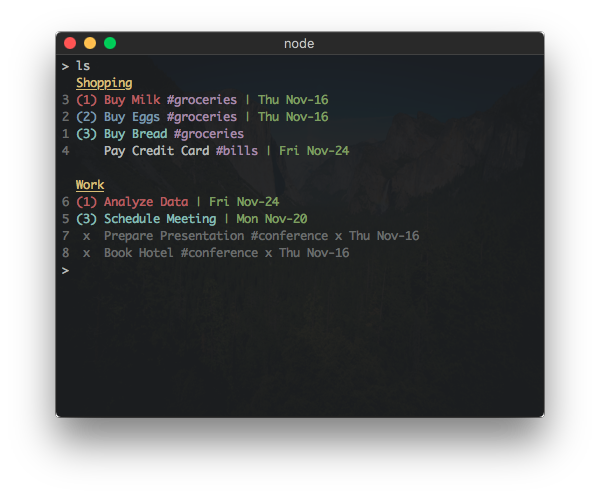
This is a fork of [dwaring87/rtm-cli](https://github.com/dwaring87/rtm-cli) so that I can maintain, modernize and add features. Your contributions are welcome!
This fork and [beauraines/rtm-api](https://github.com/beauraines/rtm-api) includes
1. performance improvements
2. rewriting to use Promises
3. additional task attributes like subtasks and recurrence
## Installation
### NPM
If you already have [Node](https://nodejs.org) installed, this program can be
installed via `npm`:
```shell
npm install -g @beauraines/rtm-cli
```
which will install the executable `rtm` into your `$PATH`.
**Note:** RTM CLI requires Node version >= 7.5.0
### Executable Releases
Standalone executables, that do not require a pre-existing installation of Node,
are available in the [Releases](https://github.com/dwaring87/rtm-cli/releases)
page. **I do not intend to continue this in my fork.**
## Usage
The main usage of the program:
```
Usage: rtm [options] <command> [command arguments]
Options:
-V, --version output the version number
-p, --plain do not use styled/colored text (overrides --color)
-c, --color force the use of styled/colored text
-s, --status toggle the display of the status spinner
-x, --completed [value] set display of completed tasks (true/false/number of days)
-d, --hideDue [value] hide tasks due more than n days from today (false/number of days)
-f, --config [file] specify configuration file
-v, --verbose print stack traces on errors
-h, --help output usage information
Commands:
add|a [task...] Add a new Task
addList|al [name] [filter...] Add a new List or Smart List
addNote|addNotes [index] [title] [body] Add note or prompt for the title and body of the note. If only an index and text are included the text will be the body of the note without a title
addTags|at [index] [tags...] Add one or more tags to a Task
archiveList|arl [name...] Archive a List
comp|x [indices...] Complete one or more Tasks
decPri|- [indices...] Decrease the Priority of one or more Tasks
due [index] [due...] Set the Due Date of a Task
edit [index] [name...] Change the name of a Task
incPri|+ [indices...] Increase the Priority of one or more Tasks
lists|l Display all lists
login Add RTM User information
logout Remove RTM User information
ls [filter...] List all tasks sorted first by list then by priority
lsd [filter...] List all tasks sorted first by due date then by priority
lsp [filter...] List all tasks sorted first by priority then due date
move|mv [index] [list...] Move Task to a different List
notes [indices...] Display the associated Notes of a Task
planner [options] [filter...] Display tasks in a weekly planner (--start: sun, mon, today)
postpone|pp [indices...] Postpone one or more Tasks
pri|p [index] [priority] Change Task Priority
remove|rm [indices...] Remove one or more Tasks
removeList|rml [name...] Remove a List
removeTags|rmt [index] [tags...] Remove one or more tags from a Task
renameList|mvl [oldName] [newName] Rename a List
reset Reset cached task indices
setUrl|su [index] [url] Set the URL of a Task
start [index] [start...] Set the Start Date of a Task
tags|t Display all tags
task|tasks [indices...] Display the Task details
uncomp|unc [indices...] Mark one or more Tasks as not complete
url [options] [indices...] Display the associated URL of a Task
whoami Display RTM user information
overdue Display incomplete tasks that are overdue
obsidian [indices...] Output tasks in Obsidian Task syntax. Export URLs and notes to configured directory (defaults to system temp dir)
```
### Interactive Mode
An interactive mode is started when no commands are given to `rtm`, which
allows commands to be given sequentially.
Use the `quit` command to leave the interactive mode.
### Full Usage Information
For full documentation on the usage of the built-in commands and options,
see the [Command Reference](https://github.com/dwaring87/rtm-cli/wiki/Command-Reference).
## Configuration
RTM CLI has a number of properties that can be configured using a separate JSON configuration
file. The default user configuration file is located at `$HOME/.rtm.json` but can be changed
using the `--config <file>` option.
Currently, the configuration can customize:
- the formats of displayed dates
- styled text output for different task properties
- the display of completed tasks
- the display of tasks with due dates in the future
- **custom aliases** for existing commands
- these are useful for applying commonly used [RTM advanced search](https://www.rememberthemilk.com/help/answer/basics-search-advanced) filters to display commands
- obsidianTaskDir: path to a directory where the `obsidian` command writes URLs and notes (defaults to the system temporary directory)
For full documentation on the configuration properties, see the
[Configuration Reference](https://github.com/dwaring87/rtm-cli/wiki/Configuration-Reference).
## Plugins
RTM CLI supports adding additional commands through plugins.
**Available Plugins:**
- Export - [rtm-plugin-export](https://github.com/dwaring87/rtm-plugin-export)
- Provides an `export` command to export tasks to a CSV file
For information on installing plugins, see the
[Plugin Reference](https://github.com/dwaring87/rtm-cli/wiki/Plugin-Reference).
For information on creating commands, see the **Creating Commands** section
in the [Project Wiki](https://github.com/dwaring87/rtm-cli/wiki#creating-commands).
### Obsidian Usage Example
Will create output in the [Obsidian Tasks](https://publish.obsidian.md/tasks/Getting+Started/Getting+Started) format. Currently, this only works for incomplete tasks.
For example, `rtm ls icemaker` would output
```
Personal
4330 (1) descale icemaker 🔁 | Tue Dec-16
```
and `rtm obsidian 4330` would output
`- [ ] descale icemaker ⌛30m ➕ 2025-09-28 📅 2025-12-16 🔁 every 3 months 🔺 #Personal 🆔 4330`
which could be written to a file in your Obsidian Vault.
```shell
rtm ls due:today | cut -wf1 | sort | xargs rtm obsidian >> ~/LocalDocs/Test/Tasks/rtm.md
```