@bapunhansdah/pptxgenjs
Version:
Enhanced fork of PptxGenJS with full animation support and PowerPoint transition effects.
344 lines (237 loc) • 12.2 kB
Markdown
# PptxGenJS





## 🚀 Features
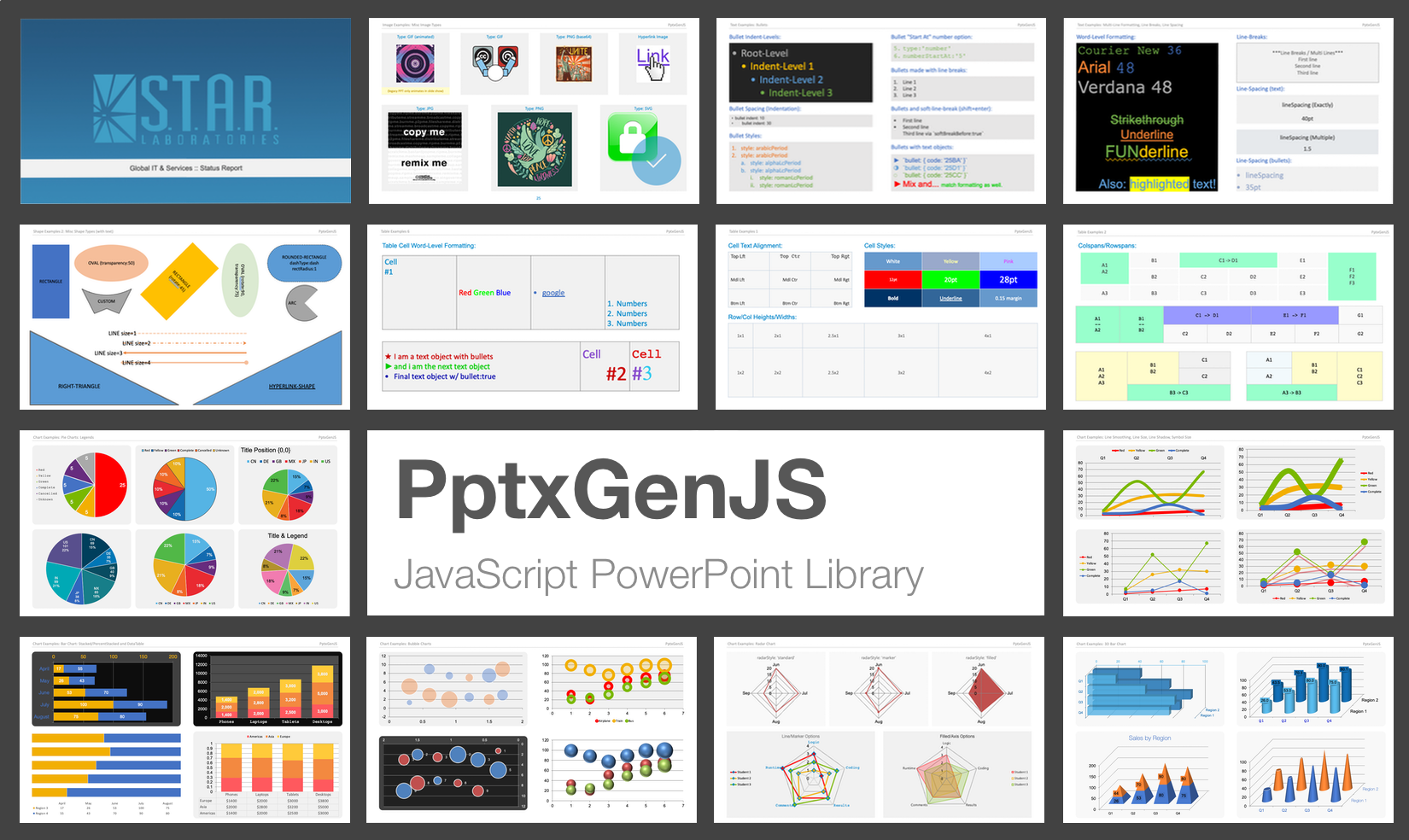
**PptxGenJS lets you generate professional PowerPoint presentations in JavaScript - directly from Node, React, Vite, Electron, or even the browser.**
The library outputs standards-compliant Open Office XML (OOXML) files compatible with:
- ✅ Microsoft PowerPoint
- ✅ Apple Keynote
- ✅ LibreOffice Impress
- ✅ Google Slides (via import)
Design custom slides, charts, images, tables, and templates programmatically - no PowerPoint install or license required.
### Works Everywhere
- Supports every major modern browser - desktop and mobile
- Seamlessly integrates with **Node.js**, **React**, **Angular**, **Vite**, and **Electron**
- Compatible with **PowerPoint**, **Keynote**, **LibreOffice**, and other OOXML apps
### Full-Featured
- Create all major slide objects: **text, tables, shapes, images, charts**, and more
- Add professional **animations** to any object - entrance, emphasis, exit, and path animations
- Define custom **Slide Masters** for consistent academic or corporate branding
- Supports **SVGs**, **animated GIFs**, **YouTube embeds**, **RTL text**, and **Asian fonts**
### Simple & Powerful
- Ridiculously easy to use - create a presentation in 4 lines of code
- Full **TypeScript definitions** for autocomplete and inline documentation
- Includes **75+ demo slides** covering every feature and usage pattern
### Export Your Way
- Instantly download `.pptx` files from the browser with proper MIME handling
- Export as **base64**, **Blob**, **Buffer**, or **Node stream**
- Supports compression and advanced output options for production use
### HTML to PowerPoint Magic
- Convert any HTML `<table>` to one or more slides with a single line of code → [Explore the HTML-to-PPTX feature](#html-to-powerpoint-magic)
## 🌐 Live Demos
Try PptxGenJS right in your browser - no setup required.
- [Basic Slide Demo](https://gitbrent.github.io/PptxGenJS/demos/) - Build a basic presentation in seconds
- [Full Feature Showcase](https://gitbrent.github.io/PptxGenJS/demo/browser/index.html) - Explore every available feature
> Perfect for testing compatibility or learning by example - all demos run 100% in the browser.
## 📦 Installation
Choose your preferred method to install **PptxGenJS**:
### Quick Install (Node-based)
```bash
npm install pptxgenjs
```
```bash
yarn add pptxgenjs
```
### CDN (Browser Usage)
Use the bundled or minified version via [jsDelivr](https://www.jsdelivr.com/package/gh/gitbrent/pptxgenjs):
```html
<script src="https://cdn.jsdelivr.net/gh/gitbrent/pptxgenjs/dist/pptxgen.bundle.js"></script>
```
> Includes the sole dependency (JSZip) in one file.
📁 Advanced: Separate Files, Direct Download
Download from GitHub: [Latest Release](https://github.com/gitbrent/PptxGenJS/releases/latest)
```html
<script src="PptxGenJS/libs/jszip.min.js"></script>
<script src="PptxGenJS/dist/pptxgen.min.js"></script>
```
## 🚀 Universal Compatibility
PptxGenJS works seamlessly in **modern web and Node environments**, thanks to dual ESM and CJS builds and zero runtime dependencies. Whether you're building a CLI tool, an Electron app, or a web-based presentation builder, the library adapts automatically to your stack.
### Supported Platforms
- **Node.js** – generate presentations in backend scripts, APIs, or CLI tools
- **React / Angular / Vite / Webpack** – just import and go, no config required
- **Electron** – build native apps with full filesystem access and PowerPoint output
- **Browser (Vanilla JS)** – embed in web apps with direct download support
- **Serverless / Edge Functions** – use in AWS Lambda, Vercel, Cloudflare Workers, etc.
> _Vite, Webpack, and modern bundlers automatically select the right build via the `exports` field in `package.json`._
### Builds Provided
- **CommonJS**: [`dist/pptxgen.cjs.js`](./dist/pptxgen.cjs.js)
- **ES Module**: [`dist/pptxgen.es.js`](./dist/pptxgen.es.js)
## 📖 Documentation
### Quick Start Guide
PptxGenJS PowerPoint presentations are created via JavaScript by following 4 basic steps:
#### Angular/React, ES6, TypeScript
```typescript
import pptxgen from "pptxgenjs";
// 1. Create a new Presentation
let pres = new pptxgen();
// 2. Add a Slide
let slide = pres.addSlide();
// 3. Add one or more objects (Tables, Shapes, Images, Text and Media) to the Slide
let textboxText = "Hello World from PptxGenJS!";
let textboxOpts = { x: 1, y: 1, color: "363636" };
slide.addText(textboxText, textboxOpts);
// 4. Save the Presentation
pres.writeFile();
```
#### Script/Web Browser
```javascript
// 1. Create a new Presentation
let pres = new PptxGenJS();
// 2. Add a Slide
let slide = pres.addSlide();
// 3. Add one or more objects (Tables, Shapes, Images, Text and Media) to the Slide
let textboxText = "Hello World from PptxGenJS!";
let textboxOpts = { x: 1, y: 1, color: "363636" };
slide.addText(textboxText, textboxOpts);
// 4. Save the Presentation
pres.writeFile();
```
That's really all there is to it!
## ✨ Add Professional Animations
Bring your presentations to life with entrance, emphasis, exit, and path animations - just like PowerPoint's built-in effects.
### Basic Animation Example
```javascript
let pptx = new PptxGenJS();
let slide = pptx.addSlide();
// Add text with a simple fade-in animation
slide.addText("Hello World!", {
x: 1,
y: 1,
fontSize: 36,
animation: "fadein"
});
// Add a shape with a fly-in animation from the left
slide.addShape(pptx.shapes.RECTANGLE, {
x: 2,
y: 3,
w: 3,
h: 2,
fill: { color: "4472C4" },
animation: {
type: "flyin",
direction: "left",
duration: 1000
}
});
pptx.writeFile();
```
### Advanced Animation Configuration
```javascript
// Image with custom animation timing
slide.addImage({
path: "logo.png",
x: 1,
y: 1,
w: 2,
h: 2,
animation: {
type: "zoom",
direction: "slideCenter",
duration: 1500,
delay: 500,
trigger: "afterPrevious"
}
});
// Table with emphasis animation
slide.addTable(tableData, {
x: 1,
y: 3,
w: 8,
animation: {
type: "pulse",
duration: 800
}
});
```
### Available Animation Types
**Entrance Animations:**
- `appear`, `fadein`, `flyin`, `floatin`, `split`, `wipe`, `shape`, `wheel`, `randombars`, `zoom`, `growandturn`, `swivel`, `bounce`
**Emphasis Animations:**
- `pulse`, `colorpulse`, `teeter`, `spin`, `growshrink`, `desaturate`, `darken`, `lighten`, `transparency`, `objectcolor`, `complementarycolor`, `linecolor`, `fillcolor`
**Exit Animations:**
- `disappear`, `fadeout`, `flyout`, `floatout`, `splitexit`, `wipeexit`, `shapeexit`, `wheelexit`, `randombarsexit`, `shrinkandturn`, `zoomexit`, `swivelexit`, `bounceexit`
**Path Animations:**
- `pathdown`, `patharcdown`, `pathturnright`, `pathcircle`, `pathzigzag`
### Animation Options
Many animations support additional options:
```javascript
// Direction options (for fly, float, split, wipe, zoom)
animation: { type: "flyin", direction: "top" | "bottom" | "left" | "right" | "topLeft" | "topRight" | "bottomLeft" | "bottomRight" }
// Shape options (for shape animations)
animation: { type: "shape", shape: "circle" | "box" | "diamond" | "plus", direction: "in" | "out" }
// Wheel spokes (for wheel animations)
animation: { type: "wheel", spokes: 1 | 2 | 3 | 4 | 8 }
// Spin options
animation: { type: "spin", direction: "clockwise" | "counterClockwise", amount: "quarterSpin" | "halfSpin" | "fullSpin" | "twoSpins" }
// Color options (for color animations)
animation: { type: "colorpulse", color: "FFFF00" }
// Transparency levels
animation: { type: "transparency", level: 25 | 50 | 75 | 100 }
```
### Timing and Triggers
Control when animations play:
```javascript
animation: {
type: "fadein",
duration: 1000, // Animation duration in milliseconds
delay: 500, // Delay before animation starts
trigger: "onClick" // "onClick" | "withPrevious" | "afterPrevious"
}
```
[View Full Animation DEMO](https://pptxgenjs-animation.vercel.app)
## 💥 HTML-to-PowerPoint Magic
Convert any HTML `<table>` into fully formatted PowerPoint slides - automatically and effortlessly.
```javascript
let pptx = new pptxgen();
pptx.tableToSlides("tableElementId");
pptx.writeFile({ fileName: "html2pptx-demo.pptx" });
```
Perfect for transforming:
- Dynamic dashboards and data reports
- Exportable grids in web apps
- Tabular content from CMS or BI tools
[View Full Docs & Live Demo](https://gitbrent.github.io/PptxGenJS/html2pptx/)
## 📚 Full Documentation
Complete API reference, tutorials, and integration guides are available on the official docs site: [https://gitbrent.github.io/PptxGenJS](https://gitbrent.github.io/PptxGenJS)
## 🛠️ Issues / Suggestions
Please file issues or suggestions on the [issues page on github](https://github.com/gitbrent/PptxGenJS/issues/new), or even better, [submit a pull request](https://github.com/gitbrent/PptxGenJS/pulls). Feedback is always welcome!
When reporting issues, please include a code snippet or a link demonstrating the problem.
Here is a small [jsFiddle](https://jsfiddle.net/gitbrent/L1uctxm0/) that is already configured and uses the latest PptxGenJS code.
## 🆘 Need Help?
Sometimes implementing a new library can be a difficult task and the slightest mistake will keep something from working. We've all been there!
If you are having issues getting a presentation to generate, check out the code in the `demos` directory. There
are demos for browser, node and, react that contain working examples of every available library feature.
- Use a pre-configured jsFiddle to test with: [PptxGenJS Fiddle](https://jsfiddle.net/gitbrent/L1uctxm0/)
- [View questions tagged `PptxGenJS` on StackOverflow](https://stackoverflow.com/questions/tagged/pptxgenjs?sort=votes&pageSize=50). If you can't find your question, [ask it yourself](https://stackoverflow.com/questions/ask?tags=PptxGenJS) - be sure to tag it `pptxgenjs`.
- Ask your AI pair programmer! All major LLMs have ingested the pptxgenjs library and have the ability to answer functionality questions and provide code.
## 🙏 Contributors
Thank you to everyone for the contributions and suggestions! ❤️
Special Thanks:
- [Dzmitry Dulko](https://github.com/DzmitryDulko) - Getting the project published on NPM
- [Michal Kacerovský](https://github.com/kajda90) - New Master Slide Layouts and Chart expertise
- [Connor Bowman](https://github.com/conbow) - Adding Placeholders
- [Reima Frgos](https://github.com/ReimaFrgos) - Multiple chart and general functionality patches
- [Matt King](https://github.com/kyrrigle) - Chart expertise
- [Mike Wilcox](https://github.com/clubajax) - Chart expertise
- [Joonas](https://github.com/wyozi) - [react-pptx](https://github.com/wyozi/react-pptx)
PowerPoint shape definitions and some XML code via [Officegen Project](https://github.com/Ziv-Barber/officegen)
## 🌟 Support the Open Source Community
If you find this library useful, consider contributing to open-source projects, or sharing your knowledge on the open social web. Together, we can build free tools and resources that empower everyone.
[@gitbrent@fosstodon.org](https://fosstodon.org/@gitbrent)
## 📜 License
Copyright © 2015-present [Brent Ely](https://github.com/gitbrent/)
[MIT](https://github.com/gitbrent/PptxGenJS/blob/master/LICENSE)