@asasugar-use/custom-json2excel
Version:
✌传入json,可自定义表格标题名称和列数、头部名称、过滤列和绑定生成开始与成功的回调函数
524 lines (460 loc) • 11.5 kB
Markdown
# @asasugar-use/custom-json2excel
## npm 账号切换新账号了,重新发包,包名更新@asasugar-use/custom-json2excel
## 更新内容
### 3.1.9
- 默认导出 `Json2excel` 类调整为具名导出 `JsonToExcel` 类和 `excelToJson` 方法
- 更新 `example` ,react 示例和 html 示例
### 3.1.8
- 新增 `sheetToJson` 方法,支持导入 excel 输出json功能
- 使用 `rslib` 重构打包,增加注释
- 更新 `example` ,react 示例和 html 示例
### 3.1.7
- 更新包名@asasugar-use/custom-json2excel 和文档
### v3.1.6
- 修复 0 开头的字符转化为 excel 被过滤的问题[#19](https://github.com/asasugar/custom-json2excel/issues/19)
### v3.1.5
- 修复打包后的兼容问题
- 修复 keyMap 问题
### v3.1.4
- 新增 `scope` 参数
- 新增 `onError` 回调函数
- bug 修复
### v3.1.3
- 重构 ts 代码,分别导出 cjs, esm, umd 模块包
### v3.1.2
- [修复导出数据重复为最后一项的 bug](https://github.com/asasugar/custom-json2excel/issues/14)
### v3.1.1
- 修复 ie 下载问题
- 修复未指定 kepMap 导致的 filters 失效问题
- 增加了`orderedKey`字段,可指定列顺序
## Plugin setup
```
yarn add @asasugar-use/custom-json2excel
or
npm install @asasugar-use/custom-json2excel
or
pnpm add @asasugar-use/custom-json2excel
```
## How to use?
### 方法一
> (示例: example/react/src/router/antd-layout.tsx)
1、直接转化 json:
```js
import { JsonToExcel } from '@asasugar-use/custom-json2excel';
const data = [
{
name: '哈哈',
age: 1,
sex: '男',
companyName: '公司1',
companyAddress: '公司地址1',
},
{
name: '呵呵',
age: 2,
sex: '女',
companyName: '公司2',
companyAddress: '公司地址2',
},
{
name: '嘻嘻',
age: 3,
sex: '男',
companyName: '公司3',
companyAddress: '公司地址3',
},
{
name: '啦啦',
age: 4,
sex: '女',
companyName: '公司4',
companyAddress: '公司地址4',
},
];
const json2excel = new JsonToExcel({ data });
json2excel.generate();
```
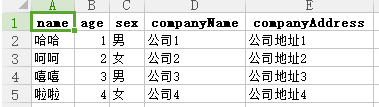
2、自定义头部无需过滤字段时的使用方式:
```js
import { JsonToExcel } from '@asasugar-use/custom-json2excel';
const data = [
{
name: '哈哈',
age: 1,
sex: '男',
companyName: '公司1',
companyAddress: '公司地址1',
},
{
name: '呵呵',
age: 2,
sex: '女',
companyName: '公司2',
companyAddress: '公司地址2',
},
{
name: '嘻嘻',
age: 3,
sex: '男',
companyName: '公司3',
companyAddress: '公司地址3',
},
{
name: '啦啦',
age: 4,
sex: '女',
companyName: '公司4',
companyAddress: '公司地址4',
},
];
const keyMap = {
name: '姓名',
age: '年龄',
sex: '性别',
companyName: '公司名称',
companyAddress: '公司地址',
};
const json2excel = new JsonToExcel({ data, keyMap });
json2excel.generate();
```
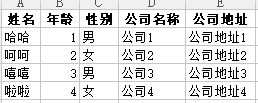
3、需要按照字段顺序返回表格列时的使用方式:
```js
import { JsonToExcel } from '@asasugar-use/custom-json2excel';
const data = [
{
name: '哈哈',
age: 1,
sex: '男',
companyName: '公司1',
companyAddress: '公司地址1',
},
{
name: '呵呵',
age: 2,
sex: '女',
companyName: '公司2',
companyAddress: '公司地址2',
},
{
name: '嘻嘻',
age: 3,
sex: '男',
companyName: '公司3',
companyAddress: '公司地址3',
},
{
name: '啦啦',
age: 4,
sex: '女',
companyName: '公司4',
companyAddress: '公司地址4',
},
];
const keyMap = {
name: '姓名',
age: '年龄',
sex: '性别',
companyName: '公司名称',
companyAddress: '公司地址',
};
const orderedKey = ['sex', 'companyName', 'name'];
const json2excel = new JsonToExcel({ data, keyMap, orderedKey });
json2excel.generate();
// data会转化成=>
[
{
性别: '男',
公司名称: '公司1',
姓名: '哈哈',
},
{
性别: '女',
公司名称: '公司2',
姓名: '呵呵',
},
{
性别: '男',
公司名称: '公司3',
姓名: '嘻嘻',
},
{
性别: '女',
公司名称: '公司4',
姓名: '啦啦',
},
];
```
4、需要过滤字段时的使用方式:
```js
import { JsonToExcel } from '@asasugar-use/custom-json2excel';
const data = [
{
name: '哈哈',
age: 1,
sex: '男',
companyName: '公司1',
companyAddress: '公司地址1',
},
{
name: '呵呵',
age: 2,
sex: '女',
companyName: '公司2',
companyAddress: '公司地址2',
},
{
name: '嘻嘻',
age: 3,
sex: '男',
companyName: '公司3',
companyAddress: '公司地址3',
},
{
name: '啦啦',
age: 4,
sex: '女',
companyName: '公司4',
companyAddress: '公司地址4',
},
];
const keyMap = {
name: '姓名',
age: '年龄',
sex: '性别',
companyName: '公司名称',
companyAddress: '公司地址',
};
const filters = ['sex'];
const json2excel = new JsonToExcel({ data, keyMap, filters });
json2excel.generate();
```
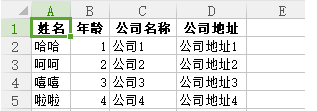
5、需要表格标题时的使用方式:
```js
import { JsonToExcel } from '@asasugar-use/custom-json2excel';
const data = [
{
name: '哈哈',
age: 1,
sex: '男',
companyName: '公司1',
companyAddress: '公司地址1',
},
{
name: '呵呵',
age: 2,
sex: '女',
companyName: '公司2',
companyAddress: '公司地址2',
},
{
name: '嘻嘻',
age: 3,
sex: '男',
companyName: '公司3',
companyAddress: '公司地址3',
},
{
name: '啦啦',
age: 4,
sex: '女',
companyName: '公司4',
companyAddress: '公司地址4',
},
];
const keyMap = {
name: '姓名',
age: '年龄',
sex: '性别',
companyName: '公司名称',
companyAddress: '公司地址',
};
const filters = ['sex'];
const title = [
{ name: '个人信息', colspan: 3 },
{ name: '公司信息', colspan: 2 },
];
const json2excel = new JsonToExcel({ data, keyMap, filters, title });
json2excel.generate();
```
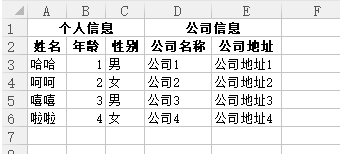
6、绑定回调函数的使用方式:
```js
import { JsonToExcel } from '@asasugar-use/custom-json2excel';
const data = [
{
name: '哈哈',
age: 1,
sex: '男',
companyName: '公司1',
companyAddress: '公司地址1',
},
{
name: '呵呵',
age: 2,
sex: '女',
companyName: '公司2',
companyAddress: '公司地址2',
},
{
name: '嘻嘻',
age: 3,
sex: '男',
companyName: '公司3',
companyAddress: '公司地址3',
},
{
name: '啦啦',
age: 4,
sex: '女',
companyName: '公司4',
companyAddress: '公司地址4',
},
];
const keyMap = {
name: '姓名',
age: '年龄',
sex: '性别',
companyName: '公司名称',
companyAddress: '公司地址',
};
const filters = ['sex'];
const title = [
{ name: '个人信息', colspan: 3 },
{ name: '公司信息', colspan: 2 },
];
const json2excel = new JsonToExcel({
data,
keyMap,
filters,
title,
onStart: () => {
console.log('开始');
},
onSuccess: () => {
console.log('成功');
},
onError: (err) => {
console.log(err);
},
});
json2excel.generate();
```
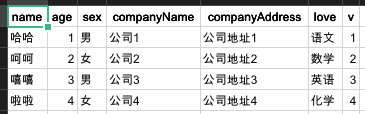
7、scope 使用:
```js
import { JsonToExcel } from '@asasugar-use/custom-json2excel';
const data = [
{
name: '哈哈',
age: 1,
sex: '男',
companyName: '公司1',
companyAddress: '公司地址1',
love: {
study: {
book: '语文',
},
},
v: {
key: 1,
},
},
{
name: '呵呵',
age: 2,
sex: '女',
companyName: '公司2',
companyAddress: '公司地址2',
love: {
study: {
book: '数学',
},
},
v: {
key: 2,
},
},
{
name: '嘻嘻',
age: 3,
sex: '男',
companyName: '公司3',
companyAddress: '公司地址3',
love: {
study: {
book: '英语',
},
},
v: {
key: 3,
},
},
{
name: '啦啦',
age: 4,
sex: '女',
companyName: '公司4',
companyAddress: '公司地址4',
love: {
study: {
book: '化学',
},
},
v: {
key: 4,
},
},
];
const scope = {
love: { study: 'book' },
v: 'key',
};
const json2excel = new JsonToExcel({ data, scope });
json2excel.generate();
```
### 方法二
> (示例: example/html/index.html)
1、下载 `dist` 文件夹 `index.umd.js`;
2、`script` 标签引入:
<script src="xx/index.umd.js"></script>
3、`index.html` 中使用:
```html
const data = [ ... ]; const json2excel = new CustomJson2excel.default({ data, keyMap });
json2excel.generate();
```
## 导入 Excel 生成 json 数据
`Antd` 例子:
```tsx
import { excelToJson } from '@asasugar-use/custom-json2excel';
const handleImport = async (e: { file: UploadFile; }) => {
const rawFile = e?.file?.originFileObj;
if (!rawFile) return;
const json = await excelToJson(rawFile);
console.log('%c [ e ]-73', 'font-size:13px; background:pink; color:#bf2c9f;', json);
};
return (
<Upload name="file" accept=".xlsx, .xls, .csv" onChange={handleImport}>
<Button type='primary'>
导入excel, 生成json
</Button>
</Upload>
)
```
## Props type
| Prop | Type | Defaults | Required | Description |
| :--------- | :----------- | :------- | :------- | :----------------------------------------------------------------- |
| data | Array | [] | ✓ | 转化成表格初始 json 数据 |
| orderedKey | Array | [] | × | 按照 key 顺序返回列,不在数组中的字段将自动过滤,优先级大于 `filters` |
| filters | Array | [] | × | 需要过滤的字段数组,适用于需过滤的数据较少 |
| keyMap | Object | {} | × | keyMap 映射表,用于自定义表格列名称 |
| name | String | excel | × | excel 表格名称 |
| title | Array | [] | × | 表格标题名称 {name:String,colspan:Number} name:名称, colspan:列数 |
| footer | Array | [] | × | 表格最后一列名称,参数同 title |
| type | String | xls | × | 生成的表格类型,可选值(xls、csv) |
| scope | Object/String | | × | 渲染的数据层级较深时扁平化处理 |
| onStart | Function | | × | 生成 Excel 前的回调函数 |
| onSuccess | Function | | × | 生成 Excel 成功的回调函数 |
| onError | Function | | × | 生成 Excel 失败的回调函数 |