@arghajit/playwright-pulse-report
Version:
A Playwright reporter and dashboard for visualizing test results.
420 lines (300 loc) • 13.3 kB
Markdown
# Playwright Pluse Report
[](https://www.npmjs.com/package/@arghajit/playwright-pulse-report)
[](https://opensource.org/licenses/MIT)
[](https://www.npmjs.com/package/@arghajit/playwright-pulse-report)

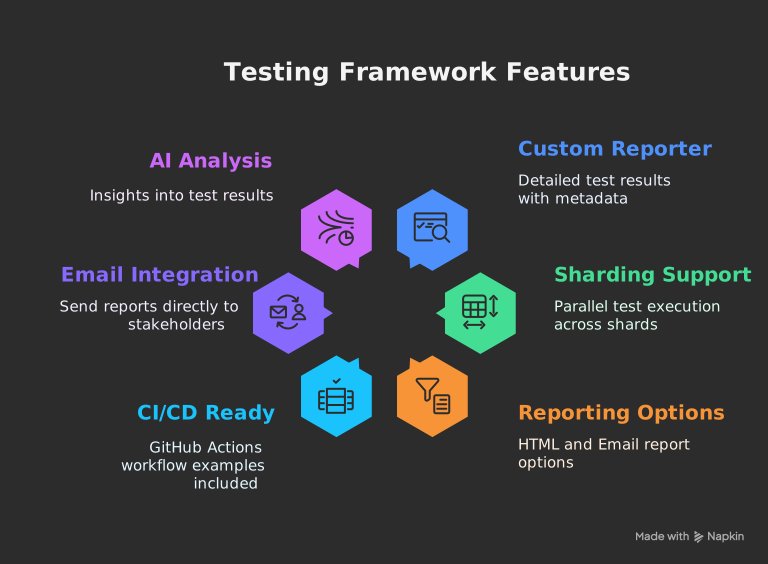
_The ultimate Playwright reporter — Interactive dashboard with historical trend analytics, CI/CD-ready standalone HTML reports, and sharding support for scalable test execution._
## [Live Demo](https://pulse-report.netlify.app/)
## 
## **Documentation**: [Pulse Report](https://playwright-pulse-report.netlify.app/)
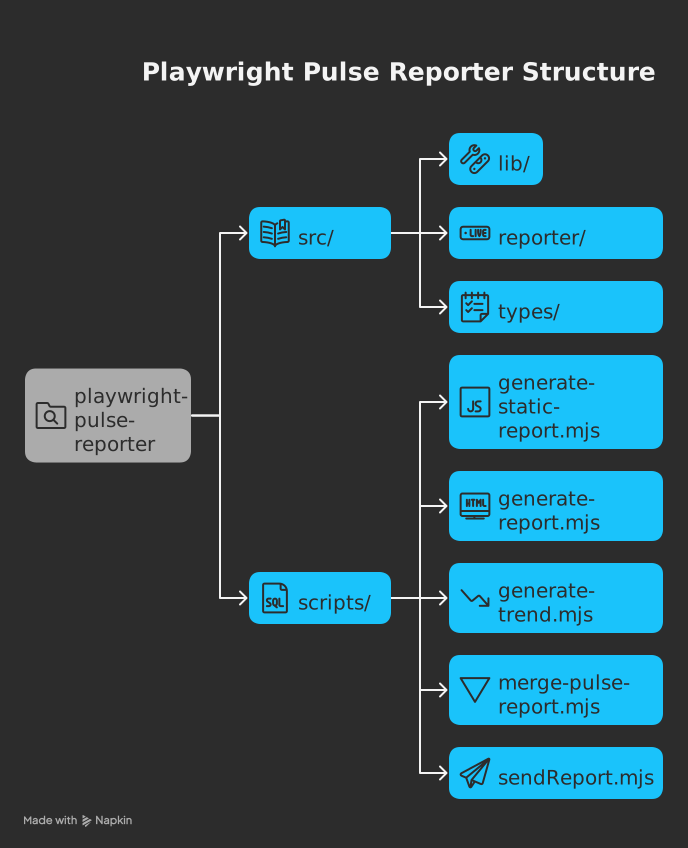
## Available Scripts
The project provides these utility commands:
| Command | Description |
|------------------------|-----------------------------------------------------------------------------|
| `generate-report` | Generates playwright-pulse-report.html, Loads screenshots and images dynamically from the attachments/ directory, Produces a lighter HTML file with faster initial load, Requires attachments/ directory to be present when viewing the report |
| `generate-pulse-report`| Generates `playwright-pulse-static-report.html`, Self-contained, no server required, Preserves all dashboard functionality, all the attachments are embadded in the report, no need to have attachments/ directory when viewing the report, with a dark theme and better initial load handling |
| `merge-pulse-report` | Combines multiple parallel test json reports, basically used in sharding |
| `generate-trend` | Analyzes historical trends in test results |
| `generate-email-report`| Generates email-friendly report versions |
| `send-email` | Generates email-friendly report versions & Distributes report via email |
Run with `npm run <command>`
## 🛠️ How It Works
1. **Reporter Collection**:
- Custom reporter collects detailed results during test execution
- Handles sharding by merging `.pulse-shard-results-*.json` files
2. **JSON Output**:
- Generates comprehensive `playwright-pulse-report.json`
3. **Visualization Options**:
- **Static HTML**: Self-contained report file with all data
- **Email**: Send formatted reports to stakeholders
## 🏁 Quick Start
### 1. Installation
```bash
npm install @arghajit/playwright-pulse-report@latest --save-dev
```
### 2. Configure Playwright
```typescript
// playwright.config.ts
import { defineConfig } from "@playwright/test";
import * as path from "path";
const PULSE_REPORT_DIR = path.resolve(__dirname, "pulse-report");
export default defineConfig({
reporter: [
["list"],
[
"@arghajit/playwright-pulse-report",
{
outputDir: PULSE_REPORT_DIR,
},
],
],
// Other configurations...
});
```
### 3. Generate Reports
After running tests:
```bash
npx generate-pulse-report # Generates static HTML
npx send-email # Sends email report
```
### 4. Custom Output Directory (Optional)
All CLI scripts now support custom output directories, giving you full flexibility over where reports are generated:
```bash
# Using custom directory
npx generate-pulse-report --outputDir {YOUR_CUSTOM_REPORT_FOLDER}
npx generate-report -o test-results/e2e
npx send-email --outputDir custom-pulse-reports
# Using nested paths
npx generate-pulse-report --outputDir reports/integration
npx merge-pulse-report --outputDir {YOUR_CUSTOM_REPORT_FOLDER}
```
**Important:** Make sure your `playwright.config.ts` custom directory matches the CLI script:
```typescript
import { defineConfig } from "@playwright/test";
import * as path from "path";
const CUSTOM_REPORT_DIR = path.resolve(__dirname, "{YOUR_CUSTOM_REPORT_FOLDER}");
export default defineConfig({
reporter: [
["list"],
[
"@arghajit/playwright-pulse-report",
{
outputDir: CUSTOM_REPORT_DIR, // Must match CLI --outputDir
},
],
],
});
```
## 📊 Report Options
### Option 1: Static HTML Report (Embedded Attachments)
```bash
npm run generate-pulse-report
or,
npx generate-pulse-report
```
- Generates `playwright-pulse-static-report.html`
- Self-contained, no server required
- Preserves all dashboard functionality
### Option 2: HTML Report (Attachment-based)
```bash
npm run generate-report
or,
npx generate-report
```
- Generates playwright-pulse-report.html
- Loads screenshots and images dynamically from the attachments/ directory
- Produces a lighter HTML file with faster initial load
- Requires attachments/ directory to be present when viewing the report
### Option 3: Email Report
1. Configure `.env`:
```bash
RECIPIENT_EMAIL_1=recipient1@example.com
RECIPIENT_EMAIL_2=recipient2@example.com
# ... up to 5 recipients
```
2. Send report:
```bash
npx send-email
```
NOTE: Email will be sent with a light-weight html file, which can be opened in mail preview application.
## 🤖 AI Analysis
The dashboard includes AI-powered test analysis that provides:
- Test flakiness detection
- Performance bottlenecks
- Failure pattern recognition
- Suggested optimizations
## 📧 Send Report to Mail
The `send-email` CLI wraps the full email flow:
- Generates a lightweight HTML summary (`pulse-email-summary.html`) from the latest `playwright-pulse-report.json`.
- Builds a stats table (start time, duration, total, passed, failed, skipped, percentages).
- Sends an email with that summary as both the body and an HTML attachment.
### 1. Configure Recipients
Set up to 5 recipients via environment variables:
```bash
RECIPIENT_EMAIL_1=recipient1@example.com
RECIPIENT_EMAIL_2=recipient2@example.com
RECIPIENT_EMAIL_3=recipient3@example.com
RECIPIENT_EMAIL_4=recipient4@example.com
RECIPIENT_EMAIL_5=recipient5@example.com
```
### 2. Choose Credential Flow
The script supports two ways to obtain SMTP credentials:
**Flow A – Environment-based credentials (recommended)**
Provide mail host and credentials via environment variables:
```bash
PULSE_MAIL_HOST=gmail # or: outlook
PULSE_MAIL_USERNAME=you@example.com
PULSE_MAIL_PASSWORD=your_app_password
```
- `PULSE_MAIL_HOST` supports `gmail` or `outlook` only.
- For Gmail/Outlook, use an app password or SMTP-enabled credentials.
**Flow B – Default Flow (fallback)**
If the above variables are not set, the script fallbacks to default the mail host for compatibility.
### 3. Run the CLI
Use the default output directory:
```bash
npx send-email
```
Or point to a custom report directory (must contain `playwright-pulse-report.json`):
```bash
npx send-email --outputDir <YOUR_CUSTOM_REPORT_FOLDER>
```
Under the hood, this will:
- Resolve the report directory (from `--outputDir` or `playwright.config.ts`).
- Run `generate-email-report.mjs` to create `pulse-email-summary.html`.
- Use Nodemailer to send the email via the selected provider (Gmail or Outlook).
## ⚙️ CI/CD Integration
### Basic Workflow
```yaml
# Upload Pulse report from each shard (per matrix.config.type)
- name: Upload Pulse Report results
if: success() || failure()
uses: actions/upload-artifact@v4
with:
name: pulse-report
path: pulse-report/
# Download all pulse-report-* artifacts after all shards complete
- name: Download Pulse Report artifacts
uses: actions/download-artifact@v4
with:
pattern: pulse-report
path: downloaded-artifacts
# Merge all sharded JSON reports into one final output
- name: Generate Pulse Report
run: |
npm run script merge-report
npm run generate-report [or, npm run generate-pulse-report]
# Upload final merged report as CI artifact
- name: Upload Pulse report
uses: actions/upload-artifact@v4
with:
name: pulse-report
```
### Sharded Workflow
```yaml
# Upload Pulse report from each shard (per matrix.config.type)
- name: Upload Pulse Report results
if: success() || failure()
uses: actions/upload-artifact@v4
with:
name: pulse-report-${{ matrix.config.type }}
path: pulse-report/
# Download all pulse-report-* artifacts after all shards complete
- name: Download Pulse Report artifacts
uses: actions/download-artifact@v4
with:
pattern: pulse-report-*
path: downloaded-artifacts
# Organize reports into a single folder and rename for merging
- name: Organize Pulse Report
run: |
mkdir -p pulse-report
for dir in downloaded-artifacts/pulse-report-*; do
config_type=$(basename "$dir" | sed 's/pulse-report-//')
cp -r "$dir/attachments" "pulse-report/attachments"
cp "$dir/playwright-pulse-report.json" "pulse-report/playwright-pulse-report-${config_type}.json"
done
# Merge all sharded JSON reports into one final output
- name: Generate Pulse Report
run: |
npm run merge-report
npm run generate-report [or, npm run generate-pulse-report]
# Upload final merged report as CI artifact
- name: Upload Pulse report
uses: actions/upload-artifact@v4
with:
name: pulse-report
path: pulse-report/
```
## 🧠 Notes
- <strong>`npm run generate-report` generates a HTML report ( screenshots/images will be taken in realtime from 'attachments/' directory ).</strong>
- <strong>`npm run generate-pulse-report` generates a fully self-contained static HTML report( All screenshots and images are embedded directly into the HTML using base64 encoding, which simplifies distribution but may result in larger file sizes and longer load times ).</strong>
- Each shard generates its own playwright-pulse-report.json inside pulse-report/.
- Artifacts are named using the shard type (matrix.config.type).
- After the test matrix completes, reports are downloaded, renamed, and merged.
- merge-report is a custom Node.js script that combines all JSON files into one.
## 
### 🚀 **Upgrade Now**
```bash
npm install @arghajit/playwright-pulse-report@latest
```
## ⚙️ Advanced Configuration
### Handling Sequential Test Runs
By default, the reporter will overwrite the `playwright-pulse-report.json` file on each new test run. This is usually what we want. However, if we run tests sequentially in the same job, like this:
```bash
npx playwright test test1.spec.ts && npx playwright test test2.spec.ts
```
By default, In this above scenario, the report from test1 will be lost. To solve this, you can use the resetOnEachRun option.
```bash
// playwright.config.ts
import { defineConfig } from "@playwright/test";
import * as path from "path";
// Define where the final report JSON and HTML should go
const PULSE_REPORT_DIR = path.resolve(__dirname, "pulse-report"); // Example: a directory in your project root
export default defineConfig({
reporter: [
["list"],
[
"@arghajit/playwright-pulse-report",
{
outputDir: PULSE_REPORT_DIR,
// Add this option
resetOnEachRun: false, // Default is true
},
],
],
// ...
});
```
**How it works when resetOnEachRun: false:**
- On the first run, it saves report-1.json to a pulse-report/pulse-results directory and creates the main playwright-pulse-report.json from it.
- On the second run, it saves report-2.json to the same directory.
- It then automatically reads both report-1.json and report-2.json, merges them, and updates the main playwright-pulse-report.json with the combined results.
***This ensures your final report is always a complete summary of all sequential test runs.***

**Real-time Playwright Test Monitoring & Analysis**
A Next.js component & CLI tool for visualizing Playwright test executions. Provides real-time insights, historical trends, and failure analysis.
**Key Features**:
- Interactive test result visualization
- Historical trend analysis
- Failure pattern identification
**Quick Start**:
```bash
npx pulse-dashboard
or,
npm run pulse-dashboard
```
*(Run from project root containing `pulse-report/` directory)*
**NPM Package**: [playwright-pulse-report](https://www.npmjs.com/package/@arghajit/playwright-pulse-report)
**Tech Stack**: Next.js, TypeScript, Tailwind CSS, Playwright
*Part of the Playwright Pulse Report ecosystem*
## 📬 Support
For issues or feature requests, please [Contact Me](mailto:arghajitsingha47@gmail.com).
## 🙌🏼 Thank you
Special Thanks to [@Suman Vishwakarma](https://www.linkedin.com/in/suman-vishwakarma-426108185/), for continuous UAT feedback.
<div align="center">Made by Arghajit Singha | MIT Licensed</div>