@arghajit/dummy
Version:
A Playwright reporter and dashboard for visualizing test results.
324 lines (235 loc) • 11.6 kB
Markdown
# Playwright Pluse Report

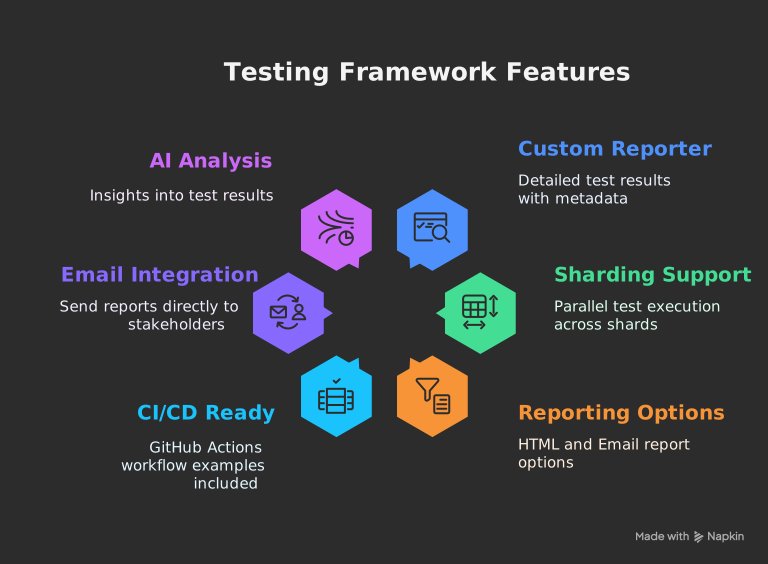
_The ultimate Playwright reporter — Interactive dashboard with historical trend analytics, CI/CD-ready standalone HTML reports, and sharding support for scalable test execution._
## [Live Demo](https://pulse-report.netlify.app/)
## 
## 📸 Screenshots
### 🖥️ Desktop View
<div align="center" style="display: flex; gap: 20px; justify-content: center; flex-wrap: wrap;">
<a href="https://ocpaxmghzmfbuhxzxzae.supabase.co/storage/v1/object/public/images//playwright-pulse-static-report-desktop.html.png" target="_blank"> <img src="https://ocpaxmghzmfbuhxzxzae.supabase.co/storage/v1/object/public/images//playwright-pulse-static-report-desktop.html.png" alt="Dashboard Overview" width="300"/>
<p align="center"><strong>Dashboard Overview</strong></p>
</a>
<a href="https://ocpaxmghzmfbuhxzxzae.supabase.co/storage/v1/object/public/images//Test-run-desktop.png" target="_blank"> <img src="https://ocpaxmghzmfbuhxzxzae.supabase.co/storage/v1/object/public/images//Test-run-desktop.png" alt="Test Details" width="300"/>
<p align="center"><strong>Test Details</strong>
</p>
</a>
<a href="https://ocpaxmghzmfbuhxzxzae.supabase.co/storage/v1/object/public/images//Test-error-desktop.png" target="_blank"> <img src="https://ocpaxmghzmfbuhxzxzae.supabase.co/storage/v1/object/public/images//Test-run-desktop.png" alt="Test Failure Details" width="300"/>
<p align="center"><strong>Test Failure Details</strong>
</p>
</a>
<a href="https://ocpaxmghzmfbuhxzxzae.supabase.co/storage/v1/object/public/images//Test-trends-desktop.png" target="_blank"> <img src="https://ocpaxmghzmfbuhxzxzae.supabase.co/storage/v1/object/public/images//Test-trends-desktop.png" alt="Filter View" width="300"/>
<p align="center"><strong>Test Trends</strong></p>
</a>
</div>
### 📱 Mobile View
<div align="center" style="display: flex; gap: 20px; justify-content: center; flex-wrap: wrap;">
<a href="https://postimg.cc/CzJBLR5N" target="_blank">
<img src="https://ocpaxmghzmfbuhxzxzae.supabase.co/storage/v1/object/public/images//playwright-pulse-static-report-Dashboard.html.png" alt="Mobile Dashboard Overview" width="300"/>
<p align="center"><strong>Dashboard Overview</strong></p>
</a>
<a href="https://postimg.cc/G8YTczT8" target="_blank">
<img src="https://ocpaxmghzmfbuhxzxzae.supabase.co/storage/v1/object/public/images//playwright-pulse-static-report_Test-results.html.png" alt="Test Details" width="300"/>
<p align="center"><strong>Test Details</strong></p>
</a>
<a href="https://postimg.cc/G8YTczT8" target="_blank">
<img src="https://ocpaxmghzmfbuhxzxzae.supabase.co/storage/v1/object/public/images//playwright-pulse-static-report-Trends.html.png" alt="Test Trends" width="300"/>
<p align="center"><strong>Test Trends</strong></p>
</a>
</div>
### Email Report Example
[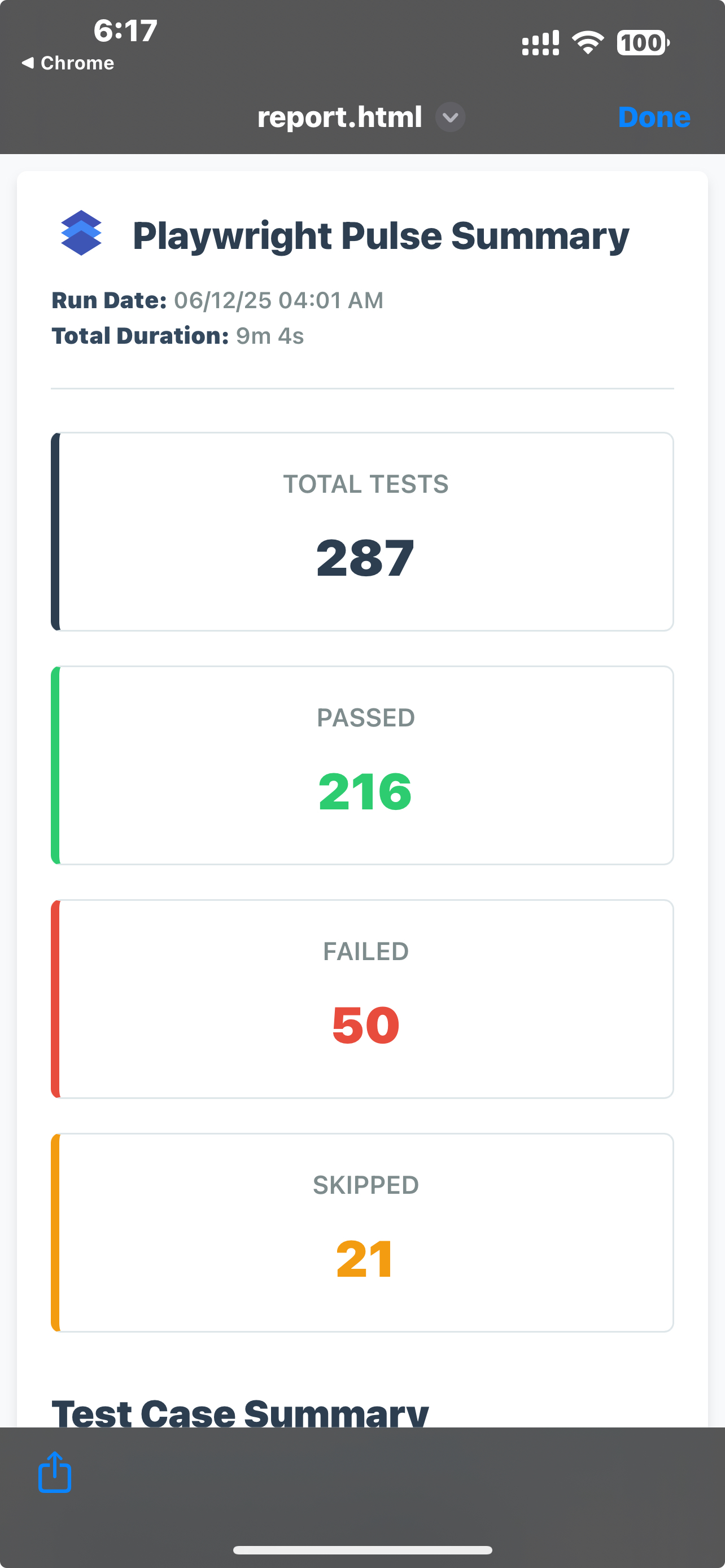](https://ocpaxmghzmfbuhxzxzae.supabase.co/storage/v1/object/public/images//Email-report-mobile-template.jpeg)
[](https://ocpaxmghzmfbuhxzxzae.supabase.co/storage/v1/object/public/images//pulse-email-summary.html.png)
## Available Scripts
The project provides these utility commands:
| Command | Description |
|------------------------|-----------------------------------------------------------------------------|
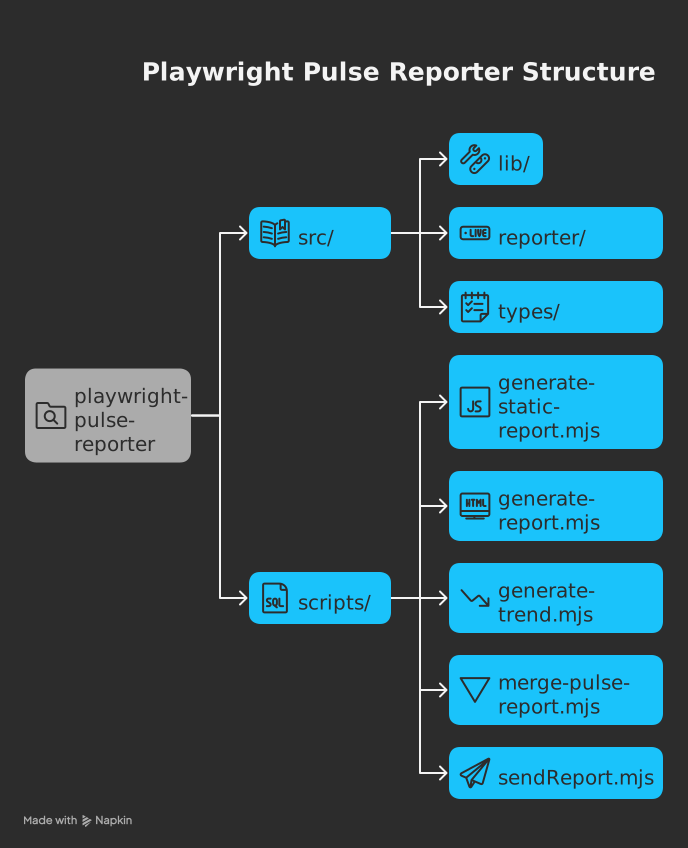
| `generate-report` | Generates playwright-pulse-report.html, Loads screenshots and images dynamically from the attachments/ directory, Produces a lighter HTML file with faster initial load, Requires attachments/ directory to be present when viewing the report |
| `generate-pulse-report`| Generates `playwright-pulse-static-report.html`, Self-contained, no server required, Preserves all dashboard functionality |
| `merge-pulse-report` | Combines multiple parallel test json reports, basically used in sharding |
| `generate-trend` | Analyzes historical trends in test results |
| `generate-email-report`| Generates email-friendly report versions |
| `send-email` | Generates email-friendly report versions & Distributes report via email |
Run with `npm run <command>`
## 🛠️ How It Works
1. **Reporter Collection**:
- Custom reporter collects detailed results during test execution
- Handles sharding by merging `.pulse-shard-results-*.json` files
2. **JSON Output**:
- Generates comprehensive `playwright-pulse-report.json`
3. **Visualization Options**:
- **Static HTML**: Self-contained report file with all data
- **Email**: Send formatted reports to stakeholders
## 🏁 Quick Start
### 1. Installation
```bash
npm install @arghajit/playwright-pulse-report@latest --save-dev
# or
yarn add @arghajit/playwright-pulse-report@latest --dev
# or
pnpm add @arghajit/playwright-pulse-report@latest --save-dev
```
### 2. Configure Playwright
```typescript
// playwright.config.ts
import { defineConfig } from "@playwright/test";
import * as path from "path";
const PULSE_REPORT_DIR = path.resolve(__dirname, "pulse-report");
export default defineConfig({
reporter: [
["list"],
[
"@arghajit/playwright-pulse-report",
{
outputDir: PULSE_REPORT_DIR,
},
],
],
// Other configurations...
});
```
### 3. Generate Reports
After running tests:
```bash
npx generate-pulse-report # Generates static HTML
npx send-email # Sends email report
```
## 📊 Report Options
### Option 1: Static HTML Report (Embedded Attachments)
```bash
npm run generate-pulse-report
or,
npx generate-pulse-report
```
- Generates `playwright-pulse-static-report.html`
- Self-contained, no server required
- Preserves all dashboard functionality
### Option 2: HTML Report (Attachment-based)
```bash
npm run generate-report
or,
npx generate-report
```
- Generates playwright-pulse-report.html
- Loads screenshots and images dynamically from the attachments/ directory
- Produces a lighter HTML file with faster initial load
- Requires attachments/ directory to be present when viewing the report
### Option 3: Email Report
1. Configure `.env`:
```bash
RECIPIENT_EMAIL_1=recipient1@example.com
RECIPIENT_EMAIL_2=recipient2@example.com
# ... up to 5 recipients
```
2. Send report:
```bash
npx send-email
```
NOTE: The email will be send with a light-weight html file, which can be opened in mail preview application.
## 🤖 AI Analysis
The dashboard includes AI-powered test analysis that provides:
- Test flakiness detection
- Performance bottlenecks
- Failure pattern recognition
- Suggested optimizations
## ⚙️ CI/CD Integration
### Basic Workflow
```yaml
# Upload Pulse report from each shard (per matrix.config.type)
- name: Upload Pulse Report results
if: success() || failure()
uses: actions/upload-artifact@v4
with:
name: pulse-report
path: pulse-report/
# Download all pulse-report-* artifacts after all shards complete
- name: Download Pulse Report artifacts
uses: actions/download-artifact@v4
with:
pattern: pulse-report
path: downloaded-artifacts
# Merge all sharded JSON reports into one final output
- name: Generate Pulse Report
run: |
npm run script merge-report
npm run generate-report [or, npm run generate-pulse-report]
# Upload final merged report as CI artifact
- name: Upload Pulse report
uses: actions/upload-artifact@v4
with:
name: pulse-report
```
### Sharded Workflow
```yaml
# Upload Pulse report from each shard (per matrix.config.type)
- name: Upload Pulse Report results
if: success() || failure()
uses: actions/upload-artifact@v4
with:
name: pulse-report-${{ matrix.config.type }}
path: pulse-report/
# Download all pulse-report-* artifacts after all shards complete
- name: Download Pulse Report artifacts
uses: actions/download-artifact@v4
with:
pattern: pulse-report-*
path: downloaded-artifacts
# Organize reports into a single folder and rename for merging
- name: Organize Pulse Report
run: |
mkdir -p pulse-report
for dir in downloaded-artifacts/pulse-report-*; do
config_type=$(basename "$dir" | sed 's/pulse-report-//')
cp -r "$dir/attachments" "pulse-report/attachments"
cp "$dir/playwright-pulse-report.json" "pulse-report/playwright-pulse-report-${config_type}.json"
done
# Merge all sharded JSON reports into one final output
- name: Generate Pulse Report
run: |
npm run merge-report
npm run generate-report [or, npm run generate-pulse-report]
# Upload final merged report as CI artifact
- name: Upload Pulse report
uses: actions/upload-artifact@v4
with:
name: pulse-report
path: pulse-report/
```
## 🧠 Notes
- <strong>`npm run generate-report` generates a HTML report ( screenshots/images will be taken in realtime from 'attachments/' directory ).</strong>
- <strong>`npm run generate-pulse-report` generates a fully self-contained static HTML report( All screenshots and images are embedded directly into the HTML using base64 encoding, which simplifies distribution but may result in larger file sizes and longer load times ).</strong>
- Each shard generates its own playwright-pulse-report.json inside pulse-report/.
- Artifacts are named using the shard type (matrix.config.type).
- After the test matrix completes, reports are downloaded, renamed, and merged.
- merge-report is a custom Node.js script that combines all JSON files into one.
## 
### 🚀 **Upgrade Now**
```bash
npm install @arghajit/playwright-pulse-report@latest
```
---
<img src="https://ocpaxmghzmfbuhxzxzae.supabase.co/storage/v1/object/public/images//pulse-logo.png" alt="pulse dashboard" title="pulse dashboard" height="35px" width="60px" align="left" padding="5px"/>
<h2>Pulse Dashboard</h2>
**Real-time Playwright Test Monitoring & Analysis**
A Next.js component & CLI tool for visualizing Playwright test executions. Provides real-time insights, historical trends, and failure analysis.
**Key Features**:
- Interactive test result visualization
- Historical trend analysis
- Failure pattern identification
**Quick Start**:
```bash
npx pulse-dashboard
or,
npm run pulse-dashboard
```
*(Run from project root containing `pulse-report/` directory)*
**NPM Package**: [pulse-dashboard](https://www.npmjs.com/package/pulse-dashboard)
**Tech Stack**: Next.js, TypeScript, Tailwind CSS, Playwright
*Part of the Playwright Pulse Report ecosystem*
---
## 📬 Support
For issues or feature requests, please [Contact Me](mailto:arghajitsingha47@gmail.com).
---
## 🙌🏼 Thank you
Special Thanks to [@Suman Vishwakarma](https://www.linkedin.com/in/suman-vishwakarma-426108185/), for continuous UAT feedback.
---
<div align="center">Made by Arghajit Singha | MIT Licensed</div>