@arcgis/map-components
Version:
ArcGIS Map Components
137 lines (136 loc) • 6.83 kB
TypeScript
/// <reference path="../../index.d.ts" />
import type HeatmapColorStop from "@arcgis/core/renderers/support/HeatmapColorStop.js";
import type { PublicLitElement as LitElement } from "@arcgis/lumina";
import type { ArcgisReferenceElement, IconName } from "../types.js";
import type { ThumbDragEvent, ThumbChangeEvent } from "@arcgis/core/widgets/Slider/types.js";
import type { SmartMappingSliderBaseState } from "@arcgis/core/widgets/smartMapping/SmartMappingSliderBase.js";
/**
* > [!WARNING]
* >
* > This is a **legacy component**. It relies on an underlying widget as part of our migration to native web components.
* >
* > A fully native replacement for this component is in development. Once it reaches feature parity, the legacy component will be deprecated and no longer maintained. At that point, development should use the native component.
*
* The Heatmap Slider component is intended for authoring and exploring data-driven visualizations in any
* layer that can be rendered with a [HeatmapRenderer](https://developers.arcgis.com/javascript/latest/references/core/renderers/HeatmapRenderer/).
*
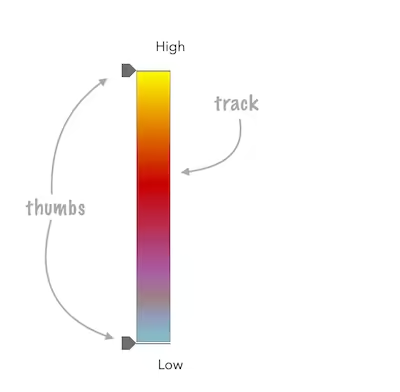
* See the image below for a summary of the configurable options available on this slider.
*
* 
*
* ```js
* const viewElement = document.querySelector("arcgis-map")!;
* const heatmapSlider = document.querySelector("arcgis-slider-heatmap-legacy")!;
*
* const layer = new CSVLayer({
* url: "https://earthquake.usgs.gov/earthquakes/feed/v1.0/summary/2.5_week.csv",
* });
*
* await viewElement.viewOnReady();
* viewElement.map?.add(layer);
*
* const params = {
* layer,
* valueExpression: "($feature.mag)",
* view: viewElement.view,
* };
*
* const rendererResult = await heatmapRendererCreator.createRenderer(params);
*
* layer.renderer = rendererResult.renderer;
*
* heatmapSlider.stops = rendererResult.renderer.colorStops;
* ```
*
* This slider should be used to update the [colorStops](https://developers.arcgis.com/javascript/latest/references/core/renderers/HeatmapRenderer/#colorStops)
* property in a HeatmapRenderer. It is the responsibility of the app developer
* to set up event listeners on this slider to update the renderer's colorStops based on how the [stops](https://developers.arcgis.com/javascript/latest/references/map-components/components/arcgis-slider-heatmap-legacy/#stops) property was recalculated.
*
* ```js
* const updateRendererFromSlider = () => {
* const renderer = layer.renderer?.clone();
* if (!renderer || !("colorStops" in renderer)) {
* return;
* }
* renderer.colorStops = heatmapSlider.stops;
* layer.renderer = renderer;
* };
*
* heatmapSlider.addEventListener("arcgisThumbChange", updateRendererFromSlider);
* heatmapSlider.addEventListener("arcgisThumbDrag", updateRendererFromSlider);
* heatmapSlider.addEventListener("arcgisPropertyChange", updateRendererFromSlider);
* ```
*
* @since 5.0
* @see [heatmapRendererCreator](https://developers.arcgis.com/javascript/latest/references/core/smartMapping/renderers/heatmap/)
*/
export abstract class ArcgisSliderHeatmapLegacy extends LitElement {
/**
* If true, the component will not be destroyed automatically when it is
* disconnected from the document. This is useful when you want to move the
* component to a different place on the page, or temporarily hide it. If this
* is set, make sure to call the [destroy()](https://developers.arcgis.com/javascript/latest/references/map-components/components/arcgis-slider-heatmap-legacy/#destroy) method when you are done to
* prevent memory leaks.
*
* @default false
*/
accessor autoDestroyDisabled: boolean;
/**
* Icon which represents the component.
* Typically used when the component is controlled by another component (e.g. by the Expand component).
*
* @see [Calcite Icons](https://developers.arcgis.com/calcite-design-system/icons/)
*/
accessor icon: IconName;
/** The maximum value or upper bound of the slider. */
get max(): number;
/** The minimum value or lower bound of the slider. */
get min(): number;
/**
* Defines how slider thumb values should be rounded. This number indicates the number
* of decimal places slider thumb _values_ should round to when they have been moved.
*
* Keep in mind this property rounds thumb values and shouldn't be used exclusively for formatting purposes.
*
* @default 4
* @example
* ```js
* // Rounds slider thumb values to 7 decimal places
* slider.precision = 7;
* ```
*/
accessor precision: number;
/**
* By assigning the `id` attribute of the Map or Scene component to this property, you can position a child component anywhere in the DOM while still maintaining a connection to the Map or Scene.
*
* @see [Associate components with a Map or Scene component](https://developers.arcgis.com/javascript/latest/programming-patterns/#associate-components-with-a-map-or-scene-component)
*/
accessor referenceElement: ArcgisReferenceElement | string | undefined;
/** The current state of the component. */
get state(): SmartMappingSliderBaseState;
/**
* The color stops of the [HeatmapRenderer](https://developers.arcgis.com/javascript/latest/references/core/renderers/HeatmapRenderer/) to associate with the slider.
*
* @example
* ```js
* heatmapSlider.stops = rendererResult.renderer.colorStops;
* ```
*/
accessor stops: Array<HeatmapColorStop>;
/** Permanently destroy the component. */
destroy(): Promise<void>;
/** Emitted when the value of a property is changed. Use this to listen to changes to properties. */
readonly arcgisPropertyChange: import("@arcgis/lumina").TargetedEvent<this, { name: "precision" | "state" | "stops"; }>;
/** Emitted when the component associated with a map or scene view is ready to be interacted with. */
readonly arcgisReady: import("@arcgis/lumina").TargetedEvent<this, void>;
/** Fires when a user changes the value of a thumb via the arrow keys or by keyboard editing of the label on the slider. */
readonly arcgisThumbChange: import("@arcgis/lumina").TargetedEvent<this, ThumbChangeEvent>;
/** Fires when a user drags a thumb on the component. */
readonly arcgisThumbDrag: import("@arcgis/lumina").TargetedEvent<this, ThumbDragEvent>;
readonly "@eventTypes": {
arcgisPropertyChange: ArcgisSliderHeatmapLegacy["arcgisPropertyChange"]["detail"];
arcgisReady: ArcgisSliderHeatmapLegacy["arcgisReady"]["detail"];
arcgisThumbChange: ArcgisSliderHeatmapLegacy["arcgisThumbChange"]["detail"];
arcgisThumbDrag: ArcgisSliderHeatmapLegacy["arcgisThumbDrag"]["detail"];
};
}