@arcgis/map-components
Version:
ArcGIS Map Components
207 lines (205 loc) • 7.67 kB
TypeScript
/// <reference types="@arcgis/core/interfaces.d.ts" />
/// <reference types="../../index.d.ts" />
import { Use } from '@arcgis/lumina/controllers';
import { default as VideoPlayerViewModel } from '@arcgis/core/widgets/VideoPlayer/VideoPlayerViewModel.js';
import { JsxNode, PublicLitElement as LitElement, TargetedEvent } from '@arcgis/lumina';
import { ArcgisReferenceElement } from '../../utils/component-utils';
declare const useVideoPlayerViewModel: (component: LitElement & Pick<VideoPlayerViewModel, never> & import('../../controllers/useViewModel').ViewModelControllerUses<VideoPlayerViewModel>) => VideoPlayerViewModel;
/**
* The Video Player component provides a user interface for interacting with a [VideoLayer](api-reference/esri-layers-VideoLayer.html).
* It displays the original video content and provides controls for playing, pausing, seeking, and changing the video speed and quality.
*
* The Video Player component provides the following capabilities:
* - Control operations (play, pause, seek)
* - Time and duration display
* - Customizable graphics colors
* - Following options (sensor, frame, video)
* - Adjustable speed and quality
* - Access to frame metadata
*
* The [VideoPlayerViewModel](https://developers.arcgis.com/javascript/latest/api-reference/esri-widgets-VideoPlayer-VideoPlayerViewModel.html) class provides the logic for the Video Player.
*
* **Known limitations**
*
* * Not supported in 3D [Scenes](https://developers.arcgis.com/javascript/latest/references/map-components/arcgis-scene/).
* * Not supported on macOS and iOS devices.
*
* [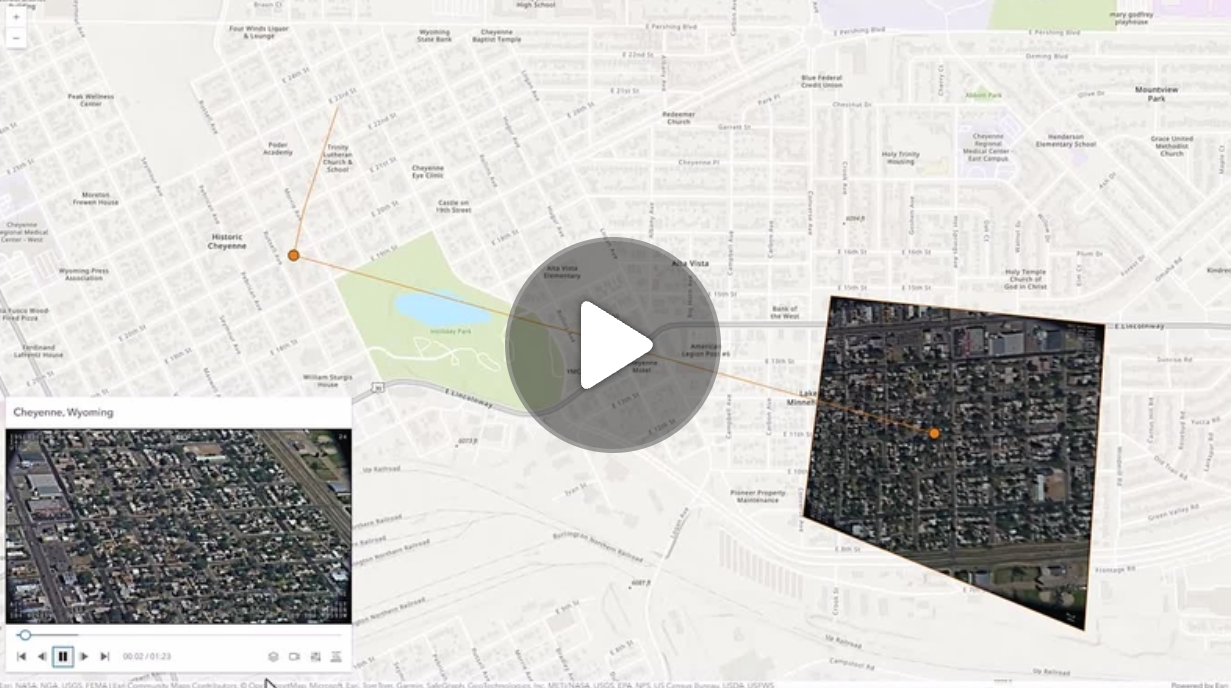](https://mediaspace.esri.com/media/1_ctc3psfr)
*
* [Read more...](https://developers.arcgis.com/javascript/latest/references/map-components/arcgis-video-player/)
*
* @example
* ```html
* <arcgis-map>
* <arcgis-video-player></arcgis-video-player>
* </arcgis-map>
* ```
*
* ```js
* const [Map, VideoLayer] = await $arcgis.import([
* "@arcgis/core/Map.js",
* "@arcgis/core/layers/VideoLayer.js",
* ]);
*
* const viewElement = document.querySelector("arcgis-map");
* const videoPlayerElement = document.querySelector("arcgis-video-player");
*
* const videoLayer = new VideoLayer({
* url: "YOUR_VIDEO_LAYER_URL",
* });
*
* viewElement.map = new Map({
* basemap: "topo-vector",
* layers: [videoLayer],
* });
* await viewElement.viewOnReady();
*
* await videoLayer.load();
* if (videoLayer.loaded) {
* videoPlayerElement.layer = videoLayer;
* }
*
* await viewElement.whenLayerView(videoLayer);
* viewElement.goTo(videoLayer.fullExtent);
* ```
* @since 4.33
*/
export declare class ArcgisVideoPlayer extends LitElement {
/**
* By assigning the `id` attribute of the Map or Scene component to this property, you can position a child component anywhere in the DOM while still maintaining a connection to the Map or Scene.
*
* @see [Associate components with a Map or Scene component](https://developers.arcgis.com/javascript/latest/programming-patterns/#associate-components-with-a-map-or-scene-component)
*/
referenceElement?: ArcgisReferenceElement | string;
/** @default "top-left" */
position: __esri.UIPosition;
/**
* Icon which represents the component.
* Typically used when the component is controlled by another component (e.g. by the Expand component).
*
* @see [Calcite Icons](https://developers.arcgis.com/calcite-design-system/icons/)
* @default "video-web"
*/
icon?: string;
/** The current state of the component. */
readonly state: "ready" | "error" | "playing" | "waiting" | "can-play" | "not-ready" | "paused" | "data-loaded";
/**
* Determines which telemetry elements to follow when the video layer is playing.
*
* @default "follow-both"
*/
get followingMode(): VideoPlayerViewModel["followingMode"];
set followingMode(value: VideoPlayerViewModel["followingMode"]);
/**
* The [VideoLayer](https://developers.arcgis.com/javascript/latest/api-reference/esri-layers-VideoLayer.html) to use as the data source for the video player.
*
* @noautocast
* @example
* ```js
* // Create a new Video Player with a VideoLayer
* videoPlayer.layer = videoLayer;
* ```
* @default null
*/
layer: nullish | __esri.VideoLayer;
/**
* If true, the component will not be destroyed automatically when it is
* disconnected from the document. This is useful when you want to move the
* component to a different place on the page, or temporarily hide it. If this
* is set, make sure to call the [destroy](https://developers.arcgis.com/javascript/latest/references/map-components/arcgis-video-player/#destroy) method when you are done to
* prevent memory leaks.
*
* @default false
*/
autoDestroyDisabled: boolean;
/**
* Replace localized message strings with your own strings.
*
* _**Note**: Individual message keys may change between releases._
*/
messageOverrides?: typeof this.messages._overrides;
/** The component's default label. */
label?: string;
/**
* Indicates whether to display the video player's header information.
*
* @name hideHeader
* @instance
* @type {boolean}
* @default false
*/
hideHeader: boolean;
/** Permanently destroy the component. */
destroy(): Promise<void>;
/** Emitted when the value of a property is changed. Use this to listen to changes to properties. */
readonly arcgisPropertyChange: TargetedEvent<this, {
name: "state" | "layer";
}>;
/** Emitted when the component associated with a map or scene view is is ready to be interacted with. */
readonly arcgisReady: TargetedEvent<this, void>;
readonly arcgisVideoReady: TargetedEvent<this, void>;
private messages: {
beginning: string;
color: string;
end: string;
errorLoadingLayer: string;
follow: string;
forward: string;
frame: string;
frameCenter: string;
frameInfo: string;
frameOutline: string;
graphics: string;
layers: string;
metadata: string;
metadataDescription: string;
metadataNotLoaded: string;
missionInfo: string;
none: string;
pause: string;
platformInfo: string;
play: string;
playbackSpeed: string;
quality: string;
reverse: string;
sensor: string;
sensorTrail: string;
settings: string;
sightLine: string;
speed: string;
video: string;
videoPlayer: string;
} & import('@arcgis/lumina/controllers').T9nMeta<{
beginning: string;
color: string;
end: string;
errorLoadingLayer: string;
follow: string;
forward: string;
frame: string;
frameCenter: string;
frameInfo: string;
frameOutline: string;
graphics: string;
layers: string;
metadata: string;
metadataDescription: string;
metadataNotLoaded: string;
missionInfo: string;
none: string;
pause: string;
platformInfo: string;
play: string;
playbackSpeed: string;
quality: string;
reverse: string;
sensor: string;
sensorTrail: string;
settings: string;
sightLine: string;
speed: string;
video: string;
videoPlayer: string;
}>;
}
export {};