@arcgis/core
Version:
ArcGIS Maps SDK for JavaScript: A complete 2D and 3D mapping and data visualization API
182 lines (180 loc) • 14.2 kB
TypeScript
import type SnappingOptions from "../../views/interactive/snapping/SnappingOptions.js";
import type Widget from "../Widget.js";
import type SnappingControlsViewModel from "./SnappingControls/SnappingControlsViewModel.js";
import type SnappingControlsVisibleElements from "./SnappingControls/VisibleElements.js";
import type { Icon } from "@esri/calcite-components/components/calcite-icon";
import type { MapViewOrSceneView } from "../../views/MapViewOrSceneView.js";
import type { WidgetProperties } from "../Widget.js";
import type { SnappingOptionsProperties } from "../../views/interactive/snapping/SnappingOptions.js";
import type { SnappingControlsViewModelProperties } from "./SnappingControls/SnappingControlsViewModel.js";
import type { SnappingControlsVisibleElementsProperties } from "./SnappingControls/VisibleElements.js";
export interface SnappingControlsProperties extends WidgetProperties, Partial<Pick<SnappingControls, "view">> {
/**
* Icon which represents the widget. It is typically used when the widget is controlled by another
* one (e.g. in the Expand widget).
*
* @default "snap-to-point"
* @since 4.27
* @see [Calcite Icon Search](https://developers.arcgis.com/calcite-design-system/icons/)
* @see [Calcite Icon Search](https://developers.arcgis.com/calcite-design-system/icons/)
*/
icon?: Icon["icon"] | null;
/**
* The SnappingControls widget's default label.
*
* @since 4.11
*/
label?: string | null;
/** The [SnappingOptions](https://developers.arcgis.com/javascript/latest/references/core/views/interactive/snapping/SnappingOptions/) for sketching. It supports [self](https://developers.arcgis.com/javascript/latest/references/core/views/interactive/snapping/SnappingOptions/#selfEnabled) and [feature](https://developers.arcgis.com/javascript/latest/references/core/views/interactive/snapping/SnappingOptions/#featureEnabled) snapping. */
snappingOptions?: SnappingOptionsProperties;
/**
* The view model for the SnappingControls widget. This class contains all the logic, (ie. properties and methods) that control the widget's behavior. See the [SnappingControlsViewModel](https://developers.arcgis.com/javascript/latest/references/core/widgets/support/SnappingControls/SnappingControlsViewModel/) class to access
* all of the properties and methods on the SnappingControls widget.
*/
viewModel?: SnappingControlsViewModelProperties;
/**
* The visible elements that are displayed within the widget.
* This property provides the ability to turn individual elements of the widget's display on/off.
*
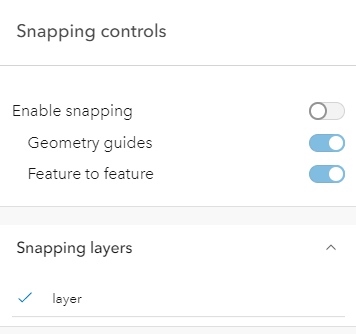
* The image below displays the default SnappingControls widget with all visible elements visible.
*
* 
*
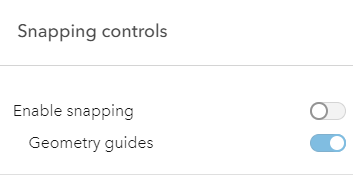
* In comparison, the following image displays the widget with the feature enabled snapping toggle
* and the feature snapping layer source layerList turned off.
*
* 
*
* @example
* // This removes the feature enabled snapping toggle and the layerlist.
* snappingControls.visibleElements = {
* featureEnabledToggle: false,
* layerList: false
* }
*/
visibleElements?: SnappingControlsVisibleElementsProperties;
}
/**
* ## Overview
*
* The SnappingControls widget provides a user interface to use alongside the [SnappingOptions](https://developers.arcgis.com/javascript/latest/references/core/views/interactive/snapping/SnappingOptions/) class. `SnappingOptions` is a property in [Sketch.snappingOptions](https://developers.arcgis.com/javascript/latest/references/core/widgets/Sketch/#snappingOptions), [SketchViewModel.snappingOptions](https://developers.arcgis.com/javascript/latest/references/core/widgets/Sketch/SketchViewModel/#snappingOptions), [Editor.snappingOptions](https://developers.arcgis.com/javascript/latest/references/core/widgets/Editor/#snappingOptions), and [EditorViewModel.snappingOptions](https://developers.arcgis.com/javascript/latest/references/core/widgets/Editor/EditorViewModel/#snappingOptions).
*
* This widget has been integrated as part of the [Sketch](https://developers.arcgis.com/javascript/latest/references/core/widgets/Sketch/) and [Editor](https://developers.arcgis.com/javascript/latest/references/core/widgets/Editor/) widgets. Therefore, it will be automatically included when loading either of these widgets and no additional work is needed on the end of the developer.
*
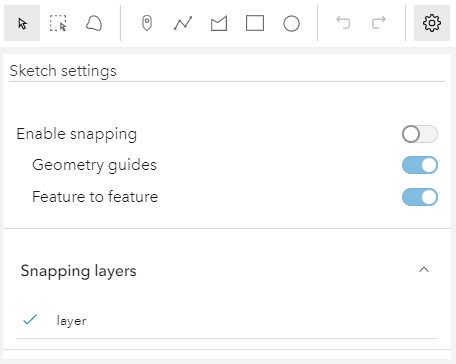
* Take a look at the SnappingControls in the Sketch widget with the [sketch-geometries](https://developers.arcgis.com/javascript/latest/sample-code/sketch-geometries/) sample.
*
* [](https://developers.arcgis.com/javascript/latest/sample-code/sketch-geometries/)
*
* ## Using the widget
*
* The SnappingControls widget can be used with the [MapView](https://developers.arcgis.com/javascript/latest/references/core/views/MapView/) or the [SceneView](https://developers.arcgis.com/javascript/latest/references/core/views/SceneView/) like any other widget. However, this widget is dependent on the [SnappingOptions](https://developers.arcgis.com/javascript/latest/references/core/views/interactive/snapping/SnappingOptions/) class. Currently, this is only available as a property in the [Sketch.snappingOptions](https://developers.arcgis.com/javascript/latest/references/core/widgets/Sketch/#snappingOptions) and [Editor.snappingOptions](https://developers.arcgis.com/javascript/latest/references/core/widgets/Editor/#snappingOptions) widgets, in addition to their respective view models. This means that the SnappingControls widget cannot be utilized as a standalone widget, unless it is being used in conjunction with these supported classes.
* To use this widget with the [Editor](https://developers.arcgis.com/javascript/latest/references/core/widgets/Editor/), [EditorViewModel](https://developers.arcgis.com/javascript/latest/references/core/widgets/Editor/EditorViewModel/) or [SketchViewModel](https://developers.arcgis.com/javascript/latest/references/core/widgets/Sketch/SketchViewModel/), it must be instantiated and its [snappingOptions](https://developers.arcgis.com/javascript/latest/references/core/widgets/support/SnappingControls/#snappingOptions) property must be set to either the [Editor's](https://developers.arcgis.com/javascript/latest/references/core/widgets/Editor/#snappingOptions), [EditorViewModel's](https://developers.arcgis.com/javascript/latest/references/core/widgets/Editor/EditorViewModel/#snappingOptions), or [SketchViewModel's](https://developers.arcgis.com/javascript/latest/references/core/widgets/Sketch/SketchViewModel/#snappingOptions) `snappingOptions` property.
*
* The following code snippet demonstrates how to use SnappingControls within the Editor widget.
*
* ```js
* const [Editor, SnappingControls] = await $arcgis.import([
* "@arcgis/core/widgets/Editor.js",
* "@arcgis/core/widgets/support/SnappingControls.js"
* ]);
* const editor = new Editor({
* view: view
* });
*
* // create a new instance of the SnappingControls widget
* const snappingControls = new SnappingControls({
* view: view,
* snappingOptions: editor.snappingOptions // set the Editor's snappingOptions property
* });
*
* view.ui.add(editor, "top-right"); // adds the Editor widget to the view
* view.ui.add(snappingControls, "top-left"); // adds the SnappingControls widget to the view
* ```
*
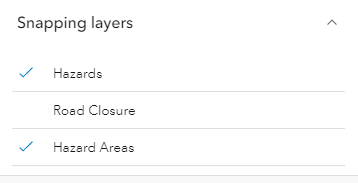
* This widget will automatically detect any layers on the [Map](https://developers.arcgis.com/javascript/latest/references/core/Map/) that support snapping and the [layerlist](https://developers.arcgis.com/javascript/latest/references/core/widgets/support/SnappingControls/VisibleElements/) populates with these [FeatureSnappingLayerSources](https://developers.arcgis.com/javascript/latest/references/core/views/interactive/snapping/FeatureSnappingLayerSource/). By default, these layers will be disabled for feature snapping. The layers will be enabled for snapping when a user clicks on the layer title in the layerlist. If there is a desire for these layers to be enabled automatically, set [FeatureSnappingLayerSource.enabled](https://developers.arcgis.com/javascript/latest/references/core/views/interactive/snapping/FeatureSnappingLayerSource/#enabled) as `true`.
*
* [](https://developers.arcgis.com/javascript/latest/sample-code/widgets-editor-basic/)
*
* > [!WARNING]
* >
* > **Known Limitations**
* >
* > Layer types currently supported for snapping include: [FeatureLayer](https://developers.arcgis.com/javascript/latest/references/core/layers/FeatureLayer/), [GraphicsLayer](https://developers.arcgis.com/javascript/latest/references/core/layers/GraphicsLayer/) (except Mesh geometries),
* > [GeoJSONLayer](https://developers.arcgis.com/javascript/latest/references/core/layers/GeoJSONLayer/), [WFSLayer](https://developers.arcgis.com/javascript/latest/references/core/layers/WFSLayer/), [CSVLayer](https://developers.arcgis.com/javascript/latest/references/core/layers/CSVLayer/),
* > [MapNotesLayer](https://developers.arcgis.com/javascript/latest/references/core/layers/MapNotesLayer/) (2D only), [3D Object SceneLayer](https://developers.arcgis.com/javascript/latest/references/core/layers/SceneLayer/) (3D only), and
* > [BuildingSceneLayer](https://developers.arcgis.com/javascript/latest/references/core/layers/BuildingSceneLayer/) (3D only).
*
* @since 4.21
* @see [SnappingOptions](https://developers.arcgis.com/javascript/latest/references/core/views/interactive/snapping/SnappingOptions/)
* @see [Sketch](https://developers.arcgis.com/javascript/latest/references/core/widgets/Sketch/)
* @see [Editor](https://developers.arcgis.com/javascript/latest/references/core/widgets/Editor/)
* @see [FeatureSnappingLayerSource](https://developers.arcgis.com/javascript/latest/references/core/views/interactive/snapping/FeatureSnappingLayerSource/)
* @see [Sample - Sketch temporary geometries](https://developers.arcgis.com/javascript/latest/sample-code/sketch-geometries/)
* @see [Sample - Snapping with Sketch widget and Magnifier](https://developers.arcgis.com/javascript/latest/sample-code/sketch-snapping-magnifier/)
* @example
* // Create a new instance of SketchViewModel
* const sketchViewModel = new SketchViewModel({
* view: view,
* layer: graphicsLayer
* });
*
* // Create a new instance of the SnappingControls widget
* const snappingControls = new SnappingControls({
* view: view,
* snappingOptions: sketchViewModel.snappingOptions
* });
*/
export default class SnappingControls extends Widget<SnappingControlsProperties> {
constructor(properties?: SnappingControlsProperties);
/**
* Icon which represents the widget. It is typically used when the widget is controlled by another
* one (e.g. in the Expand widget).
*
* @default "snap-to-point"
* @since 4.27
* @see [Calcite Icon Search](https://developers.arcgis.com/calcite-design-system/icons/)
* @see [Calcite Icon Search](https://developers.arcgis.com/calcite-design-system/icons/)
*/
get icon(): Icon["icon"];
set icon(value: Icon["icon"] | null | undefined);
/**
* The SnappingControls widget's default label.
*
* @since 4.11
*/
get label(): string;
set label(value: string | null | undefined);
/** The [SnappingOptions](https://developers.arcgis.com/javascript/latest/references/core/views/interactive/snapping/SnappingOptions/) for sketching. It supports [self](https://developers.arcgis.com/javascript/latest/references/core/views/interactive/snapping/SnappingOptions/#selfEnabled) and [feature](https://developers.arcgis.com/javascript/latest/references/core/views/interactive/snapping/SnappingOptions/#featureEnabled) snapping. */
get snappingOptions(): SnappingOptions;
set snappingOptions(value: SnappingOptionsProperties);
/** The view from which the widget will operate. */
accessor view: MapViewOrSceneView | null | undefined;
/**
* The view model for the SnappingControls widget. This class contains all the logic, (ie. properties and methods) that control the widget's behavior. See the [SnappingControlsViewModel](https://developers.arcgis.com/javascript/latest/references/core/widgets/support/SnappingControls/SnappingControlsViewModel/) class to access
* all of the properties and methods on the SnappingControls widget.
*/
get viewModel(): SnappingControlsViewModel;
set viewModel(value: SnappingControlsViewModelProperties);
/**
* The visible elements that are displayed within the widget.
* This property provides the ability to turn individual elements of the widget's display on/off.
*
* The image below displays the default SnappingControls widget with all visible elements visible.
*
* 
*
* In comparison, the following image displays the widget with the feature enabled snapping toggle
* and the feature snapping layer source layerList turned off.
*
* 
*
* @example
* // This removes the feature enabled snapping toggle and the layerlist.
* snappingControls.visibleElements = {
* featureEnabledToggle: false,
* layerList: false
* }
*/
get visibleElements(): SnappingControlsVisibleElements;
set visibleElements(value: SnappingControlsVisibleElementsProperties);
}