@arcgis/core
Version:
ArcGIS Maps SDK for JavaScript: A complete 2D and 3D mapping and data visualization API
403 lines (401 loc) • 21 kB
TypeScript
import type SliderViewModel from "../Slider/SliderViewModel.js";
import type { InputParseFunction, InputFormatFunction, LabelFormatFunction } from "../types.js";
import type { LabelInfos } from "../Slider/types.js";
import type { SmartMappingSupportedStop, ZoomOptions, ViewModelState } from "./types.js";
import type { SliderViewModelProperties } from "../Slider/SliderViewModel.js";
export interface SmartMappingSliderViewModelProperties<StopType extends SmartMappingSupportedStop = SmartMappingSupportedStop, BreakType extends any = any> extends SliderViewModelProperties, Partial<Pick<SmartMappingSliderViewModel<StopType, BreakType>, "zoomingEnabled" | "zoomOptions">> {
/**
* A function used to format user inputs. As opposed to [labelFormatFunction](https://developers.arcgis.com/javascript/latest/references/core/widgets/smartMapping/SmartMappingSliderViewModel/#labelFormatFunction), which formats
* thumb labels, the `inputFormatFunction` formats thumb values in the input element when the user begins
* to edit them.
*
* The image below demonstrates how slider input values resemble corresponding slider values by default
* and won't match the formatting set in `labelFormatFunction`.
*
* 
*
* If you want to format slider input values so they match thumb labels, you can pass the same function set in `labelFormatFunction` to
* `inputFormatFunction` for consistent formatting.
*
* 
*
* However, if an `inputFormatFunction` is specified, you must also write a corresponding
* [inputParseFunction](https://developers.arcgis.com/javascript/latest/references/core/widgets/smartMapping/SmartMappingSliderViewModel/#inputParseFunction) to parse user inputs to understandable slider values. In most cases, if
* you specify an `inputFormatFunction`, you should set the [labelFormatFunction](https://developers.arcgis.com/javascript/latest/references/core/widgets/smartMapping/SmartMappingSliderViewModel/#labelFormatFunction) to the same value
* for consistency between labels and inputs.
*
* This property overrides the default input formatter, which formats by calling `toString()` on the input value.
*
* @see [inputParseFunction](https://developers.arcgis.com/javascript/latest/references/core/widgets/smartMapping/SmartMappingSliderViewModel/#inputParseFunction)
* @example
* // Formats the slider input to abbreviated numbers with units
* // e.g. a thumb at position 1500 will render with an input label of 1.5k
* slider.viewModel.inputFormatFunction = function(value, type){
* if(value >= 1000000){
* return (value / 1000000).toPrecision(3) + "m"
* }
* if(value >= 100000){
* return (value / 1000).toPrecision(3) + "k"
* }
* if(value >= 1000){
* return (value / 1000).toPrecision(2) + "k"
* }
* return value.toFixed(0);
* }
* @see [inputParseFunction](https://developers.arcgis.com/javascript/latest/references/core/widgets/Slider/SliderViewModel/#inputParseFunction)
* @example
* // Formats the slider input to abbreviated numbers with units
* // e.g. a thumb at position 1500 will render with an input label of 1.5k
* slider.inputFormatFunction = function(value, type){
* if(value >= 1000000){
* return (value / 1000000).toPrecision(3) + "m"
* }
* if(value >= 100000){
* return (value / 1000).toPrecision(3) + "k"
* }
* if(value >= 1000){
* return (value / 1000).toPrecision(2) + "k"
* }
* return value.toFixed(0);
* }
*/
inputFormatFunction?: InputFormatFunction | null;
/**
* Function used to parse slider inputs formatted by the [inputFormatFunction](https://developers.arcgis.com/javascript/latest/references/core/widgets/smartMapping/SmartMappingSliderViewModel/#inputFormatFunction).
* This property must be set if an `inputFormatFunction` is set. Otherwise the slider values will
* likely not update to their expected positions.
*
* Overrides the default input parses, which is a parsed floating point number.
*
* @see [inputFormatFunction](https://developers.arcgis.com/javascript/latest/references/core/widgets/smartMapping/SmartMappingSliderViewModel/#inputFormatFunction)
* @example
* // Parses the slider input (a string value) to a number value understandable to the slider
* // This assumes the slider was already configured with an inputFormatFunction
* // For example, if the input is 1.5k this function will parse
* // it to a value of 1500
* slider.viewModel.inputParseFunction = function(value, type, index){
* let charLength = value.length;
* let valuePrefix = parseFloat(value.substring(0,charLength-1));
* let finalChar = value.substring(charLength-1);
*
* if(parseFloat(finalChar) >= 0){
* return parseFloat(value);
* }
* if(finalChar === "k"){
* return valuePrefix * 1000;
* }
* if(finalChar === "m"){
* return valuePrefix * 1000000;
* }
* return value;
* }
* @see [inputFormatFunction](https://developers.arcgis.com/javascript/latest/references/core/widgets/Slider/SliderViewModel/#inputFormatFunction)
* @example
* // Parses the slider input (a string value) to a number value understandable to the slider
* // This assumes the slider was already configured with an inputFormatFunction
* // For example, if the input is 1.5k this function will parse
* // it to a value of 1500
* slider.inputParseFunction = function(value, type, index){
* let charLength = value.length;
* let valuePrefix = parseFloat(value.substring(0,charLength-1));
* let finalChar = value.substring(charLength-1);
*
* if(parseFloat(finalChar) >= 0){
* return parseFloat(value);
* }
* if(finalChar === "k"){
* return valuePrefix * 1000;
* }
* if(finalChar === "m"){
* return valuePrefix * 1000000;
* }
* return value;
* }
*/
inputParseFunction?: InputParseFunction | null;
/**
* A modified version of
* [SliderViewModel.labelFormatFunction](https://developers.arcgis.com/javascript/latest/references/core/widgets/Slider/SliderViewModel/#labelFormatFunction),
* which is a custom function used to format labels on the thumbs, min, max, and average
* values. Overrides the default label formatter.
* This function also supports date formatting.
*
* @example
* // For thumb values, rounds each label to whole numbers
* sliderViewModel.labelFormatFunction = function(value, type) {
* return (type === "value") ? value.toFixed(0): value;
* }
* @example
* // For thumb values, rounds each label to whole numbers.
* // Note the actual value of the thumb continues to be stored
* // based on the indicated data `precision` despite this formatting
* sliderViewModel.labelFormatFunction = function(value, type) {
* return (type === "value") ? value.toFixed(0) : value;
* }
*/
labelFormatFunction?: LabelFormatFunction | null;
}
/**
* Provides the shared base logic for the [smart mapping slider](https://developers.arcgis.com/javascript/latest/references/core/widgets/smartMapping/SmartMappingSliderBase/) view models.
*
* @since 4.14
* @see [SmartMappingSliderBase](https://developers.arcgis.com/javascript/latest/references/core/widgets/smartMapping/SmartMappingSliderBase/)
* @see [Programming patterns: Widget viewModel pattern](https://developers.arcgis.com/javascript/latest/programming-patterns/#widget-viewmodel-pattern)
*/
export default class SmartMappingSliderViewModel<StopType extends SmartMappingSupportedStop = SmartMappingSupportedStop, BreakType extends any = any> extends SliderViewModel {
constructor(properties?: SmartMappingSliderViewModelProperties);
/**
* A function used to format user inputs. As opposed to [labelFormatFunction](https://developers.arcgis.com/javascript/latest/references/core/widgets/smartMapping/SmartMappingSliderViewModel/#labelFormatFunction), which formats
* thumb labels, the `inputFormatFunction` formats thumb values in the input element when the user begins
* to edit them.
*
* The image below demonstrates how slider input values resemble corresponding slider values by default
* and won't match the formatting set in `labelFormatFunction`.
*
* 
*
* If you want to format slider input values so they match thumb labels, you can pass the same function set in `labelFormatFunction` to
* `inputFormatFunction` for consistent formatting.
*
* 
*
* However, if an `inputFormatFunction` is specified, you must also write a corresponding
* [inputParseFunction](https://developers.arcgis.com/javascript/latest/references/core/widgets/smartMapping/SmartMappingSliderViewModel/#inputParseFunction) to parse user inputs to understandable slider values. In most cases, if
* you specify an `inputFormatFunction`, you should set the [labelFormatFunction](https://developers.arcgis.com/javascript/latest/references/core/widgets/smartMapping/SmartMappingSliderViewModel/#labelFormatFunction) to the same value
* for consistency between labels and inputs.
*
* This property overrides the default input formatter, which formats by calling `toString()` on the input value.
*
* @see [inputParseFunction](https://developers.arcgis.com/javascript/latest/references/core/widgets/smartMapping/SmartMappingSliderViewModel/#inputParseFunction)
* @example
* // Formats the slider input to abbreviated numbers with units
* // e.g. a thumb at position 1500 will render with an input label of 1.5k
* slider.viewModel.inputFormatFunction = function(value, type){
* if(value >= 1000000){
* return (value / 1000000).toPrecision(3) + "m"
* }
* if(value >= 100000){
* return (value / 1000).toPrecision(3) + "k"
* }
* if(value >= 1000){
* return (value / 1000).toPrecision(2) + "k"
* }
* return value.toFixed(0);
* }
* @see [inputParseFunction](https://developers.arcgis.com/javascript/latest/references/core/widgets/Slider/SliderViewModel/#inputParseFunction)
* @example
* // Formats the slider input to abbreviated numbers with units
* // e.g. a thumb at position 1500 will render with an input label of 1.5k
* slider.inputFormatFunction = function(value, type){
* if(value >= 1000000){
* return (value / 1000000).toPrecision(3) + "m"
* }
* if(value >= 100000){
* return (value / 1000).toPrecision(3) + "k"
* }
* if(value >= 1000){
* return (value / 1000).toPrecision(2) + "k"
* }
* return value.toFixed(0);
* }
*/
accessor inputFormatFunction: InputFormatFunction | null | undefined;
/**
* Function used to parse slider inputs formatted by the [inputFormatFunction](https://developers.arcgis.com/javascript/latest/references/core/widgets/smartMapping/SmartMappingSliderViewModel/#inputFormatFunction).
* This property must be set if an `inputFormatFunction` is set. Otherwise the slider values will
* likely not update to their expected positions.
*
* Overrides the default input parses, which is a parsed floating point number.
*
* @see [inputFormatFunction](https://developers.arcgis.com/javascript/latest/references/core/widgets/smartMapping/SmartMappingSliderViewModel/#inputFormatFunction)
* @example
* // Parses the slider input (a string value) to a number value understandable to the slider
* // This assumes the slider was already configured with an inputFormatFunction
* // For example, if the input is 1.5k this function will parse
* // it to a value of 1500
* slider.viewModel.inputParseFunction = function(value, type, index){
* let charLength = value.length;
* let valuePrefix = parseFloat(value.substring(0,charLength-1));
* let finalChar = value.substring(charLength-1);
*
* if(parseFloat(finalChar) >= 0){
* return parseFloat(value);
* }
* if(finalChar === "k"){
* return valuePrefix * 1000;
* }
* if(finalChar === "m"){
* return valuePrefix * 1000000;
* }
* return value;
* }
* @see [inputFormatFunction](https://developers.arcgis.com/javascript/latest/references/core/widgets/Slider/SliderViewModel/#inputFormatFunction)
* @example
* // Parses the slider input (a string value) to a number value understandable to the slider
* // This assumes the slider was already configured with an inputFormatFunction
* // For example, if the input is 1.5k this function will parse
* // it to a value of 1500
* slider.inputParseFunction = function(value, type, index){
* let charLength = value.length;
* let valuePrefix = parseFloat(value.substring(0,charLength-1));
* let finalChar = value.substring(charLength-1);
*
* if(parseFloat(finalChar) >= 0){
* return parseFloat(value);
* }
* if(finalChar === "k"){
* return valuePrefix * 1000;
* }
* if(finalChar === "m"){
* return valuePrefix * 1000000;
* }
* return value;
* }
*/
accessor inputParseFunction: InputParseFunction | null | undefined;
/**
* A modified version of
* [SliderViewModel.labelFormatFunction](https://developers.arcgis.com/javascript/latest/references/core/widgets/Slider/SliderViewModel/#labelFormatFunction),
* which is a custom function used to format labels on the thumbs, min, max, and average
* values. Overrides the default label formatter.
* This function also supports date formatting.
*
* @example
* // For thumb values, rounds each label to whole numbers
* sliderViewModel.labelFormatFunction = function(value, type) {
* return (type === "value") ? value.toFixed(0): value;
* }
* @example
* // For thumb values, rounds each label to whole numbers.
* // Note the actual value of the thumb continues to be stored
* // based on the indicated data `precision` despite this formatting
* sliderViewModel.labelFormatFunction = function(value, type) {
* return (type === "value") ? value.toFixed(0) : value;
* }
*/
accessor labelFormatFunction: LabelFormatFunction | null | undefined;
/**
* An array of strings associated with [values](https://developers.arcgis.com/javascript/latest/references/core/widgets/smartMapping/SmartMappingSliderViewModel/#values) generated using an internal label formatter or
* the values returned from [labelFormatFunction](https://developers.arcgis.com/javascript/latest/references/core/widgets/smartMapping/SmartMappingSliderViewModel/#labelFormatFunction).
*/
get labels(): LabelInfos;
/** The state of the view model. */
get state(): ViewModelState;
/**
* The data values associated with the thumb locations of the slider.
* These are computed from the stops. Actual thumb locations
* depend on the number of stops provided.
*
* @see [setValue()](https://developers.arcgis.com/javascript/latest/references/core/widgets/smartMapping/SmartMappingSliderViewModel/#setValue)
* @see [setValue()](https://developers.arcgis.com/javascript/latest/references/core/widgets/Slider/SliderViewModel/#setValue)
* @example
* const slider = new SliderVM({
* min: 20,
* max: 100, // data range of 80
* values: [50.4331],
* // thumb label will display 50.43
* // thumb value will maintain precision, so
* // value will remain at 50.4331
* });
*/
get values(): number[];
/**
* Enables zooming on the slider. See [zoomOptions](https://developers.arcgis.com/javascript/latest/references/core/widgets/smartMapping/SmartMappingSliderViewModel/#zoomOptions) for
* more information on zooming along the slider track.
*
* @default true
* @see [zoomOptions](https://developers.arcgis.com/javascript/latest/references/core/widgets/smartMapping/SmartMappingSliderViewModel/#zoomOptions)
* @example
* // disables zooming on the slider
* slider.viewModel.zoomingEnabled = false;
*/
accessor zoomingEnabled: boolean;
/**
* Zooms the slider track to the bounds provided in this property.
* When min and/or max zoom values are provided, the absolute
* [min](https://developers.arcgis.com/javascript/latest/references/core/widgets/smartMapping/SmartMappingSliderViewModel/#min) and [max](https://developers.arcgis.com/javascript/latest/references/core/widgets/smartMapping/SmartMappingSliderViewModel/#max) slider values are preserved and
* rendered at their typical positions on the slider. However, the
* slider track itself is zoomed so that thumbs cannot be moved above or
* below the provided min and max zoomed values.
*
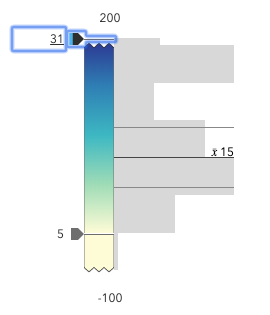
* When a slider is in a zoomed state, the zoomed
* ends of the track will appear jagged. In the image below, notice how the
* top thumb cannot be moved past the zoom max of `31` even though the slider
* max is `200`.
*
* 
*
* To exit a zoomed state, the user can click the
* jagged line or the developer can set the `zoomOptions` to `null`. It
* is up to the developer to provide a UI option for end users to
* enable zooming on the slider.
*
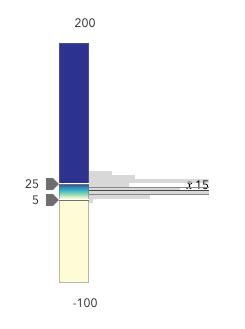
* Setting the `zoomOptions` is useful when the slider is tied to heavily skewed
* datasets where the histogram renders only one or two bars because of outliers.
*
* 
*
* You can remove the influence of outliers by zooming the slider and regenerating
* a histogram based on the zoomed min and max. This will provide a better view of the data
* and make the slider more useful to the end user.
*
* @example
* // zooms the slider to so thumbs can only be moved
* // to positions between the values of 10 and 25 while
* // maintaining the slider's absolute minimum and
* // maximum values
* slider.viewModel.zoomOptions = {
* min: 10,
* max: 25
* };
* @example
* // disables zooming on the slider
* slider.viewModel.zoomOptions = null;
* @example
* // zooms the slider to so thumbs can only be moved
* // to positions above the value of 10, while maintaining
* // the slider's absolute minimum value
* slider.viewModel.zoomOptions = {
* min: 10
* };
* @example
* // zooms the slider to so thumbs can only be moved
* // to positions below the value of 25, while maintaining
* // the slider's absolute maximum value
* slider.viewModel.zoomOptions = {
* max: 25
* };
* @example
* // zooms the slider to the handle positions
* // with some padding
* document.getElementById("zoomInButton").onclick = function() {
* const lowerThumb = slider.values[0];
* const upperThumb = slider.values[1];
*
* const range = upperThumb - lowerThumb;
* const padding = range * 0.3;
*
* const zoomMin = (lowerThumb - padding) > slider.min ? (lowerThumb - padding) : slider.min;
* const zoomMax = (upperThumb + padding) < slider.max ? (upperThumb + padding) : slider.max;
*
* slider.viewModel.set({ zoomOptions: { min: zoomMin, max: zoomMax } });
* };
*/
accessor zoomOptions: ZoomOptions | null | undefined;
/**
* Gets the [max](https://developers.arcgis.com/javascript/latest/references/core/widgets/smartMapping/SmartMappingSliderViewModel/#max) value of the slider. This is useful for when the user
* wants to change the slider max when it is not visible in the zoomed
* state.
*
* @see [zoomOptions](https://developers.arcgis.com/javascript/latest/references/core/widgets/smartMapping/SmartMappingSliderViewModel/#zoomOptions)
*/
getUnzoomedMax(): number;
/**
* Gets the [min](https://developers.arcgis.com/javascript/latest/references/core/widgets/smartMapping/SmartMappingSliderViewModel/#min) value of the slider. This is useful for when the user
* wants to change the slider min when it is not visible in the zoomed
* state.
*
* @see [zoomOptions](https://developers.arcgis.com/javascript/latest/references/core/widgets/smartMapping/SmartMappingSliderViewModel/#zoomOptions)
*/
getUnzoomedMin(): number;
}