@arcgis/core
Version:
ArcGIS Maps SDK for JavaScript: A complete 2D and 3D mapping and data visualization API
356 lines (352 loc) • 18.2 kB
TypeScript
import type Color from "../../Color.js";
import type SizeVariable from "../../renderers/visualVariables/SizeVariable.js";
import type SizeStop from "../../renderers/visualVariables/support/SizeStop.js";
import type SmartMappingSliderBase from "./SmartMappingSliderBase.js";
import type SizeSliderViewModel from "./SizeSlider/SizeSliderViewModel.js";
import type { ContinuousRendererResult } from "../../smartMapping/renderers/size.js";
import type { HistogramResult } from "../../smartMapping/statistics/types.js";
import type { SmartMappingSliderBaseProperties } from "./SmartMappingSliderBase.js";
import type { SizeSliderViewModelProperties } from "./SizeSlider/SizeSliderViewModel.js";
export interface SizeSliderProperties extends SmartMappingSliderBaseProperties, Partial<Pick<SizeSlider, "handlesSyncedToPrimary" | "persistSizeRangeEnabled" | "primaryHandleEnabled" | "stops" | "style">> {
/**
* The widget's default label. This label displays when it is
* used within another widget, such as the [Expand](https://developers.arcgis.com/javascript/latest/references/core/widgets/Expand/)
* or [LayerList](https://developers.arcgis.com/javascript/latest/references/core/widgets/LayerList/) widgets.
*
* @since 4.11
*/
label?: string | null;
/**
* The view model for the SizeSlider widget. This class contains all the logic
* (properties and methods) that controls this widget's behavior. See the
* [SizeSliderViewModel](https://developers.arcgis.com/javascript/latest/references/core/widgets/smartMapping/SizeSlider/SizeSliderViewModel/)
* class to access all properties and methods on the SizeSlider widget.
*/
viewModel?: SizeSliderViewModelProperties<SizeSliderSizeStop>;
}
export interface SizeSliderStyle {
/**
* The color of the slider's track.
* For single-color visualizations where
* only a Size variable is present, you should set this color to match
* the color of the symbol in the [SimpleRenderer](https://developers.arcgis.com/javascript/latest/references/core/renderers/SimpleRenderer/).
*
* @default new Color([149, 149, 149])
*/
trackFillColor?: Color;
/**
* The background color of the
* slider's track. Generally, this color should be subdued and not interfere with the `trackFillColor`.
*
* @default new Color([224, 224, 224])
*/
trackBackgroundColor?: Color;
}
export type SizeSliderSizeStop = SizeStop;
/**
* The SizeSlider widget is intended for authoring and exploring data-driven visualizations in any
* layer that can be rendered with a [SizeVariable](https://developers.arcgis.com/javascript/latest/references/core/renderers/visualVariables/SizeVariable/).
* At a minimum you must set the [min](https://developers.arcgis.com/javascript/latest/references/core/widgets/smartMapping/SizeSlider/#min), [max](https://developers.arcgis.com/javascript/latest/references/core/widgets/smartMapping/SizeSlider/#max), and [stops](https://developers.arcgis.com/javascript/latest/references/core/widgets/smartMapping/SizeSlider/#stops) properties
* of the widget.
*
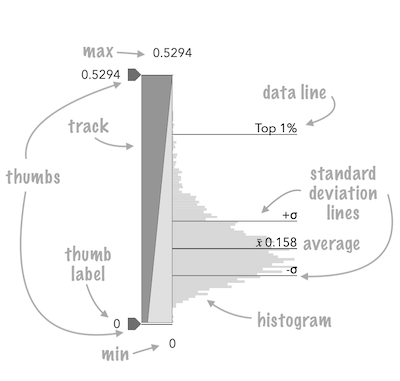
* <span id="image-annotations"></span>
* See the image below for a summary of the configurable options available on this slider.
*
* 
*
* The [fromRendererResult()](https://developers.arcgis.com/javascript/latest/references/core/widgets/smartMapping/SizeSlider/#fromRendererResult) method can be used to conveniently create this slider
* from the result of the [createContinuousRenderer()](https://developers.arcgis.com/javascript/latest/references/core/smartMapping/renderers/size/#createContinuousRenderer)
* method.
*
* ```js
* const sizeParams = {
* layer: layer,
* basemap: map.basemap,
* valueExpression: "( $feature.POP_POVERTY / $feature.TOTPOP_CY ) * 100",
* view: view
* };
*
* let rendererResult = null;
*
* sizeRendererCreator
* .createContinuousRenderer(sizeParams)
* .then(function(response) {
* rendererResult = response;
* layer.renderer = response.renderer;
*
* return histogram({
* layer: layer,
* valueExpression: sizeParams.valueExpression,
* view: view,
* numBins: 70
* });
* })
* .then(function(histogramResult) {
* const sizeSlider = SizeSlider.fromRendererResult(rendererResult, histogramResult);
* sizeSlider.container = "slider";
* })
* .catch(function(error) {
* console.log("there was an error: ", error);
* });
* ```
*
* This slider should be used to update a [size visual variable](https://developers.arcgis.com/javascript/latest/references/core/renderers/visualVariables/SizeVariable/)
* in a layer's renderer. It is the responsibility of the app developer
* to set up event listeners on that update the size variable of the appropriate renderer.
*
* ```js
* // when the user slides the handle(s), update the renderer
* // with the updated size stops
*
* sizeSlider.on(["thumb-change", "thumb-drag"], function() {
* const renderer = layer.renderer.clone();
* const sizeVariable = renderer.visualVariables[0];
* renderer.visualVariables = [ sizeSlider.updateVisualVariable(sizeVariable) ];
* layer.renderer = renderer;
* });
* ```
*
* @deprecated since version 5.0. Use the [Slider Size](https://developers.arcgis.com/javascript/latest/references/map-components/components/arcgis-slider-size-legacy/) component instead. For information on widget deprecation, read about [Esri's move to web components](https://developers.arcgis.com/javascript/latest/components-transition-plan/).
* @since 4.12
* @see [SizeSliderViewModel](https://developers.arcgis.com/javascript/latest/references/core/widgets/smartMapping/SizeSlider/SizeSliderViewModel/)
* @see [sizeRendererCreator](https://developers.arcgis.com/javascript/latest/references/core/smartMapping/renderers/size/)
*/
export default class SizeSlider extends SmartMappingSliderBase {
/**
* A convenience function used to create a SizeSlider widget instance from the
* [result](https://developers.arcgis.com/javascript/latest/references/core/smartMapping/renderers/size/#ContinuousRendererResult) of
* the [createContinuousRenderer()](https://developers.arcgis.com/javascript/latest/references/core/smartMapping/renderers/size/#createContinuousRenderer)
* method.
*
* This method sets the slider [stops](https://developers.arcgis.com/javascript/latest/references/core/widgets/smartMapping/SizeSlider/#stops), [min](https://developers.arcgis.com/javascript/latest/references/core/widgets/smartMapping/SizeSlider/#min), [max](https://developers.arcgis.com/javascript/latest/references/core/widgets/smartMapping/SizeSlider/#max),
* and [histogramConfig](https://developers.arcgis.com/javascript/latest/references/core/widgets/smartMapping/SizeSlider/#histogramConfig). It is still the developer's responsibility to assign it a proper
* [container](https://developers.arcgis.com/javascript/latest/references/core/widgets/smartMapping/SizeSlider/#container) and any other optional properties.
*
* @param rendererResult - The result object from the [createContinuousRenderer()](https://developers.arcgis.com/javascript/latest/references/core/smartMapping/renderers/size/#createContinuousRenderer)
* method.
* @param histogramResult - The result histogram object from the [histogram()](https://developers.arcgis.com/javascript/latest/references/core/smartMapping/statistics/histogram/#histogram)
* method.
* @returns Returns a SizeSlider instance. This will not render until you assign
* it a valid [container](https://developers.arcgis.com/javascript/latest/references/core/widgets/smartMapping/SizeSlider/#container).
* @example
* const params = {
* layer: layer,
* basemap: map.basemap,
* field: "POP_POVERTY"
* };
*
* let rendererResult = null;
*
* sizeRendererCreator
* .createContinuousRenderer(colorParams)
* .then(function(response) {
* rendererResult = response;
* layer.renderer = response.renderer;
*
* return histogram({
* layer: layer,
* valueExpression: params.field,
* numBins: 30
* });
* })
* .then(function(histogramResult) {
*
* const sizeSlider = SizeSlider.fromRendererResult(rendererResult, histogramResult);
* sizeSlider.container = "slider";
*
* // when the user slides the handle(s), update the renderer
* // with the updated size properties
*
* sizeSlider.on(["thumb-change", "thumb-drag"], function() {
* const renderer = layer.renderer.clone();
* const sizeVariable = renderer.visualVariables[0];
* renderer.visualVariables = [ sizeSlider.updateVisualVariable( sizeVariable ) ];
* layer.renderer = renderer;
* });
* })
* .catch(function(error) {
* console.log("there was an error: ", error);
* });
*/
static fromRendererResult(rendererResult: ContinuousRendererResult, histogramResult?: HistogramResult): SizeSlider;
/**
* @example
* // Typical usage
* const slider = new SizeSlider({
* container: "sliderDiv",
* min: 0,
* max: 100,
* stops: [
* { value: 0, size: 4 },
* { value: 100, size: 40 }
* ]
* });
*/
constructor(properties?: SizeSliderProperties);
/**
* Only applicable when three thumbs (i.e. handles) are set on the slider [values](https://developers.arcgis.com/javascript/latest/references/core/widgets/smartMapping/SizeSlider/SizeSliderViewModel/#values). This property
* indicates whether the position of the outside handles are synced with the middle, or primary,
* handle. When enabled, if the primary handle is moved then the outside handle positions are updated
* while maintaining a fixed distance from the primary handle.
*
* Only applicable when [primaryHandleEnabled](https://developers.arcgis.com/javascript/latest/references/core/widgets/smartMapping/SizeSlider/#primaryHandleEnabled) is `true`.
*
* @default true
* @since 4.18
* @see [primaryHandleEnabled](https://developers.arcgis.com/javascript/latest/references/core/widgets/smartMapping/SizeSlider/#primaryHandleEnabled)
* @example
* // enables the primary handles and syncs it with the others
* slider.primaryHandleEnabled = true;
* slider.handlesSyncedToPrimary = true;
*/
accessor handlesSyncedToPrimary: boolean;
/**
* The widget's default label. This label displays when it is
* used within another widget, such as the [Expand](https://developers.arcgis.com/javascript/latest/references/core/widgets/Expand/)
* or [LayerList](https://developers.arcgis.com/javascript/latest/references/core/widgets/LayerList/) widgets.
*
* @since 4.11
*/
get label(): string;
set label(value: string | null | undefined);
/**
* Only applicable when three thumbs (i.e. handles) are set on the
* slider (i.e. when [primaryHandleEnabled](https://developers.arcgis.com/javascript/latest/references/core/widgets/smartMapping/SizeSlider/#primaryHandleEnabled) is `true`).
* This property is typically used in diverging, or `above-and-below` renderer configurations.
*
* When `true`, ensures symbol sizes in the `above` range
* are consistent with symbol sizes in the `below` range for all slider thumb positions.
* In other words, the size values in the [stops](https://developers.arcgis.com/javascript/latest/references/core/widgets/smartMapping/SizeSlider/#stops) will adjust
* proportionally according to the positions of the data values within the
* constraints of the size range (maxSize - minSize) as the slider thumbs update.
* When `false`, size values in the stops will remain the same even when slider thumb values
* change.
*
* In most cases, this should be set to `true` to keep sizes in the `above` range consistent with
* sizes in the `below` range to avoid map misinterpretation.
*
* @default false
* @since 4.19
* @see [primaryHandleEnabled](https://developers.arcgis.com/javascript/latest/references/core/widgets/smartMapping/SizeSlider/#primaryHandleEnabled)
* @example
* slider.primaryHandleEnabled = true;
* slider.persistSizeRangeEnabled = true;
*/
accessor persistSizeRangeEnabled: boolean;
/**
* When `true`, the slider will render a third handle between the
* two handles already provided by default. This is the primary handle.
* When [handlesSyncedToPrimary](https://developers.arcgis.com/javascript/latest/references/core/widgets/smartMapping/SizeSlider/#handlesSyncedToPrimary) is `true`, then
* this handle will control the position of the others when moved.
*
* @default false
* @since 4.18
* @see [handlesSyncedToPrimary](https://developers.arcgis.com/javascript/latest/references/core/widgets/smartMapping/SizeSlider/#handlesSyncedToPrimary)
* @see [persistSizeRangeEnabled](https://developers.arcgis.com/javascript/latest/references/core/widgets/smartMapping/SizeSlider/#persistSizeRangeEnabled)
* @example
* // enables the primary handles and syncs it with the others
* slider.primaryHandleEnabled = true;
* slider.handlesSyncedToPrimary = true;
* slider.persistSizeRangeEnabled = true;
*/
accessor primaryHandleEnabled: boolean;
/**
* The size stops from the [SizeVariable](https://developers.arcgis.com/javascript/latest/references/core/renderers/visualVariables/SizeVariable/)
* to link to the slider.
*
* @see [updateVisualVariable()](https://developers.arcgis.com/javascript/latest/references/core/widgets/smartMapping/SizeSlider/#updateVisualVariable)
* @example
* const slider = new SizeSlider({
* container: "sliderDiv",
* min: 0,
* max: 100,
* stops: [
* { value: 0, size: 4 },
* { value: 100, size: 40 }
* ]
* });
*/
accessor stops: SizeSliderSizeStop[];
/**
* Exposes various properties of the widget
* that can be styled.
*
* @example
* slider.style = {
* trackFillColor: new Color("dodgerblue"),
* trackBackgroundColor: new Color([50,50,50])
* };
*/
accessor style: SizeSliderStyle;
/**
* The view model for the SizeSlider widget. This class contains all the logic
* (properties and methods) that controls this widget's behavior. See the
* [SizeSliderViewModel](https://developers.arcgis.com/javascript/latest/references/core/widgets/smartMapping/SizeSlider/SizeSliderViewModel/)
* class to access all properties and methods on the SizeSlider widget.
*/
get viewModel(): SizeSliderViewModel<SizeSliderSizeStop>;
set viewModel(value: SizeSliderViewModelProperties<SizeSliderSizeStop>);
/**
* A convenience function used to update the properties of a SizeSlider widget instance from the
* [result](https://developers.arcgis.com/javascript/latest/references/core/smartMapping/renderers/size/#ContinuousRendererResult) of
* the [createContinuousRenderer()](https://developers.arcgis.com/javascript/latest/references/core/smartMapping/renderers/size/#createContinuousRenderer)
* method. This method is useful for cases when the app allows the end user to switch data variables
* used to render the data.
*
* @param rendererResult - The result object from the [createContinuousRenderer()](https://developers.arcgis.com/javascript/latest/references/core/smartMapping/renderers/size/#createContinuousRenderer)
* method.
* @param histogramResult - The result histogram object from the [histogram()](https://developers.arcgis.com/javascript/latest/references/core/smartMapping/statistics/histogram/#histogram)
* method.
* @example
* const params = {
* layer: layer,
* basemap: map.basemap,
* field: "POP_POVERTY"
* };
*
* let rendererResult = null;
*
* sizeRendererCreator
* .createContinuousRenderer(colorParams)
* .then(function(response) {
* rendererResult = response;
* layer.renderer = response.renderer;
*
* return histogram({
* layer: layer,
* valueExpression: params.field,
* numBins: 30
* });
* })
* .then(function(histogramResult) {
* sizeSlider.updateFromRendererResult(rendererResult, histogramResult);
* })
* .catch(function(error) {
* console.log("there was an error: ", error);
* });
*/
updateFromRendererResult(rendererResult: ContinuousRendererResult, histogramResult?: HistogramResult): void;
/**
* A convenience function used to update the [SizeVariable](https://developers.arcgis.com/javascript/latest/references/core/renderers/visualVariables/SizeVariable/)
* to match the values of the [stops](https://developers.arcgis.com/javascript/latest/references/core/widgets/smartMapping/SizeSlider/#stops) on the slider.
*
* This is particularly useful for Size visual variables that have a set
* [SizeVariable.minDataValue](https://developers.arcgis.com/javascript/latest/references/core/renderers/visualVariables/SizeVariable/#minDataValue) and
* [maxDataValue](https://developers.arcgis.com/javascript/latest/references/core/renderers/visualVariables/SizeVariable/#minDataValue).
* This method will properly reconstruct the variable to set on the renderer so it matches the
* stops on the slider.
*
* @param sizeVariable - The size visual variable
* from the renderer to update to the set [stops](https://developers.arcgis.com/javascript/latest/references/core/widgets/smartMapping/SizeSlider/#stops) on the slider.
* @returns Returns the updated visual variable
* to set back on the renderer.
* @example
* sizeSlider.on(["thumb-change", "thumb-drag"], function() {
* const renderer = layer.renderer.clone();
* const sizeVariable = renderer.visualVariables[0];
* renderer.visualVariables = [ sizeSlider.updateVisualVariable( sizeVariable ) ];
* layer.renderer = renderer;
* });
*/
updateVisualVariable(sizeVariable: SizeVariable): SizeVariable | null | undefined;
}