@arcgis/core
Version:
ArcGIS Maps SDK for JavaScript: A complete 2D and 3D mapping and data visualization API
275 lines (272 loc) • 12.9 kB
TypeScript
import type Color from "../../Color.js";
import type ClassBreakInfo from "../../renderers/support/ClassBreakInfo.js";
import type SmartMappingSliderBase from "./SmartMappingSliderBase.js";
import type ClassedSizeSliderViewModel from "./ClassedSizeSlider/ClassedSizeSliderViewModel.js";
import type { ClassBreaksRendererResult } from "../../smartMapping/renderers/size.js";
import type { HistogramResult } from "../../smartMapping/statistics/types.js";
import type { SmartMappingSliderBaseProperties } from "./SmartMappingSliderBase.js";
import type { SizeBreak } from "./types.js";
import type { ClassedSizeSliderViewModelProperties } from "./ClassedSizeSlider/ClassedSizeSliderViewModel.js";
export interface ClassedSizeSliderProperties extends SmartMappingSliderBaseProperties, Partial<Pick<ClassedSizeSlider, "breaks" | "style">> {
/**
* The widget's default label. This label displays when it is
* used within another widget, such as the [Expand](https://developers.arcgis.com/javascript/latest/references/core/widgets/Expand/)
* or [LayerList](https://developers.arcgis.com/javascript/latest/references/core/widgets/LayerList/) widgets.
*
* @since 4.11
*/
label?: string | null;
/**
* The view model for the ClassedSizeSlider widget. This class contains all the logic
* (properties and methods) that controls this widget's behavior. See the
* [ClassedSizeSliderViewModel](https://developers.arcgis.com/javascript/latest/references/core/widgets/smartMapping/ClassedSizeSlider/ClassedSizeSliderViewModel/)
* class to access all properties and methods on the ClassedSizeSlider widget.
*/
viewModel?: ClassedSizeSliderViewModelProperties;
}
export interface ClassedSizeSliderStyle {
/**
* The color of the slider's track.
* For single-color visualizations where
* only a Size variable is present, you should set this color to match
* the color of the symbol in the [SimpleRenderer](https://developers.arcgis.com/javascript/latest/references/core/renderers/SimpleRenderer/).
*
* @default new Color([149, 149, 149])
*/
trackFillColor?: Color;
/**
* The background color of the
* slider's track. Generally, this color should be subdued and not interfere with the `trackFillColor`.
*
* @default new Color([224, 224, 224])
*/
trackBackgroundColor?: Color;
}
/**
* The ClassedSizeSlider widget is designed for authoring and exploring data-driven visualizations in any
* layer that can be rendered with size in a [ClassBreaksRenderer](https://developers.arcgis.com/javascript/latest/references/core/renderers/ClassBreaksRenderer/).
* At a minimum you must set the [breaks](https://developers.arcgis.com/javascript/latest/references/core/widgets/smartMapping/ClassedSizeSlider/#breaks) property
* of the widget. The breaks are used to set the slider's thumbs.
*
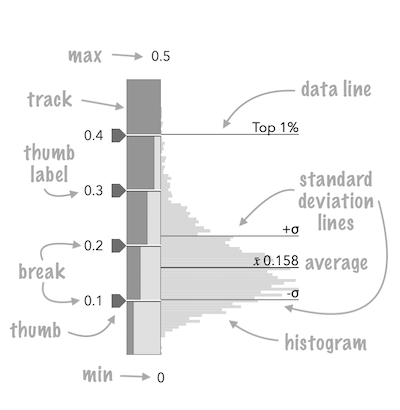
* <span id="image-annotations"></span>
* See the image below for a summary of the configurable options available on this slider.
*
* 
*
* The [fromRendererResult()](https://developers.arcgis.com/javascript/latest/references/core/widgets/smartMapping/ClassedSizeSlider/#fromRendererResult) method can be used to conveniently create this slider
* from the result of the [createClassBreaksRenderer()](https://developers.arcgis.com/javascript/latest/references/core/smartMapping/renderers/size/#createClassBreaksRenderer)
* method.
*
* ```js
* const params = {
* layer: layer,
* basemap: map.basemap,
* valueExpression: "( $feature.POP_POVERTY / $feature.TOTPOP_CY ) * 100",
* view: view,
* classificationMethod: "equal-interval"
* };
*
* let rendererResult = null;
*
* sizeRendererCreator
* .createClassBreaksRenderer(params)
* .then(function(response) {
* rendererResult = response;
* layer.renderer = response.renderer;
*
* return histogram({
* layer: layer,
* valueExpression: params.valueExpression,
* view: view,
* numBins: 70
* });
* })
* .then(function(histogramResult) {
* const slider = ClassedSizeSlider.fromRendererResult(rendererResult, histogramResult);
* slider.container = "slider";
* })
* .catch(function(error) {
* console.log("there was an error: ", error);
* });
* ```
*
* This slider should be used to update the [classBreakInfos](https://developers.arcgis.com/javascript/latest/references/core/renderers/ClassBreaksRenderer/#classBreakInfos)
* in a ClassBreaksRenderer. It is the responsibility of the app developer
* to set up event listeners on this slider that update the breaks of the appropriate renderer.
*
* ```js
* // when the user slides the handle(s), update the renderer
* // with the updated class breaks
*
* slider.on(["thumb-change", "thumb-drag"], function() {
* const renderer = layer.renderer.clone();
* renderer.classBreaks = slider.updateClassBreakInfos( renderer.classBreaks );
* layer.renderer = renderer;
* });
* ```
*
* @deprecated since version 5.0. Use the [Slider Classed Size](https://developers.arcgis.com/javascript/latest/references/map-components/components/arcgis-slider-classed-size-legacy/) component instead. For information on widget deprecation, read about [Esri's move to web components](https://developers.arcgis.com/javascript/latest/components-transition-plan/).
* @since 4.12
* @see [ClassedSizeSliderViewModel](https://developers.arcgis.com/javascript/latest/references/core/widgets/smartMapping/ClassedSizeSlider/ClassedSizeSliderViewModel/)
* @see [sizeRendererCreator](https://developers.arcgis.com/javascript/latest/references/core/smartMapping/renderers/size/)
* @see [ClassBreaksRenderer](https://developers.arcgis.com/javascript/latest/references/core/renderers/ClassBreaksRenderer/)
*/
export default class ClassedSizeSlider extends SmartMappingSliderBase {
/**
* A convenience function used to create a ClassedSizeSlider widget from the result
* of the [createClassBreaksRenderer()](https://developers.arcgis.com/javascript/latest/references/core/smartMapping/renderers/size/#createClassBreaksRenderer) method.
*
* @param rendererResult - The result object from the [createClassBreaksRenderer()](https://developers.arcgis.com/javascript/latest/references/core/smartMapping/renderers/size/#createClassBreaksRenderer)
* method.
* @param histogramResult - The result histogram object from the [histogram()](https://developers.arcgis.com/javascript/latest/references/core/smartMapping/statistics/histogram/#histogram)
* method.
* @returns Returns a ClassedSizeSlider instance. This will not render until you assign
* it a valid [container](https://developers.arcgis.com/javascript/latest/references/core/widgets/smartMapping/ClassedSizeSlider/#container).
* @example
* const params = {
* layer: layer,
* basemap: map.basemap,
* valueExpression: "( $feature.POP_POVERTY / $feature.TOTPOP_CY ) * 100",
* view: view,
* classificationMethod: "equal-interval"
* };
*
* let rendererResult = null;
*
* sizeRendererCreator
* .createClassBreaksRenderer(params)
* .then(function(response) {
* rendererResult = response;
* layer.renderer = response.renderer;
*
* return histogram({
* layer: layer,
* valueExpression: params.valueExpression,
* view: view,
* numBins: 70
* });
* })
* .then(function(histogramResult) {
* const slider = ClassedSizeSlider.fromRendererResult(rendererResult, histogramResult);
* slider.container = "slider";
* })
* .catch(function(error) {
* console.log("there was an error: ", error);
* });
*/
static fromRendererResult(rendererResult: ClassBreaksRendererResult, histogramResult?: HistogramResult): ClassedSizeSlider;
constructor(properties?: ClassedSizeSliderProperties);
/**
* An array of class breaks with associated sizes. The size mapped to each break should
* be used to update the renderer of a layer. A minimum of two breaks must be provided to the slider.
*
* @example
* slider.breaks = [{
* min: 0,
* max: 20,
* size: 6
* }, {
* min: 20,
* max: 40,
* size: 12
* }, {
* min: 40,
* max: 60,
* size: 24
* }, {
* min: 60,
* max: 80,
* size: 48
* }];
*/
accessor breaks: SizeBreak[];
/**
* The widget's default label. This label displays when it is
* used within another widget, such as the [Expand](https://developers.arcgis.com/javascript/latest/references/core/widgets/Expand/)
* or [LayerList](https://developers.arcgis.com/javascript/latest/references/core/widgets/LayerList/) widgets.
*
* @since 4.11
*/
get label(): string;
set label(value: string | null | undefined);
/**
* Exposes various properties of the widget that can be styled.
*
* @example
* slider.style = {
* trackFillColor: new Color("dodgerblue"),
* trackBackgroundColor: new Color([50,50,50])
* };
*/
accessor style: ClassedSizeSliderStyle;
/**
* The view model for the ClassedSizeSlider widget. This class contains all the logic
* (properties and methods) that controls this widget's behavior. See the
* [ClassedSizeSliderViewModel](https://developers.arcgis.com/javascript/latest/references/core/widgets/smartMapping/ClassedSizeSlider/ClassedSizeSliderViewModel/)
* class to access all properties and methods on the ClassedSizeSlider widget.
*/
get viewModel(): ClassedSizeSliderViewModel;
set viewModel(value: ClassedSizeSliderViewModelProperties);
/**
* A convenience function used to update the
* [ClassBreaksRenderer.classBreakInfos](https://developers.arcgis.com/javascript/latest/references/core/renderers/ClassBreaksRenderer/#classBreakInfos)
* of a [ClassBreaksRenderer](https://developers.arcgis.com/javascript/latest/references/core/renderers/ClassBreaksRenderer/) associated with this slider.
*
* The number of breaks from the renderer must match the number of breaks in the slider.
* Generally, the input breaks for this method should come from the same renderer as one
* used to create the slider with the [fromRendererResult()](https://developers.arcgis.com/javascript/latest/references/core/widgets/smartMapping/ClassedSizeSlider/#fromRendererResult) method.
*
* @param breakInfos - The classBreakInfos
* from a [ClassBreaksRenderer](https://developers.arcgis.com/javascript/latest/references/core/renderers/ClassBreaksRenderer/) instance to update based on
* the properties of the slider.
* @returns The updated classBreakInfos to set
* on a ClassBreaksRenderer object.
* @example
* slider.on(["thumb-change", "thumb-drag"], function() {
* const renderer = layer.renderer.clone();
* renderer.classBreaks = slider.updateClassBreakInfos( renderer.classBreaks );
* layer.renderer = renderer;
* });
*/
updateClassBreakInfos(breakInfos: ClassBreakInfo[]): ClassBreakInfo[] | null | undefined;
/**
* A convenience function used to update the properties a ClassedSizeSlider from the result
* of the [createClassBreaksRenderer()](https://developers.arcgis.com/javascript/latest/references/core/smartMapping/renderers/size/#createClassBreaksRenderer) method.
*
* @param rendererResult - The result object from the [createClassBreaksRenderer()](https://developers.arcgis.com/javascript/latest/references/core/smartMapping/renderers/size/#createClassBreaksRenderer)
* method.
* @param histogramResult - The result histogram object from the [histogram()](https://developers.arcgis.com/javascript/latest/references/core/smartMapping/statistics/histogram/#histogram)
* method.
* @example
* const params = {
* layer: layer,
* basemap: map.basemap,
* valueExpression: "( $feature.POP_POVERTY / $feature.TOTPOP_CY ) * 100",
* view: view,
* classificationMethod: "equal-interval"
* };
*
* let rendererResult = null;
*
* sizeRendererCreator
* .createClassBreaksRenderer(params)
* .then(function(response) {
* rendererResult = response;
* layer.renderer = response.renderer;
*
* return histogram({
* layer: layer,
* valueExpression: params.valueExpression,
* view: view,
* numBins: 70
* });
* })
* .then(function(histogramResult) {
* slider.updateFromRendererResult(rendererResult, histogramResult);
* })
* .catch(function(error) {
* console.log("there was an error: ", error);
* });
*/
updateFromRendererResult(rendererResult: ClassBreaksRendererResult, histogramResult?: HistogramResult): void;
}