@arcgis/core
Version:
ArcGIS Maps SDK for JavaScript: A complete 2D and 3D mapping and data visualization API
119 lines (117 loc) • 5.35 kB
TypeScript
import type VideoLayer from "../layers/VideoLayer.js";
import type MapView from "../views/MapView.js";
import type Widget from "./Widget.js";
import type VideoPlayerViewModel from "./VideoPlayer/VideoPlayerViewModel.js";
import type { Icon } from "@esri/calcite-components/components/calcite-icon";
import type { VideoPlayerViewModelProperties } from "./VideoPlayer/VideoPlayerViewModel.js";
import type { WidgetProperties } from "./Widget.js";
export interface VideoPlayerProperties extends WidgetProperties, Partial<Pick<VideoPlayer, "layer" | "view">> {
/**
* Icon which represents the widget. It is typically used when the widget is controlled by another
* one (e.g. in the Expand widget).
*
* @default "video-web"
* @see [Calcite Icon Search](https://developers.arcgis.com/calcite-design-system/icons/)
* @example
* // Use a different icon for the VideoPlayer
* videoPlayer.icon = "livestream-video-layer";
* @since 4.27
* @see [Calcite Icon Search](https://developers.arcgis.com/calcite-design-system/icons/)
*/
icon?: Icon["icon"] | null;
/**
* The view model for the VideoPlayer widget. This class contains all the logic
* (properties and methods) that controls this widget's behavior. See the
* [VideoPlayerViewModel](https://developers.arcgis.com/javascript/latest/references/core/widgets/VideoPlayer/VideoPlayerViewModel/) class to access
* all properties and methods on the VideoPlayer widget.
*
* @example
* // Use the view model to set the seekLength to 20 seconds
* videoPlayer.viewModel.seekLength = 20;
*/
viewModel?: VideoPlayerViewModelProperties;
}
/**
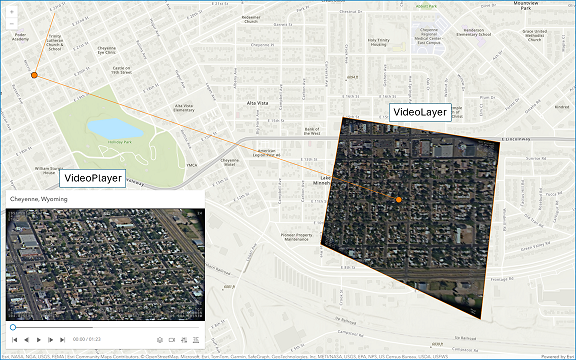
* The VideoPlayer widget provides a user interface for interacting with a [VideoLayer](https://developers.arcgis.com/javascript/latest/references/core/layers/VideoLayer/).
* It displays the original video content and provides controls for playing, pausing, seeking, and changing the video speed and quality.
*
* The VideoPlayer widget provides the following capabilities:
* - Control operations (play, pause, seek)
* - Time and duration display
* - Customizable graphics colors
* - Following options (sensor, frame, video)
* - Adjustable speed and quality
* - Access to frame metadata
*
* > [!WARNING]
* >
* > **Known Limitations**
* >
* > Not supported in 3D [SceneViews](https://developers.arcgis.com/javascript/latest/references/core/views/SceneView/).
* > Not supported on macOS and iOS devices.
*
* 
*
* @deprecated since version 4.33. Use the [Video Player component](https://developers.arcgis.com/javascript/latest/references/map-components/components/arcgis-video-player/) instead. For information on widget deprecation, read about [Esri's move to web components](https://developers.arcgis.com/javascript/latest/components-transition-plan/).
* @since 4.30
* @see [VideoLayer](https://developers.arcgis.com/javascript/latest/references/core/layers/VideoLayer/)
* @see [VideoPlayer](https://developers.arcgis.com/javascript/latest/references/core/widgets/VideoPlayer/)
* @example
* const videoPlayer = new VideoPlayer({
* layer: videoLayer,
* view
* });
*/
export default class VideoPlayer extends Widget {
/**
* @example
* // Create a new VideoPlayer with a VideoLayer
* const videoPlayer = new VideoPlayer({
* layer: videoLayer,
* view
* });
*/
constructor(properties?: VideoPlayerProperties);
/**
* Icon which represents the widget. It is typically used when the widget is controlled by another
* one (e.g. in the Expand widget).
*
* @default "video-web"
* @see [Calcite Icon Search](https://developers.arcgis.com/calcite-design-system/icons/)
* @example
* // Use a different icon for the VideoPlayer
* videoPlayer.icon = "livestream-video-layer";
* @since 4.27
* @see [Calcite Icon Search](https://developers.arcgis.com/calcite-design-system/icons/)
*/
get icon(): Icon["icon"];
set icon(value: Icon["icon"] | null | undefined);
/**
* The [VideoLayer](https://developers.arcgis.com/javascript/latest/references/core/layers/VideoLayer/) to use as the data source for the video player.
*
* @example
* // Create a new VideoPlayer with a VideoLayer
* videoPlayer.layer = videoLayer;
*/
accessor layer: VideoLayer | null | undefined;
/**
* A reference to the [MapView](https://developers.arcgis.com/javascript/latest/references/core/views/MapView/). This widget is only supported in a MapView.
*
* @example
* // Set the map view for the VideoPlayer
* videoPlayer.view = mapView;
*/
accessor view: MapView | null | undefined;
/**
* The view model for the VideoPlayer widget. This class contains all the logic
* (properties and methods) that controls this widget's behavior. See the
* [VideoPlayerViewModel](https://developers.arcgis.com/javascript/latest/references/core/widgets/VideoPlayer/VideoPlayerViewModel/) class to access
* all properties and methods on the VideoPlayer widget.
*
* @example
* // Use the view model to set the seekLength to 20 seconds
* videoPlayer.viewModel.seekLength = 20;
*/
get viewModel(): VideoPlayerViewModel;
set viewModel(value: VideoPlayerViewModelProperties);
}