@arcgis/core
Version:
ArcGIS Maps SDK for JavaScript: A complete 2D and 3D mapping and data visualization API
130 lines (127 loc) • 5.93 kB
TypeScript
import type UtilityNetwork from "../networks/UtilityNetwork.js";
import type MapView from "../views/MapView.js";
import type Widget from "./Widget.js";
import type UtilityNetworkValidateTopologyViewModel from "./UtilityNetworkValidateTopology/UtilityNetworkValidateTopologyViewModel.js";
import type { Icon } from "@esri/calcite-components/components/calcite-icon";
import type { WidgetProperties } from "./Widget.js";
import type { UtilityNetworkValidateTopologyViewModelProperties } from "./UtilityNetworkValidateTopology/UtilityNetworkValidateTopologyViewModel.js";
export interface UtilityNetworkValidateTopologyProperties extends WidgetProperties, Partial<Pick<UtilityNetworkValidateTopology, "extentToValidate" | "utilityNetwork" | "view">> {
/**
* Icon displayed in the widget's button.
*
* @default "check-circle"
* @since 4.27
* @see [Calcite Icon Search](https://developers.arcgis.com/calcite-design-system/icons/)
* @see [Calcite Icon Search](https://developers.arcgis.com/calcite-design-system/icons/)
*/
icon?: Icon["icon"] | null;
/**
* The widget's default label.
*
* @since 4.11
*/
label?: string | null;
/**
* The view model for this widget. This is a class that contains all the logic
* (properties and methods) that controls this widget's behavior. See the
* [UtilityNetworkValidateTopologyViewModel](https://developers.arcgis.com/javascript/latest/references/core/widgets/UtilityNetworkValidateTopology/UtilityNetworkValidateTopologyViewModel/) class to access
* all properties and methods on the widget.
*
* @since 4.27
*/
viewModel?: UtilityNetworkValidateTopologyViewModelProperties;
}
export type UtilityNetworkValidateTopologyExtentOption = "current" | "entire";
/**
* The UtilityNetworkValidateTopology widget class, functioning as a part of the ArcGIS Maps SDK for JavaScript,
* simplifies the process of validating a DirtyArea within a utility network.
* It offers an intuitive user interface, reducing the complexity of working with utility network associations.
* This widget is specifically designed to validate topology and it handles both current Extent and full Extent,
* minimizing the amount of code required for such operations.
*
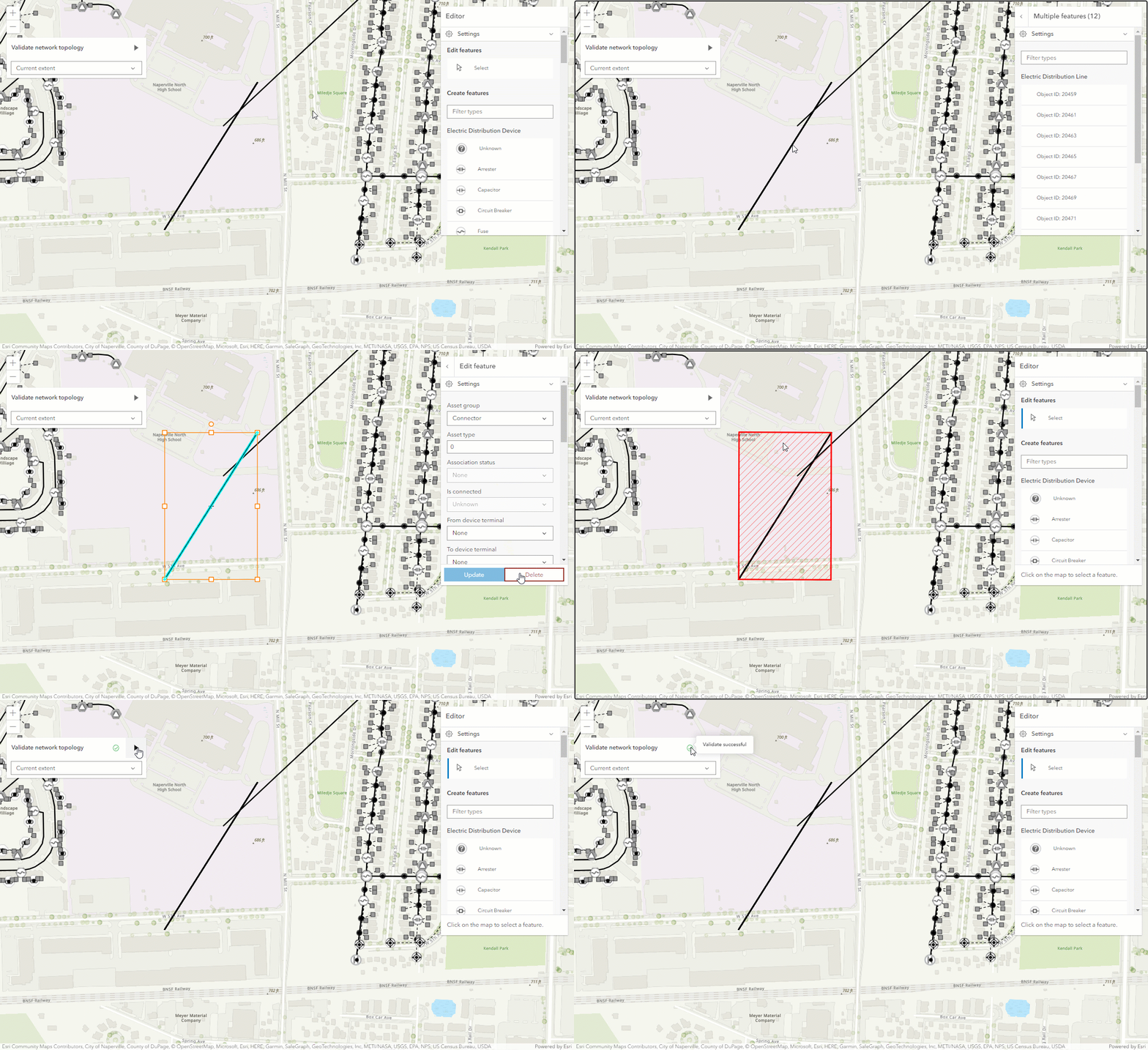
* The following image demonstrates an example of validating a network topology using the widget after an edit results in a dirty area feature.
* 
* > [!CAUTION]
* >
* > **Notes**
* >
* > The UtilityNetworkValidateTopology widget class is unable to support proxied feature services or feature services that utilize stored credentials.
*
* @deprecated since version 5.0. Use the [Utility Network Validate Topology component](https://developers.arcgis.com/javascript/latest/references/map-components/components/arcgis-utility-network-validate-topology/) instead. For information on widget deprecation, read about [Esri's move to web components](https://developers.arcgis.com/javascript/latest/components-transition-plan/).
* @since 4.27
* @see [UtilityNetwork](https://developers.arcgis.com/javascript/latest/references/core/networks/UtilityNetwork/)
* @see [UtilityNetworkValidateTopologyViewModel](https://developers.arcgis.com/javascript/latest/references/core/widgets/UtilityNetworkValidateTopology/UtilityNetworkValidateTopologyViewModel/)
* @example
* // How to use the UtilityNetworkValidateTopology widget
* view.when(async () => {
* // load all the layers in the map
* await view.map.loadAll();
*
* // if the map does not contain a utility network layer return
* if(!(view.map.utilityNetworks.items.length > 0)) {
* return;
* }
*
* utilityNetwork = view.map.utilityNetworks.getItemAt(0);
* await utilityNetwork.load();
*
* // function to add the dirty areas layer to the map
* addDirtyAreasLayer();
*
* // initialize the UtilityNetworkValidateTopology widget
* const unValidateTopology = new UtilityNetworkValidateTopology({
* view,
* utilityNetwork: utilityNetwork
* });
*
* view.ui.add(unValidateTopology, "top-left");
* });
*/
export default class UtilityNetworkValidateTopology extends Widget<UtilityNetworkValidateTopologyProperties> {
constructor(properties?: UtilityNetworkValidateTopologyProperties);
/**
* Specifies the extent of the validation.
*
* @default "current"
*/
accessor extentToValidate: UtilityNetworkValidateTopologyExtentOption;
/**
* Icon displayed in the widget's button.
*
* @default "check-circle"
* @since 4.27
* @see [Calcite Icon Search](https://developers.arcgis.com/calcite-design-system/icons/)
* @see [Calcite Icon Search](https://developers.arcgis.com/calcite-design-system/icons/)
*/
get icon(): Icon["icon"];
set icon(value: Icon["icon"] | null | undefined);
/**
* The widget's default label.
*
* @since 4.11
*/
get label(): string;
set label(value: string | null | undefined);
/**
* Determines the utility network to use.
*
* @since 4.27
*/
accessor utilityNetwork: UtilityNetwork | null | undefined;
/**
* The view from which the widget will operate.
*
* @since 4.27
*/
accessor view: MapView | null | undefined;
/**
* The view model for this widget. This is a class that contains all the logic
* (properties and methods) that controls this widget's behavior. See the
* [UtilityNetworkValidateTopologyViewModel](https://developers.arcgis.com/javascript/latest/references/core/widgets/UtilityNetworkValidateTopology/UtilityNetworkValidateTopologyViewModel/) class to access
* all properties and methods on the widget.
*
* @since 4.27
*/
get viewModel(): UtilityNetworkValidateTopologyViewModel;
set viewModel(value: UtilityNetworkValidateTopologyViewModelProperties);
}