@arcgis/core
Version:
ArcGIS Maps SDK for JavaScript: A complete 2D and 3D mapping and data visualization API
310 lines (306 loc) • 14.6 kB
TypeScript
import type UtilityNetwork from "../networks/UtilityNetwork.js";
import type PictureMarkerSymbol from "../symbols/PictureMarkerSymbol.js";
import type SimpleMarkerSymbol from "../symbols/SimpleMarkerSymbol.js";
import type MapView from "../views/MapView.js";
import type Widget from "./Widget.js";
import type UtilityNetworkTraceViewModel from "./UtilityNetworkTrace/UtilityNetworkTraceViewModel.js";
import type { Icon } from "@esri/calcite-components/components/calcite-icon";
import type { FlagProperty, GraphicColor, ResultAreaPropertiesExtend, TraceResultExtend, UtilityNetworkTraceViewModelEvents, UtilityNetworkTraceViewModelProperties } from "./UtilityNetworkTrace/UtilityNetworkTraceViewModel.js";
import type { WidgetProperties } from "./Widget.js";
export interface UtilityNetworkTraceProperties extends WidgetProperties, Partial<Pick<UtilityNetworkTrace, "defaultGraphicColor" | "disabled" | "enableResultArea" | "flags" | "inputSettings" | "resultAreaProperties" | "selectedTraces" | "selectOnComplete" | "showGraphicsOnComplete" | "showSelectionAttributes" | "utilityNetwork" | "view">> {
/**
* Icon displayed in the widget's button.
*
* @default "utility-network-trace"
* @since 4.27
* @see [Calcite Icon Search](https://developers.arcgis.com/calcite-design-system/icons/)
* @see [Calcite Icon Search](https://developers.arcgis.com/calcite-design-system/icons/)
*/
icon?: Icon["icon"] | null;
/**
* The widget's default label.
*
* @since 4.11
*/
label?: string | null;
/**
* The view model for this widget. This is a class that contains all the logic
* (properties and methods) that controls this widget's behavior. See the
* [UtilityNetworkTraceViewModel](https://developers.arcgis.com/javascript/latest/references/core/widgets/UtilityNetworkTrace/UtilityNetworkTraceViewModel/) class to access
* all properties and methods on the widget.
*/
viewModel?: UtilityNetworkTraceViewModelProperties;
}
/**
* InputSetting represents the labels, descriptions, and symbols that can be overridden for the [flags](https://developers.arcgis.com/javascript/latest/references/core/widgets/UtilityNetworkTrace/#flags) user interface (UI) in the UtilityNetworkTrace widget.
*
* @example
* // Set inputSettings with a SimpleMarkerSymbol
* utilityNetworkTrace.inputSettings = [
* {
* type: "starting-point",
* label: "Start locations",
* description: "Add starting locations before running a trace!",
* symbol: {
* type: "simple-marker",
* style: "cross",
* color: "blue",
* size: "8px",
* outline: {
* color: [ 255, 255, 0 ],
* width: 3
* }
* }
* }
* ]
*/
export interface InputSetting {
/** The flag type indicates which section will have its settings overridden. */
type: string;
/** The label that replaces either the default "Starting points" or "Barriers" headings depending on what flag type is passed. */
label: string;
/** The description that replaces the default sub-headings for either the starting points or barriers. */
description: string;
/** The symbol displayed next to either the "Starting points" or "Barriers" headings. */
symbol?: SimpleMarkerSymbol | PictureMarkerSymbol;
}
export interface UtilityNetworkTraceEvents extends UtilityNetworkTraceViewModelEvents {}
/**
* The UtilityNetworkTrace widget provides a way to run traces in a Utility Network based on connectivity or traversability from set input flags.
* Input flags (starting points and barriers) can be set by clicking the view. Alternatively, the widget allows setting input flags programmatically on creation, or at runtime, by setting the [flags](https://developers.arcgis.com/javascript/latest/references/core/widgets/UtilityNetworkTrace/#flags) property.
* The widget can execute one or multiple traces concurrently by selecting them from the trace types dropdown. Trace types can be preset in the widget programmatically on creation, or at runtime, by setting the [selectedTraces](https://developers.arcgis.com/javascript/latest/references/core/widgets/UtilityNetworkTrace/#selectedTraces) property.
* 
*
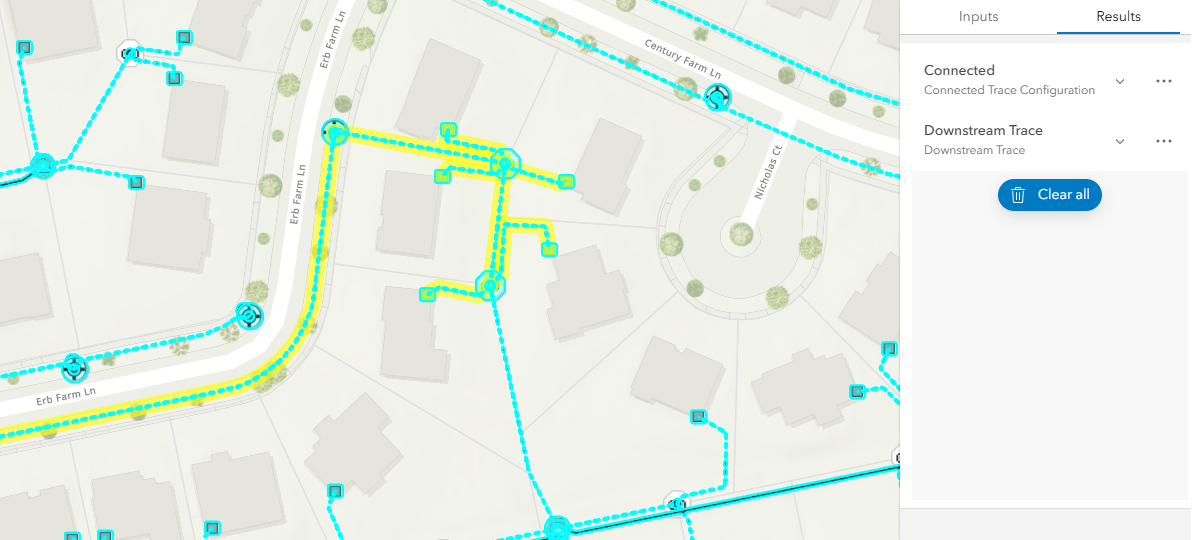
* The trace results are returned as a selection or as graphics, or both (if aggregated geometry is set as a [Result Type](https://pro.arcgis.com/en/pro-app/latest/help/data/utility-network/configure-a-trace.htm#ESRI_SECTION2_A4D0D10A7C904C278F61ACDEBFCEDDA5)).
* 
*
* The resulting selection of features can be visualized in a list organized by asset groups and asset types if the [showSelectionAttributes](https://developers.arcgis.com/javascript/latest/references/core/widgets/UtilityNetworkTrace/#showSelectionAttributes) property is `true`.
*
* 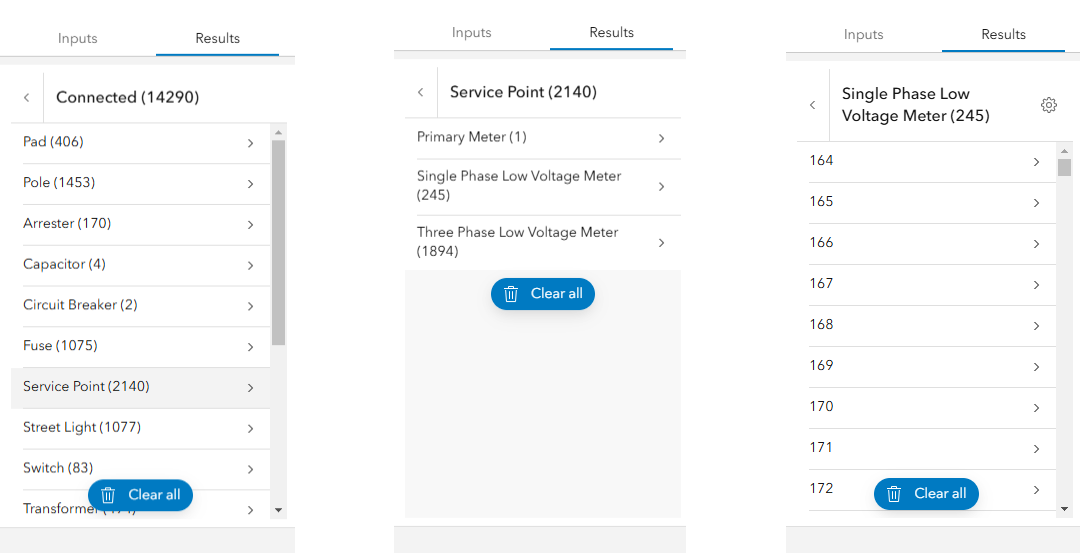
* In the image above, the left image displays a list of trace results filtered by asset group. The center image displays a list of asset types for the asset group "Service Point". The right image displays a list of features for the asset type "Single Phase Low Voltage Meter".
*
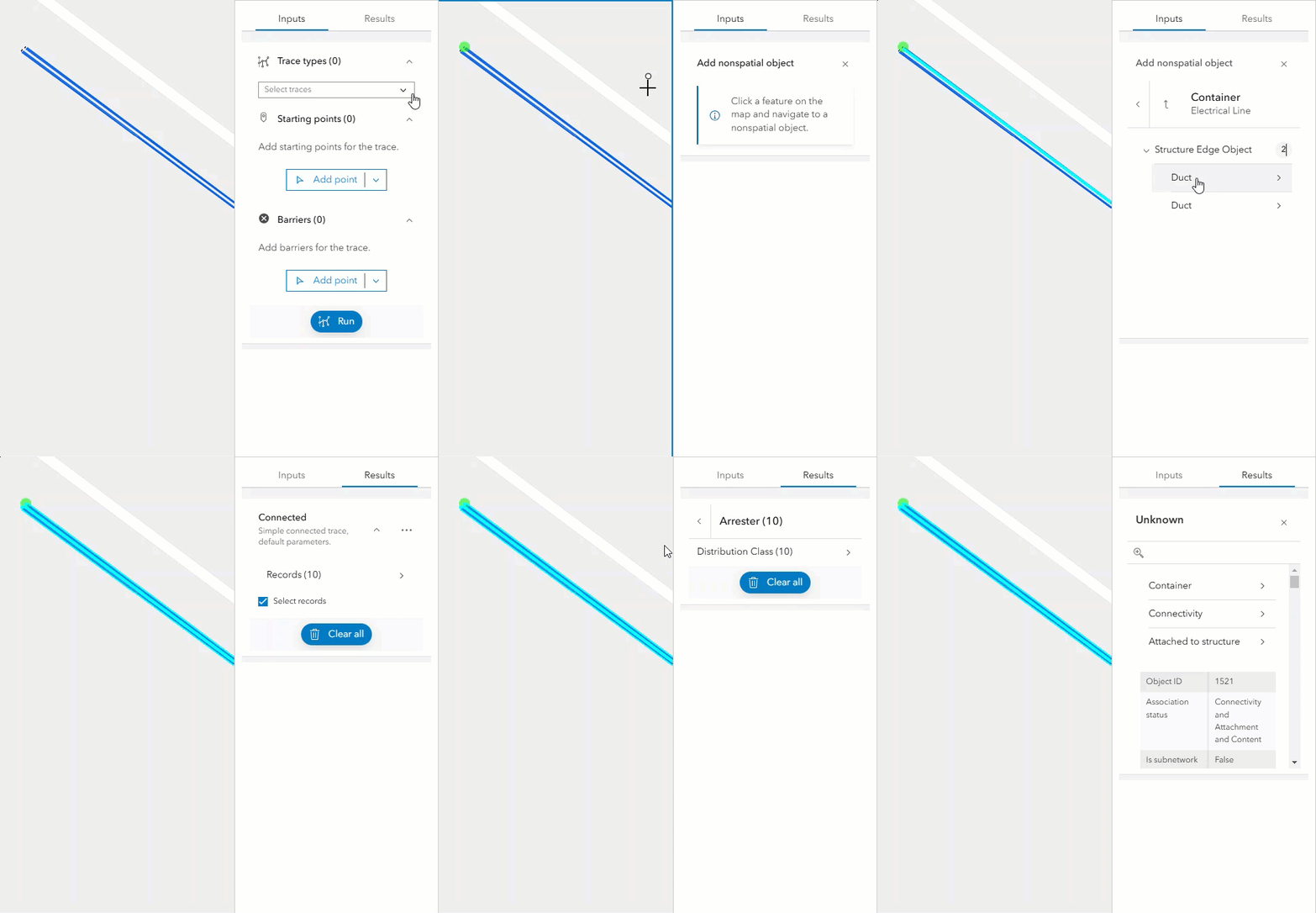
* Nonspatial data can be included as trace starting points and barriers. Additionally, users can examine nonspatial data within the trace results.
*
* 
* > [!WARNING]
* >
* > **Notes**
* >
* > The UtilityNetworkTrace widget class is unable to support proxied feature services or feature services that utilize stored credentials.
* > Requires a [WebMap](https://developers.arcgis.com/javascript/latest/references/core/WebMap/) published with a Utility Network and [shared named trace configurations](https://developers.arcgis.com/javascript/latest/references/core/networks/UtilityNetwork/#sharedNamedTraceConfigurations) (Available at [Enterprise 10.9](https://enterprise.arcgis.com/en/get-started/10.9/windows/what-is-arcgis-enterprise-.htm)).
* > The network topology must be [enabled](https://pro.arcgis.com/en/pro-app/latest/help/data/utility-network/enable-the-network-topology.htm) and the results of a trace are not guaranteed to be accurate if dirty areas are traced. The network topology for the area to be traced must be [validated](https://pro.arcgis.com/en/pro-app/latest/help/data/utility-network/validate-a-network-topology.htm) to reflect the most recent edits or updates made to the network.
* > Running traces on map services is not supported.
* > Support for adding nonspatial features as trace locations and displaying [Utility Network Associations](https://pro.arcgis.com/en/pro-app/latest/help/data/utility-network/associations.htm) info in the [trace result](https://developers.arcgis.com/javascript/latest/references/core/rest/networks/support/TraceResult/) require using a [WebMap](https://developers.arcgis.com/javascript/latest/references/core/WebMap/) with popups including [UtilityNetworkAssociationsContent](https://developers.arcgis.com/javascript/latest/references/core/popup/content/UtilityNetworkAssociationsContent/).
* > Updating the `map` property in the [View](https://developers.arcgis.com/javascript/latest/references/core/views/View/) does not automatically refresh the contents of the UtilityNetworkTrace widget.
*
* @deprecated since version 5.0. Use the [Utility Network Trace Analysis component](https://developers.arcgis.com/javascript/latest/references/map-components/components/arcgis-utility-network-trace-analysis) instead. For information on widget deprecation, read about [Esri's move to web components](https://developers.arcgis.com/javascript/latest/components-transition-plan/).
* @since 4.22
* @see [UtilityNetworkTraceViewModel](https://developers.arcgis.com/javascript/latest/references/core/widgets/UtilityNetworkTrace/UtilityNetworkTraceViewModel/)
* @see [UtilityNetwork](https://developers.arcgis.com/javascript/latest/references/core/networks/UtilityNetwork/)
* @see [NamedTraceConfiguration](https://developers.arcgis.com/javascript/latest/references/core/networks/support/NamedTraceConfiguration/)
* @see [Trace (Utility Network)](https://pro.arcgis.com/en/pro-app/latest/tool-reference/utility-networks/trace.htm)
* @see [Sample - UtilityNetworkTrace widget](https://developers.arcgis.com/javascript/latest/sample-code/widgets-untrace/)
* @example
* // Create a new instance of the UtilityNetworkTrace widget and set
* // its required parameters.
* const unTraceWidget = new UtilityNetworkTrace({
* view: view
* });
*
* view.ui.add(unTraceWidget, "top-right");
*/
export default class UtilityNetworkTrace extends Widget {
/**
* @deprecated
* Do not directly reference this property.
* Use EventNames and EventTypes helpers from \@arcgis/core/Evented
*/
"@eventTypes": UtilityNetworkTraceEvents;
constructor(properties?: UtilityNetworkTraceProperties);
/**
* The default color to assign the aggregated geometry of a trace result.
*
* @default
* {
* color: [255, 255, 0, 0.6],
* haloOpacity: 0.9,
* fillOpacity: 0.2,
* hex: "#FFFF00"
* }
* @since 4.23
*/
accessor defaultGraphicColor: GraphicColor;
/**
* When true, the widget is visually withdrawn and cannot be interacted with.
*
* @default true
* @since 4.22
*/
accessor disabled: boolean;
/**
* When `true`, provides the ability to show the convex hull or buffer.
*
* @default false
* @since 4.27
*/
accessor enableResultArea: boolean;
/**
* An array of map points to load into the widget to lookup flags.
*
* @default []
* @since 4.22
* @example
* const unt = new UtilityNetworkTrace({
* view: view,
* showSelectionAttributes: true,
* selectOnComplete: true,
* showGraphicsOnComplete: true,
* selectedTraces: ["{E8D545B8-596D-4656-BF5E-16C1D7CBEC9B}"],
* flags: [
* {
* type: "starting-point",
* mapPoint: {
* spatialReference: { latestWkid: 3857, wkid: 102100 },
* x: -9814829.166046409,
* y: 5127094.1017433
* }
* },
* {
* type: "barrier",
* mapPoint: {
* spatialReference: { latestWkid: 3857, wkid: 102100 },
* x: -9814828.449441982,
* y: 5127089.085566963
* }
* }
* ]
* });
*/
accessor flags: FlagProperty[];
/**
* Icon displayed in the widget's button.
*
* @default "utility-network-trace"
* @since 4.27
* @see [Calcite Icon Search](https://developers.arcgis.com/calcite-design-system/icons/)
* @see [Calcite Icon Search](https://developers.arcgis.com/calcite-design-system/icons/)
*/
get icon(): Icon["icon"];
set icon(value: Icon["icon"] | null | undefined);
/**
* Custom labels, descriptions, and symbol for the input [flags](https://developers.arcgis.com/javascript/latest/references/core/widgets/UtilityNetworkTrace/#flags).
*
* @default []
* @since 4.23
*/
accessor inputSettings: InputSetting[];
/**
* The widget's default label.
*
* @since 4.11
*/
get label(): string;
set label(value: string | null | undefined);
/**
* The properties to determine the size and color of the result area convex hull or buffer, and determines if it displays on the map when the trace completes.
*
* @default
* {
* type: "convexhull",
* distance: 10,
* unit: "meters",
* areaUnit: "square-meters",
* color: {
* color: [255, 165, 0, 0.5],
* haloOpacity: 0.9,
* fillOpacity: 0.2,
* hex: "#ffa500"
* },
* show: false
* }
* @since 4.27
* @example
* const unt = new UtilityNetworkTrace({
* un: un,
* view: view,
* enableResultArea: true,
* resultAreaProperties: {
* type: "buffer",
* distance: 10,
* unit: "feet",
* areaUnit: "square-feet",
* color: {
* color: [255, 165, 0, 0.5],
* haloOpacity: 0.9,
* fillOpacity: 0.2,
* hex: "#ffa500"
* },
* show: true
* }
* });
*/
accessor resultAreaProperties: ResultAreaPropertiesExtend;
/**
* A list of global Ids of traces to select on load
*
* @default []
* @since 4.22
* @example
* const unt = new UtilityNetworkTrace({
* view: view,
* selectedTraces: ["{E8D545B8-596D-4656-BF5E-16C1D7CBEC9B}"]
* });
*/
accessor selectedTraces: string[];
/**
* When true, the utility network elements are selected in the view when traces are completed.
*
* @default true
* @since 4.22
*/
accessor selectOnComplete: boolean;
/**
* When true, a graphic layer is added to the view to highlight the utility network elements when traces are completed.
*
* @default true
* @since 4.22
*/
accessor showGraphicsOnComplete: boolean;
/**
* Determines whether to show list of selection attributes
*
* @default true
* @since 4.22
*/
accessor showSelectionAttributes: boolean;
/**
* Stores the result of completed traces.
*
* @since 4.34
*/
get traceResults(): Array<TraceResultExtend>;
/**
* Determines the utility network to use.
*
* @since 4.27
*/
accessor utilityNetwork: UtilityNetwork | null | undefined;
/** The view from which the widget will operate. */
accessor view: MapView | null | undefined;
/**
* The view model for this widget. This is a class that contains all the logic
* (properties and methods) that controls this widget's behavior. See the
* [UtilityNetworkTraceViewModel](https://developers.arcgis.com/javascript/latest/references/core/widgets/UtilityNetworkTrace/UtilityNetworkTraceViewModel/) class to access
* all properties and methods on the widget.
*/
get viewModel(): UtilityNetworkTraceViewModel;
set viewModel(value: UtilityNetworkTraceViewModelProperties);
/**
* Checks if the requirements to execute a trace are met. Returns an error if any of the requirements are not met.
*
* @returns When resolved, an error is returned if requirements are not met to execute a trace.
*/
checkCanTrace(): Promise<void>;
/** Prompts to clear all input flags, selected trace types, and the trace results. */
confirmReset(): void;
}