@arcgis/core
Version:
ArcGIS Maps SDK for JavaScript: A complete 2D and 3D mapping and data visualization API
228 lines (226 loc) • 10.5 kB
TypeScript
import type UtilityNetwork from "../networks/UtilityNetwork.js";
import type SimpleLineSymbol from "../symbols/SimpleLineSymbol.js";
import type MapView from "../views/MapView.js";
import type Widget from "./Widget.js";
import type UtilityNetworkAssociationsViewModel from "./UtilityNetworkAssociations/UtilityNetworkAssociationsViewModel.js";
import type VisibleElements from "./UtilityNetworkAssociations/VisibleElements.js";
import type { Icon } from "@esri/calcite-components/components/calcite-icon";
import type { WidgetProperties } from "./Widget.js";
import type { SimpleLineSymbolProperties } from "../symbols/SimpleLineSymbol.js";
import type { UtilityNetworkAssociationsViewModelProperties } from "./UtilityNetworkAssociations/UtilityNetworkAssociationsViewModel.js";
import type { VisibleElementsProperties } from "./UtilityNetworkAssociations/VisibleElements.js";
export interface UtilityNetworkAssociationsProperties extends WidgetProperties, Partial<Pick<UtilityNetworkAssociations, "autoRefreshAssociations" | "includeConnectivityAssociations" | "includeStructuralAttachmentAssociations" | "maxAllowableAssociations" | "maxAllowableAssociationsSliderMax" | "maxAllowableAssociationsSliderMin" | "maxAllowableAssociationsSliderStep" | "showArrowsConnectivity" | "showArrowsStructuralAttachment" | "showAssociationsEnabled" | "utilityNetwork" | "view">> {
/**
* A [SimpleLineSymbol](https://developers.arcgis.com/javascript/latest/references/core/symbols/SimpleLineSymbol/) used for representing the polyline geometry that is being
* drawn for connectivity associations.
*
* @since 4.26
*/
connectivityAssociationsLineSymbol?: SimpleLineSymbolProperties;
/**
* Icon displayed in the widget's button.
*
* @default "view-associations"
* @since 4.27
* @see [Calcite Icon Search](https://developers.arcgis.com/calcite-design-system/icons/)
* @see [Calcite Icon Search](https://developers.arcgis.com/calcite-design-system/icons/)
*/
icon?: Icon["icon"] | null;
/**
* The widget's default label.
*
* @since 4.26
*/
label?: string | null;
/**
* A [SimpleLineSymbol](https://developers.arcgis.com/javascript/latest/references/core/symbols/SimpleLineSymbol/) used for representing the polyline geometry that is being drawn for structural attachment associations.
*
* @since 4.26
*/
structuralAttachmentAssociationsLineSymbol?: SimpleLineSymbolProperties;
/**
* The view model for this widget.
*
* @since 4.26
*/
viewModel?: UtilityNetworkAssociationsViewModelProperties;
/**
* The visible elements that are displayed within the widget.
*
* @since 4.26
*/
visibleElements?: VisibleElementsProperties;
}
/**
* The UtilityNetworkAssociations widget class, functioning as a part of the ArcGIS Maps SDK for JavaScript,
* simplifies the management and manipulation of associations within a utility network.
* It offers an intuitive user interface, reducing the complexity of working with utility network associations.
* It efficiently handles associations between various utility network elements like junctions, edges, and terminals,
* providing precise control over the network topology. The UtilityNetworkAssociations widget class empowers developers to
* streamline their workflow, enhance data integrity, and enable effective network analysis and visualization within utility network applications.
*
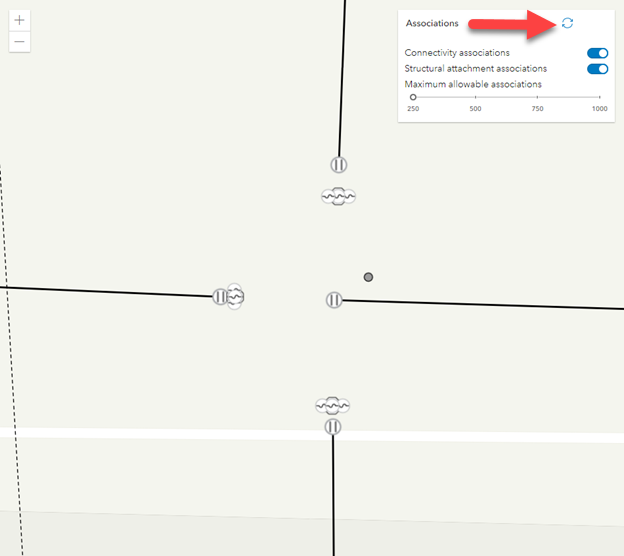
* Here is an example of [autoRefreshAssociations](https://developers.arcgis.com/javascript/latest/references/core/widgets/UtilityNetworkAssociations/#autoRefreshAssociations) set to `false`.
* 
*
* By clicking the refresh button the associations will appear.
* 
*
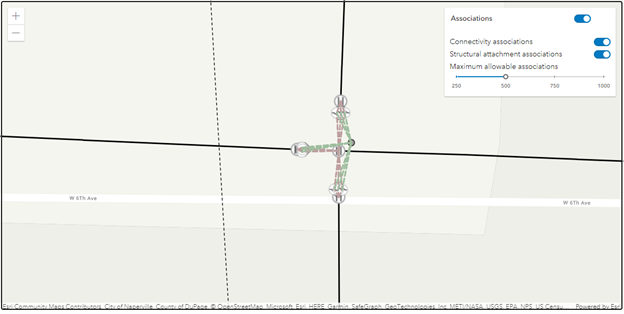
* Here is an example of [autoRefreshAssociations](https://developers.arcgis.com/javascript/latest/references/core/widgets/UtilityNetworkAssociations/#autoRefreshAssociations) set to `true`.
* 
*
* > [!CAUTION]
* >
* > **Notes**
* >
* > The UtilityNetworkAssociations widget class is unable to support proxied feature services or feature services that utilize stored credentials.
*
* @deprecated since version 5.0. Use the [Utility Network Associations component](https://developers.arcgis.com/javascript/latest/references/map-components/components/arcgis-utility-network-associations/) instead. For information on widget deprecation, read about [Esri's move to web components](https://developers.arcgis.com/javascript/latest/components-transition-plan/).
* @since 4.26
* @see [UtilityNetworkAssociationsViewModel](https://developers.arcgis.com/javascript/latest/references/core/widgets/UtilityNetworkAssociations/UtilityNetworkAssociationsViewModel/)
* @see [UtilityNetwork](https://developers.arcgis.com/javascript/latest/references/core/networks/UtilityNetwork/)
* @example
* // Create a new instance of the UtilityNetworkAssociations widget and set
* // its required parameters.
* const unAssociationsWidget = new UtilityNetworkAssociations({
* view: view
* });
*
* view.ui.add(unAssociationsWidget, "top-right");
*/
export default class UtilityNetworkAssociations extends Widget<UtilityNetworkAssociationsProperties> {
constructor(properties?: UtilityNetworkAssociationsProperties);
/**
* Indicates whether to show a toggle to automatically show associations every time the map
* extent changes, or an action button to show associations within the current map extent on demand.
*
* @default true
* @since 4.26
*/
accessor autoRefreshAssociations: boolean;
/**
* A [SimpleLineSymbol](https://developers.arcgis.com/javascript/latest/references/core/symbols/SimpleLineSymbol/) used for representing the polyline geometry that is being
* drawn for connectivity associations.
*
* @since 4.26
*/
get connectivityAssociationsLineSymbol(): SimpleLineSymbol;
set connectivityAssociationsLineSymbol(value: SimpleLineSymbolProperties);
/**
* Icon displayed in the widget's button.
*
* @default "view-associations"
* @since 4.27
* @see [Calcite Icon Search](https://developers.arcgis.com/calcite-design-system/icons/)
* @see [Calcite Icon Search](https://developers.arcgis.com/calcite-design-system/icons/)
*/
get icon(): Icon["icon"];
set icon(value: Icon["icon"] | null | undefined);
/**
* Indicates whether to query and display connectivity associations.
*
* @default true
* @since 4.26
*/
accessor includeConnectivityAssociations: boolean;
/**
* Indicates whether to query and display structural attachment associations.
*
* @default true
* @since 4.26
*/
accessor includeStructuralAttachmentAssociations: boolean;
/**
* The widget's default label.
*
* @since 4.26
*/
get label(): string;
set label(value: string | null | undefined);
/**
* The maximum number of associations that can be returned from the server.
*
* @default 250
* @since 4.26
*/
accessor maxAllowableAssociations: number;
/**
* The maximum value or upper bound of the Maximum allowable associations slider.
*
* If the value in the constructor is less than or equal to the value set for
* [maxAllowableAssociationsSliderMin](https://developers.arcgis.com/javascript/latest/references/core/widgets/UtilityNetworkAssociations/#maxAllowableAssociationsSliderMin), the property will be set to a default value (1000).
*
* @since 4.26
*/
accessor maxAllowableAssociationsSliderMax: number;
/**
* The minimum value or lower bound of the Maximum allowable associations slider.
*
* If the value in the constructor is less than 0, the property will be set to a default value (250).
* If the value in the constructor is greater than or equal to [maxAllowableAssociationsSliderMax](https://developers.arcgis.com/javascript/latest/references/core/widgets/UtilityNetworkAssociations/#maxAllowableAssociationsSliderMax),
* the property will be set to a default value (250).
*
* @since 4.26
*/
accessor maxAllowableAssociationsSliderMin: number;
/**
* Specifies the interval to move the maximum allowable associations slider with the up, or down keys.
*
* @since 4.26
*/
accessor maxAllowableAssociationsSliderStep: number;
/**
* Indicates whether to show arrows for connectivity associations.
*
* @default false
* @since 4.26
*/
accessor showArrowsConnectivity: boolean;
/**
* Indicates whether to show arrows for structural attachment associations.
*
* @default false
* @since 4.26
*/
accessor showArrowsStructuralAttachment: boolean;
/**
* When `autoRefreshAssociations` is `true`, indicates whether to automatically show associations
* every time the current map extent changes.
*
* @default false
* @since 4.26
*/
accessor showAssociationsEnabled: boolean;
/**
* A [SimpleLineSymbol](https://developers.arcgis.com/javascript/latest/references/core/symbols/SimpleLineSymbol/) used for representing the polyline geometry that is being drawn for structural attachment associations.
*
* @since 4.26
*/
get structuralAttachmentAssociationsLineSymbol(): SimpleLineSymbol;
set structuralAttachmentAssociationsLineSymbol(value: SimpleLineSymbolProperties);
/**
* Determines the utility network to use.
*
* @since 4.26
*/
accessor utilityNetwork: UtilityNetwork | null | undefined;
/**
* The view associated with the UtilityNetworkAssociations widget instance.
*
* @since 4.26
*/
accessor view: MapView | null | undefined;
/**
* The view model for this widget.
*
* @since 4.26
*/
get viewModel(): UtilityNetworkAssociationsViewModel;
set viewModel(value: UtilityNetworkAssociationsViewModelProperties);
/**
* The visible elements that are displayed within the widget.
*
* @since 4.26
*/
get visibleElements(): VisibleElements;
set visibleElements(value: VisibleElementsProperties);
}