@arcgis/core
Version:
ArcGIS Maps SDK for JavaScript: A complete 2D and 3D mapping and data visualization API
178 lines (176 loc) • 9.38 kB
TypeScript
import type Layer from "../layers/Layer.js";
import type MapView from "../views/MapView.js";
import type Widget from "./Widget.js";
import type SwipeViewModel from "./Swipe/SwipeViewModel.js";
import type { Icon } from "@esri/calcite-components/components/calcite-icon";
import type { ReadonlyArrayOrCollection } from "../core/Collection.js";
import type { WidgetProperties } from "./Widget.js";
import type { Direction, VisibleElements } from "./Swipe/types.js";
import type { SwipeViewModelProperties } from "./Swipe/SwipeViewModel.js";
export interface SwipeProperties extends WidgetProperties, Partial<Pick<Swipe, "direction" | "disabled" | "position" | "view" | "visibleElements">> {
/**
* The text that shows in a tooltip when hovering over the handle of
* the Swipe widget.
*/
dragLabel?: string | null;
/**
* Icon which represents the widget. It is typically used when the widget is controlled by another
* one (e.g. in the Expand widget).
*
* @default "compare"
* @since 4.27
* @see [Calcite Icon Search](https://developers.arcgis.com/calcite-design-system/icons/)
* @see [Calcite Icon Search](https://developers.arcgis.com/calcite-design-system/icons/)
*/
icon?: Icon["icon"] | null;
/**
* The widget's default label.
*
* @since 4.7
*/
label?: string | null;
/**
* A collection of [Layer](https://developers.arcgis.com/javascript/latest/references/core/layers/Layer/)s that will show on the left or top side of the Swipe widget.
* See the image in the [class description](https://developers.arcgis.com/javascript/latest/references/core/widgets/Swipe/) at the top of the page.
*
* @see [trailingLayers](https://developers.arcgis.com/javascript/latest/references/core/widgets/Swipe/#trailingLayers)
*/
leadingLayers?: ReadonlyArrayOrCollection<Layer>;
/**
* A collection of [Layer](https://developers.arcgis.com/javascript/latest/references/core/layers/Layer/)s that will show on the right or bottom side of the Swipe widget.
* See the image in the [class description](https://developers.arcgis.com/javascript/latest/references/core/widgets/Swipe/) at the top of the page.
*
* @see [leadingLayers](https://developers.arcgis.com/javascript/latest/references/core/widgets/Swipe/#leadingLayers)
*/
trailingLayers?: ReadonlyArrayOrCollection<Layer>;
/**
* The view model for this widget. This is a class that contains all the logic
* (properties and methods) that controls this widget's behavior. See the
* [SwipeViewModel](https://developers.arcgis.com/javascript/latest/references/core/widgets/Swipe/SwipeViewModel/) class to access
* all properties and methods on the widget.
*/
viewModel?: SwipeViewModelProperties;
}
/**
* The Swipe widget provides a tool to show a portion of a layer or layers
* on top of a map. Layers can be swiped vertically or horizontally to easily
* compare two layers or see what is underneath a layer.
*
* To use the Swipe widget, set the [leadingLayers](https://developers.arcgis.com/javascript/latest/references/core/widgets/Swipe/#leadingLayers) and [trailingLayers](https://developers.arcgis.com/javascript/latest/references/core/widgets/Swipe/#trailingLayers)
* properties to determine what will be compared on either side of the widget. If one of these properties
* is not set, then the Swipe widget will overlay the existing map. The [visibleElements](https://developers.arcgis.com/javascript/latest/references/core/widgets/Swipe/#visibleElements)
* separate the leading and trailing layers, as shown in the image below.
*
* [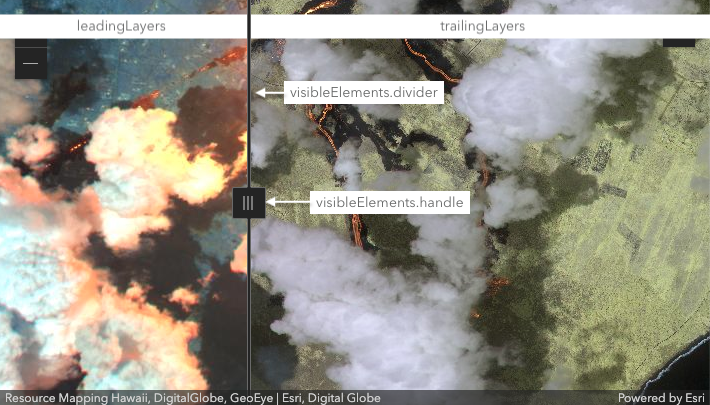](https://developers.arcgis.com/javascript/latest/sample-code/swipe/)
*
* > [!WARNING]
* >
* > **Known Limitations**
* >
* > - This widget is not currently supported with a [SceneView](https://developers.arcgis.com/javascript/latest/references/core/views/SceneView/).
*
* @deprecated since version 4.32. Use the [Swipe component](https://developers.arcgis.com/javascript/latest/references/map-components/components/arcgis-swipe/) instead. For information on widget deprecation, read about [Esri's move to web components](https://developers.arcgis.com/javascript/latest/components-transition-plan/).
* @since 4.13
* @see [Swipe component](https://developers.arcgis.com/javascript/latest/references/map-components/components/arcgis-swipe/)
* @see [Sample - Swipe component](https://developers.arcgis.com/javascript/latest/sample-code/swipe/)
* @see [Sample - Swipe component with scroll](https://developers.arcgis.com/javascript/latest/sample-code/swipe-scroll/)
* @see [SwipeViewModel](https://developers.arcgis.com/javascript/latest/references/core/widgets/Swipe/SwipeViewModel/)
* @example
* let swipe = new Swipe({
* view: view,
* leadingLayers: [layer1, layer2],
* trailingLayers: [layer3],
* direction: "vertical", // swipe widget will move from top to bottom of view
* position: 50 // position set to middle of the view (50%)
* });
* view.ui.add(swipe);
*/
export default class Swipe extends Widget {
constructor(properties?: SwipeProperties);
/**
* The direction the Swipe widget moves across the view.
* If `"horizontal"`, the widget will move left and right and
* if `"vertical"`, the widget will move up and down.
*
* | horizontal | vertical |
* |------------|----------|
* |[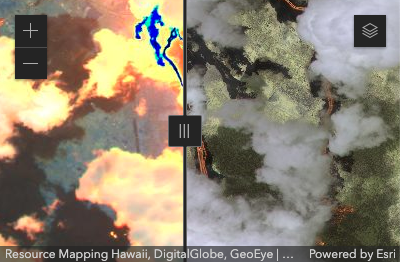](https://developers.arcgis.com/javascript/latest/sample-code/swipe/) |[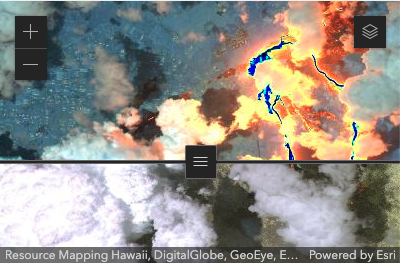](https://developers.arcgis.com/javascript/latest/sample-code/swipe/)|
*
* @default "horizontal"
*/
accessor direction: Direction;
/**
* When `true`, sets the widget to a disabled state so the user cannot interact with it.
*
* @default false
*/
accessor disabled: boolean;
/**
* The text that shows in a tooltip when hovering over the handle of
* the Swipe widget.
*/
get dragLabel(): string;
set dragLabel(value: string | null | undefined);
/**
* Icon which represents the widget. It is typically used when the widget is controlled by another
* one (e.g. in the Expand widget).
*
* @default "compare"
* @since 4.27
* @see [Calcite Icon Search](https://developers.arcgis.com/calcite-design-system/icons/)
* @see [Calcite Icon Search](https://developers.arcgis.com/calcite-design-system/icons/)
*/
get icon(): Icon["icon"];
set icon(value: Icon["icon"] | null | undefined);
/**
* The widget's default label.
*
* @since 4.7
*/
get label(): string;
set label(value: string | null | undefined);
/**
* A collection of [Layer](https://developers.arcgis.com/javascript/latest/references/core/layers/Layer/)s that will show on the left or top side of the Swipe widget.
* See the image in the [class description](https://developers.arcgis.com/javascript/latest/references/core/widgets/Swipe/) at the top of the page.
*
* @see [trailingLayers](https://developers.arcgis.com/javascript/latest/references/core/widgets/Swipe/#trailingLayers)
*/
get leadingLayers(): SwipeViewModel["leadingLayers"];
set leadingLayers(value: ReadonlyArrayOrCollection<Layer>);
/**
* The position of the Swipe widget. This determines what percentage
* of the view will be taken up by the [leadingLayers](https://developers.arcgis.com/javascript/latest/references/core/widgets/Swipe/#leadingLayers).
*
* @default 25
*/
accessor position: number;
/**
* A collection of [Layer](https://developers.arcgis.com/javascript/latest/references/core/layers/Layer/)s that will show on the right or bottom side of the Swipe widget.
* See the image in the [class description](https://developers.arcgis.com/javascript/latest/references/core/widgets/Swipe/) at the top of the page.
*
* @see [leadingLayers](https://developers.arcgis.com/javascript/latest/references/core/widgets/Swipe/#leadingLayers)
*/
get trailingLayers(): SwipeViewModel["trailingLayers"];
set trailingLayers(value: ReadonlyArrayOrCollection<Layer>);
/** A reference to the [MapView](https://developers.arcgis.com/javascript/latest/references/core/views/MapView/). Set this to link the widget to a specific view. */
accessor view: MapView | null | undefined;
/**
* The view model for this widget. This is a class that contains all the logic
* (properties and methods) that controls this widget's behavior. See the
* [SwipeViewModel](https://developers.arcgis.com/javascript/latest/references/core/widgets/Swipe/SwipeViewModel/) class to access
* all properties and methods on the widget.
*/
get viewModel(): SwipeViewModel;
set viewModel(value: SwipeViewModelProperties);
/**
* The visible elements that are displayed within the widget.
* This property provides the ability change the visibility of individual elements of the widget's display.
*
* @example
* swipe.visibleElements = {
* divider: true,
* handle: false // handle will not display
* }
*/
accessor visibleElements: VisibleElements;
}