@arcgis/core
Version:
ArcGIS Maps SDK for JavaScript: A complete 2D and 3D mapping and data visualization API
207 lines (205 loc) • 10.4 kB
TypeScript
import type SliceAnalysis from "../analysis/SliceAnalysis.js";
import type SceneView from "../views/SceneView.js";
import type Widget from "./Widget.js";
import type SliceViewModel from "./Slice/SliceViewModel.js";
import type { Icon } from "@esri/calcite-components/components/calcite-icon";
import type { WidgetProperties } from "./Widget.js";
import type { HeadingLevel } from "./support/types.js";
import type { SliceAnalysisProperties } from "../analysis/SliceAnalysis.js";
import type { SliceViewModelProperties } from "./Slice/SliceViewModel.js";
/** @deprecated since version 4.33. Use the [Slice component](https://developers.arcgis.com/javascript/latest/references/map-components/components/arcgis-slice/) instead. For information on widget deprecation, read about [Esri's move to web components](https://developers.arcgis.com/javascript/latest/components-transition-plan/). */
export interface SliceProperties extends WidgetProperties, Partial<Pick<Slice, "headingLevel" | "view">> {
/**
* The slice analysis object being created or modified by the widget. This property is an
* alias for [SliceViewModel.analysis](https://developers.arcgis.com/javascript/latest/references/core/widgets/Slice/SliceViewModel/#analysis).
*
* If no analysis is provided, the widget automatically creates its own analysis and adds it to the view. In this
* case, the analysis will also be automatically removed from the view when the widget is destroyed.
*
* @since 4.23
* @see [SliceViewModel.analysis](https://developers.arcgis.com/javascript/latest/references/core/widgets/Slice/SliceViewModel/#analysis)
* @example
* // Construct a slice analysis object outside of the widget
* const sliceAnalysis = new SliceAnalysis({
* shape: {
* type: "plane", // autocasts as new SlicePlane()
* position: {
* type: "point",
* x: -0.1,
* y: 51.5
* },
* width: 50,
* height: 50,
* tilt: 45
* },
* tiltEnabled: true
* });
*
* // Ensure that the analysis is added to the view
* view.analyses.add(sliceAnalysis);
*
* // Frame the analysis in the view
* view.goTo(sliceAnalysis.extent);
*
* // Pass the analysis object as a constructor parameter to modify it using the widget
* const sliceWidget = new Slice({
* analysis: sliceAnalysis,
* view: view
* });
*/
analysis?: SliceAnalysisProperties;
/**
* Icon which represents the widget. It is typically used when the widget is controlled by another
* one (e.g. in the Expand widget).
*
* @default "slice"
* @since 4.27
* @see [Calcite Icon Search](https://developers.arcgis.com/calcite-design-system/icons/)
* @see [Calcite Icon Search](https://developers.arcgis.com/calcite-design-system/icons/)
*/
icon?: Icon["icon"] | null;
/**
* The widget's default label. This label displays when it is
* used within another widget, such as the [Expand](https://developers.arcgis.com/javascript/latest/references/core/widgets/Expand/)
* or [LayerList](https://developers.arcgis.com/javascript/latest/references/core/widgets/LayerList/) widgets.
*
* @since 4.11
*/
label?: string | null;
/**
* The view model for this widget. This is a class that contains the properties
* and methods that control this widget's behavior.
*/
viewModel?: SliceViewModelProperties;
}
/**
* The Slice widget is a 3D analysis tool that can be used to reveal occluded content in a [SceneView](https://developers.arcgis.com/javascript/latest/references/core/views/SceneView/). The slice widget can be applied to any layer type, making it possible
* to see inside buildings or to explore geological surfaces.
*
* [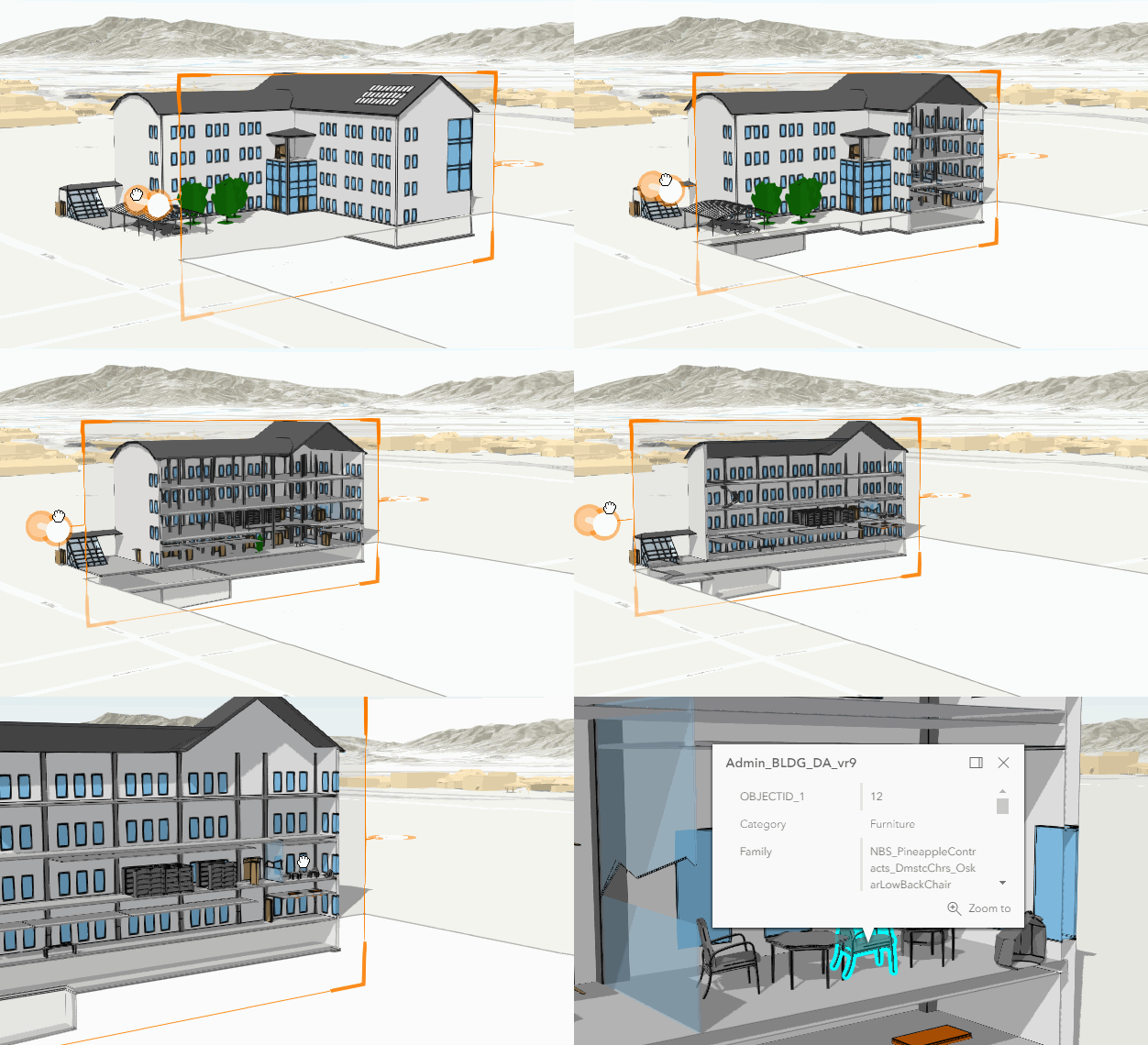](https://developers.arcgis.com/javascript/latest/sample-code/building-scene-layer-slice/)
*
* To use the widget, instantiate it and add it to the view:
* ```js
* const sliceWidget = new Slice({
* view: view
* });
*
* // Add widget to the bottom left corner of the view
* view.ui.add(sliceWidget, {
* position: "bottom-left"
* });
* ```
*
* The slicing shape is always a [plane](https://developers.arcgis.com/javascript/latest/references/core/analysis/SlicePlane/).
* By default, the plane is either horizontal or vertical. To allow a tilt angle for the
* plane, set [SliceViewModel.tiltEnabled](https://developers.arcgis.com/javascript/latest/references/core/widgets/Slice/SliceViewModel/#tiltEnabled) to `true`.
* The slice hides any content in front of the surface. The handles on the sides
* of the plane can be used to adjust the size, heading, tilt and position of the slice plane. The [SlicePlane](https://developers.arcgis.com/javascript/latest/references/core/analysis/SlicePlane/) can be set or retrieved using
* [SliceViewModel.shape](https://developers.arcgis.com/javascript/latest/references/core/widgets/Slice/SliceViewModel/#shape).
*
* Once a slice is created, layers can be excluded from the slice. For example, to look at
* interior elements inside a [BuildingSceneLayer](https://developers.arcgis.com/javascript/latest/references/core/layers/BuildingSceneLayer/), the windows or
* furniture layers can be excluded from the slice widget.
*
* [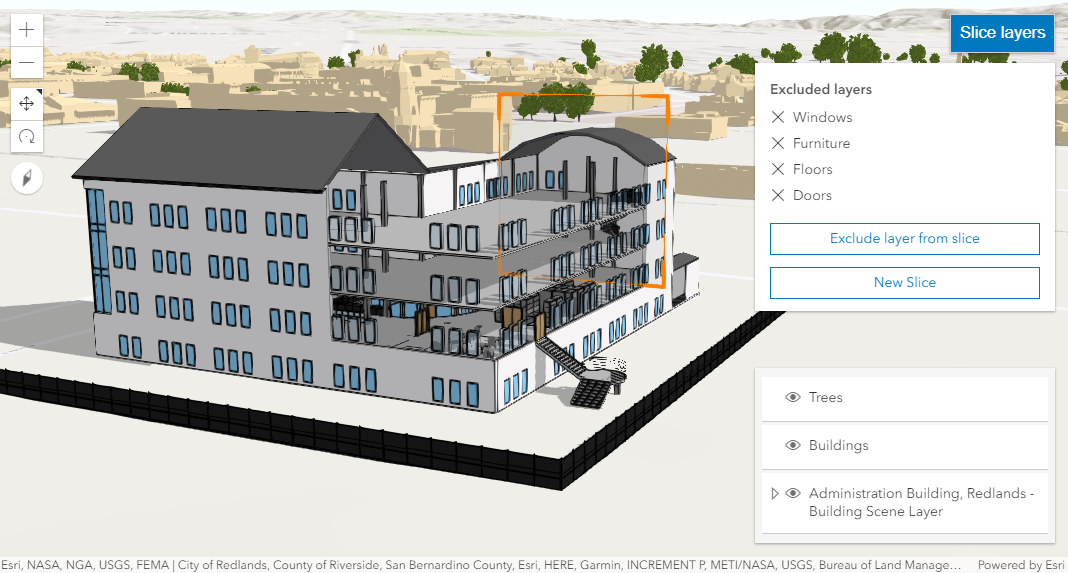](https://developers.arcgis.com/javascript/latest/sample-code/building-scene-layer-slice/)
*
* While interactively creating a new slice, the Shift key can be held to force the slice to be applied vertically.
*
* Slice only works with [SceneView](https://developers.arcgis.com/javascript/latest/references/core/views/SceneView/).
*
* @deprecated since version 4.33. Use the [Slice component](https://developers.arcgis.com/javascript/latest/references/map-components/components/arcgis-slice/) instead. For information on widget deprecation, read about [Esri's move to web components](https://developers.arcgis.com/javascript/latest/components-transition-plan/).
* @since 4.10
* @see [SliceViewModel](https://developers.arcgis.com/javascript/latest/references/core/widgets/Slice/SliceViewModel/) - _Deprecated since 4.33. Use the [SliceAnalysis](https://developers.arcgis.com/javascript/latest/references/core/analysis/SliceAnalysis/) or [Slice component](https://developers.arcgis.com/javascript/latest/references/map-components/components/arcgis-slice/) instead._
* @see [Sample - Slice widget](https://developers.arcgis.com/javascript/latest/sample-code/building-scene-layer-slice/)
* @see [Sample - Analysis objects](https://developers.arcgis.com/javascript/latest/sample-code/analysis-objects/)
*/
export default class Slice extends Widget<SliceProperties> {
/**
* @example
* // typical usage
* const sliceWidget = new Slice({
* view: view
* });
*/
constructor(properties?: SliceProperties);
/**
* The slice analysis object being created or modified by the widget. This property is an
* alias for [SliceViewModel.analysis](https://developers.arcgis.com/javascript/latest/references/core/widgets/Slice/SliceViewModel/#analysis).
*
* If no analysis is provided, the widget automatically creates its own analysis and adds it to the view. In this
* case, the analysis will also be automatically removed from the view when the widget is destroyed.
*
* @since 4.23
* @see [SliceViewModel.analysis](https://developers.arcgis.com/javascript/latest/references/core/widgets/Slice/SliceViewModel/#analysis)
* @example
* // Construct a slice analysis object outside of the widget
* const sliceAnalysis = new SliceAnalysis({
* shape: {
* type: "plane", // autocasts as new SlicePlane()
* position: {
* type: "point",
* x: -0.1,
* y: 51.5
* },
* width: 50,
* height: 50,
* tilt: 45
* },
* tiltEnabled: true
* });
*
* // Ensure that the analysis is added to the view
* view.analyses.add(sliceAnalysis);
*
* // Frame the analysis in the view
* view.goTo(sliceAnalysis.extent);
*
* // Pass the analysis object as a constructor parameter to modify it using the widget
* const sliceWidget = new Slice({
* analysis: sliceAnalysis,
* view: view
* });
*/
get analysis(): SliceAnalysis;
set analysis(value: SliceAnalysisProperties);
/**
* Indicates the heading level to use for the "Excluded layers" heading. By default, this is rendered
* as a level 3 heading (e.g. `<h3>Excluded layers</h3>`). Depending on the widget's placement
* in your app, you may need to adjust this heading for proper semantics. This is
* important for meeting accessibility standards.
*
* @default 3
* @since 4.20
* @see [Heading Elements](https://developer.mozilla.org/en-US/docs/Web/HTML/Element/Heading_Elements)
* @example slice.headingLevel = 2;
*/
accessor headingLevel: HeadingLevel;
/**
* Icon which represents the widget. It is typically used when the widget is controlled by another
* one (e.g. in the Expand widget).
*
* @default "slice"
* @since 4.27
* @see [Calcite Icon Search](https://developers.arcgis.com/calcite-design-system/icons/)
* @see [Calcite Icon Search](https://developers.arcgis.com/calcite-design-system/icons/)
*/
get icon(): Icon["icon"];
set icon(value: Icon["icon"] | null | undefined);
/**
* The widget's default label. This label displays when it is
* used within another widget, such as the [Expand](https://developers.arcgis.com/javascript/latest/references/core/widgets/Expand/)
* or [LayerList](https://developers.arcgis.com/javascript/latest/references/core/widgets/LayerList/) widgets.
*
* @since 4.11
*/
get label(): string;
set label(value: string | null | undefined);
/** A reference to the [SceneView](https://developers.arcgis.com/javascript/latest/references/core/views/SceneView/). Set this to link the widget to a specific view. */
accessor view: SceneView | null | undefined;
/**
* The view model for this widget. This is a class that contains the properties
* and methods that control this widget's behavior.
*/
get viewModel(): SliceViewModel;
set viewModel(value: SliceViewModelProperties);
}