@arcgis/core
Version:
ArcGIS Maps SDK for JavaScript: A complete 2D and 3D mapping and data visualization API
661 lines (657 loc) • 34.8 kB
TypeScript
import type Graphic from "../Graphic.js";
import type PopupTemplate from "../PopupTemplate.js";
import type Collection from "../core/Collection.js";
import type Portal from "../portal/Portal.js";
import type Widget from "./Widget.js";
import type SearchViewModel from "./Search/SearchViewModel.js";
import type { Icon } from "@esri/calcite-components/components/calcite-icon";
import type { MapViewOrSceneView } from "../views/MapViewOrSceneView.js";
import type { WidgetProperties } from "./Widget.js";
import type { SearchViewModelEvents, SearchViewModelProperties } from "./Search/SearchViewModel.js";
import type { SearchItem, SearchResponse, SearchResult, BaseSearchResults, SuggestResponse, SupportedSearchSource, SourcesHandler } from "./Search/types.js";
import type { GoToOverride } from "./support/types.js";
import type { PopupTemplateProperties } from "../PopupTemplate.js";
import type { PortalProperties } from "../portal/Portal.js";
import type { LayerSearchSourceProperties } from "./Search/LayerSearchSource.js";
import type { LocatorSearchSourceProperties } from "./Search/LocatorSearchSource.js";
import type { ReadonlyArrayOrCollection } from "../core/Collection.js";
/** Configurable Search properties of the widget. */
export interface SearchProperties extends WidgetProperties, Partial<Pick<Search, "activeMenu" | "activeSourceIndex" | "allPlaceholder" | "autoNavigate" | "autoSelect" | "disabled" | "goToOverride" | "includeDefaultSources" | "locationEnabled" | "maxResults" | "maxSuggestions" | "minSuggestCharacters" | "popupEnabled" | "resultGraphic" | "resultGraphicEnabled" | "searchAllEnabled" | "searchTerm" | "suggestionsEnabled" | "view">> {
/**
* Icon which represents the widget. It is typically used when the widget is controlled by another
* one (e.g. in the Expand widget).
*
* @default "search"
* @since 4.27
* @see [Calcite Icon Search](https://developers.arcgis.com/calcite-design-system/icons/)
* @see [Calcite Icon Search](https://developers.arcgis.com/calcite-design-system/icons/)
*/
icon?: Icon["icon"] | null;
/**
* The widget's default label.
*
* @since 4.7
*/
label?: string | null;
/**
* A customized [PopupTemplate](https://developers.arcgis.com/javascript/latest/references/core/PopupTemplate/) for the selected feature.
* Note that any [templates](https://developers.arcgis.com/javascript/latest/references/core/PopupTemplate/)
* defined on [allSources](https://developers.arcgis.com/javascript/latest/references/core/widgets/Search/#allSources) take precedence over those defined directly on the template.
*/
popupTemplate?: PopupTemplateProperties | null;
/**
* It is possible to search a specified portal instance's [locator services](https://enterprise.arcgis.com/en/portal/latest/administer/windows/configure-portal-to-geocode-addresses.htm)
* Use this property to set this [ArcGIS Portal](https://enterprise.arcgis.com/en/portal/) instance to search.
*
* @since 4.8
*/
portal?: PortalProperties | null;
/**
* The Search widget may be used to search features in a
* [map](https://developers.arcgis.com/javascript/latest/references/core/layers/MapImageLayer/)/[feature](https://developers.arcgis.com/javascript/latest/references/core/layers/FeatureLayer/) service feature
* layer(s), [SceneLayers](https://developers.arcgis.com/javascript/latest/references/core/layers/SceneLayer/) with an associated feature layer,
* [BuildingComponentSublayer](https://developers.arcgis.com/javascript/latest/references/core/layers/buildingSublayers/BuildingComponentSublayer/) with an associated feature layer,
* [GeoJSONLayer](https://developers.arcgis.com/javascript/latest/references/core/layers/GeoJSONLayer/), [CSVLayer](https://developers.arcgis.com/javascript/latest/references/core/layers/CSVLayer/) or
* [OGCFeatureLayer](https://developers.arcgis.com/javascript/latest/references/core/layers/OGCFeatureLayer/), or [table](https://developers.arcgis.com/javascript/latest/references/core/webdoc/applicationProperties/SearchTable/),
* or geocode locations with a [locator](https://developers.arcgis.com/javascript/latest/references/core/rest/locator/). The `sources` property defines the sources from which
* to search for the [view](https://developers.arcgis.com/javascript/latest/references/core/widgets/Search/#view) specified by the Search widget instance. There are two types of sources:
*
* * [LayerSearchSource](https://developers.arcgis.com/javascript/latest/references/core/widgets/Search/LayerSearchSource/)
* * [LocatorSearchSource](https://developers.arcgis.com/javascript/latest/references/core/widgets/Search/LocatorSearchSource/)
*
* Any combination of these sources may be used
* together in the same instance of the Search widget.
*
* > [!WARNING]
* >
* > Feature layers created from client-side graphics are not supported.
*
* @example
* // Default sources[] when sources is not specified
* [
* {
* url: "https://geocode-api.arcgis.com/arcgis/rest/services/World/GeocodeServer",
* singleLineFieldName: "SingleLine",
* outFields: ["Addr_type"],
* name: "ArcGIS World Geocoding Service",
* placeholder: "Address",
* resultSymbol: {
* type: "picture-marker", // autocasts as new PictureMarkerSymbol()
* url: this.basePath + "/images/search/search-symbol-32.png",
* size: 24,
* width: 24,
* height: 24,
* xoffset: 0,
* yoffset: 0
* }
* }
* ]
* @example
* // Example of multiple sources[]
* const sources = [
* {
* url: "https://geocode-api.arcgis.com/arcgis/rest/services/World/GeocodeServer",
* singleLineFieldName: "SingleLine",
* name: "Custom Geocoding Service",
* placeholder: "Search Geocoder",
* maxResults: 3,
* maxSuggestions: 6,
* suggestionsEnabled: false,
* minSuggestCharacters: 0
* }, {
* layer: new FeatureLayer({
* url: "https://services.arcgis.com/DO4gTjwJVIJ7O9Ca/arcgis/rest/services/GeoForm_Survey_v11_live/FeatureServer/0",
* outFields: ["*"]
* }),
* searchFields: ["Email", "URL"],
* displayField: "Email",
* exactMatch: false,
* outFields: ["*"],
* name: "Point FS",
* placeholder: "example: esri",
* maxResults: 6,
* maxSuggestions: 6,
* suggestionsEnabled: true,
* minSuggestCharacters: 0
* },
* {
* layer: new FeatureLayer({
* outFields: ["*"]
* }),
* placeholder: "esri",
* name: "A FeatureLayer",
* prefix: "",
* suffix: "",
* maxResults: 1,
* maxSuggestions: 6,
* exactMatch: false,
* searchFields: [], // defaults to FeatureLayer.displayField
* displayField: "", // defaults to FeatureLayer.displayField
* minSuggestCharacters: 0
* }
* ];
* @example
* // Set source(s) on creation
* const searchWidget = new Search({
* sources: []
* });
* @example
* // Set source(s)
* const searchWidget = new Search();
* const sources = [{ ... }, { ... }, { ... }]; //array of sources
* searchWidget.sources = sources;
* @example
* // Add to source(s)
* const searchWidget = new Search();
* searchWidget.sources.push({ ... }); //new source
*/
sources?: ReadonlyArrayOrCollection<(LocatorSearchSourceProperties | LayerSearchSourceProperties)>;
/**
* The view model for this widget. This is a class that contains all the logic
* (properties and methods) that controls this widget's behavior. See the
* [SearchViewModel](https://developers.arcgis.com/javascript/latest/references/core/widgets/Search/SearchViewModel/) class to access
* all properties and methods on the widget.
*/
viewModel?: SearchViewModelProperties;
}
export type SearchActiveMenu = "none" | "suggestion" | "source" | "warning";
export interface SearchEvents extends SearchViewModelEvents {
/**
* Fires when the widget's text input loses focus.
*
* @example
* const searchWidget = new Search();
*
* searchWidget.on("search-blur", function(event){
* console.log("Focus removed from search input textbox.");
* });
*/
"search-blur": void;
/**
* Fires when the widget's text input sets focus.
*
* @example
* const searchWidget = new Search();
*
* searchWidget.on("search-focus", function(event){
* console.log("Search input textbox is focused.");
* });
*/
"search-focus": void;
}
/**
* The Search widget provides a way to perform search operations on [locator service(s)](https://developers.arcgis.com/javascript/latest/references/core/rest/locator/),
* [map](https://developers.arcgis.com/javascript/latest/references/core/layers/MapImageLayer/)/[feature](https://developers.arcgis.com/javascript/latest/references/core/layers/FeatureLayer/) service feature
* layer(s), [SceneLayers](https://developers.arcgis.com/javascript/latest/references/core/layers/SceneLayer/) with an associated feature layer,
* [BuildingComponentSublayer](https://developers.arcgis.com/javascript/latest/references/core/layers/buildingSublayers/BuildingComponentSublayer/) with an associated feature layer,
* [GeoJSONLayer](https://developers.arcgis.com/javascript/latest/references/core/layers/GeoJSONLayer/), [CSVLayer](https://developers.arcgis.com/javascript/latest/references/core/layers/CSVLayer/), [OGCFeatureLayer](https://developers.arcgis.com/javascript/latest/references/core/layers/OGCFeatureLayer/), and/or
* [table(s)](https://developers.arcgis.com/javascript/latest/references/core/webdoc/applicationProperties/SearchTable/). If using a locator with a geocoding service, the
* [findAddressCandidates](https://developers.arcgis.com/rest/geocode/api-reference/geocoding-find-address-candidates.htm)
* operation is used, whereas [queries](https://developers.arcgis.com/javascript/latest/references/core/rest/support/Query/) are used on feature layers.
*
* By default, the Search widget uses the ArcGIS World Geocoding Service via this URL:
* `https://geocode.arcgis.com/arcgis/rest/services/World/GeocodeServer`.
* If a [global apiKey](https://developers.arcgis.com/javascript/latest/references/core/config/#Config-apiKey) is present, the Search widget uses this URL:
* `https://geocode-api.arcgis.com/arcgis/rest/services/World/GeocodeServer`.
* If an [LocatorSearchSource.apiKey](https://developers.arcgis.com/javascript/latest/references/core/widgets/Search/LocatorSearchSource/#apiKey) is present on the
* [LocatorSearchSource](https://developers.arcgis.com/javascript/latest/references/core/widgets/Search/LocatorSearchSource/),
* then the Search widget uses the URL defined by the [LocatorSearchSource.url](https://developers.arcgis.com/javascript/latest/references/core/widgets/Search/LocatorSearchSource/#url)
* property.
*
* The Search widget sets the view on the [Search result](https://developers.arcgis.com/javascript/latest/references/core/widgets/Search/types/#SearchResult). The level of detail (LOD)
* at the center of the view depends on the data source, with higher quality data sources returning extents closer to the
* `feature` obtained from the search. To manually define the scale of the view at the Search result, use the `zoomScale` property
* of the [LocatorSearchSource.zoomScale](https://developers.arcgis.com/javascript/latest/references/core/widgets/Search/LocatorSearchSource/#zoomScale)
* or [LayerSearchSource.zoomScale](https://developers.arcgis.com/javascript/latest/references/core/widgets/Search/LayerSearchSource/#zoomScale).
*
* Search widget results are typically sorted according to their relevance to the search and their relative importance.
* However, when the scale of the [MapView.scale](https://developers.arcgis.com/javascript/latest/references/core/views/MapView/#scale) or
* [SceneView.scale](https://developers.arcgis.com/javascript/latest/references/core/views/SceneView/#scale) is less than or equal to 300,000, the operations
* support prioritization of candidates based on their distance from a specified point (the center of the view)
* by passing in the `location` parameter. Features closest to the input location show up higher in the list of results.
* This behavior can be changed by using the [LocatorSearchSource.localSearchDisabled](https://developers.arcgis.com/javascript/latest/references/core/widgets/Search/LocatorSearchSource/#localSearchDisabled)
* property.
*
* 
*
* You can use the view's [DefaultUI](https://developers.arcgis.com/javascript/latest/references/core/views/ui/DefaultUI/) to add widgets to the view's user interface via the
* `ui` property on the view. See the example below.
*
* @deprecated since version 4.33. Use the [Search component](https://developers.arcgis.com/javascript/latest/references/map-components/components/arcgis-search/) instead. For information on widget deprecation, read about [Esri's move to web components](https://developers.arcgis.com/javascript/latest/components-transition-plan/).
* @since 4.0
* @see [SearchViewModel](https://developers.arcgis.com/javascript/latest/references/core/widgets/Search/SearchViewModel/)
* @see [SearchSource](https://developers.arcgis.com/javascript/latest/references/core/widgets/Search/SearchSource/)
* @see [locator](https://developers.arcgis.com/javascript/latest/references/core/rest/locator/)
* @see [DefaultUI](https://developers.arcgis.com/javascript/latest/references/core/views/ui/DefaultUI/)
* @see [Sample - Search component with multiple sources](https://developers.arcgis.com/javascript/latest/sample-code/search-component-multisource/)
* @see [Sample - Search component with custom source](https://developers.arcgis.com/javascript/latest/sample-code/search-component-customsource/)
* @see [Proximity searches](https://developers.arcgis.com/rest/geocode/api-reference/geocoding-find-address-candidates.htm#ESRI_SECTION1_6B80D672B3F74F4697212696D890CFE1)
* @example
* const searchWidget = new Search({
* view: view
* });
* // Adds the search widget below other elements in
* // the top left corner of the view
* view.ui.add(searchWidget, {
* position: "top-left",
* index: 2
* });
*/
export default class Search extends Widget {
/**
* @deprecated
* Do not directly reference this property.
* Use EventNames and EventTypes helpers from \@arcgis/core/Evented
*/
"@eventTypes": SearchEvents;
/**
* @example
* // typical usage
* const searchWidget = new Search({
* view: view,
* sources: [ ... ]
* });
*/
constructor(properties?: SearchProperties);
/**
* The current active menu of the Search widget.
*
* @default "none"
*/
accessor activeMenu: SearchActiveMenu;
/**
* The [source](https://developers.arcgis.com/javascript/latest/references/core/widgets/Search/#sources) object currently selected. Can be either a
* [LayerSearchSource](https://developers.arcgis.com/javascript/latest/references/core/widgets/Search/LayerSearchSource/) or a [LocatorSearchSource](https://developers.arcgis.com/javascript/latest/references/core/widgets/Search/LocatorSearchSource/).
*/
get activeSource(): SupportedSearchSource | null | undefined;
/**
* The selected source's index. This value is `-1` when all sources are selected.
*
* @default 0
*/
accessor activeSourceIndex: number;
/**
* String value used as a hint for input text when searching on multiple sources. See
* the image below to view the location and style of this text in the context of the widget.
*
* 
*
* @default "Find address or place"
*/
accessor allPlaceholder: string | null | undefined;
/**
* The combined collection of [SearchViewModel.defaultSources](https://developers.arcgis.com/javascript/latest/references/core/widgets/Search/SearchViewModel/#defaultSources)
* and [SearchViewModel.sources](https://developers.arcgis.com/javascript/latest/references/core/widgets/Search/SearchViewModel/#sources).
* The [SearchViewModel.defaultSources](https://developers.arcgis.com/javascript/latest/references/core/widgets/Search/SearchViewModel/#defaultSources)
* displays first in the Search UI.
*
* @since 4.8
*/
get allSources(): Collection<SupportedSearchSource>;
/**
* Indicates whether to automatically navigate to the selected result once selected.
*
* @default true
* @since 4.32
*/
accessor autoNavigate: boolean;
/**
* Indicates whether to automatically select and zoom to the first geocoded result. If `false`, the
* [findAddressCandidates](https://developers.arcgis.com/rest/geocode/api-reference/geocoding-find-address-candidates.htm)
* operation will still geocode the input string, but the top result will not be selected. To work with the
* geocoded results, you can set up a [@search-complete](https://developers.arcgis.com/javascript/latest/references/core/widgets/Search/#event-search-complete) event handler and get the results
* through the event object.
*
* @default true
*/
accessor autoSelect: boolean;
/**
* A read-only property that is a [Collection](https://developers.arcgis.com/javascript/latest/references/core/core/Collection/)
* of [LayerSearchSource](https://developers.arcgis.com/javascript/latest/references/core/widgets/Search/LayerSearchSource/)
* and/or [LocatorSearchSource](https://developers.arcgis.com/javascript/latest/references/core/widgets/Search/LocatorSearchSource/). This property
* may contain [ArcGIS Portal](https://enterprise.arcgis.com/en/portal/)
* [locators](https://enterprise.arcgis.com/en/server/latest/publish-services/windows/geocode-services.htm)
* and any web map or web scene [configurable search sources](https://doc.arcgis.com/en/arcgis-online/create-maps/configure-feature-search.htm).
* Web maps or web scenes may contain
* [map](https://developers.arcgis.com/javascript/latest/references/core/layers/MapImageLayer/)/[feature](https://developers.arcgis.com/javascript/latest/references/core/layers/FeatureLayer/) service feature
* layer(s), and/or [table(s)](https://developers.arcgis.com/javascript/latest/references/core/webdoc/applicationProperties/SearchTable/) as sources.
*
* This property is used to populate the Search UI if the [SearchViewModel.sources](https://developers.arcgis.com/javascript/latest/references/core/widgets/Search/SearchViewModel/#sources) property is not set.
*
* @since 4.8
*/
get defaultSources(): Collection<SupportedSearchSource>;
/**
* When true, the widget is visually withdrawn and cannot be interacted with.
*
* @default false
* @since 4.15
*/
accessor disabled: boolean;
/**
* This function provides the ability to override either the
* [MapView goTo()](https://developers.arcgis.com/javascript/latest/references/core/views/MapView/#goTo) or
* [SceneView goTo()](https://developers.arcgis.com/javascript/latest/references/core/views/SceneView/#goTo) methods.
*
* @since 4.8
* @see [MapView.goTo()](https://developers.arcgis.com/javascript/latest/references/core/views/MapView/#goTo)
* @see [SceneView.goTo()](https://developers.arcgis.com/javascript/latest/references/core/views/SceneView/#goTo)
* @example
* // The following snippet uses Search but can be applied to any
* // widgets that support the goToOverride property.
* search.goToOverride = function(view, goToParams) {
* goToParams.options = {
* duration: updatedDuration
* };
* return view.goTo(goToParams.target, goToParams.options);
* };
*/
accessor goToOverride: GoToOverride | null | undefined;
/**
* Icon which represents the widget. It is typically used when the widget is controlled by another
* one (e.g. in the Expand widget).
*
* @default "search"
* @since 4.27
* @see [Calcite Icon Search](https://developers.arcgis.com/calcite-design-system/icons/)
* @see [Calcite Icon Search](https://developers.arcgis.com/calcite-design-system/icons/)
*/
get icon(): Icon["icon"];
set icon(value: Icon["icon"] | null | undefined);
/**
* Indicates whether or not to include [SearchViewModel.defaultSources](https://developers.arcgis.com/javascript/latest/references/core/widgets/Search/SearchViewModel/#defaultSources) in the Search UI.
* This can be a boolean value or a function that returns an array of Search [SearchViewModel.sources](https://developers.arcgis.com/javascript/latest/references/core/widgets/Search/SearchViewModel/#sources).
*
* @default true
* @since 4.8
* @example
* // includeDefaultSources passed as a boolean value
* const searchWidget = new Search({
* view: view,
* sources: [customSearchSource],
* includeDefaultSources: false
* });
*
* // includeDefaultSources passed as a function
* const searchWidget = new Search({
* view: view,
* sources: [customSearchSource],
* includeDefaultSources: function(sourcesResponse) {
* return sourcesResponse.defaultSources;
* }
* });
*/
accessor includeDefaultSources: boolean | SourcesHandler;
/**
* The widget's default label.
*
* @since 4.7
*/
get label(): string;
set label(value: string | null | undefined);
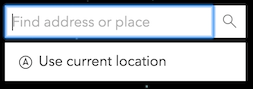
/**
* Enables location services within the widget.
*
* 
*
* > [!WARNING]
* >
* > The use of this property is only supported on secure origins.
* > To use it, switch your application to a secure origin, such as HTTPS.
* > Note that localhost is considered "potentially secure" and can be used for easy testing in browsers that supports
* > [Window.isSecureContext](https://developer.mozilla.org/en-US/docs/Web/API/isSecureContext#browser_compatibility)
* > (currently Chrome and Firefox).
*
* @default true
* @since 4.6
*/
accessor locationEnabled: boolean;
/**
* The maximum number of results returned by the widget if not specified by the source.
*
* @default 6
*/
accessor maxResults: number;
/**
* The maximum number of suggestions returned by the widget if not specified by the source.
*
* If working with the default
* [ArcGIS Online Geocoding service](https://developers.arcgis.com/rest/geocode/api-reference/overview-world-geocoding-service.htm),
* the default remains at `5`.
*
* @default 6
*/
accessor maxSuggestions: number;
/**
* Indicates the minimum number of characters required before querying for a suggestion.
*
* @default 3
*/
accessor minSuggestCharacters: number;
/**
* Indicates whether to display a [Popup](https://developers.arcgis.com/javascript/latest/references/core/widgets/Popup/) when a selected result is clicked.
*
* @default true
*/
accessor popupEnabled: boolean;
/**
* A customized [PopupTemplate](https://developers.arcgis.com/javascript/latest/references/core/PopupTemplate/) for the selected feature.
* Note that any [templates](https://developers.arcgis.com/javascript/latest/references/core/PopupTemplate/)
* defined on [allSources](https://developers.arcgis.com/javascript/latest/references/core/widgets/Search/#allSources) take precedence over those defined directly on the template.
*/
get popupTemplate(): PopupTemplate | null | undefined;
set popupTemplate(value: PopupTemplateProperties | null | undefined);
/**
* It is possible to search a specified portal instance's [locator services](https://enterprise.arcgis.com/en/portal/latest/administer/windows/configure-portal-to-geocode-addresses.htm)
* Use this property to set this [ArcGIS Portal](https://enterprise.arcgis.com/en/portal/) instance to search.
*
* @since 4.8
*/
get portal(): Portal | null | undefined;
set portal(value: PortalProperties | null | undefined);
/**
* The graphic used to highlight the resulting feature or location.
*
* > [!CAUTION]
* >
* > A graphic will be placed in the View's
* > [View.graphics](https://developers.arcgis.com/javascript/latest/references/core/views/View/#graphics)
* > for [layer views](https://developers.arcgis.com/javascript/latest/references/core/views/layers/LayerView/)
* > that do not support the `highlight` method.
*/
accessor resultGraphic: Graphic | null | undefined;
/**
* Indicates if the [resultGraphic](https://developers.arcgis.com/javascript/latest/references/core/widgets/Search/#resultGraphic) will display at the
* location of the selected feature.
*
* @default true
*/
accessor resultGraphicEnabled: boolean;
/** An array of objects, each containing a [SearchResult](https://developers.arcgis.com/javascript/latest/references/core/widgets/Search/types/#SearchResult) from the search. */
get results(): BaseSearchResults<SearchResult>[] | null | undefined;
/**
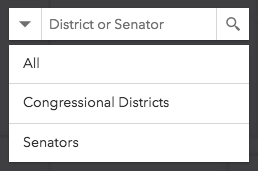
* Indicates whether to display the option to search all sources. When `true`, the "All" option
* is displayed by default:
*
* 
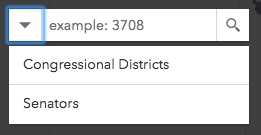
*
* When `false`, no option to search all sources at once is available:
*
* 
*
* @default true
*/
accessor searchAllEnabled: boolean;
/** The value of the search box input text string. */
accessor searchTerm: string;
/**
* The result selected from a search.
*
* @see [Event: select-result](https://developers.arcgis.com/javascript/latest/references/core/widgets/Search/#event-select-result)
* @see [SearchViewModel.select()](https://developers.arcgis.com/javascript/latest/references/core/widgets/Search/SearchViewModel/#select)
*/
get selectedResult(): SearchResult | null | undefined;
/**
* The Search widget may be used to search features in a
* [map](https://developers.arcgis.com/javascript/latest/references/core/layers/MapImageLayer/)/[feature](https://developers.arcgis.com/javascript/latest/references/core/layers/FeatureLayer/) service feature
* layer(s), [SceneLayers](https://developers.arcgis.com/javascript/latest/references/core/layers/SceneLayer/) with an associated feature layer,
* [BuildingComponentSublayer](https://developers.arcgis.com/javascript/latest/references/core/layers/buildingSublayers/BuildingComponentSublayer/) with an associated feature layer,
* [GeoJSONLayer](https://developers.arcgis.com/javascript/latest/references/core/layers/GeoJSONLayer/), [CSVLayer](https://developers.arcgis.com/javascript/latest/references/core/layers/CSVLayer/) or
* [OGCFeatureLayer](https://developers.arcgis.com/javascript/latest/references/core/layers/OGCFeatureLayer/), or [table](https://developers.arcgis.com/javascript/latest/references/core/webdoc/applicationProperties/SearchTable/),
* or geocode locations with a [locator](https://developers.arcgis.com/javascript/latest/references/core/rest/locator/). The `sources` property defines the sources from which
* to search for the [view](https://developers.arcgis.com/javascript/latest/references/core/widgets/Search/#view) specified by the Search widget instance. There are two types of sources:
*
* * [LayerSearchSource](https://developers.arcgis.com/javascript/latest/references/core/widgets/Search/LayerSearchSource/)
* * [LocatorSearchSource](https://developers.arcgis.com/javascript/latest/references/core/widgets/Search/LocatorSearchSource/)
*
* Any combination of these sources may be used
* together in the same instance of the Search widget.
*
* > [!WARNING]
* >
* > Feature layers created from client-side graphics are not supported.
*
* @example
* // Default sources[] when sources is not specified
* [
* {
* url: "https://geocode-api.arcgis.com/arcgis/rest/services/World/GeocodeServer",
* singleLineFieldName: "SingleLine",
* outFields: ["Addr_type"],
* name: "ArcGIS World Geocoding Service",
* placeholder: "Address",
* resultSymbol: {
* type: "picture-marker", // autocasts as new PictureMarkerSymbol()
* url: this.basePath + "/images/search/search-symbol-32.png",
* size: 24,
* width: 24,
* height: 24,
* xoffset: 0,
* yoffset: 0
* }
* }
* ]
* @example
* // Example of multiple sources[]
* const sources = [
* {
* url: "https://geocode-api.arcgis.com/arcgis/rest/services/World/GeocodeServer",
* singleLineFieldName: "SingleLine",
* name: "Custom Geocoding Service",
* placeholder: "Search Geocoder",
* maxResults: 3,
* maxSuggestions: 6,
* suggestionsEnabled: false,
* minSuggestCharacters: 0
* }, {
* layer: new FeatureLayer({
* url: "https://services.arcgis.com/DO4gTjwJVIJ7O9Ca/arcgis/rest/services/GeoForm_Survey_v11_live/FeatureServer/0",
* outFields: ["*"]
* }),
* searchFields: ["Email", "URL"],
* displayField: "Email",
* exactMatch: false,
* outFields: ["*"],
* name: "Point FS",
* placeholder: "example: esri",
* maxResults: 6,
* maxSuggestions: 6,
* suggestionsEnabled: true,
* minSuggestCharacters: 0
* },
* {
* layer: new FeatureLayer({
* outFields: ["*"]
* }),
* placeholder: "esri",
* name: "A FeatureLayer",
* prefix: "",
* suffix: "",
* maxResults: 1,
* maxSuggestions: 6,
* exactMatch: false,
* searchFields: [], // defaults to FeatureLayer.displayField
* displayField: "", // defaults to FeatureLayer.displayField
* minSuggestCharacters: 0
* }
* ];
* @example
* // Set source(s) on creation
* const searchWidget = new Search({
* sources: []
* });
* @example
* // Set source(s)
* const searchWidget = new Search();
* const sources = [{ ... }, { ... }, { ... }]; //array of sources
* searchWidget.sources = sources;
* @example
* // Add to source(s)
* const searchWidget = new Search();
* searchWidget.sources.push({ ... }); //new source
*/
get sources(): SearchViewModel["sources"];
set sources(value: ReadonlyArrayOrCollection<(LocatorSearchSourceProperties | LayerSearchSourceProperties)>);
/**
* An array of results from the [suggest method](https://developers.arcgis.com/javascript/latest/references/core/widgets/Search/#suggest).
*
* This is available if working with a 10.3 or greater geocoding service that has
* [suggest capability loaded](https://developers.arcgis.com/rest/geocode/api-reference/geocoding-suggest.htm) or a
* 10.3 or greater feature layer that supports pagination, i.e. `supportsPagination = true`.
*/
get suggestions(): SearchViewModel["suggestions"];
/**
* Enable suggestions for the widget.
*
* This is only available if working with a 10.3 or greater geocoding service that has [suggest capability
* loaded](https://developers.arcgis.com/rest/geocode/api-reference/geocoding-suggest.htm) or a 10.3 or greater feature layer that supports pagination, i.e. `supportsPagination = true`.
*
* @default true
*/
accessor suggestionsEnabled: boolean;
/** A reference to the [MapView](https://developers.arcgis.com/javascript/latest/references/core/views/MapView/) or [SceneView](https://developers.arcgis.com/javascript/latest/references/core/views/SceneView/). Set this to link the widget to a specific view. */
accessor view: MapViewOrSceneView | null | undefined;
/**
* The view model for this widget. This is a class that contains all the logic
* (properties and methods) that controls this widget's behavior. See the
* [SearchViewModel](https://developers.arcgis.com/javascript/latest/references/core/widgets/Search/SearchViewModel/) class to access
* all properties and methods on the widget.
*/
get viewModel(): SearchViewModel;
set viewModel(value: SearchViewModelProperties);
/** Unfocuses the widget's text input. */
blur(): void;
/**
* Clears the current searchTerm, search results, suggest results, graphic, and graphics layer.
* It also hides any open menus.
*/
clear(): void;
/** Brings focus to the widget's text input. */
focus(): void;
/**
* Depending on the sources specified, search() queries the feature layer(s) and/or performs
* address matching using any specified [locator(s)](https://developers.arcgis.com/javascript/latest/references/core/rest/locator/) and
* returns any applicable results.
*
* @param searchTerm - This searchTerm can be
* a string, geometry, suggest candidate object, or an array of [longitude,latitude] coordinate pairs.
* If a geometry is supplied, then it will reverse geocode (locator) or
* findAddressCandidates with geometry instead of text.
* @returns When resolved, returns a [SearchResponse](https://developers.arcgis.com/javascript/latest/references/core/widgets/Search/types/#SearchResponse) containing a
* [SearchResult](https://developers.arcgis.com/javascript/latest/references/core/widgets/Search/types/#SearchResult).
*/
search(searchTerm?: SearchItem | null | undefined): Promise<SearchResponse | null | undefined>;
/**
* Performs a suggest() request on the active Locator. It also uses the current value of
* the widget or one that is passed in.
*
* Suggestions are available if working with a 10.3 or greater geocoding service that has
* [suggest capability loaded](https://developers.arcgis.com/rest/geocode/api-reference/geocoding-suggest.htm)
* or a 10.3 or greater feature layer that supports pagination, i.e. `supportsPagination = true`.
*
* @param query - The string value used to suggest() on an active Locator or feature layer. If
* nothing is passed in, takes the current value of the widget.
* @returns When resolved, returns [SuggestResponse](https://developers.arcgis.com/javascript/latest/references/core/widgets/Search/types/#SuggestResponse) containing an array of result objects. Each of these results contains a [SuggestResult](https://developers.arcgis.com/javascript/latest/references/core/widgets/Search/types/#SuggestResult).
*/
suggest(query?: string): Promise<SuggestResponse | null | undefined>;
}