@arcgis/core
Version:
ArcGIS Maps SDK for JavaScript: A complete 2D and 3D mapping and data visualization API
114 lines (110 loc) • 5.34 kB
TypeScript
import type PortalItem from "../../portal/PortalItem.js";
import type LayoutTemplateInfo from "./LayoutTemplateInfo.js";
import type { JSONSupport } from "../../core/JSONSupport.js";
import type { Unit } from "../../core/units.js";
import type { PrintLayoutTemplate, PrintFileFormat } from "../../rest/support/types.js";
import type { MapSurroundInfo } from "./types.js";
export interface CustomTemplateProperties extends Partial<Pick<CustomTemplate, "format">> {}
export interface LayoutOptions {
/** Indicates whether the legend will be included in the print-out. */
legend?: boolean | null;
/** Indicates whether the north arrow will be included in the print-out. */
northArrow?: boolean | null;
}
export interface MapSurroundInfoOptions {
/** MapSurroundInfo for north arrow. */
northArrow: Extract<MapSurroundInfo, { type: "cim-marker-north-arrow"; }>[];
/** MapSurroundInfo for scale bar. */
scaleBar: Extract<MapSurroundInfo, { type: "cim-scale-line" | "cim-group-element"; }>[];
/** MapSurroundInfo for legend. */
legend: Extract<MapSurroundInfo, { type: "cim-legend"; }>[];
}
/**
* Defines the custom layout template options used by the [Print widget](https://developers.arcgis.com/javascript/latest/references/core/widgets/Print/) and
* [Print component](https://developers.arcgis.com/javascript/latest/references/map-components/components/arcgis-print/) to generate the print page. While custom templates can be published from ArcGIS Pro to a portal,
* custom layout templates are defined in a portal, where they can be added, removed, or edited as necessary
* without having to republish the print service. There are a limited number of options available for customization.
*
* The main benefit of this class is that it allows developers to give a name to a preferred `format` and `layout`
* and if there should be a `Legend` present or not, in a reusable way. This is what the UI looks like in a portal:
*
* [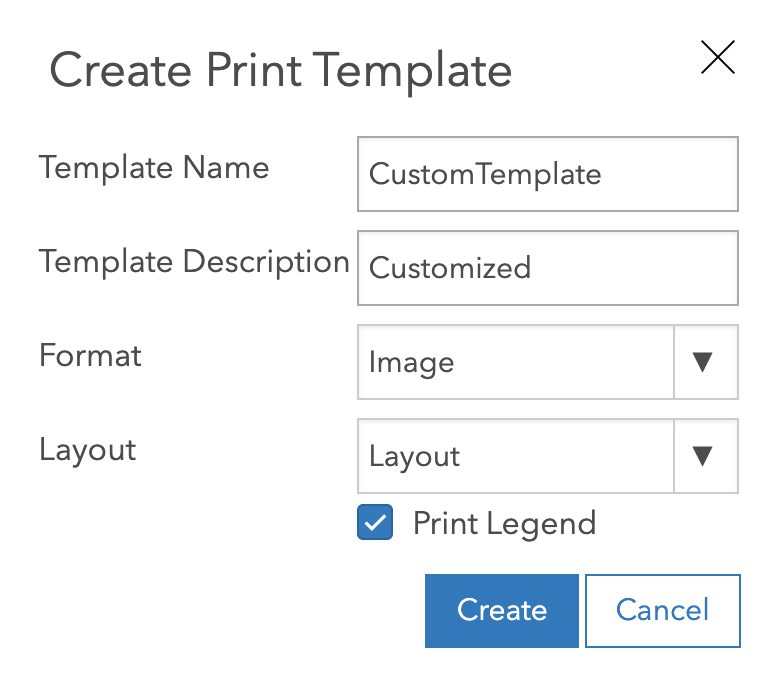](https://developers.arcgis.com/javascript/latest/references/map-components/components/arcgis-print/#demo/)
*
* @since 4.18
* @see [Print widget](https://developers.arcgis.com/javascript/latest/references/core/widgets/Print/) - _Deprecated since 4.33. Use the [Print component](https://developers.arcgis.com/javascript/latest/references/map-components/components/arcgis-print/) instead._
* @see [Print component](https://developers.arcgis.com/javascript/latest/references/map-components/components/arcgis-print/)
* @see [Programming patterns: Widget viewModel pattern](https://developers.arcgis.com/javascript/latest/programming-patterns/#widget-viewmodel-pattern)
*/
export default class CustomTemplate extends JSONSupport {
constructor(properties?: CustomTemplateProperties);
/** The template's description. */
get description(): string | null | undefined;
/** The output format for the printed map. */
format?: PrintFileFormat | null;
/**
* Unique id for the template.
*
* @since 4.33
*/
get id(): string;
/**
* The text that appears inside the `Select template` button.
* This is the label for the template as defined in a portal.
*/
get label(): string | null | undefined;
/**
* The layout used for the print output. When the value is `map-only` or is empty, the output map does not contain any page layout
* surroundings (for example: legend, scale bar, and so forth). The print service provides out-of-the-box templates listed in possible values.
* The server administrator can add additional templates to the print service.
*
* Possible values are listed below:
* Value | Description
* | --- | ---
* map-only | Map does not contain any layout elements. Only the map image is printed.
* a3-landscape | A3 Landscape
* a3-portrait | A3 Portrait
* a4-landscape | A4 Landscape
* a4-portrait | A4 Portrait
* letter-ansi-a-landscape | Letter ANSI A Landscape
* letter-ansi-a-portrait | Letter ANSI A Portrait
* tabloid-ansi-b-landscape| Tabloid ANSI B Landscape
* tabloid-ansi-b-portrait | Tabloid ANSI B Portrait
*/
get layout(): PrintLayoutTemplate | null | undefined;
/** The portal item associated with layout (if any). */
get layoutItem(): PortalItem | null | undefined;
/** Defines the layout elements. It's an object with the following property: */
get layoutOptions(): LayoutOptions | null | undefined;
/**
* Defines the layout template info for the layout item.
*
* @since 4.33
*/
get layoutTemplateInfo(): LayoutTemplateInfo | null | undefined;
/**
* This object returns settings for a legend, north arrow and scale bar (if any).
*
* @since 4.33
*/
get mapSurroundInfoOptions(): MapSurroundInfoOptions | null | undefined;
/**
* The pageUnits from layoutTemplateInfo.
*
* @since 4.33
*/
get pageUnits(): Unit | null | undefined;
/**
* Loading state of the template.
*
* @default "not-loaded"
* @since 4.33
*/
get state(): "loaded" | "not-loaded" | "loading" | "error";
/**
* The type of CustomTemplate.
*
* @deprecated since version 5.0.
* @since 4.33
*/
get type(): "browse-template" | "default-template" | "print-service-template" | null | undefined;
}