@arcgis/core
Version:
ArcGIS Maps SDK for JavaScript: A complete 2D and 3D mapping and data visualization API
758 lines (755 loc) • 47.1 kB
TypeScript
import type Graphic from "../Graphic.js";
import type Collection from "../core/Collection.js";
import type Point from "../geometry/Point.js";
import type Feature from "./Feature.js";
import type Widget from "./Widget.js";
import type PopupViewModel from "./Popup/PopupViewModel.js";
import type PopupVisibleElements from "./Popup/PopupVisibleElements.js";
import type { Icon } from "@esri/calcite-components/components/calcite-icon";
import type { ScreenPoint } from "../core/types.js";
import type { MapViewOrSceneView } from "../views/MapViewOrSceneView.js";
import type { FetchPopupFeaturesResult } from "../views/types.js";
import type { FeaturesViewModelEvents } from "./Features/FeaturesViewModel.js";
import type { PopupAction, Alignment, DockOptions, PopupPositionResult, PopupOpenOptions, FetchFeaturesOptions, InitialDisplayOptions } from "./Popup/types.js";
import type { HeadingLevel, GoToOverride } from "./support/types.js";
import type { ActionToggleProperties } from "../support/actions/ActionToggle.js";
import type { ActionButtonProperties } from "../support/actions/ActionButton.js";
import type { ReadonlyArrayOrCollection } from "../core/Collection.js";
import type { PointProperties } from "../geometry/Point.js";
import type { PopupViewModelProperties } from "./Popup/PopupViewModel.js";
import type { PopupVisibleElementsProperties } from "./Popup/PopupVisibleElements.js";
import type { WidgetProperties } from "./Widget.js";
export interface PopupProperties extends WidgetProperties, Partial<Pick<Popup, "alignment" | "autoCloseEnabled" | "collapsed" | "content" | "defaultPopupTemplateEnabled" | "dockEnabled" | "dockOptions" | "features" | "goToOverride" | "headingLevel" | "highlightEnabled" | "initialDisplayMode" | "promises" | "selectedFeatureIndex" | "title" | "view">> {
/**
* [Collection](https://developers.arcgis.com/javascript/latest/references/core/core/Collection/) of [action](https://developers.arcgis.com/javascript/latest/references/core/support/actions/ActionButton/) or [action toggle](https://developers.arcgis.com/javascript/latest/references/core/support/actions/ActionToggle/) objects.
* Each action may be executed by clicking the icon or image symbolizing them.
* By default, popups have a `Zoom To` action styled with a magnifying glass icon .
* When this icon is clicked, the view zooms in four LODs and centers on the selected feature.
*
* You may remove this default action by setting [PopupViewModel.includeDefaultActions](https://developers.arcgis.com/javascript/latest/references/core/widgets/Popup/PopupViewModel/#includeDefaultActions) to `false`, or by setting the
* [PopupTemplate.overwriteActions](https://developers.arcgis.com/javascript/latest/references/core/PopupTemplate/#overwriteActions) property to `true` in a [PopupTemplate](https://developers.arcgis.com/javascript/latest/references/core/PopupTemplate/).
* The order of each action is the order in which they appear in the actions [Collection](https://developers.arcgis.com/javascript/latest/references/core/core/Collection/).
*
* The [@trigger-action](https://developers.arcgis.com/javascript/latest/references/core/widgets/Popup/#event-trigger-action) event fires each time an action is clicked.
*
* Actions are defined with the properties listed in the [ActionButton](https://developers.arcgis.com/javascript/latest/references/core/support/actions/ActionButton/) or [ActionToggle](https://developers.arcgis.com/javascript/latest/references/core/support/actions/ActionToggle/) classes.
*
* @see [@trigger-action](https://developers.arcgis.com/javascript/latest/references/core/widgets/Popup/#event-trigger-action)
* @see [Sample - Popup actions](https://developers.arcgis.com/javascript/latest/sample-code/popup-actions/)
* @see [Sample - Custom popup actions per feature](https://developers.arcgis.com/javascript/latest/sample-code/popup-custom-action/)
* @see [Sample - Popup with edit action](https://developers.arcgis.com/javascript/latest/sample-code/popup-editaction/)
* @example
* // Defines an action button to zoom out from the selected feature
* const zoomOutAction = {
* type: "button",
* // This text is displayed as a tooltip
* title: "Zoom out",
* // The ID by which to reference the action in the event handler
* id: "zoom-out",
* // Sets the icon used to style the action button
* icon: "magnifying-glass-minus"
* };
* // Adds the custom action to the popup.
* view.popup.actions.push(zoomOutAction);
*/
actions?: ReadonlyArrayOrCollection<((ActionButtonProperties & { type: "button" }) | (ActionToggleProperties & { type: "toggle" }))>;
/**
* Icon displayed in the widget's button.
*
* @default "popup"
* @since 4.27
* @see [Calcite Icon Search](https://developers.arcgis.com/calcite-design-system/icons/)
* @see [Calcite Icon Search](https://developers.arcgis.com/calcite-design-system/icons/)
*/
icon?: Icon["icon"] | null;
/**
* The widget's default label.
*
* @since 4.11
*/
label?: string | null;
/**
* Point used to position the popup. This is automatically set when viewing the
* popup by selecting a feature. If using the Popup to display content not related
* to features in the map, such as the results from a task, then you must set this
* property before making the popup [visible](https://developers.arcgis.com/javascript/latest/references/core/widgets/Popup/#visible) to the user.
*
* @see [Intro to popups](https://developers.arcgis.com/javascript/latest/sample-code/intro-popup/)
* @example
* // Sets the location of the popup to the center of the view
* view.popup.location = view.center;
* // Displays the popup
* view.popup.visible = true;
* @example
* // Sets the location of the popup to a specific place (using autocast)
* // Note: using latitude/longitude only works if view is in Web Mercator or WGS84 spatial reference.
* view.popup.location = {latitude: 34.0571, longitude: -117.1968};
* @example
* // Sets the location of the popup to the location of a click on the view
* reactiveUtils.on(()=>view, "click", (event)=>{
* view.popup.location = event.mapPoint;
* // Displays the popup
* view.popup.visible = true;
* });
*/
location?: PointProperties | null;
/**
* This is a class that contains all the logic
* (properties and methods) that controls this widget's behavior. See the
* [PopupViewModel](https://developers.arcgis.com/javascript/latest/references/core/widgets/Popup/PopupViewModel/) class to access
* all properties and methods on the widget.
*/
viewModel?: PopupViewModelProperties;
/**
* Indicates whether the popup is visible. This property is `true` when the popup is querying for results, even if it is not open in the view.
* Use the [PopupViewModel.active](https://developers.arcgis.com/javascript/latest/references/core/widgets/Popup/PopupViewModel/#active) property to check if the popup is visible and is not [waiting for results](https://developers.arcgis.com/javascript/latest/references/core/widgets/Popup/PopupViewModel/#waitingForResult).
*
* @see [PopupViewModel.active](https://developers.arcgis.com/javascript/latest/references/core/widgets/Popup/PopupViewModel/#active)
* @example
* // Hides the widget in the view
* widget.visible = false;
*/
visible?: boolean;
/**
* The visible elements that are displayed within the widget.
* This property provides the ability to turn individual elements of the widget's display on/off.
*
* @since 4.15
* @example
* popup.visibleElements = {
* closeButton: false
* };
*/
visibleElements?: PopupVisibleElementsProperties;
}
export interface PopupEvents extends FeaturesViewModelEvents {}
/**
* <span id="overview"></span>
*
* ## Overview
* The Popup widget allows users to view content from feature attributes. Popups enhance web applications
* by providing users with a simple way to interact with and view attributes in a layer.
* They play an important role in relaying information to the user, which improves the storytelling capabilities of the application.
*
* <span id="loading-the-popup"></span>
*
* ## Loading the Popup
* At [version 4.27](https://developers.arcgis.com/javascript/latest/release-notes#popup-performance-improvements), the view's default popup is loaded on demand when [View2D.popupEnabled](https://developers.arcgis.com/javascript/latest/references/core/views/View2D/#popupEnabled) is set to `true` (which is the default), when the [View2D.openPopup()](https://developers.arcgis.com/javascript/latest/references/core/views/View2D/#openPopup) method is called,
* or when some widgets need the popup, such as [Search](https://developers.arcgis.com/javascript/latest/references/core/widgets/Search/). Please see the read more section below for details on how to manually load the popup or take
* advantage of the API lazy loading.
*
* <details>
* <summary>Read More</summary>
*
* The Popup class can be loaded when the [View](https://developers.arcgis.com/javascript/latest/references/core/views/View/) is instantiated, however, this does not take advantage of the performance improvements of lazily loading the popup.
* ```js
* // Create a new MapView
* const view = new MapView({
* // set the popup property to a new instance of Popup
* popup: new Popup(...)
* });
* ```
* To utilize the performance improvements and the API automatically lazy loading the popup:
* - Set options/properties on the view's popup:
* ```js
* const view = MapView({
* popup: {
* dockEnabled: true,
* dockOptions: {
* position: true,
* ...
* }
* }
* });
* ```
* - Use [View2D.popupEnabled](https://developers.arcgis.com/javascript/latest/references/core/views/View2D/#popupEnabled) to prevent the popup appearing when the user clicks the view.
* ```js
* // The popup doesn't show for features on selection, but will on Search results and when `openPopup()` is called.
* view.popupEnabled = false;
* ```
* - Use [View2D.openPopup()](https://developers.arcgis.com/javascript/latest/references/core/views/View2D/#openPopup) instead of [open()](https://developers.arcgis.com/javascript/latest/references/core/widgets/Popup/#open) and [View2D.closePopup()](https://developers.arcgis.com/javascript/latest/references/core/views/View2D/#closePopup) instead of [close()](https://developers.arcgis.com/javascript/latest/references/core/widgets/Popup/#close).
* ```js
* // A deprecation warning is prompted if the popup isn't created
* // and calls view.openPopup() or view.closePopup() respectively under the hood.
* view.popup.open(...);
* view.popup.close(...);
*
* // Opens or closes the popup on the View.
* view.openPopup(...);
* view.closePopup(...);
* ```
* - Use [reactiveUtils](https://developers.arcgis.com/javascript/latest/references/core/core/reactiveUtils/) to watch properties on the popup and its view model instead of the `watch()` method.
* ```js
* // This will throw an error that watch() is not a method
* // since the popup hasn't been created yet.
* view.popup.watch("selectedFeature", ...)
*
* // Call reactiveUtils.watch() on popup properties with optional chaining.
* reactiveUtils.watch(() => view.popup?.selectedFeature, ...);
* ```
* - Use the [when()](https://developers.arcgis.com/javascript/latest/references/core/core/reactiveUtils/#when) method to check when the popup instance is created. Once its created, then it's properties or methods can be accessed and called.
* ```js
* // This will throw an error that actions is not a property.
* view.popup.actions.push(...);
*
* // Wait for the popup to load before accessing properties.
* reactiveUtils.when(() => view.popup?.actions, ()=>{
* view.popup.actions.push(...);
* });
* ```
*
* </details>
*
* <span id="popup-ui"></span>
*
* ## Popup UI
* All [Views](https://developers.arcgis.com/javascript/latest/references/core/views/View/) contain a default popup.
* This popup can display generic content, which is set in its [title](https://developers.arcgis.com/javascript/latest/references/core/widgets/Popup/#title)
* and [content](https://developers.arcgis.com/javascript/latest/references/core/widgets/Popup/#content) properties.
* When content is set directly on the Popup instance it is not tied to a specific feature or layer.
*
* [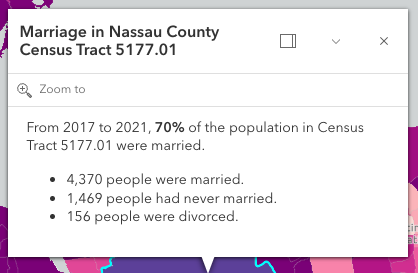](https://developers.arcgis.com/javascript/latest/sample-code/sandbox/?sample=intro-popup)
*
* In the image above, the text "Marriage in New York County Census Tract 8" is the popup's `title`. The remaining text is
* its `content`. A dock button  may also be available in the
* top right corner of the popup. This allows the user to dock the popup to one of the sides or corners of the view.
* The options for docking may be set in the [dockOptions](https://developers.arcgis.com/javascript/latest/references/core/widgets/Popup/#dockOptions) property.
*
* Popups can also contain [actions](https://developers.arcgis.com/javascript/latest/references/core/widgets/Popup/#actions) that act like buttons,
* which execute a function defined by the developer when clicked.
* By default, every popup has a "Zoom to" action 
* that allows users to zoom to the selected feature. See the [actions](https://developers.arcgis.com/javascript/latest/references/core/widgets/Popup/#actions)
* property for information about adding custom actions to a popup.
*
* The Popup widget is tied to the [View](https://developers.arcgis.com/javascript/latest/references/core/views/View/), whether it's docked or anchored to the selected feature.
* If wanting to utilize the Popup functionality outside of the View, the [Features](https://developers.arcgis.com/javascript/latest/references/core/widgets/Features/) widget can be used to display the same content
* in its own container that's not tied to the View.
*
* <span id="popup-and-popuptemplate"></span>
*
* ## Popup and PopupTemplate
* [PopupTemplate](https://developers.arcgis.com/javascript/latest/references/core/PopupTemplate/) is closely related to Popup, but is more specific to [layers](https://developers.arcgis.com/javascript/latest/references/core/layers/Layer/)
* and [graphics](https://developers.arcgis.com/javascript/latest/references/core/Graphic/). It allows you to define custom titles and content templates based on the source of the
* [selected feature](https://developers.arcgis.com/javascript/latest/references/core/widgets/Popup/#selectedFeature). When a layer or a graphic has a defined
* PopupTemplate, the popup will display the content
* defined in the PopupTemplate when the feature is clicked. The content may contain field values from the attributes of the [selected feature](https://developers.arcgis.com/javascript/latest/references/core/widgets/Popup/#selectedFeature).
*
* Custom PopupTemplates may also be assigned directly to a popup by setting [graphics](https://developers.arcgis.com/javascript/latest/references/core/Graphic/) on the
* [features](https://developers.arcgis.com/javascript/latest/references/core/widgets/Popup/#features) property. For more information about Popup
* and how it relates to [PopupTemplate](https://developers.arcgis.com/javascript/latest/references/core/PopupTemplate/) see the samples listed below.
*
* @deprecated since 5.0. Use the [Popup component](https://developers.arcgis.com/javascript/latest/references/map-components/components/arcgis-popup/) instead. For information on widget deprecation, read about [Esri's move to web components](https://developers.arcgis.com/javascript/latest/components-transition-plan/).
* @since 4.0
* @see [PopupTemplate](https://developers.arcgis.com/javascript/latest/references/core/PopupTemplate/)
* @see [SceneView.popup](https://developers.arcgis.com/javascript/latest/references/core/views/SceneView/#popup)
* @see [View2D.popup](https://developers.arcgis.com/javascript/latest/references/core/views/View2D/#popup)
* @see [Sample - Intro to popups](https://developers.arcgis.com/javascript/latest/sample-code/intro-popup/)
* @see [Sample - to PopupTemplate](https://developers.arcgis.com/javascript/latest/sample-code/intro-popuptemplate/)
* @see [Sample - Dock positions with popup](https://developers.arcgis.com/javascript/latest/sample-code/popup-docking-position/)
* @see [Sample - Popup actions](https://developers.arcgis.com/javascript/latest/sample-code/popup-actions/)
* @see [Sample - Custom popup actions per feature](https://developers.arcgis.com/javascript/latest/sample-code/popup-custom-action/)
* @see [Sample - Popup with edit action](https://developers.arcgis.com/javascript/latest/sample-code/popup-editaction/)
* @see [Sample - Popup with DOM node](https://developers.arcgis.com/javascript/latest/sample-code/popup-domnode/)
* @see [Guide - Esri Icon Font](https://developers.arcgis.com/javascript/latest/guide/esri-icon-font/)
* @see [PopupViewModel](https://developers.arcgis.com/javascript/latest/references/core/widgets/Popup/PopupViewModel/)
*/
export default class Popup extends Widget {
/**
* @deprecated
* Do not directly reference this property.
* Use EventNames and EventTypes helpers from \@arcgis/core/Evented
*/
"@eventTypes": PopupEvents;
constructor(properties?: PopupProperties);
/**
* [Collection](https://developers.arcgis.com/javascript/latest/references/core/core/Collection/) of [action](https://developers.arcgis.com/javascript/latest/references/core/support/actions/ActionButton/) or [action toggle](https://developers.arcgis.com/javascript/latest/references/core/support/actions/ActionToggle/) objects.
* Each action may be executed by clicking the icon or image symbolizing them.
* By default, popups have a `Zoom To` action styled with a magnifying glass icon .
* When this icon is clicked, the view zooms in four LODs and centers on the selected feature.
*
* You may remove this default action by setting [PopupViewModel.includeDefaultActions](https://developers.arcgis.com/javascript/latest/references/core/widgets/Popup/PopupViewModel/#includeDefaultActions) to `false`, or by setting the
* [PopupTemplate.overwriteActions](https://developers.arcgis.com/javascript/latest/references/core/PopupTemplate/#overwriteActions) property to `true` in a [PopupTemplate](https://developers.arcgis.com/javascript/latest/references/core/PopupTemplate/).
* The order of each action is the order in which they appear in the actions [Collection](https://developers.arcgis.com/javascript/latest/references/core/core/Collection/).
*
* The [@trigger-action](https://developers.arcgis.com/javascript/latest/references/core/widgets/Popup/#event-trigger-action) event fires each time an action is clicked.
*
* Actions are defined with the properties listed in the [ActionButton](https://developers.arcgis.com/javascript/latest/references/core/support/actions/ActionButton/) or [ActionToggle](https://developers.arcgis.com/javascript/latest/references/core/support/actions/ActionToggle/) classes.
*
* @see [@trigger-action](https://developers.arcgis.com/javascript/latest/references/core/widgets/Popup/#event-trigger-action)
* @see [Sample - Popup actions](https://developers.arcgis.com/javascript/latest/sample-code/popup-actions/)
* @see [Sample - Custom popup actions per feature](https://developers.arcgis.com/javascript/latest/sample-code/popup-custom-action/)
* @see [Sample - Popup with edit action](https://developers.arcgis.com/javascript/latest/sample-code/popup-editaction/)
* @example
* // Defines an action button to zoom out from the selected feature
* const zoomOutAction = {
* type: "button",
* // This text is displayed as a tooltip
* title: "Zoom out",
* // The ID by which to reference the action in the event handler
* id: "zoom-out",
* // Sets the icon used to style the action button
* icon: "magnifying-glass-minus"
* };
* // Adds the custom action to the popup.
* view.popup.actions.push(zoomOutAction);
*/
get actions(): Collection<PopupAction>;
set actions(value: ReadonlyArrayOrCollection<((ActionButtonProperties & { type: "button" }) | (ActionToggleProperties & { type: "toggle" }))>);
/**
* Indicates if the widget is active when it is visible and is not [waiting for results](https://developers.arcgis.com/javascript/latest/references/core/widgets/Popup/PopupViewModel/#waitingForResult).
*
* @default false
* @since 4.30
*/
get active(): boolean;
/**
* Position of the popup in relation to the selected feature. The default behavior
* is to display above the feature and adjust if not enough room. If needing
* to explicitly control where the popup displays in relation to the feature, choose
* an option besides `auto`.
*
* @default "auto"
* @since 4.8
* @example
* // Popup will display on the bottom-right of the selected feature regardless of where that feature is located
* view.popup.alignment = "bottom-right";
*/
accessor alignment: Alignment;
/**
* This closes the popup when the [View](https://developers.arcgis.com/javascript/latest/references/core/views/View/) camera or [Viewpoint](https://developers.arcgis.com/javascript/latest/references/core/Viewpoint/) changes.
*
* @default false
* @since 4.5
*/
accessor autoCloseEnabled: boolean;
/**
* Indicates whether the popup displays its content. If `true`, only the header displays.
*
* @default false
* @since 4.5
*/
accessor collapsed: boolean;
/**
* The content of the popup. When set directly on the Popup, this content is
* static and cannot use fields to set content templates. To set a template
* for the content based on field or attribute names, see
* [PopupTemplate.content](https://developers.arcgis.com/javascript/latest/references/core/PopupTemplate/#content).
*
* @see [Sample - Popup Docking](https://developers.arcgis.com/javascript/latest/sample-code/popup-docking-position/)
* @see [Sample - Popup with DOM node](https://developers.arcgis.com/javascript/latest/sample-code/popup-domnode/)
* @example
* // This sets generic instructions in the popup that will always be displayed
* // unless it is overridden by a PopupTemplate
* view.popup.content = "Click a feature on the map to view its attributes";
*/
accessor content: PopupViewModel["content"];
/** Dock position in the [View](https://developers.arcgis.com/javascript/latest/references/core/views/View/). */
get currentDockPosition(): PopupPositionResult | null | undefined;
/**
* Enables automatic creation of a popup template for layers that have popups enabled but no
* popupTemplate defined. Automatic popup templates are supported for layers that
* support the `createPopupTemplate` method. (Supported for
* [FeatureLayer](https://developers.arcgis.com/javascript/latest/references/core/layers/FeatureLayer/),
* [GeoJSONLayer](https://developers.arcgis.com/javascript/latest/references/core/layers/GeoJSONLayer/),
* [OGCFeatureLayer](https://developers.arcgis.com/javascript/latest/references/core/layers/OGCFeatureLayer/),
* [SceneLayer](https://developers.arcgis.com/javascript/latest/references/core/layers/SceneLayer/),
* [CSVLayer](https://developers.arcgis.com/javascript/latest/references/core/layers/CSVLayer/),
* [PointCloudLayer](https://developers.arcgis.com/javascript/latest/references/core/layers/PointCloudLayer/),
* [StreamLayer](https://developers.arcgis.com/javascript/latest/references/core/layers/StreamLayer/),
* [ImageryLayer](https://developers.arcgis.com/javascript/latest/references/core/layers/ImageryLayer/), and
* [VoxelLayer](https://developers.arcgis.com/javascript/latest/references/core/layers/VoxelLayer/)).
*
* @default false
* @since 4.11
*/
accessor defaultPopupTemplateEnabled: boolean;
/**
* Indicates whether the placement of the popup is docked to the side of the view.
*
* Docking the popup allows for a better user experience, particularly when opening
* popups in apps on mobile devices. When a popup is "dockEnabled" it means the popup no
* longer points to the [selected feature](https://developers.arcgis.com/javascript/latest/references/core/widgets/Popup/#selectedFeature) or the [location](https://developers.arcgis.com/javascript/latest/references/core/widgets/Popup/#location)
* assigned to it. Rather it is attached to a side, the top, or the bottom of the view.
*
* See [dockOptions](https://developers.arcgis.com/javascript/latest/references/core/widgets/Popup/#dockOptions) to override default options related to docking the popup.
*
* @default false
* @see [Sample - Popup docking](https://developers.arcgis.com/javascript/latest/sample-code/popup-docking-position/)
* @example
* // The popup will automatically be dockEnabled when made visible
* view.popup.dockEnabled = true;
*/
accessor dockEnabled: boolean;
/**
* Docking the popup allows for a better user experience, particularly when opening
* popups in apps on mobile devices. When a popup is "dockEnabled" it means the popup no
* longer points to the [selected feature](https://developers.arcgis.com/javascript/latest/references/core/widgets/Popup/#selectedFeature) or the [location](https://developers.arcgis.com/javascript/latest/references/core/widgets/Popup/#location)
* assigned to it. Rather it is placed in one of the corners of the view or to the top or bottom
* of it. This property allows the developer to set various options for docking the popup.
*
* See the object specification table below to override default docking properties on the popup.
*
* @see [Sample - Popup docking](https://developers.arcgis.com/javascript/latest/sample-code/popup-docking-position/)
* @example
* view.popup.dockOptions = {
* // Disable the dock button so users cannot undock the popup
* buttonEnabled: false,
* // Dock the popup when the size of the view is less than or equal to 600x1000 pixels
* breakpoint: {
* width: 600,
* height: 1000
* }
* };
*/
accessor dockOptions: DockOptions;
/**
* The number of selected [features](https://developers.arcgis.com/javascript/latest/references/core/widgets/Popup/#features) available to the popup.
*
* @default 0
*/
get featureCount(): number;
/**
* An array of features associated with the popup. Each graphic in this array must
* have a valid [PopupTemplate](https://developers.arcgis.com/javascript/latest/references/core/PopupTemplate/) set. They may share the same
* [PopupTemplate](https://developers.arcgis.com/javascript/latest/references/core/PopupTemplate/) or have unique
* [PopupTemplates](https://developers.arcgis.com/javascript/latest/references/core/PopupTemplate/) depending on their attributes.
* The [content](https://developers.arcgis.com/javascript/latest/references/core/widgets/Popup/#content) and [title](https://developers.arcgis.com/javascript/latest/references/core/widgets/Popup/#title)
* of the popup is set based on the `content` and `title` properties of each graphic's respective
* [PopupTemplate](https://developers.arcgis.com/javascript/latest/references/core/PopupTemplate/).
*
* When more than one graphic exists in this array, the current content of the
* Popup is set based on the value of the [selected feature](https://developers.arcgis.com/javascript/latest/references/core/widgets/Popup/#selectedFeature).
*
* This value is `null` if no features are associated with the popup.
*
* @example
* // When setting the features property, the graphics pushed to this property
* // must have a PopupTemplate set.
* let g1 = new Graphic();
* g1.popupTemplate = new PopupTemplate({
* title: "Results title",
* content: "Results: {ATTRIBUTE_NAME}"
* });
* // Set the graphics as an array to the popup instance. The content and title of
* // the popup will be set depending on the PopupTemplate of the graphics.
* // Each graphic may share the same PopupTemplate or have a unique PopupTemplate
* let graphics = [g1, g2, g3, g4, g5];
* view.popup.features = graphics;
*/
accessor features: Graphic[];
/**
* This function provides the ability to override either the
* [MapView goTo()](https://developers.arcgis.com/javascript/latest/references/core/views/MapView/#goTo) or
* [SceneView goTo()](https://developers.arcgis.com/javascript/latest/references/core/views/SceneView/#goTo) methods.
*
* @since 4.8
* @see [MapView.goTo()](https://developers.arcgis.com/javascript/latest/references/core/views/MapView/#goTo)
* @see [SceneView.goTo()](https://developers.arcgis.com/javascript/latest/references/core/views/SceneView/#goTo)
* @example
* // The following snippet uses Search but can be applied to any
* // widgets that support the goToOverride property.
* search.goToOverride = function(view, goToParams) {
* goToParams.options = {
* duration: updatedDuration
* };
* return view.goTo(goToParams.target, goToParams.options);
* };
*/
accessor goToOverride: GoToOverride | null | undefined;
/**
* Indicates the heading level to use for the [title](https://developers.arcgis.com/javascript/latest/references/core/widgets/Popup/#title) of the popup.
* By default, the title is rendered
* as a level 2 heading (e.g. `<h2>Popup title</h2>`). Depending on the widget's placement
* in your app, you may need to adjust this heading for proper semantics. This is
* important for meeting accessibility standards.
*
* @default 2
* @since 4.20
* @see [Heading Elements](https://developer.mozilla.org/en-US/docs/Web/HTML/Element/Heading_Elements)
* @example
* // popup title will render as an <h3>
* popup.headingLevel = 3;
*/
accessor headingLevel: HeadingLevel;
/**
* Highlight the selected popup feature using the [MapView.highlights](https://developers.arcgis.com/javascript/latest/references/core/views/MapView/#highlights)
* set on the [MapView](https://developers.arcgis.com/javascript/latest/references/core/views/MapView/) or the [SceneView.highlights](https://developers.arcgis.com/javascript/latest/references/core/views/SceneView/#highlights)
* set on the [SceneView](https://developers.arcgis.com/javascript/latest/references/core/views/SceneView/).
*
* @default true
*/
accessor highlightEnabled: boolean;
/**
* Icon displayed in the widget's button.
*
* @default "popup"
* @since 4.27
* @see [Calcite Icon Search](https://developers.arcgis.com/calcite-design-system/icons/)
* @see [Calcite Icon Search](https://developers.arcgis.com/calcite-design-system/icons/)
*/
get icon(): Icon["icon"];
set icon(value: Icon["icon"] | null | undefined);
/**
* Indicates whether to initially display a list of features, or the content for one feature.
*
* @default "feature"
* @since 4.32
*/
accessor initialDisplayMode: InitialDisplayOptions;
/**
* The widget's default label.
*
* @since 4.11
*/
get label(): string;
set label(value: string | null | undefined);
/**
* Point used to position the popup. This is automatically set when viewing the
* popup by selecting a feature. If using the Popup to display content not related
* to features in the map, such as the results from a task, then you must set this
* property before making the popup [visible](https://developers.arcgis.com/javascript/latest/references/core/widgets/Popup/#visible) to the user.
*
* @see [Intro to popups](https://developers.arcgis.com/javascript/latest/sample-code/intro-popup/)
* @example
* // Sets the location of the popup to the center of the view
* view.popup.location = view.center;
* // Displays the popup
* view.popup.visible = true;
* @example
* // Sets the location of the popup to a specific place (using autocast)
* // Note: using latitude/longitude only works if view is in Web Mercator or WGS84 spatial reference.
* view.popup.location = {latitude: 34.0571, longitude: -117.1968};
* @example
* // Sets the location of the popup to the location of a click on the view
* reactiveUtils.on(()=>view, "click", (event)=>{
* view.popup.location = event.mapPoint;
* // Displays the popup
* view.popup.visible = true;
* });
*/
get location(): Point | null | undefined;
set location(value: PointProperties | null | undefined);
/**
* An array of pending Promises that have not yet been fulfilled. If there are
* no pending promises, the value is `null`. When the pending promises are
* resolved they are removed from this array and the features they return
* are pushed into the [features](https://developers.arcgis.com/javascript/latest/references/core/widgets/Popup/#features) array.
*/
accessor promises: Promise<Graphic[]>[];
/**
* The feature that the widget has drilled into.
* This feature is either associated with the selected feature in a [relationship element](https://developers.arcgis.com/javascript/latest/references/core/popup/content/RelationshipContent/) or [utility network association element](https://developers.arcgis.com/javascript/latest/references/core/popup/content/UtilityNetworkAssociationsContent/).
*
* @since 4.32
*/
get selectedDrillInFeature(): Graphic | null | undefined;
/**
* The selected feature accessed by the popup. The content of the Popup is
* determined based on the [PopupTemplate](https://developers.arcgis.com/javascript/latest/references/core/PopupTemplate/) assigned to
* this feature.
*/
get selectedFeature(): Graphic | null;
/**
* Index of the feature that is [selected](https://developers.arcgis.com/javascript/latest/references/core/widgets/Popup/#selectedFeature). When [features](https://developers.arcgis.com/javascript/latest/references/core/widgets/Popup/#features) are set,
* the first index is automatically selected.
*/
accessor selectedFeatureIndex: number;
/**
* Returns a reference to the current [Feature](https://developers.arcgis.com/javascript/latest/references/core/widgets/Feature/) that the Popup is using.
* This is useful if needing to get a reference to the widget in order to make any changes to it.
*
* @since 4.7
*/
get selectedFeatureWidget(): Feature | null;
/**
* The title of the popup. This can be set generically on the popup no
* matter the features that are selected. If the [selected feature](https://developers.arcgis.com/javascript/latest/references/core/widgets/Popup/#selectedFeature)
* has a [PopupTemplate](https://developers.arcgis.com/javascript/latest/references/core/PopupTemplate/), then the title set in the
* corresponding template is used here.
*
* @see [headingLevel](https://developers.arcgis.com/javascript/latest/references/core/widgets/Popup/#headingLevel)
* @example
* // This title will display in the popup unless a selected feature's
* // PopupTemplate overrides it
* view.popup.title = "Population by zip codes in Southern California";
*/
accessor title: string | null | undefined;
/** A reference to the [MapView](https://developers.arcgis.com/javascript/latest/references/core/views/MapView/) or [SceneView](https://developers.arcgis.com/javascript/latest/references/core/views/SceneView/). Set this to link the widget to a specific view. */
accessor view: MapViewOrSceneView | null | undefined;
/**
* This is a class that contains all the logic
* (properties and methods) that controls this widget's behavior. See the
* [PopupViewModel](https://developers.arcgis.com/javascript/latest/references/core/widgets/Popup/PopupViewModel/) class to access
* all properties and methods on the widget.
*/
get viewModel(): PopupViewModel;
set viewModel(value: PopupViewModelProperties);
/**
* Indicates whether the popup is visible. This property is `true` when the popup is querying for results, even if it is not open in the view.
* Use the [PopupViewModel.active](https://developers.arcgis.com/javascript/latest/references/core/widgets/Popup/PopupViewModel/#active) property to check if the popup is visible and is not [waiting for results](https://developers.arcgis.com/javascript/latest/references/core/widgets/Popup/PopupViewModel/#waitingForResult).
*
* @see [PopupViewModel.active](https://developers.arcgis.com/javascript/latest/references/core/widgets/Popup/PopupViewModel/#active)
* @example
* // Hides the widget in the view
* widget.visible = false;
*/
accessor visible: boolean;
/**
* The visible elements that are displayed within the widget.
* This property provides the ability to turn individual elements of the widget's display on/off.
*
* @since 4.15
* @example
* popup.visibleElements = {
* closeButton: false
* };
*/
get visibleElements(): PopupVisibleElements;
set visibleElements(value: PopupVisibleElementsProperties);
/**
* Use this method to remove focus from the Widget.
*
* @since 4.6
*/
blur(): void;
/**
* Removes [promises](https://developers.arcgis.com/javascript/latest/references/core/widgets/Popup/#promises), [features](https://developers.arcgis.com/javascript/latest/references/core/widgets/Popup/#features), [content](https://developers.arcgis.com/javascript/latest/references/core/widgets/Popup/#content),
* [title](https://developers.arcgis.com/javascript/latest/references/core/widgets/Popup/#title) and [location](https://developers.arcgis.com/javascript/latest/references/core/widgets/Popup/#location) from the Popup.
*/
clear(): void;
/**
* Closes the popup by setting its [visible](https://developers.arcgis.com/javascript/latest/references/core/widgets/Popup/#visible) property to `false`. Users can
* alternatively close the popup
* by directly setting the [visible](https://developers.arcgis.com/javascript/latest/references/core/widgets/Popup/#visible) property to `false`.
*
* @see [visible](https://developers.arcgis.com/javascript/latest/references/core/widgets/Popup/#visible)
*/
close(): void;
/**
* Use this method to return feature(s) at a given screen location.
* These features are fetched from all of the [LayerViews](https://developers.arcgis.com/javascript/latest/references/core/views/layers/LayerView/)
* in the [View](https://developers.arcgis.com/javascript/latest/references/core/views/View/). In order to use this, a layer must already have an
* associated [PopupTemplate](https://developers.arcgis.com/javascript/latest/references/core/PopupTemplate/) and have its [FeatureLayer.popupEnabled](https://developers.arcgis.com/javascript/latest/references/core/layers/FeatureLayer/#popupEnabled).
* These features can then be used within a custom [Popup](https://developers.arcgis.com/javascript/latest/references/core/widgets/Popup/)
* or [Feature](https://developers.arcgis.com/javascript/latest/references/core/widgets/Feature/) widget experience.
* One example could be a custom side panel that displays feature-specific information based on
* an end user's click location. This method allows a developer the ability to
* control how the input location is handled, and then subsequently, what to do with the results.
*
* @param screenPoint - An object representing a point on the screen. This point can be in either the
* [ScreenPoint](https://developers.arcgis.com/javascript/latest/references/core/core/types/#ScreenPoint) or
* [ScreenPoint](https://developers.arcgis.com/javascript/latest/references/core/core/types/#ScreenPoint).
* @param options - The [options](https://developers.arcgis.com/javascript/latest/references/core/widgets/Popup/types/#FetchFeaturesOptions)
* to pass into the `fetchFeatures` method.
* @returns Resolves with the selected `hitTest`
* location. In addition, it also returns an array of [graphics](https://developers.arcgis.com/javascript/latest/references/core/Graphic/) if the `hitTest` is
* performed directly on the [View](https://developers.arcgis.com/javascript/latest/references/core/views/View/), a single Promise containing an array of all resulting
* [graphics](https://developers.arcgis.com/javascript/latest/references/core/Graphic/), or an array of objects containing this array of resulting [graphics](https://developers.arcgis.com/javascript/latest/references/core/Graphic/) in addition to its associated
* [LayerView](https://developers.arcgis.com/javascript/latest/references/core/views/layers/LayerView/).
*
* Most commonly if accessing all features, use the single promise returned in the
* [result's allGraphicsPromise](https://developers.arcgis.com/javascript/latest/references/core/views/types/#FetchPopupFeaturesResult) and call `.then()`
* as seen in the example snippet.
* @since 4.15
* @example
* // Add Feature widget to UI
* view.ui.add(featureWidget, "top-right");
*
* // Get view's click event
* reactiveUtils.on(()=>view, "click", (event)=>{
* // Call fetchFeatures and pass in the click event screenPoint
* view.popup.fetchFeatures(event.screenPoint).then((response) => {
* // Access the response from fetchFeatures
* response.allGraphicsPromise.then((graphics) => {
* // Set the feature widget's graphic to the returned graphic from fetchFeatures
* featureWidget.graphic = graphics[0];
* });
* });
* });
*/
fetchFeatures(screenPoint: ScreenPoint, options?: FetchFeaturesOptions): Promise<FetchPopupFeaturesResult>;
/**
* Use this method to give focus to the Widget if the widget is able to be focused.
*
* @since 4.6
*/
focus(): void;
/**
* Selects the feature at the next index in relation to the selected feature.
*
* @returns Returns an instance of the popup's view model.
* @see [selectedFeatureIndex](https://developers.arcgis.com/javascript/latest/references/core/widgets/Popup/#selectedFeatureIndex)
*/
next(): PopupViewModel;
/**
* Opens the popup at the given location with content defined either explicitly with `content`
* or driven from the [PopupTemplate](https://developers.arcgis.com/javascript/latest/references/core/PopupTemplate/) of input features. This method sets
* the popup's [visible](https://developers.arcgis.com/javascript/latest/references/core/widgets/Popup/#visible) property to `true`. Users can alternatively open the popup
* by directly setting the [visible](https://developers.arcgis.com/javascript/latest/references/core/widgets/Popup/#visible) property to `true`.
*
* > [!WARNING]
* >
* > The popup will only display if
* > the view's size constraints in [dockOptions](https://developers.arcgis.com/javascript/latest/references/core/widgets/Popup/#dockOptions) are met or the [location](https://developers.arcgis.com/javascript/latest/references/core/widgets/Popup/#location)
* > property is set to a geometry.
*
* @param options - Defines the location and content of the popup when opened.
* @see [Intro to popups](https://developers.arcgis.com/javascript/latest/sample-code/intro-popup/)
* @see [visible](https://developers.arcgis.com/javascript/latest/references/core/widgets/Popup/#visible)
* @see [Sample - Query with `rest/query`](https://developers.arcgis.com/javascript/latest/sample-code/query/)
* @see [Sample - Popup with DOM node](https://developers.arcgis.com/javascript/latest/sample-code/popup-domnode/)
* @example
* reactiveUtils.on(()=>view, "click", (event)=>{
* view.popup.open({
* location: event.mapPoint, // location of the click on the view
* title: "You clicked here", // title displayed in the popup
* content: "This is a point of interest" // content displayed in the popup
* });
* });
* @example
* reactiveUtils.on(()=>view, "click", (event)=>{
* view.popup.open({
* location: event.mapPoint, // location of the click on the view
* fetchFeatures: true // display the content for the selected feature if a popupTemplate is defined.
* });
* });
* @example
* view.popup.open({
* title: "You clicked here", // title displayed in the popup
* content: "This is a point of interest", // content displayed in the popup
* location: event.mapPoint,
* updateLocationEnabled: true // updates the location of popup based on
* // selected feature's geometry
* });
* @example
* view.popup.open({
* features: graphics, // array of graphics
* featureMenuOpen: true, // selected features initially display in a list
* location: graphics[0].geometry // location of the first graphic in the array of graphics
* });
*/
open(options?: PopupOpenOptions): void;
/**
* Selects the feature at the previous index in relation to the selected feature.
*
* @returns Returns an instance of the popup's view model.
* @see [selectedFeatureIndex](https://developers.arcgis.com/javascript/latest/references/core/widgets/Popup/#selectedFeatureIndex)
*/
previous(): PopupViewModel;
/**
* Positions the popup on the view.
* Moves the popup into the view's extent if the popup is partially or fully outside
* the view's extent.
*
* If the popup is partially out of view, the view will move to fully show the popup.
* If the popup is fully out of view, the view will move to the popup's location.
*/
reposition(): void;
/**
* Triggers the [@trigger-action](https://developers.arcgis.com/javascript/latest/references/core/widgets/Popup/#event-trigger-action) event and executes the [action](https://developers.arcgis.com/javascript/latest/references/core/widgets/Popup/#actions)
* at the specified index in the [actions](https://developers.arcgis.com/javascript/latest/references/core/widgets/Popup/#actions) array.
*
* @param actionIndex - The index of the [action](https://developers.arcgis.com/javascript/latest/references/core/widgets/Popup/#actions) to execute.
*/
triggerAction(actionIndex: number): void;
}