@arcgis/core
Version:
ArcGIS Maps SDK for JavaScript: A complete 2D and 3D mapping and data visualization API
202 lines (200 loc) • 10.3 kB
TypeScript
import type LineOfSightAnalysis from "../analysis/LineOfSightAnalysis.js";
import type SceneView from "../views/SceneView.js";
import type Widget from "./Widget.js";
import type LineOfSightViewModel from "./LineOfSight/LineOfSightViewModel.js";
import type { Icon } from "@esri/calcite-components/components/calcite-icon";
import type { LineOfSightAnalysisProperties } from "../analysis/LineOfSightAnalysis.js";
import type { WidgetProperties } from "./Widget.js";
import type { LineOfSightViewModelProperties } from "./LineOfSight/LineOfSightViewModel.js";
/** @deprecated since version 4.33. Use the [Line Of Sight component](https://developers.arcgis.com/javascript/latest/references/map-components/components/arcgis-line-of-sight/) instead. For information on widget deprecation, read about [Esri's move to web components](https://developers.arcgis.com/javascript/latest/components-transition-plan/). */
export interface LineOfSightProperties extends WidgetProperties, Partial<Pick<LineOfSight, "view">> {
/**
* The line of sight analysis object being created or modified by the widget. This property is an
* alias for [LineOfSightViewModel.analysis](https://developers.arcgis.com/javascript/latest/references/core/widgets/LineOfSight/LineOfSightViewModel/#analysis).
*
* If no analysis is provided, the widget automatically creates its own analysis and adds it to the view. In this
* case, the analysis will also be automatically removed from the view when the widget is destroyed.
*
* @since 4.23
* @see [LineOfSightViewModel.analysis](https://developers.arcgis.com/javascript/latest/references/core/widgets/LineOfSight/LineOfSightViewModel/#analysis)
* @example
* // Construct a line of sight analysis object outside of the widget
* const analysis = new LineOfSightAnalysis({
* observer: {
* type: "point", // autocasts as new Point()
* x: 7.67,
* y: 45.981,
* z: 3435.765
* },
* targets: [{
* location: {
* type: "point",
* x: 7.659,
* y: 45.976,
* z: 4437
* }
* }]
* });
*
* // Ensure that the analysis is added to the view
* view.analyses.add(analysis);
*
* // Frame the analysis in the view
* view.goTo(analysis.extent);
*
* // Pass the analysis object as a constructor parameter to modify it using the widget
* const viewModel = new LineOfSight({
* analysis: analysis,
* view: view
* });
*/
analysis?: LineOfSightAnalysisProperties & { type: "line-of-sight"; };
/**
* Icon which represents the widget. It is typically used when the widget is controlled by another
* one (e.g. in the Expand widget).
*
* @default "line-of-sight"
* @since 4.27
* @see [Calcite Icon Search](https://developers.arcgis.com/calcite-design-system/icons/)
* @see [Calcite Icon Search](https://developers.arcgis.com/calcite-design-system/icons/)
*/
icon?: Icon["icon"] | null;
/**
* The widget's default label.
*
* @since 4.14
*/
label?: string | null;
/**
* The view model for this widget. This is a class that contains the
* properties and methods that control this widget's behavior. See the [LineOfSightViewModel](https://developers.arcgis.com/javascript/latest/references/core/widgets/LineOfSight/LineOfSightViewModel/) class to access all
* properties and methods on the widget.
*/
viewModel?: LineOfSightViewModelProperties;
}
/**
* The LineOfSight widget is a 3D analysis tool that allows you to perform visibility analysis
* in a [SceneView](https://developers.arcgis.com/javascript/latest/references/core/views/SceneView/).
* Visibility between a given observer and multiple target points is calculated against
* the currently displayed content in the view, including ground, integrated meshes and
* 3D objects such as buildings or trees.
*
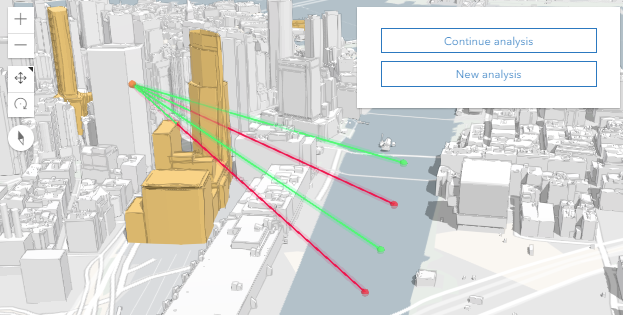
* The results from the analysis are displayed as lines, where the visible part, indicating what the
* observer can see, is colored green. Occluded targets are displayed as a red sphere, and the
* occluded part of the line of sight is also displayed in red. Visible targets are displayed with
* a green sphere, and a fully green line of sight. When the line of sight can't be calculated,
* it will be displayed with a gray color. This happens when either the target or the observer
* are not in the view, or when neither of them are in the view.
*
* 
*
* To use the widget, instantiate it and add it to the view:
* ```js
* const lineOfSight = new LineOfSight({
* view: view
* });
*
* // Add widget to the bottom left corner of the view
* view.ui.add(lineOfSight, {
* position: "bottom-left"
* });
* ```
*
* With the interactive widget you can click once in the scene to set the observer, and
* then click again to set one or multiple targets. Both observer and target points can be moved
* by dragging them. Remove a target with right click.
*
* Using the [LineOfSightViewModel](https://developers.arcgis.com/javascript/latest/references/core/widgets/LineOfSight/LineOfSightViewModel/) you can also set
* the observer and targets programmatically. Read more about it in the
* [LineOfSightViewModel](https://developers.arcgis.com/javascript/latest/references/core/widgets/LineOfSight/LineOfSightViewModel/) documentation or
* explore the code in the [Line of sight sample](https://developers.arcgis.com/javascript/latest/sample-code/widgets-line-of-sight/).
*
* LineOfSight only works with [SceneView](https://developers.arcgis.com/javascript/latest/references/core/views/SceneView/). The results displayed by
* the widget can be saved to a [WebScene](https://developers.arcgis.com/javascript/latest/references/core/WebScene/) by assigning the [analysis](https://developers.arcgis.com/javascript/latest/references/core/widgets/LineOfSight/#analysis)
* to a [LineOfSightLayer](https://developers.arcgis.com/javascript/latest/references/core/layers/LineOfSightLayer/).
*
* @deprecated since version 4.33. Use the [Line Of Sight component](https://developers.arcgis.com/javascript/latest/references/map-components/components/arcgis-line-of-sight/) instead. For information on widget deprecation, read about [Esri's move to web components](https://developers.arcgis.com/javascript/latest/components-transition-plan/).
* @since 4.14
* @see [LineOfSightViewModel](https://developers.arcgis.com/javascript/latest/references/core/widgets/LineOfSight/LineOfSightViewModel/) - _Deprecated since 4.33. Use the [LineOfSightAnalysis](https://developers.arcgis.com/javascript/latest/references/core/analysis/LineOfSightAnalysis/) or [Line Of Sight component](https://developers.arcgis.com/javascript/latest/references/map-components/components/arcgis-line-of-sight/) instead._
* @see [Sample - Line of sight widget](https://developers.arcgis.com/javascript/latest/sample-code/widgets-line-of-sight/)
* @see [Sample - Analysis objects](https://developers.arcgis.com/javascript/latest/sample-code/analysis-objects/)
*/
export default class LineOfSight extends Widget<LineOfSightProperties> {
/**
* @example
* // typical usage
* const lineOfSight = new LineOfSight({
* view: view
* });
*/
constructor(properties?: LineOfSightProperties);
/**
* The line of sight analysis object being created or modified by the widget. This property is an
* alias for [LineOfSightViewModel.analysis](https://developers.arcgis.com/javascript/latest/references/core/widgets/LineOfSight/LineOfSightViewModel/#analysis).
*
* If no analysis is provided, the widget automatically creates its own analysis and adds it to the view. In this
* case, the analysis will also be automatically removed from the view when the widget is destroyed.
*
* @since 4.23
* @see [LineOfSightViewModel.analysis](https://developers.arcgis.com/javascript/latest/references/core/widgets/LineOfSight/LineOfSightViewModel/#analysis)
* @example
* // Construct a line of sight analysis object outside of the widget
* const analysis = new LineOfSightAnalysis({
* observer: {
* type: "point", // autocasts as new Point()
* x: 7.67,
* y: 45.981,
* z: 3435.765
* },
* targets: [{
* location: {
* type: "point",
* x: 7.659,
* y: 45.976,
* z: 4437
* }
* }]
* });
*
* // Ensure that the analysis is added to the view
* view.analyses.add(analysis);
*
* // Frame the analysis in the view
* view.goTo(analysis.extent);
*
* // Pass the analysis object as a constructor parameter to modify it using the widget
* const viewModel = new LineOfSight({
* analysis: analysis,
* view: view
* });
*/
get analysis(): LineOfSightAnalysis;
set analysis(value: LineOfSightAnalysisProperties & { type: "line-of-sight"; });
/**
* Icon which represents the widget. It is typically used when the widget is controlled by another
* one (e.g. in the Expand widget).
*
* @default "line-of-sight"
* @since 4.27
* @see [Calcite Icon Search](https://developers.arcgis.com/calcite-design-system/icons/)
* @see [Calcite Icon Search](https://developers.arcgis.com/calcite-design-system/icons/)
*/
get icon(): Icon["icon"];
set icon(value: Icon["icon"] | null | undefined);
/**
* The widget's default label.
*
* @since 4.14
*/
get label(): string;
set label(value: string | null | undefined);
/** A reference to the [SceneView](https://developers.arcgis.com/javascript/latest/references/core/views/SceneView/). Set this to link the widget to a specific view. */
accessor view: SceneView | null | undefined;
/**
* The view model for this widget. This is a class that contains the
* properties and methods that control this widget's behavior. See the [LineOfSightViewModel](https://developers.arcgis.com/javascript/latest/references/core/widgets/LineOfSight/LineOfSightViewModel/) class to access all
* properties and methods on the widget.
*/
get viewModel(): LineOfSightViewModel;
set viewModel(value: LineOfSightViewModelProperties);
}