@arcgis/core
Version:
ArcGIS Maps SDK for JavaScript: A complete 2D and 3D mapping and data visualization API
322 lines (319 loc) • 13.9 kB
TypeScript
import type Widget from "./Widget.js";
import type HistogramViewModel from "./Histogram/HistogramViewModel.js";
import type { Icon } from "@esri/calcite-components/components/calcite-icon";
import type { HistogramBin, HistogramResult } from "../smartMapping/statistics/types.js";
import type { HistogramLabelFormatFunction } from "./types.js";
import type { BarCreatedFunction, DataLineInfos, DataLineCreatedFunction, HistogramState } from "./Histogram/types.js";
import type { HistogramViewModelProperties } from "./Histogram/HistogramViewModel.js";
import type { WidgetProperties } from "./Widget.js";
export interface HistogramProperties extends WidgetProperties, Partial<Pick<Histogram, "average" | "barCreatedFunction" | "bins" | "dataLineCreatedFunction" | "dataLines" | "labelFormatFunction" | "layout" | "max" | "min">> {
/**
* Icon displayed in the widget's button.
*
* @default "graph-histogram"
* @since 4.27
* @see [Calcite Icon Search](https://developers.arcgis.com/calcite-design-system/icons/)
* @see [Calcite Icon Search](https://developers.arcgis.com/calcite-design-system/icons/)
*/
icon?: Icon["icon"] | null;
/**
* The widget's default label. This label displays when it is
* used within another widget, such as the [Expand](https://developers.arcgis.com/javascript/latest/references/core/widgets/Expand/)
* or [LayerList](https://developers.arcgis.com/javascript/latest/references/core/widgets/LayerList/) widgets.
*
* @since 4.11
*/
label?: string | null;
/**
* The view model for the Histogram widget. This is a class that contains all the logic
* (properties and methods) that controls this widget's behavior. See the
* [HistogramViewModel](https://developers.arcgis.com/javascript/latest/references/core/widgets/Histogram/HistogramViewModel/)
* class to access all properties and methods on the Histogram widget.
*/
viewModel?: HistogramViewModelProperties;
}
export type Layout = "vertical" | "horizontal";
/**
* Renders a histogram to visualize the spread of a dataset based on [bins](https://developers.arcgis.com/javascript/latest/references/core/widgets/Histogram/#bins) representing buckets, or sub-ranges, of
* data. Each [HistogramBin](https://developers.arcgis.com/javascript/latest/references/core/smartMapping/statistics/types/#HistogramBin) is defined by a minimum and maximum value and a total count.
*
* You can generate the underlying histogram's bins with the [histogram](https://developers.arcgis.com/javascript/latest/references/core/smartMapping/statistics/histogram/)
* module. In this scenario, you can use the [fromHistogramResult()](https://developers.arcgis.com/javascript/latest/references/core/widgets/Histogram/#fromHistogramResult) helper method to conveniently
* create the histogram from the result object.
*
* ```js
* const params = {
* layer: povLayer,
* field: "POP_POVERTY",
* normalizationField: "TOTPOP_CY",
* numBins: 30
* };
*
* histogram(params)
* .then(function(histogramResult) {
* const histogram = Histogram.fromHistogramResult(histogramResult);
* histogram.container = "histogram";
* })
* .catch(function(error) {
* console.log("there was an error: ", error);
* });
* ```
*
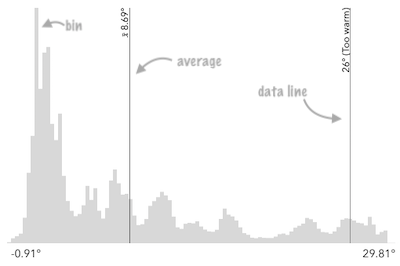
* Other properties of this widget allow to display meaningful values on the histogram, such as the [average](https://developers.arcgis.com/javascript/latest/references/core/widgets/Histogram/#average)
* and the [dataLines](https://developers.arcgis.com/javascript/latest/references/core/widgets/Histogram/#dataLines) properties.
*
* <span id="image-annotations"></span>
* See the image below for a summary of the configurable options available on this slider.
*
* 
*
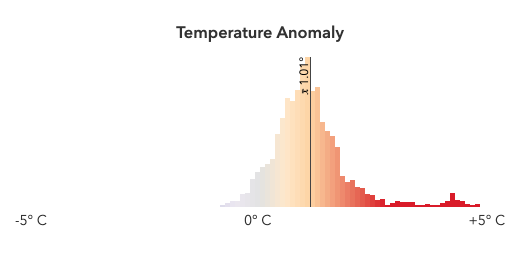
* The [barCreatedFunction](https://developers.arcgis.com/javascript/latest/references/core/widgets/Histogram/#barCreatedFunction) property may be used to style the histogram bins based on the color
* of features in the renderer of a layer associated with the histogram.
*
* 
*
* @deprecated since version 5.0. Use the [Histogram component](https://developers.arcgis.com/javascript/latest/references/common-components/components/arcgis-histogram/) instead. For information on widget deprecation, read about [Esri's move to web components](https://developers.arcgis.com/javascript/latest/components-transition-plan/).
* @since 4.12
* @see [histogram](https://developers.arcgis.com/javascript/latest/references/core/smartMapping/statistics/histogram/)
*/
export default class Histogram extends Widget {
/**
* A convenience function used to create a Histogram widget instance from the result of
* the [histogram](https://developers.arcgis.com/javascript/latest/references/core/smartMapping/statistics/histogram/) statistics
* function.
*
* @param result - The result of the [histogram](https://developers.arcgis.com/javascript/latest/references/core/smartMapping/statistics/histogram/) statistics
* function used to generate a histogram for a field or expression from a layer.
* @returns The histogram instance representing the histogram
* returned from [histogram](https://developers.arcgis.com/javascript/latest/references/core/smartMapping/statistics/histogram/).
* @example
* let colorParams = {
* layer: povLayer,
* basemap: map.basemap,
* field: "POP_POVERTY",
* normalizationField: "TOTPOP_CY",
* theme: "above-and-below"
* };
*
* let stats = null;
*
* colorRendererCreator
* .createContinuousRenderer(colorParams)
* .then(function(response) {
* // set the renderer to the layer and add it to the map
* stats = response.statistics;
*
* return histogram({
* layer: povLayer,
* field: "POP_POVERTY",
* normalizationField: "TOTPOP_CY",
* numBins: 100
* });
* })
* .then(function(histogramResult) {
*
* let histogram = Histogram.fromHistogramResult(histogramResult);
* histogram.container = "histogram";
* histogram.average = stats.avg;
* })
* .catch(function(error) {
* console.log("there was an error: ", error);
* });
*/
static fromHistogramResult(result: HistogramResult): Histogram;
/**
* @example
* // typical usage
* const histogram = new Histogram({
* bins: [{
* minValue: 0,
* maxValue: 20,
* count: 1
* }, {
* minValue: 21,
* maxValue: 40,
* count: 60
* },{
* minValue: 41,
* maxValue: 60,
* count: 239
* },{
* minValue: 61,
* maxValue: 80,
* count: 88
* },{
* minValue: 81,
* maxValue: 100,
* count: 20
* }],
* max: 100,
* min: 0,
* average: 44
* });
*/
constructor(properties?: HistogramProperties);
/**
* The statistical average of the data in the histogram. You would typically
* get this value from the `avg` property of
* [SummaryStatisticsResult](https://developers.arcgis.com/javascript/latest/references/core/smartMapping/statistics/types/#SummaryStatisticsResult),
* which is the result of the
* [summaryStatistics](https://developers.arcgis.com/javascript/latest/references/core/smartMapping/statistics/summaryStatistics/) function.
*
* When set, this value will render on the histogram with a symbol indicating it is the average.
*
* @see [summaryStatistics](https://developers.arcgis.com/javascript/latest/references/core/smartMapping/statistics/summaryStatistics/)
* @example
* // sets result returned from a smart mapping method
* // to the histogram
* histogram.average = response.statistics.avg;
* @example histogram.average = 34.5;
*/
accessor average: number | null | undefined;
/**
* Function for styling bars representing histogram bins.
* This can be used to color bins with the same color of features in the
* view that fall into bins representing the same range of data.
*
* @example
* histogram.barCreatedFunction = function(index, element){
* let bin = histogram.bins[index];
* let midValue = ((bin.maxValue - bin.minValue) / 2) + bin.minValue;
* // colors the histogram bins with a custom function
* // (not defined here for brevity of the snippet) for interpolating
* // colors from data values to match the legend
* let color = getColorFromValue(midValue);
* element.setAttribute("fill", color.toHex());
* };
*/
accessor barCreatedFunction: BarCreatedFunction | null | undefined;
/**
* An array of objects representing each bin in the histogram. This
* information is typically returned from the
* [histogram](https://developers.arcgis.com/javascript/latest/references/core/smartMapping/statistics/histogram/) function.
*
* @example
* // sets the bins of the histogram from the bins in the histogram() result
* histogram.bins = histogramResult.bins;
* @example
* // Creates a histogram with 7 bins.
* histogram.bins = [
* { minValue: 0, maxValue: 10, count: 4 },
* { minValue: 10.1, maxValue: 20, count: 14 },
* { minValue: 20.1, maxValue: 30, count: 9 },
* { minValue: 30.1, maxValue: 40, count: 34 },
* { minValue: 40.1, maxValue: 50, count: 351 },
* { minValue: 50.1, maxValue: 60, count: 100 },
* { minValue: 60.1, maxValue: 70, count: 1 }
* ];
*/
accessor bins: HistogramBin[] | null | undefined;
/**
* Function that fires each time a data line is created.
* You can use this to style individual [dataLines](https://developers.arcgis.com/javascript/latest/references/core/widgets/Histogram/#dataLines) on the data axis.
*
* @example
* histogram.dataLineCreatedFunction = function (lineElement, labelElement, index) {
* lineElement.setAttribute("y2", "25%");
* lineElement.classList.add("line-style");
* };
*/
accessor dataLineCreatedFunction: DataLineCreatedFunction | null | undefined;
/**
* When set, renders lines on the histogram that indicate important or
* meaningful values to the end user.
*
* @example
* // will render lines at the 25th, 50th, 75th, and 99th percentiles
* histogram.dataLines = [{
* value: 30,
* label: "25 pctl"
* }, {
* value: 45,
* label: "50 pctl"
* }, {
* value: 65,
* label: "75 pctl"
* }, {
* value: 89,
* label: "99 pctl"
* }];
* @example
* // calculate standard deviations from mean using stats
* // returned from smart mapping statistic methods
* const stddevs = smartMappingUtils.getDeviationValues(stats.stddev, stats.avg, 2);
* histogram.dataLines = stddevs.map(function(stddev){
* return {
* value: stddev
* };
* });
*/
accessor dataLines: DataLineInfos[] | null | undefined;
/**
* Icon displayed in the widget's button.
*
* @default "graph-histogram"
* @since 4.27
* @see [Calcite Icon Search](https://developers.arcgis.com/calcite-design-system/icons/)
* @see [Calcite Icon Search](https://developers.arcgis.com/calcite-design-system/icons/)
*/
get icon(): Icon["icon"];
set icon(value: Icon["icon"] | null | undefined);
/**
* The widget's default label. This label displays when it is
* used within another widget, such as the [Expand](https://developers.arcgis.com/javascript/latest/references/core/widgets/Expand/)
* or [LayerList](https://developers.arcgis.com/javascript/latest/references/core/widgets/LayerList/) widgets.
*
* @since 4.11
*/
get label(): string;
set label(value: string | null | undefined);
/**
* A function used to format labels on the histogram. Overrides the default label formatter.
*
* @example
* // For thumb values, rounds each label to whole numbers.
* slider.labelFormatFunction = function(value) {
* return value.toFixed(0);
* }
*/
accessor labelFormatFunction: HistogramLabelFormatFunction | null | undefined;
/**
* Determines the orientation of the Histogram widget.
*
* @default "horizontal"
* @example histogram.layout = "vertical";
*/
accessor layout: Layout;
/**
* The maximum value or bound of the entire histogram. This
* should match the maximum bound of the last [bin](https://developers.arcgis.com/javascript/latest/references/core/widgets/Histogram/#bins).
*
* @example histogram.max = 100;
* @example
* // sets result returned from a smart mapping method
* // to the histogram
* histogram.max = response.statistics.max;
*/
accessor max: number | null | undefined;
/**
* The minimum value or bound of the entire histogram. This
* should match the minimum bound of the first [bin](https://developers.arcgis.com/javascript/latest/references/core/widgets/Histogram/#bins).
*
* @example histogram.min = 0;
* @example
* // sets result returned from a smart mapping method
* // to the histogram
* histogram.min = response.statistics.min;
*/
accessor min: number | null | undefined;
/** The state of the widget. */
get state(): HistogramState;
/**
* The view model for the Histogram widget. This is a class that contains all the logic
* (properties and methods) that controls this widget's behavior. See the
* [HistogramViewModel](https://developers.arcgis.com/javascript/latest/references/core/widgets/Histogram/HistogramViewModel/)
* class to access all properties and methods on the Histogram widget.
*/
get viewModel(): HistogramViewModel;
set viewModel(value: HistogramViewModelProperties);
}