@arcgis/core
Version:
ArcGIS Maps SDK for JavaScript: A complete 2D and 3D mapping and data visualization API
499 lines (495 loc) • 31.3 kB
TypeScript
import type Graphic from "../Graphic.js";
import type EsriMap from "../Map.js";
import type Collection from "../core/Collection.js";
import type SpatialReference from "../geometry/SpatialReference.js";
import type ActionBase from "../support/actions/ActionBase.js";
import type Feature from "./Feature.js";
import type Widget from "./Widget.js";
import type FeaturesViewModel from "./Features/FeaturesViewModel.js";
import type FeaturesVisibleElements from "./Features/FeaturesVisibleElements.js";
import type { ScreenPoint } from "../core/types.js";
import type { SpatialReferenceProperties } from "../geometry/SpatialReference.js";
import type { TimeZone } from "../time/types.js";
import type { MapViewOrSceneView } from "../views/MapViewOrSceneView.js";
import type { FetchPopupFeaturesResult } from "../views/types.js";
import type { WidgetProperties } from "./Widget.js";
import type { FeaturesViewModelEvents, FeaturesViewModelProperties } from "./Features/FeaturesViewModel.js";
import type { PopupOpenOptions, FetchFeaturesOptions, InitialDisplayOptions } from "./Popup/types.js";
import type { HeadingLevel, GoToOverride } from "./support/types.js";
import type { ActionBaseProperties } from "../support/actions/ActionBase.js";
import type { ReadonlyArrayOrCollection } from "../core/Collection.js";
import type { FeaturesVisibleElementsProperties } from "./Features/FeaturesVisibleElements.js";
export interface FeaturesProperties extends WidgetProperties, Partial<Pick<Features, "collapsed" | "content" | "featureNavigationTop" | "features" | "goToOverride" | "headingLevel" | "initialDisplayMode" | "map" | "promises" | "selectedFeatureIndex" | "timeZone" | "title" | "view">> {
/**
* The actions that are displayed in the header of the widget.
*
* @since 4.32
*/
headerActions?: ReadonlyArrayOrCollection<ActionBaseProperties>;
/**
* The widget's default label.
*
* @since 4.11
*/
label?: string | null;
/**
* The spatial reference used for [Arcade](https://developers.arcgis.com/arcade) operations.
* This property should be set if the Features widget executes Arcade expressions that contain [geometry functions](https://developers.arcgis.com/arcade/function-reference/geometry_functions/).
*
* Alternatively, the [view](https://developers.arcgis.com/javascript/latest/references/core/widgets/Features/#view) property can be used to provide the spatial reference instance for this property.
*
* @since 4.30
* @see [Type system](https://developers.arcgis.com/arcade/guide/types/#featuresetcollection)
* @see [Arcade Profiles: Popup](https://developers.arcgis.com/arcade/profiles/popup/)
*/
spatialReference?: SpatialReferenceProperties | null;
/**
* This is a class that contains all the logic
* (properties and methods) that controls this widget's behavior. See the
* [FeaturesViewModel](https://developers.arcgis.com/javascript/latest/references/core/widgets/Features/FeaturesViewModel/) class to access
* all properties and methods on the widget.
*/
viewModel?: FeaturesViewModelProperties;
/**
* Indicates whether the widget is visible.
*
* @example
* // Hides the widget in the view
* widget.visible = false;
*/
visible?: boolean;
/**
* The visible elements that are displayed within the widget.
* This provides the ability to turn individual elements of the widget's display on/off.
*/
visibleElements?: FeaturesVisibleElementsProperties;
}
export type FeaturesOpenOptions = Partial<Pick<PopupOpenOptions, "actions" | "collapsed" | "content" | "features" | "fetchFeatures" | "featureMenuOpen" | "featureMenuTitle" | "location" | "promises" | "title" | "updateLocationEnabled">>;
export interface FeaturesEvents extends FeaturesViewModelEvents {}
/**
* The Features widget allows users to view a feature's popupTemplate content such as attributes,
* actions, related records, etc., without having to be tied to the [View](https://developers.arcgis.com/javascript/latest/references/core/views/View/).
* This widget looks and behaves similarly to the [Popup](https://developers.arcgis.com/javascript/latest/references/core/widgets/Popup/) widget,
* however unlike Popup, the Features widget can be placed outside of the view.
* For example, when features are selected in the [View](https://developers.arcgis.com/javascript/latest/references/core/views/View/),
* the [Popup](https://developers.arcgis.com/javascript/latest/references/core/widgets/Popup/) widget opens within the View whether it is docked
* or anchored to the selected feature.
* With the Features widget, the same information that popup provides is shown in a separate container from the view, such as
* a HTML div within a Calcite Design System
* [Shell Panel](https://developers.arcgis.com/calcite-design-system/components/shell-panel/).
*
* [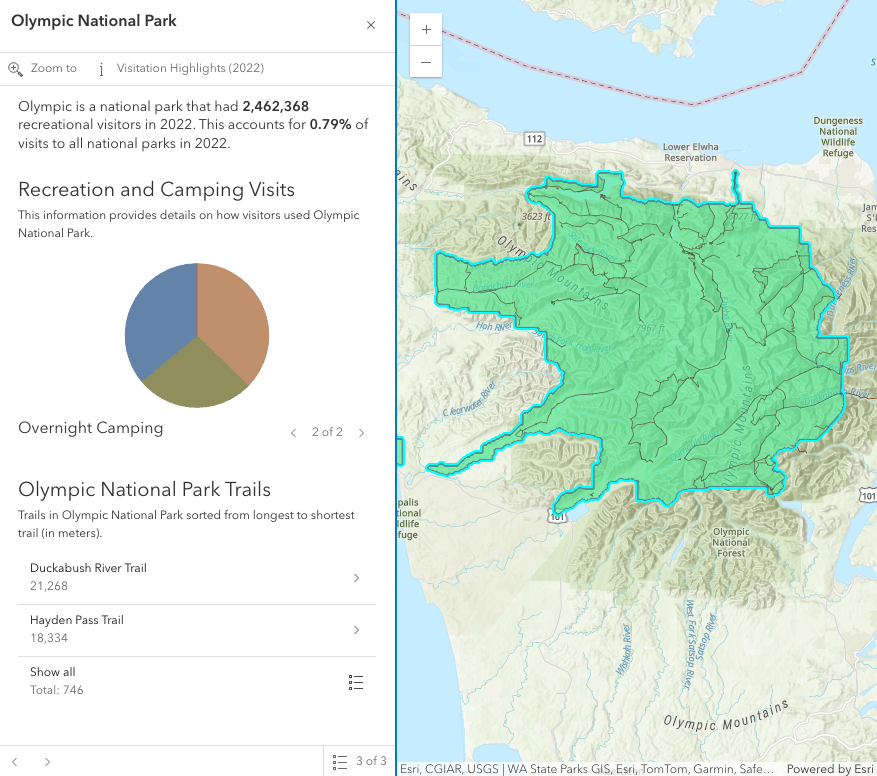](https://developers.arcgis.com/javascript/latest/sample-code/sandbox/?sample=widgets-features)
*
* In the image above, a Calcite shell panel displays the Features widget along with a MapView in a separate div.
* A generic `title` and `content` property can be set directly on the Features widget or
* each individual layer's [PopupTemplate](https://developers.arcgis.com/javascript/latest/references/core/PopupTemplate/) can be displayed (e.g.
* the Olympic National Park feature's PopupTemplate that contains text, media, and relationship elements).
* The action bar, shown below the title in the image above, displays [actions](https://developers.arcgis.com/javascript/latest/references/core/support/actions/ActionButton/) that can be defined either on the widget level within the [open()](https://developers.arcgis.com/javascript/latest/references/core/widgets/Features/#open) method,
* with the [FeaturesViewModel.actions](https://developers.arcgis.com/javascript/latest/references/core/widgets/Features/FeaturesViewModel/#actions) property, or in the [PopupTemplate](https://developers.arcgis.com/javascript/latest/references/core/PopupTemplate/) of the layer.
* If multiple features are passed into the Features widget, the widget provides buttons to page though the features and a feature menu that allows the
* list of features to be displayed so the user can choose which feature content to display in the widget. The widget also respects
* feature reduction PopupTemplates for [binning](https://developers.arcgis.com/javascript/latest/references/core/layers/support/FeatureReductionBinning/#popupTemplate) and [clustering](https://developers.arcgis.com/javascript/latest/references/core/layers/support/FeatureReductionCluster/#popupTemplate).
*
* The Features widget should be used if needing to use the Popup functionality outside of the View. If wanting to show a single feature's content without
* actions, related records, clustering configuration, etc., then use the [Feature](https://developers.arcgis.com/javascript/latest/references/core/widgets/Feature/) widget.
*
* @deprecated since version 4.34. Use the [Features component](https://developers.arcgis.com/javascript/latest/references/map-components/components/arcgis-features/) instead. For information on widget deprecation, read about [Esri's move to web components](https://developers.arcgis.com/javascript/latest/components-transition-plan/).
* @since 4.27
* @see [PopupTemplate](https://developers.arcgis.com/javascript/latest/references/core/PopupTemplate/)
* @see [Guide - Esri Icon Font](https://developers.arcgis.com/javascript/latest/esri-icon-font/)
* @see [FeaturesViewModel](https://developers.arcgis.com/javascript/latest/references/core/widgets/Features/FeaturesViewModel/)
* @example
* // Create a new instance of Features and set this on the View's
* // popup. When features are selected in the map, the Features widget
* // will automatically open in its respective container.
* const view = new MapView({
* container: "viewDiv",
* map: map,
* popup: new Features({
* container: "features-widget"
* })
* });
* @example
* // Create a new instance of Features and set the view property
* // to the View along with the container that holds the widget
* // such as a Calcite Shell Panel.
* const featuresWidget = new Features({
* view: view,
* container: "features-widget"
* });
*
* // Use reactiveUtils to watch for when the view has a click event
* // then open the Features widget in its respective container.
* reactiveUtils.on(()=> view, "click",
* (event)=>{
* featuresWidget.open({
* location: event.mapPoint,
* fetchFeatures: true
* })
* });
*/
export default class Features extends Widget {
/**
* @deprecated
* Do not directly reference this property.
* Use EventNames and EventTypes helpers from \@arcgis/core/Evented
*/
"@eventTypes": FeaturesEvents;
constructor(properties?: FeaturesProperties);
/**
* Indicates if the widget is active when it is visible and is not [waiting for results](https://developers.arcgis.com/javascript/latest/references/core/widgets/Features/FeaturesViewModel/#waitingForResult).
*
* @default false
* @since 4.30
*/
get active(): boolean;
/**
* Indicates whether the popup displays its content. If `true`, only the header displays.
*
* @default false
*/
accessor collapsed: boolean;
/**
* The content of the Features widget. When set directly on the Popup, this content is
* static and cannot use fields to set content templates. To set a template
* for the content based on field or attribute names, see
* [PopupTemplate.content](https://developers.arcgis.com/javascript/latest/references/core/PopupTemplate/#content).
*
* @example
* // This sets generic instructions in the widget that will always be displayed
* // unless it is overridden by a PopupTemplate
* featuresWidget.content = "Click a feature on the map to view its attributes";
*/
accessor content: FeaturesViewModel["content"];
/**
* Indicates whether the feature navigation arrows are displayed at the top of the widget.
* By default, the navigation arrows are displayed at the bottom of the widget.
*
* @default false
* @since 4.32
*/
accessor featureNavigationTop: boolean;
/**
* An array of features associated with the Features widget. Each graphic in this array must
* have a valid [PopupTemplate](https://developers.arcgis.com/javascript/latest/references/core/PopupTemplate/) set. They may share the same
* [PopupTemplate](https://developers.arcgis.com/javascript/latest/references/core/PopupTemplate/) or have unique
* [PopupTemplates](https://developers.arcgis.com/javascript/latest/references/core/PopupTemplate/) depending on their attributes.
* The [content](https://developers.arcgis.com/javascript/latest/references/core/widgets/Features/#content) and [title](https://developers.arcgis.com/javascript/latest/references/core/widgets/Features/#title)
* of the widget is set based on the `content` and `title` properties of each graphic's respective
* [PopupTemplate](https://developers.arcgis.com/javascript/latest/references/core/PopupTemplate/).
*
* When more than one graphic exists in this array, the current content of the
* Features widget is set based on the value of the [selected feature](https://developers.arcgis.com/javascript/latest/references/core/widgets/Features/#selectedFeature).
*
* This value is `null` if no features are associated with the widget.
*
* @example
* // When setting the features property, the graphics pushed to this property
* // must have a PopupTemplate set.
* let g1 = new Graphic();
* g1.popupTemplate = new PopupTemplate({
* title: "Results title",
* content: "Results: {ATTRIBUTE_NAME}"
* });
* // Set the graphics as an array to the Features widget instance. The content and title of
* // the widget will be set depending on the PopupTemplate of the graphics.
* // Each graphic may share the same PopupTemplate or have a unique PopupTemplate
* let graphics = [g1, g2, g3, g4, g5];
* const featuresWidget = new Features({
* container: "features-widget",
* features: graphics
* visible: true
* });
*/
accessor features: Graphic[];
/**
* This function provides the ability to override either the
* [MapView goTo()](https://developers.arcgis.com/javascript/latest/references/core/views/MapView/#goTo) or
* [SceneView goTo()](https://developers.arcgis.com/javascript/latest/references/core/views/SceneView/#goTo) methods.
*
* @since 4.8
* @see [MapView.goTo()](https://developers.arcgis.com/javascript/latest/references/core/views/MapView/#goTo)
* @see [SceneView.goTo()](https://developers.arcgis.com/javascript/latest/references/core/views/SceneView/#goTo)
* @example
* // The following snippet uses Search but can be applied to any
* // widgets that support the goToOverride property.
* search.goToOverride = function(view, goToParams) {
* goToParams.options = {
* duration: updatedDuration
* };
* return view.goTo(goToParams.target, goToParams.options);
* };
*/
accessor goToOverride: GoToOverride | null | undefined;
/**
* The actions that are displayed in the header of the widget.
*
* @since 4.32
*/
get headerActions(): Collection<ActionBase>;
set headerActions(value: ReadonlyArrayOrCollection<ActionBaseProperties>);
/**
* Indicates the heading level to use for the [title](https://developers.arcgis.com/javascript/latest/references/core/widgets/Features/#title) of the widget.
* By default, the title is rendered
* as a level 2 heading (e.g. `<h2>Popup title</h2>`). Depending on the widget's placement
* in your app, you may need to adjust this heading for proper semantics. This is
* important for meeting accessibility standards.
*
* @default 2
*/
accessor headingLevel: HeadingLevel;
/**
* Indicates whether to initially display a list of features, or the content for one feature.
*
* @default "feature"
* @since 4.32
*/
accessor initialDisplayMode: InitialDisplayOptions;
/**
* The widget's default label.
*
* @since 4.11
*/
get label(): string;
set label(value: string | null | undefined);
/**
* A map is required when the input [features](https://developers.arcgis.com/javascript/latest/references/core/widgets/Features/#features) have a popupTemplate that contains [Arcade](https://developers.arcgis.com/arcade) expressions in [ExpressionInfo](https://developers.arcgis.com/javascript/latest/references/core/popup/ExpressionInfo/) or [ExpressionContent](https://developers.arcgis.com/javascript/latest/references/core/popup/content/ExpressionContent/) that may use the `$map` profile variable to access data from layers within a map. Without a map, expressions that use `$map` will throw an error.
*
* Alternatively, the [view](https://developers.arcgis.com/javascript/latest/references/core/widgets/Features/#view) property can be used to provide the map instance for this property.
*
* @since 4.30
* @see [Type system](https://developers.arcgis.com/arcade/guide/types/#featuresetcollection)
* @see [Arcade Profiles: Popup](https://developers.arcgis.com/arcade/profiles/popup/)
* @example
* // The building footprints represent the buildings that intersect a clicked parcel
* let buildingFootprints = Intersects($feature, FeatureSetByName($map, "Building Footprints"));
*/
accessor map: EsriMap | null | undefined;
/**
* An array of pending Promises that have not yet been fulfilled. If there are
* no pending promises, the value is `null`. When the pending promises are
* resolved they are removed from this array and the features they return
* are pushed into the [features](https://developers.arcgis.com/javascript/latest/references/core/widgets/Features/#features) array.
*/
accessor promises: Promise<Graphic[]>[];
/**
* The feature that the widget has drilled into.
* This feature is either associated with the selected feature in a [relationship element](https://developers.arcgis.com/javascript/latest/references/core/popup/content/RelationshipContent/) or [utility network association element](https://developers.arcgis.com/javascript/latest/references/core/popup/content/UtilityNetworkAssociationsContent/).
*
* @since 4.32
*/
get selectedDrillInFeature(): Graphic | null | undefined;
/**
* The selected feature accessed by the Features widget. The content displayed in the widget is
* determined based on the [PopupTemplate](https://developers.arcgis.com/javascript/latest/references/core/PopupTemplate/) assigned to this feature.
*/
get selectedFeature(): Graphic | null;
/**
* Index of the feature that is [selected](https://developers.arcgis.com/javascript/latest/references/core/widgets/Features/#selectedFeature). When [features](https://developers.arcgis.com/javascript/latest/references/core/widgets/Features/#features) are set,
* the first index is automatically selected.
*/
accessor selectedFeatureIndex: number;
/**
* Returns a reference to the current [Feature](https://developers.arcgis.com/javascript/latest/references/core/widgets/Feature/).
* This is useful if needing to get a reference to the Feature widget in order to make any changes to it.
*/
get selectedFeatureWidget(): Feature | null;
/**
* The spatial reference used for [Arcade](https://developers.arcgis.com/arcade) operations.
* This property should be set if the Features widget executes Arcade expressions that contain [geometry functions](https://developers.arcgis.com/arcade/function-reference/geometry_functions/).
*
* Alternatively, the [view](https://developers.arcgis.com/javascript/latest/references/core/widgets/Features/#view) property can be used to provide the spatial reference instance for this property.
*
* @since 4.30
* @see [Type system](https://developers.arcgis.com/arcade/guide/types/#featuresetcollection)
* @see [Arcade Profiles: Popup](https://developers.arcgis.com/arcade/profiles/popup/)
*/
get spatialReference(): SpatialReference | null | undefined;
set spatialReference(value: SpatialReferenceProperties | null | undefined);
/**
* Dates and times displayed in the widget will be displayed in this time zone. By default this time zone is
* inherited from [MapView.timeZone](https://developers.arcgis.com/javascript/latest/references/core/views/MapView/#timeZone) if the [view](https://developers.arcgis.com/javascript/latest/references/core/widgets/Features/#view) property is set. When a MapView is not associated with the widget
* then the property will fallback to the `system` time zone.
*
* **Possible Values**
*
* Value | Description |
* ----- | ----------- |
* system | Dates and times will be displayed in the timezone of the device or browser.
* unknown | Dates and time are not adjusted for any timezone.
* Specified IANA timezone | Dates and times will be displayed in the specified IANA time zone. See [wikipedia - List of tz database time zones](https://en.wikipedia.org/wiki/List_of_tz_database_time_zones).
*
* @since 4.30
*/
accessor timeZone: TimeZone;
/**
* The title of the Features widget. This can be set to any string value no
* matter the features that are selected. If the [selected feature](https://developers.arcgis.com/javascript/latest/references/core/widgets/Features/#selectedFeature)
* has a [PopupTemplate](https://developers.arcgis.com/javascript/latest/references/core/PopupTemplate/), then the title set in the
* corresponding template is used here.
*
* @see [headingLevel](https://developers.arcgis.com/javascript/latest/references/core/widgets/Features/#headingLevel)
* @example
* // This title will display in the widget unless a selected feature's
* // PopupTemplate overrides it.
* featuresWidget.title = "Population by zip codes in Southern California";
*/
accessor title: string | null | undefined;
/**
* A reference to the [MapView](https://developers.arcgis.com/javascript/latest/references/core/views/MapView/) or [SceneView](https://developers.arcgis.com/javascript/latest/references/core/views/SceneView/). Set this to link the widget to a specific view.
*
* > [!WARNING]
* >
* > The Features widget requires a view if:
* > - The [features](https://developers.arcgis.com/javascript/latest/references/core/widgets/Features/#features) have a popupTemplate containing Arcade expressions in [ExpressionInfo](https://developers.arcgis.com/javascript/latest/references/core/popup/ExpressionInfo/) or [ExpressionContent](https://developers.arcgis.com/javascript/latest/references/core/popup/content/ExpressionContent/) that may use [geometry functions](https://developers.arcgis.com/arcade/function-reference/geometry_functions/) or reference the `$map` profile variable (i.e. access data from layers within a map). Alternatively, set the [map](https://developers.arcgis.com/javascript/latest/references/core/widgets/Features/#map) property.
* > - Content is displayed from the popup template of an [aggregate feature](https://developers.arcgis.com/javascript/latest/references/core/Graphic/#isAggregate) (i.e. a [cluster](https://developers.arcgis.com/javascript/latest/references/core/layers/support/FeatureReductionCluster/) or [bin](https://developers.arcgis.com/javascript/latest/references/core/layers/support/FeatureReductionBinning/)).
* > - Values from `date` and `timestamp-offset` [fields](https://developers.arcgis.com/javascript/latest/references/core/layers/support/Field/#type) should respect the view's [time zone](https://developers.arcgis.com/javascript/latest/references/core/views/MapView/#timeZone). Alternatively, set the [timeZone](https://developers.arcgis.com/javascript/latest/references/core/widgets/Features/#timeZone) property.
* > - Using the [fetchFeatures()](https://developers.arcgis.com/javascript/latest/references/core/widgets/Features/#fetchFeatures) method or the `fetchFeatures` option in the [open()](https://developers.arcgis.com/javascript/latest/references/core/widgets/Features/#open) method.
* > - Using the `Zoom to` default action. If the `view` is not specified, set the [FeaturesViewModel.includeDefaultActions](https://developers.arcgis.com/javascript/latest/references/core/widgets/Features/FeaturesViewModel/#includeDefaultActions) property to `false` to remove this default action.
*/
accessor view: MapViewOrSceneView | null | undefined;
/**
* This is a class that contains all the logic
* (properties and methods) that controls this widget's behavior. See the
* [FeaturesViewModel](https://developers.arcgis.com/javascript/latest/references/core/widgets/Features/FeaturesViewModel/) class to access
* all properties and methods on the widget.
*/
get viewModel(): FeaturesViewModel;
set viewModel(value: FeaturesViewModelProperties);
/**
* Indicates whether the widget is visible.
*
* @example
* // Hides the widget in the view
* widget.visible = false;
*/
accessor visible: boolean;
/**
* The visible elements that are displayed within the widget.
* This provides the ability to turn individual elements of the widget's display on/off.
*/
get visibleElements(): FeaturesVisibleElements;
set visibleElements(value: FeaturesVisibleElementsProperties);
/** Use this method to remove focus from the Widget. */
blur(): void;
/**
* Removes [promises](https://developers.arcgis.com/javascript/latest/references/core/widgets/Features/#promises), [features](https://developers.arcgis.com/javascript/latest/references/core/widgets/Features/#features), [content](https://developers.arcgis.com/javascript/latest/references/core/widgets/Features/#content), and
* [title](https://developers.arcgis.com/javascript/latest/references/core/widgets/Features/#title) from the Features widget.
*/
clear(): void;
/**
* This is a convenience method to closes the widget. Users can alternatively close the widget
* by directly setting the [visible](https://developers.arcgis.com/javascript/latest/references/core/widgets/Features/#visible) property to `false`.
*
* @see [visible](https://developers.arcgis.com/javascript/latest/references/core/widgets/Features/#visible)
*/
close(): void;
/**
* Use this method to return feature(s) at a given screen location.
* These features are fetched from all of the [layer views](https://developers.arcgis.com/javascript/latest/references/core/views/layers/LayerView/)
* in the [View](https://developers.arcgis.com/javascript/latest/references/core/views/View/). In order to use this, a layer must already have an
* associated [PopupTemplate](https://developers.arcgis.com/javascript/latest/references/core/PopupTemplate/). This method allows a developer to
* control how the input location is handled.
*
* @param screenPoint - An object representing a point on the screen. This point can be in either the
* [ScreenPoint](https://developers.arcgis.com/javascript/latest/references/core/core/types/#ScreenPoint) or
* [ScreenPoint](https://developers.arcgis.com/javascript/latest/references/core/core/types/#ScreenPoint).
* @param options - The [options](https://developers.arcgis.com/javascript/latest/references/core/widgets/Popup/types/#FetchFeaturesOptions)
* to pass into the `fetchFeatures` method.
* @returns Resolves with the selected `hitTest`
* location. In addition, it also returns an array of [graphics](https://developers.arcgis.com/javascript/latest/references/core/Graphic/) if the `hitTest` is
* performed directly on the [View](https://developers.arcgis.com/javascript/latest/references/core/views/View/), a single Promise containing an array of all resulting
* [graphics](https://developers.arcgis.com/javascript/latest/references/core/Graphic/), or an array of objects containing this array of resulting [graphics](https://developers.arcgis.com/javascript/latest/references/core/Graphic/) in addition to its associated
* [LayerView](https://developers.arcgis.com/javascript/latest/references/core/views/layers/LayerView/).
*
* Most commonly if accessing all features, use the single promise returned in the
* [result's allGraphicsPromise](https://developers.arcgis.com/javascript/latest/references/core/widgets/Popup/types/#FetchFeaturesOptions) and call `.then()`
* as seen in the example snippet.
* @example
* // Use reactiveUtils to watch the view's click event.
* reactiveUtils.on(() => view, "click",
* (event) => {
* // Call fetchFeatures and pass in the click event screenPoint
* featuresWidget.fetchFeatures(event.screenPoint).then((response) => {
* // Access the response from fetchFeatures
* response.allGraphicsPromise.then((graphics) => {
* // If there are no graphics in the click event, then make sure
* // the Features widget is not showing.
* if(graphics.length === 0){
* featuresWidget.visible = false;
* }
* // If graphics do exist, set the Features widget features property to the returned
* // graphics from fetchFeatures and set the visible property to true.
* else{
* featuresWidget.features = graphics;
* featuresWidget.visible = true;
* }
* });
* });
*/
fetchFeatures(screenPoint: ScreenPoint, options?: FetchFeaturesOptions): Promise<FetchPopupFeaturesResult>;
/** Use this method to give focus to the Widget if the widget is able to be focused. */
focus(): void;
/**
* Selects the feature at the next index in relation to the selected feature.
*
* @returns Returns an instance of the popup's view model.
* @see [selectedFeatureIndex](https://developers.arcgis.com/javascript/latest/references/core/widgets/Features/#selectedFeatureIndex)
*/
next(): FeaturesViewModel;
/**
* Opens the Features widget in its [container](https://developers.arcgis.com/javascript/latest/references/core/widgets/Features/#container) with content defined either explicitly with `content`
* or driven from the [PopupTemplate](https://developers.arcgis.com/javascript/latest/references/core/PopupTemplate/) of input features. This method sets
* the Feature widget's [visible](https://developers.arcgis.com/javascript/latest/references/core/widgets/Features/#visible) property to `true`. Users can alternatively show the Features widget
* by directly setting the [visible](https://developers.arcgis.com/javascript/latest/references/core/widgets/Features/#visible) property to `true`.
*
* @param options - Defines the content of the Feature's widget when opened.
* @see [visible](https://developers.arcgis.com/javascript/latest/references/core/widgets/Features/#visible)
* @example
* // Use reactiveUtils to watch the view's click event.
* reactiveUtils.on(() => view, "click",
* (event) => {
* featuresWidget.open({
* // Title and content displayed in the widget
* title: `Click location: (${event.mapPoint.x},${event.mapPoint.y})`,
* content: "This is the default content displayed on click."
* });
* });
* @example
* // The Features widget must have a view set on the widget along with the
* // location property to fetch features.
* // Use reactiveUtils to watch the view's click event.
* reactiveUtils.on(() => view, "click",
* (event) => {
* featuresWidget.open({
* location: event.mapPoint,
* // Display the content for the selected feature(s) if a popupTemplate is defined.
* fetchFeatures: true
* });
* });
* @example
* // Open the Features widget with a specified array of graphics that already
* // have a PopupTemplate set and display the feature menu when it opens.
* featuresWidget.open({
* // array of graphics
* features: graphics,
* // selected features initially display in a list
* featureMenuOpen: true
* });
*/
open(options?: FeaturesOpenOptions): void;
/**
* Selects the feature at the previous index in relation to the selected feature.
*
* @returns Returns an instance of the Features widget view model.
* @see [selectedFeatureIndex](https://developers.arcgis.com/javascript/latest/references/core/widgets/Features/#selectedFeatureIndex)
*/
previous(): FeaturesViewModel;
/**
* Triggers the [@trigger-action](https://developers.arcgis.com/javascript/latest/references/core/widgets/Features/#event-trigger-action) event and executes the [action](https://developers.arcgis.com/javascript/latest/references/core/widgets/Features/FeaturesViewModel/#actions)
* at the specified index in the [FeaturesViewModel.actions](https://developers.arcgis.com/javascript/latest/references/core/widgets/Features/FeaturesViewModel/#actions) array.
*
* @param actionIndex - The index of the [action](https://developers.arcgis.com/javascript/latest/references/core/widgets/Features/FeaturesViewModel/#actions) to execute.
*/
triggerAction(actionIndex: number): void;
}