@arcgis/core
Version:
ArcGIS Maps SDK for JavaScript: A complete 2D and 3D mapping and data visualization API
212 lines (207 loc) • 10.5 kB
TypeScript
import type SharedTemplateMetadata from "../../editing/sharedTemplates/SharedTemplateMetadata.js";
import type SubtypeGroupLayer from "../../layers/SubtypeGroupLayer.js";
import type FeatureTemplate from "../../layers/support/FeatureTemplate.js";
import type TemplateItem from "./TemplateItem.js";
import type TemplateItemGroup from "./TemplateItemGroup.js";
import type { EventedAccessor } from "../../core/Evented.js";
import type { LayerWithFeatureTemplatesUnion } from "../../layers/types.js";
import type { Filter, GroupByType } from "./types.js";
export interface FeatureTemplatesViewModelProperties extends Partial<Pick<FeatureTemplatesViewModel, "disabled" | "filterFunction" | "groupBy" | "layers">> {}
export type FeatureTemplatesViewModelState = "disabled" | "loading" | "ready";
export interface SelectEvent {
/** The selected template item. */
item?: TemplateItem | null;
/** The feature template associated with the template item. */
template?: FeatureTemplate | SharedTemplateMetadata | null;
}
export interface FeatureTemplatesViewModelEvents {
/**
* Fires when a [template item](https://developers.arcgis.com/javascript/latest/references/core/widgets/FeatureTemplates/TemplateItem/) is selected.
* This occurs when the [select()](https://developers.arcgis.com/javascript/latest/references/core/widgets/FeatureTemplates/FeatureTemplatesViewModel/#select) method
* is called.
*
* @see [Sample - Update FeatureLayer using ApplyEdits](https://developers.arcgis.com/javascript/latest/sample-code/editing-applyedits/)
* @example
* // Listen for when a template item is selected
* templates.on("select", function(evtTemplate) {
* // Access the selected template item's attributes
* attributes = evtTemplate.template.prototype.attributes;
*
* // Create a new feature with the selected template at cursor location
* const handler = view.on("click", function(event) {
* handler.remove(); // remove click event handler.
* event.stopPropagation(); // Stop click event propagation
*
* if (event.mapPoint) {
* // Create a new feature with the selected template item.
* editFeature = new Graphic({
* geometry: event.mapPoint,
* attributes: {
* "IncidentType": attributes.IncidentType
* }
* });
*
* // Setup the applyEdits parameter with adds.
* const edits = {
* addFeatures: [editFeature]
* };
* featureLayer.applyEdits(params).then(function(editsResult) {
* if (editsResult.addFeatureResults.length > 0) {
* console.log("Created a new feature.")
* }
* });
* }
* });
* });
*/
select: SelectEvent;
}
/**
* Provides the logic for the [FeatureTemplates](https://developers.arcgis.com/javascript/latest/references/core/widgets/FeatureTemplates/) widget.
*
* @since 4.10
* @see [FeatureTemplates](https://developers.arcgis.com/javascript/latest/references/core/widgets/FeatureTemplates/)
* @see [TemplateItem](https://developers.arcgis.com/javascript/latest/references/core/widgets/FeatureTemplates/TemplateItem/)
* @see [TemplateItemGroup](https://developers.arcgis.com/javascript/latest/references/core/widgets/FeatureTemplates/TemplateItemGroup/)
* @see [Sample - Update FeatureLayer using ApplyEdits](https://developers.arcgis.com/javascript/latest/sample-code/editing-applyedits/)
* @see [Programming patterns: Widget viewModel pattern](https://developers.arcgis.com/javascript/latest/programming-patterns/#widget-viewmodel-pattern)
* @example
* const templatesVM = new FeatureTemplatesViewModel({
* layers: layers
* });
*
* const featureTemplates = new FeatureTemplates({
* viewModel: templatesVM
* container: "templatesDiv"
* });
*/
export default class FeatureTemplatesViewModel extends EventedAccessor {
/**
* @deprecated
* Do not directly reference this property.
* Use EventNames and EventTypes helpers from \@arcgis/core/Evented
*/
"@eventTypes": FeatureTemplatesViewModelEvents;
constructor(properties?: FeatureTemplatesViewModelProperties);
/**
* Used to disable the associated user interface. This does not prevent the
* view model from functioning programmatically. Methods invoked programmatically
* still work as expected.
*
* @default false
* @since 4.28
*/
accessor disabled: boolean;
/**
* [function](https://developers.arcgis.com/javascript/latest/references/core/widgets/FeatureTemplates/types/#Filter) can be defined to help filter
* [template items](https://developers.arcgis.com/javascript/latest/references/core/widgets/FeatureTemplates/TemplateItem/) within the widget.
* A custom function can be used to aid when searching for templates. It takes a function which passes in
* an object containing a [name](https://developers.arcgis.com/javascript/latest/references/core/widgets/FeatureTemplates/TemplateItem/#label)
* property of the [template item](https://developers.arcgis.com/javascript/latest/references/core/widgets/FeatureTemplates/TemplateItem/).
*
* 
*
* @example
* // Filter and display templates only if their names contain the word `Street`
* function myFilterFunction(filter) {
* let containsName = filter.label.includes("Street");
* return containsName;
* }
*
* // Create the FeatureTemplates widget
* const templates = new FeatureTemplates({
* container: "templatesDiv",
* visibleElements = {
* filter: false // does not display the default feature templates filter
* },
* layers: [featureLayer], // in this example, one layer is used
* filterFunction: myFilterFunction
* });
*/
accessor filterFunction: Filter | null | undefined;
/**
* It is possible to group [template items](https://developers.arcgis.com/javascript/latest/references/core/widgets/FeatureTemplates/TemplateItem/). This can aid
* in managing various template items and how they display within the widget. The values are discussed below.
*
* Type | Description | Example
* ----- | ----------- | -------
* layer | This is the *default* grouping. Groups template items by layers. | 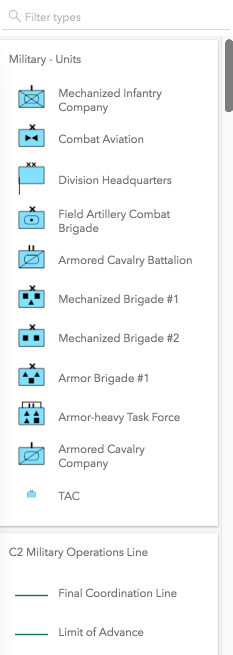
* geometry | Groups template items by geometry type. | 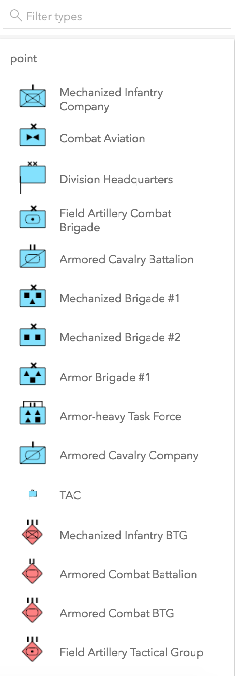
* none | The widget displays everything in one list with no grouping. | 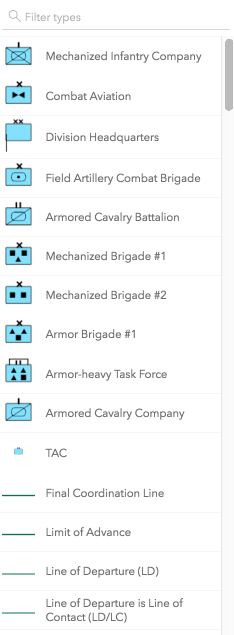
* [GroupByFunction](https://developers.arcgis.com/javascript/latest/references/core/widgets/FeatureTemplates/types/#GroupByFunction) | Custom function that takes an object containing a [FeatureTemplate](https://developers.arcgis.com/javascript/latest/references/core/layers/support/FeatureTemplate/) and [FeatureLayer](https://developers.arcgis.com/javascript/latest/references/core/layers/FeatureLayer/). | 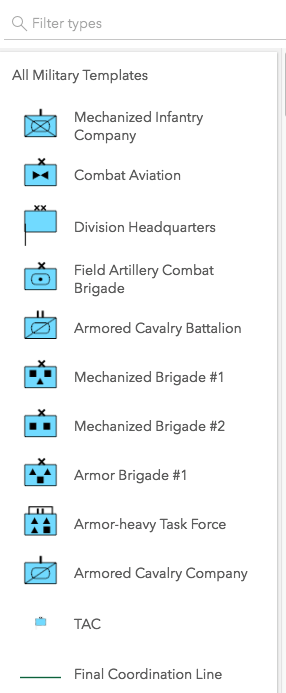
*
* @default "layer"
* @example
* // This example shows using a function to check if
* // the layer title contains the word 'military'. If so,
* // return a group of items called "All Military Templates"
* function customGroup(grouping) {
* // Consolidate all military layers
* if (grouping.layer.title.toLowerCase().indexOf("military") > -1) {
* return "All Military Templates"
* }
* // Otherwise, group by layer title
* return grouping.layer.title;
* }
*
* // Create the FeatureTemplates widget
* templates = new FeatureTemplates({
* container: "templatesDiv",
* layers: layers,
* groupBy: customGroup
* });
*/
accessor groupBy: GroupByType | null | undefined;
/** The template items or grouped template items. */
get items(): (TemplateItem | TemplateItemGroup)[];
/**
* An array of [FeatureLayers](https://developers.arcgis.com/javascript/latest/references/core/layers/FeatureLayer/)
* that are associated with the widget. The order in which these layers are
* set in the array dictates how they display within the widget.
*
* > [!WARNING]
* >
* > The widget is designed to only display layers that are enabled for editing.
* > It will not display layers that are enabled to only edit attributes.
*
* @example
* // The layers to display within the widget
* let militaryUnits = new FeatureLayer({
* url: "http://sampleserver6.arcgisonline.com/arcgis/rest/services/Military/FeatureServer/2"
* });
*
* let militaryHostile = new FeatureLayer({
* url: "http://sampleserver6.arcgisonline.com/arcgis/rest/services/Military/FeatureServer/6"
* });
*
* let layers = [militaryUnits, militaryHostile];
*
* // Create FeatureTemplates widget
* templates = new FeatureTemplates({
* container: "templatesDiv",
* layers: layers
* });
*/
accessor layers: Array<LayerWithFeatureTemplatesUnion | SubtypeGroupLayer>;
/**
* The widget's state. Possible values are in the table below.
*
* Value | Description
* ------|------------
* ready | Dependencies are met and has valid property values.
* loading | Layers are still loading and not ready yet.
* disabled | No layers are available to load.
*
* @default "disabled"
*/
get state(): FeatureTemplatesViewModelState;
/** This method updates the [template items](https://developers.arcgis.com/javascript/latest/references/core/widgets/FeatureTemplates/TemplateItem/) with the provided filter. */
refresh(): void;
/**
* Selects the [template item](https://developers.arcgis.com/javascript/latest/references/core/widgets/FeatureTemplates/TemplateItem/) to use.
*
* @param item - The [template item](https://developers.arcgis.com/javascript/latest/references/core/widgets/FeatureTemplates/TemplateItem/) to select.
* @see [select event](https://developers.arcgis.com/javascript/latest/references/core/widgets/FeatureTemplates/#event-select)
*/
select(item: TemplateItem | null | undefined): void;
}