@arcgis/core
Version:
ArcGIS Maps SDK for JavaScript: A complete 2D and 3D mapping and data visualization API
97 lines (95 loc) • 5.77 kB
TypeScript
import type FeatureLayer from "../../layers/FeatureLayer.js";
import type SceneLayer from "../../layers/SceneLayer.js";
import type Relationship from "../../layers/support/Relationship.js";
import type Column from "./Grid/Column.js";
import type { Icon } from "@esri/calcite-components/components/calcite-icon";
import type { ColumnProperties } from "./Grid/Column.js";
import type { TextAlign } from "./Grid/types.js";
export interface RelationshipColumnProperties extends ColumnProperties, Partial<Pick<RelationshipColumn, "collapsed">> {
/**
* The [Calcite Icon](https://developers.arcgis.com/calcite-design-system/icons/) displayed within the [FeatureTable](https://developers.arcgis.com/javascript/latest/references/core/widgets/FeatureTable/) header for the attachments column.
*
* @default "link"
* @see [Calcite Icon Search](https://developers.arcgis.com/calcite-design-system/icons/)
* @see [Calcite Icon Search](https://developers.arcgis.com/calcite-design-system/icons/)
*/
icon?: Icon["icon"];
/**
* Default width of the relationship column in pixels.
*
* @default "200px"
*/
width?: number | string;
}
/**
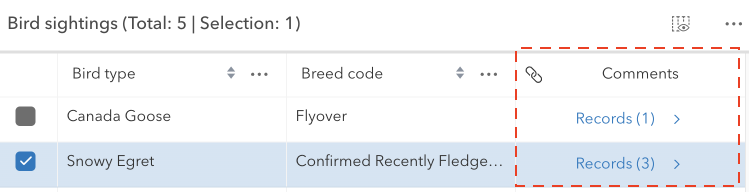
* The `RelationshipColumn` class works with the [FeatureTable](https://developers.arcgis.com/javascript/latest/references/core/widgets/FeatureTable/) to display any associated related records for each feature in the table. This column will only be displayed if the related layer or table is also added to the map. If a feature has related records and the table is configured to [enable related records](https://developers.arcgis.com/javascript/latest/references/core/widgets/FeatureTable/#relatedRecordsEnabled), the count of related records is displayed in the cell. Whereas the cell is empty if the feature does not have related records. This column is always appended to the end of the table.
*
* > [!WARNING]
* >
* > This class should be used for observing potential changes. It is designed
* > primarily to read and not interact directly with the relationship columns.
*
* 
*
* @since 4.30
* @see [Column](https://developers.arcgis.com/javascript/latest/references/core/widgets/FeatureTable/Grid/Column/)
* @see [FeatureTable](https://developers.arcgis.com/javascript/latest/references/core/widgets/FeatureTable/)
* @see [FeatureTableViewModel](https://developers.arcgis.com/javascript/latest/references/core/widgets/FeatureTable/FeatureTableViewModel/)
*/
export default class RelationshipColumn extends Column {
constructor(properties?: RelationshipColumnProperties);
/**
* Indicates whether the column displays collapsed. If collapsed, the header will always display as empty.
*
* @default false
*/
accessor collapsed: boolean;
/**
* The sanitized label displayed within the [FeatureTable](https://developers.arcgis.com/javascript/latest/references/core/widgets/FeatureTable/) header for the relationship column. If the label is not provided, the name of the relationship is used. If the relationship name is not provided, the title of the related layer is used.
*
* @since 4.30
* @see [ArcGIS HTML Sanitizer](https://github.com/Esri/arcgis-html-sanitizer#readme)
* @see [ArcGIS Online supported HTML specification](https://doc.arcgis.com/en/arcgis-online/reference/supported-html.htm)
*/
get effectiveLabel(): string;
/**
* The [Calcite Icon](https://developers.arcgis.com/calcite-design-system/icons/) displayed within the [FeatureTable](https://developers.arcgis.com/javascript/latest/references/core/widgets/FeatureTable/) header for the attachments column.
*
* @default "link"
* @see [Calcite Icon Search](https://developers.arcgis.com/calcite-design-system/icons/)
* @see [Calcite Icon Search](https://developers.arcgis.com/calcite-design-system/icons/)
*/
accessor icon: Icon["icon"];
/** The layer that contains the features being displayed in the table. */
get layer(): FeatureLayer | SceneLayer;
/** Returns the [Relationship](https://developers.arcgis.com/javascript/latest/references/core/layers/support/Relationship/) of the [relatedLayer](https://developers.arcgis.com/javascript/latest/references/core/widgets/FeatureTable/RelationshipColumn/#relatedLayer) to find a relationship that has the same id as the [relationshipId](https://developers.arcgis.com/javascript/latest/references/core/widgets/FeatureTable/RelationshipColumn/#relationshipId). */
get originRelationship(): Relationship | null | undefined;
/** The layer that contains the related features being displayed in the table. */
get relatedLayer(): FeatureLayer | SceneLayer;
/** Returns the first relationship from [layer's](https://developers.arcgis.com/javascript/latest/references/core/widgets/FeatureTable/RelationshipColumn/#layer) `relationships` that matches the [relationshipId](https://developers.arcgis.com/javascript/latest/references/core/widgets/FeatureTable/RelationshipColumn/#relationshipId). */
get relationship(): Relationship | null | undefined;
/**
* The unique ID for the relationship.
*
* @see [Relationship.id](https://developers.arcgis.com/javascript/latest/references/core/layers/support/Relationship/#id)
*/
get relationshipId(): number;
/**
* Indicates whether the relationship column can be resized. This is always set to `true`.
*
* @default true
*/
get resizable(): boolean;
/**
* The text alignment of the relationship column.
*
* @default "center"
*/
get textAlign(): TextAlign;
/**
* Default width of the relationship column in pixels.
*
* @default "200px"
*/
accessor width: number | string;
}