@arcgis/core
Version:
ArcGIS Maps SDK for JavaScript: A complete 2D and 3D mapping and data visualization API
708 lines (705 loc) • 80.2 kB
TypeScript
import type Collection from "../../core/Collection.js";
import type Relationship from "../../layers/support/Relationship.js";
import type AttributeTableTemplate from "../../tables/AttributeTableTemplate.js";
import type TimeExtent from "../../time/TimeExtent.js";
import type LinkChartView from "../../views/LinkChartView.js";
import type SelectionManager from "../../views/SelectionManager.js";
import type LayerView from "../../views/layers/LayerView.js";
import type FeatureTable from "../FeatureTable.js";
import type ActionColumn from "./ActionColumn.js";
import type AttachmentsColumn from "./AttachmentsColumn.js";
import type FieldColumn from "./FieldColumn.js";
import type RelationshipColumn from "./RelationshipColumn.js";
import type GridViewModel from "./Grid/GridViewModel.js";
import type GroupColumn from "./Grid/GroupColumn.js";
import type AttachmentsViewOptions from "./support/AttachmentsViewOptions.js";
import type TableTemplate from "./support/TableTemplate.js";
import type { ReadonlyArrayOrCollection } from "../../core/Collection.js";
import type { GeometryUnion } from "../../geometry/types.js";
import type { FieldValue } from "../../layers/support/fieldUtils.js";
import type { TimeZone } from "../../time/types.js";
import type { MapViewOrSceneView } from "../../views/MapViewOrSceneView.js";
import type { ObjectId } from "../../views/types.js";
import type { GridViewModelProperties } from "./Grid/GridViewModel.js";
import type { DiscardPendingEditsParameters, FeatureStoreEdits, FeatureTableState, GridMultiSortPriority, GridSupportedColumns, TableInteractionCellClickEvent, TableInteractionCellDblclickEvent, TableInteractionCellKeydownEvent, TableInteractionCellPointeroverEvent, TableInteractionColumnReorderEvent, TableInteractionCellPointeroutEvent, TableMenuConfig } from "./Grid/types.js";
import type { ColumnSortOrder, FeatureTableSupportedColumn as SupportedColumn, FeatureTableSupportedFilters as SupportedFilters, FeatureTableSupportedLayer, ActionColumnConfig, FeatureStoreItem } from "./support/types.js";
import type { AttributeTableTemplateProperties } from "../../tables/AttributeTableTemplate.js";
import type { MeshProperties } from "../../geometry/Mesh.js";
import type { PolylineProperties } from "../../geometry/Polyline.js";
import type { PolygonProperties } from "../../geometry/Polygon.js";
import type { PointProperties } from "../../geometry/Point.js";
import type { MultipointProperties } from "../../geometry/Multipoint.js";
import type { ExtentProperties } from "../../geometry/Extent.js";
import type { TableTemplateProperties } from "./support/TableTemplate.js";
import type { TimeExtentProperties } from "../../time/TimeExtent.js";
export interface FeatureTableViewModelProperties extends GridViewModelProperties, Partial<Pick<FeatureTableViewModel, "actionColumnConfig" | "attachmentsEnabled" | "autoRefreshEnabled" | "autoSaveEnabled" | "columnPerformanceModeEnabled" | "columnReorderingEnabled" | "definitionExpression" | "editingEnabled" | "filterBySelectionEnabled" | "highlightEnabled" | "initialSize" | "layer" | "layers" | "maxSize" | "menuConfig" | "multipleSelectionEnabled" | "multipleSortPriority" | "multiSortEnabled" | "outFields" | "pageIndex" | "pageSize" | "paginationEnabled" | "relatedRecordsEnabled" | "returnGeometryEnabled" | "returnMEnabled" | "returnZEnabled" | "selectionManager" | "syncTemplateOnChangesEnabled" | "syncViewSelection" | "tableController" | "tableParent" | "timeZone" | "view">> {
/**
* Use this property to configure how columns display within the table in regard to visibility, column order, and sorting.
*
* > [!WARNING]
* >
* > This property differs from the [tableTemplate](https://developers.arcgis.com/javascript/latest/references/core/widgets/FeatureTable/FeatureTableViewModel/#tableTemplate) property. The `tableTemplate` property provides more fine-grained control over how the table is rendered within the application by offering more advanced configurations such as custom cell rendering, column formatting, and more. It is useful for application-level development that remains within an application. Use the [attributeTableTemplate](https://developers.arcgis.com/javascript/latest/references/core/widgets/FeatureTable/FeatureTableViewModel/#attributeTableTemplate) property to access the table's settings across different applications. By using this property, the settings can be saved within a webmap or layer. Please refer to the [AttributeTableTemplate](https://developers.arcgis.com/javascript/latest/references/core/tables/AttributeTableTemplate/) and [TableTemplate](https://developers.arcgis.com/javascript/latest/references/core/widgets/FeatureTable/support/TableTemplate/) documentation for more information.
*
* @since 4.31
* @see [Sample - FeatureTable Component](https://developers.arcgis.com/javascript/latest/sample-code/feature-table/)
*/
attributeTableTemplate?: AttributeTableTemplateProperties | null;
/**
* Set this property to filter the features displayed in the table. It accepts a [Geometry](https://developers.arcgis.com/javascript/latest/references/core/geometry/Geometry/), e.g. [Extent](https://developers.arcgis.com/javascript/latest/references/core/geometry/Extent/), and uses it as a spatial filter. When modifying this property, the FeatureTable will completely refresh and re-query for all features.
*
* @since 4.19
* @see [Sample - FeatureTable using a map](https://developers.arcgis.com/javascript/latest/sample-code/widgets-featuretable-map/)
* @example
* // Listen for when the view is updated. If so, pass the new
* // view.extent into the table's filterGeometry.
*
* await whenOnce(() => featureLayer.loaded);
*
* reactiveUtils.when(
* () => view.stationary === false && !!view.extent,
* () => {
* // Filter and show only the visible features in the feature table
* featureTable.viewModel.filterGeometry = view.extent;
* },
* { initial: true }
* );
*/
filterGeometry?: ((ExtentProperties & { type: "extent" }) | (MultipointProperties & { type: "multipoint" }) | (PointProperties & { type: "point" }) | (PolygonProperties & { type: "polygon" }) | (PolylineProperties & { type: "polyline" }) | (MeshProperties & { type: "mesh" })) | null;
/**
* A collection of string [field.names](https://developers.arcgis.com/javascript/latest/references/core/layers/support/Field/) that are to remain hidden within the table. By default fields such as `CreationDate`, `Creator`, `EditDate`, `Editor`, and `GlobalID` do not show. If these fields are needed, set them via [TableTemplate.columnTemplates](https://developers.arcgis.com/javascript/latest/references/core/widgets/FeatureTable/support/TableTemplate/#columnTemplates). In this case, it is also required that the column template's [FieldColumnTemplate.visible](https://developers.arcgis.com/javascript/latest/references/core/widgets/FeatureTable/support/FieldColumnTemplate/#visible) property is set to `true`.
*
* @default true
* @since 4.16
* @see [TableTemplate](https://developers.arcgis.com/javascript/latest/references/core/widgets/FeatureTable/support/TableTemplate/)
* @see [viewModel: { // autocasts as new FeatureTableViewModel layer: featureLayer, tableTemplate: tableTemplate //autocasts as new TableTemplate](https://developers.arcgis.com/javascript/latest/references/core/widgets/FeatureTable/support/FieldColumnTemplate/)}
* @example
* const featureTableVM = new FeatureTableViewModel({
* layer: featureLayer,
* hiddenFields: ["Primary_Type", "incident_date"], // will not show these two fields within the table
* },
* container: document.getElementById("tableDiv")
* });
* @example
* // Set this syntax if needing to display a default hidden field, e.g. 'CreationDate`
* const featureTableVM = new FeatureTableViewModel({
* layer: featureLayer,
* tableTemplate: { // autocasts to TableTemplate
* customTemplates: [ // takes an array of FieldColumnTemplate and GroupColumnTemplate
* { //autocasts to FieldColumnTemplate
* type: "field",
* fieldName: "CreationDate",
* label: "Date created",
* visible: true
* }]
* },
* container: document.getElementById("tableDiv")
* });
*/
hiddenFields?: ReadonlyArrayOrCollection<string>;
/**
* This property accepts and returns a collection of feature object IDs. Use this to access and control which features are currently selected in the table and subsequently highlighted within the map. Once an application sets a collection of object IDs, the table will select the corresponding row and highlight its feature within the map.
*
* @since 4.25
* @see [highlightEnabled](https://developers.arcgis.com/javascript/latest/references/core/widgets/FeatureTable/FeatureTableViewModel/#highlightEnabled)
* @see [rowHighlightIds](https://developers.arcgis.com/javascript/latest/references/core/widgets/FeatureTable/FeatureTableViewModel/#rowHighlightIds)
* @see [Sample - FeatureTable using a map](https://developers.arcgis.com/javascript/latest/sample-code/widgets-featuretable-map/)
* @example
* // This example instantiates the table with highlighted features
* const featureTable = new FeatureTable({
* view: view,
* layer: featureLayer,
* container: "tableDiv",
* highlightIds
* });
*
* // Push the object ids into a collection and select
* featureTable.viewModel.highlightIds.push(2, 3, 4);
*
* // Listen for changes in the collection of highlighted features
* featureTable.viewModel.highlightIds.on("change", (event) => {
* console.log("features selected", event.added);
* console.log("features deselected", event.removed);
* });
*/
highlightIds?: ReadonlyArrayOrCollection<ObjectId>;
/**
* This property accepts and returns a collection of feature object IDs. Use this to access and control which features are currently visible in the table.
* When the collection is empty, all potential rows are displayed. Modifying object IDs is not supported while [filterBySelectionEnabled](https://developers.arcgis.com/javascript/latest/references/core/widgets/FeatureTable/FeatureTableViewModel/#filterBySelectionEnabled) is `true` as these properties are mutually exclusive.
* This filter can also be combined with [filterGeometry](https://developers.arcgis.com/javascript/latest/references/core/widgets/FeatureTable/FeatureTableViewModel/#filterGeometry) to display features that satisfy both conditions.
*
* @since 4.30
*/
objectIds?: ReadonlyArrayOrCollection<ObjectId>;
/**
* This property accepts and returns a collection of feature object IDs. It is used to access and control which rows display a darker background, i.e., highlighted. Take note that highlighted rows are not considered selected as this property is independent of the table's selection state. Use the [highlightIds](https://developers.arcgis.com/javascript/latest/references/core/widgets/FeatureTable/FeatureTableViewModel/#highlightIds) property to choose rows. Setting `rowHighlightIds` applies an alternative highlight style to an entire row or rows.
*
* @since 4.30
* @see [highlightEnabled](https://developers.arcgis.com/javascript/latest/references/core/widgets/FeatureTable/FeatureTableViewModel/#highlightEnabled)
* @see [highlightIds](https://developers.arcgis.com/javascript/latest/references/core/widgets/FeatureTable/FeatureTableViewModel/#highlightIds)
*/
rowHighlightIds?: ReadonlyArrayOrCollection<ObjectId>;
/**
* The associated [template](https://developers.arcgis.com/javascript/latest/references/core/widgets/FeatureTable/support/TableTemplate/) used for the feature table.
*
* The [TableTemplate](https://developers.arcgis.com/javascript/latest/references/core/widgets/FeatureTable/support/TableTemplate/) is where you configure how the feature table should display and set any associated properties for the table and its columns.
*
* > [!WARNING]
* >
* > The `TableTemplate` provides more fine-grained control over how the table is rendered within the application by offering more advanced configurations such as custom cell rendering, column formatting, and more. `TableTemplate` is useful for application-level development that remains within an application. This property differs from the [attributeTableTemplate](https://developers.arcgis.com/javascript/latest/references/core/widgets/FeatureTable/FeatureTableViewModel/#attributeTableTemplate) property as that property should be used to access the table's settings across different applications. By using [attributeTableTemplate](https://developers.arcgis.com/javascript/latest/references/core/widgets/FeatureTable/FeatureTableViewModel/#attributeTableTemplate), the settings can be saved within a webmap or layer. Please refer to the [AttributeTableTemplate](https://developers.arcgis.com/javascript/latest/references/core/tables/AttributeTableTemplate/) and [TableTemplate](https://developers.arcgis.com/javascript/latest/references/core/widgets/FeatureTable/support/TableTemplate/) documentation for more information.
*
* > [!WARNING]
* >
* > Take note that it is required to set the `type` property when creating column templates.
*
* @since 4.24
* @example
* const tableTemplate = new TableTemplate({
* columnTemplates: [ // takes an array of FieldColumnTemplate and GroupColumnTemplate
* { // autocasts to FieldColumnTemplate
* type: "field",
* fieldName: "ObjectId",
* direction: "asc", // In order to use initialSortPriority, make sure direction is set
* initialSortPriority: 1 // This field's sort order takes the second-highest priority.
* },
* {
* type: "field",
* fieldName: "NAME",
* label: "Name",
* asc: "asc", // In order to use initialSortPriority, make sure direction is set
* initialSortPriority: 0 // This field's sort order takes the highest priority
* },
* {
* type: "field",
* fieldName: "STATUS",
* label: "Status",
* direction: "asc", // In order to use initialSortPriority, make sure direction is set
* initialSortPriority: 2 // This field's sort order is prioritized after Name and ObjectId, respectively.
* }
* ]
* });
*/
tableTemplate?: TableTemplateProperties | null;
/**
* The [TimeExtent](https://developers.arcgis.com/javascript/latest/references/core/time/TimeExtent/) in which to filter and display data within the [FeatureTable](https://developers.arcgis.com/javascript/latest/references/core/widgets/FeatureTable/) widget. Setting this property directly on the viewModel or its [widget](https://developers.arcgis.com/javascript/latest/references/core/widgets/FeatureTable/#timeExtent) takes precedence over the layer's [FeatureLayer.timeExtent](https://developers.arcgis.com/javascript/latest/references/core/layers/FeatureLayer/#timeExtent). If this property is set directly on the [widget](https://developers.arcgis.com/javascript/latest/references/core/widgets/FeatureTable/#timeExtent), the table will not refresh when the layer's [TimeExtent](https://developers.arcgis.com/javascript/latest/references/core/time/TimeExtent/) changes.
*
* @since 4.30
* @see [FeatureLayer.timeExtent](https://developers.arcgis.com/javascript/latest/references/core/layers/FeatureLayer/#timeExtent)
* @example
* // Filters the table to display only features that fit within the time extent
* reactiveUtils.watch(
* () => timeSlider.timeExtent,
* (extent) => {
* featureTable.viewModel.timeExtent = extent;
* }
* );
*/
timeExtent?: TimeExtentProperties | null;
}
export interface FeatureTableViewModelEvents {
/**
* Fires when a cell within the table is clicked.
*
* @since 4.30
* @example
* // This snippet removes the selection column and adds an event listener
* // which toggles the selection of a feature when a cell is clicked.
* featureTable.visibleElements.selectionColumn = false;
* featureTable.on("cell-click", (event) => {
* if (featureTable.highlightIds.includes(event.objectId)) {
* featureTable.highlightIds.remove(event.objectId);
* }
* else {
* featureTable.highlightIds.push(event.objectId);
* }
* });
*/
"cell-click": TableInteractionCellClickEvent;
/**
* Fires when a cell within the table is double-clicked.
*
* @since 4.31
*/
"cell-dblclick": TableInteractionCellDblclickEvent;
/**
* Fires when the mouse pointer is moved over a cell within the table.
*
* @since 4.30
*/
"cell-pointerover": TableInteractionCellPointeroverEvent;
/**
* Fires when the mouse pointer is moved out of a cell within the table. This event is useful for scenarios highlighting for things like highlighting a feature in the view, while hovering, without requiring manual interaction to select a row. Another example: these events can also be used to show information about the cell in a tooltip attached to the mouse.
*
* @since 4.30
*/
"cell-pointerout": TableInteractionCellPointeroutEvent;
/**
* Fires when a key is pressed down within a cell within the table.
*
* @since 4.30
* @example
* // The following snippet listens for the Enter key to be pressed within a cell and zooms
* // to the feature associated with the row.
* featureTable.on("cell-keydown", (event) => {
* if (event.native.key === "Enter") {
* view.goTo(event.feature);
* }
* });
*/
"cell-keydown": TableInteractionCellKeydownEvent;
/**
* Fires when a column is reordered via drag-and-drop.
*
* @since 4.31
*/
"column-reorder": TableInteractionColumnReorderEvent;
}
/**
* Provides the logic for the [FeatureTable](https://developers.arcgis.com/javascript/latest/references/core/widgets/FeatureTable/) widget and [component](https://developers.arcgis.com/javascript/latest/references/map-components/components/arcgis-feature-table/), which allows users to view content from feature attributes in a tabular format.
*
* @since 4.15
* @see [FeatureTable](https://developers.arcgis.com/javascript/latest/references/core/widgets/FeatureTable/) widget
* @see [Feature Table component](https://developers.arcgis.com/javascript/latest/references/map-components/components/arcgis-feature-table/)
* @example
* const featureTable = new FeatureTable({
* viewModel: { // autocasts as new FeatureTableViewModel
* layer: featureLayer,
* tableTemplate: tableTemplate //autocasts as new TableTemplate
* }
* });
*/
export default class FeatureTableViewModel extends GridViewModel {
/**
* @deprecated
* Do not directly reference this property.
* Use EventNames and EventTypes helpers from \@arcgis/core/Evented
*/
"@eventTypes": FeatureTableViewModelEvents;
/** @internal */
constructor(properties?: FeatureTableViewModelProperties);
/**
* Reference to the current [action column](https://developers.arcgis.com/javascript/latest/references/core/widgets/FeatureTable/ActionColumn/). This column is only generated if a [configuration](https://developers.arcgis.com/javascript/latest/references/core/widgets/FeatureTable/FeatureTableViewModel/#actionColumnConfig) has been provided.
*
* @since 4.33
* @see [actionColumnConfig](https://developers.arcgis.com/javascript/latest/references/core/widgets/FeatureTable/FeatureTableViewModel/#actionColumnConfig)
*/
get actionColumn(): ActionColumn | null | undefined;
/**
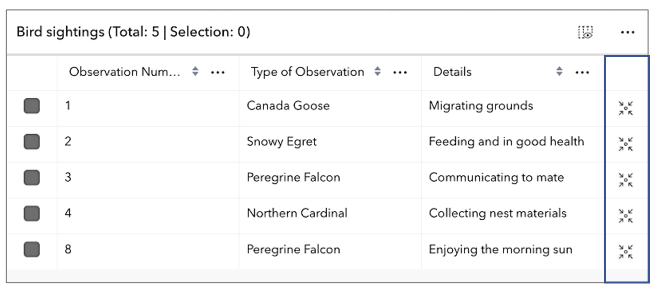
* Configuration for the [ActionColumn](https://developers.arcgis.com/javascript/latest/references/core/widgets/FeatureTable/ActionColumn/).
* This property allows for customizing the action column's appearance and behavior.
* The action column is a column that contains interactive buttons for each row.
* These buttons can be used to perform actions such as editing, deleting, or
* viewing additional information about a feature. This column is displayed as the
* last column in the table and is only displayed if this property is set.
*
* 
*
* @since 4.30
* @see [Calcite Icon Search](https://developers.arcgis.com/calcite-design-system/icons/)
* @example
* // The following snippet demonstrates how to configure an action column that adds a button
* // to each row which allows the user to zoom to the associated row's feature within the view.
* featureTable.viewModel.actionColumnConfig = {
* label: "Go to feature",
* icon: "zoom-to-object",
* callback: (params) => {
* view.goTo(params.feature);
* }
* }
*/
actionColumnConfig?: ActionColumnConfig | null;
/**
* A read-only property indicating the type of filter used by the table. It returns either filters by geometry or selections using a row's object ID.
*
* @since 4.23
* @see [Sample - FeatureTable using a map](https://developers.arcgis.com/javascript/latest/sample-code/widgets-featuretable-map/)
*/
get activeFilters(): Collection<SupportedFilters>;
/**
* Use this read-only property if needing to query features while retaining a column's sort order. It returns an array of [ColumnSortOrder](https://developers.arcgis.com/javascript/latest/references/core/widgets/FeatureTable/support/types/#ColumnSortOrder) which contains a column's name and its sort direction. The sort priority is honored in the returned [ColumnSortOrder](https://developers.arcgis.com/javascript/latest/references/core/widgets/FeatureTable/support/types/#ColumnSortOrder) if [multiSortEnabled](https://developers.arcgis.com/javascript/latest/references/core/widgets/FeatureTable/FeatureTableViewModel/#multiSortEnabled) is `true` with a set [FieldColumnTemplate.initialSortPriority](https://developers.arcgis.com/javascript/latest/references/core/widgets/FeatureTable/support/FieldColumnTemplate/#initialSortPriority).
*
* @default []
* @since 4.25
*/
get activeSortOrders(): ColumnSortOrder[];
/**
* A flattened array of all [columns](https://developers.arcgis.com/javascript/latest/references/core/widgets/FeatureTable/Grid/Column/) within the table, including nested columns. Take note that [group columns](https://developers.arcgis.com/javascript/latest/references/core/widgets/FeatureTable/Grid/GroupColumn/) are separate entries. This property is useful when applying
* updates to all columns, including nested columns, as it provides ease of use when iterating through all columns in the table.
*
* @since 4.33
*/
get allColumns(): GridSupportedColumns[];
/**
* Indicates the table is displaying all related tables in `show all` mode.
*
* @since 4.31
*/
get allRelatedTablesVisible(): boolean;
/**
* A flattened array of all visible [columns](https://developers.arcgis.com/javascript/latest/references/core/widgets/FeatureTable/Grid/Column/) within the table, including nested columns. [Group columns](https://developers.arcgis.com/javascript/latest/references/core/widgets/FeatureTable/Grid/GroupColumn/) are separate entries.
*
* @since 4.33
*/
get allVisibleColumns(): GridSupportedColumns[];
/**
* A flattened array of all [attachment columns](https://developers.arcgis.com/javascript/latest/references/core/widgets/FeatureTable/AttachmentsColumn/) within the table, including nested columns.
*
* @since 4.33
*/
get attachmentsColumns(): AttachmentsColumn[];
/**
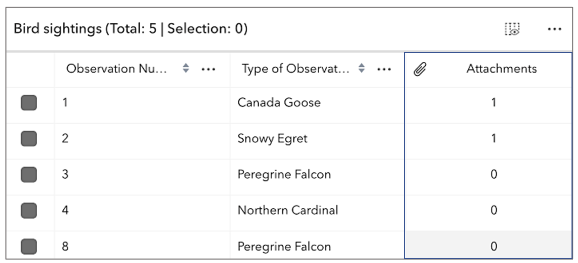
* Indicates whether to display the `Attachments` field in the table. It displays the count of attachments per feature and is only applicable if the feature layer [supports attachments](https://developers.arcgis.com/javascript/latest/references/core/layers/FeatureLayer/#capabilities).
*
* 
*
* @default false
* @see [FeatureLayer.capabilities.data.supportsAttachment](https://developers.arcgis.com/javascript/latest/references/core/layers/FeatureLayer/#capabilities)
*/
accessor attachmentsEnabled: boolean;
/**
* This read-only property provides the the configuration options for the attachments view.
*
* @since 4.33
* @see [Sample - FeatureTable with editing and attachments enabled](https://developers.arcgis.com/javascript/latest/sample-code/widgets-featuretable-editing/)
*/
get attachmentsViewOptions(): AttachmentsViewOptions;
/**
* Use this property to configure how columns display within the table in regard to visibility, column order, and sorting.
*
* > [!WARNING]
* >
* > This property differs from the [tableTemplate](https://developers.arcgis.com/javascript/latest/references/core/widgets/FeatureTable/FeatureTableViewModel/#tableTemplate) property. The `tableTemplate` property provides more fine-grained control over how the table is rendered within the application by offering more advanced configurations such as custom cell rendering, column formatting, and more. It is useful for application-level development that remains within an application. Use the [attributeTableTemplate](https://developers.arcgis.com/javascript/latest/references/core/widgets/FeatureTable/FeatureTableViewModel/#attributeTableTemplate) property to access the table's settings across different applications. By using this property, the settings can be saved within a webmap or layer. Please refer to the [AttributeTableTemplate](https://developers.arcgis.com/javascript/latest/references/core/tables/AttributeTableTemplate/) and [TableTemplate](https://developers.arcgis.com/javascript/latest/references/core/widgets/FeatureTable/support/TableTemplate/) documentation for more information.
*
* @since 4.31
* @see [Sample - FeatureTable Component](https://developers.arcgis.com/javascript/latest/sample-code/feature-table/)
*/
get attributeTableTemplate(): AttributeTableTemplate | null | undefined;
set attributeTableTemplate(value: AttributeTableTemplateProperties | null | undefined);
/**
* Indicates whether the table should automatically refresh when the underlying data changes. This property is useful when the table is displaying data from a feature layer that is being updated by other clients.
*
* @default true
* @since 4.23
*/
accessor autoRefreshEnabled: boolean;
/**
* Indicates whether the table should automatically save edits, or cache all edits until the 'savePendingEdits' or 'discardPendingEdits' methods are called.
*
* @default true
* @since 5.0
*/
accessor autoSaveEnabled: boolean;
/**
* Indicates whether the table supports adding a related record based on the current relationship
* configuration. This accounts for whether table is currently configured to show related features.
* If the table is not displaying related features, then the value of this property is always false.
*
* @default false
* @since 5.0
*/
get canAddRelatedFeature(): boolean;
/**
* Indicates whether to enable the table's column performance mode. This mode is designed to improve the performance of the table when working with a large number of columns.
*
* @default true
* @since 4.33
*/
columnPerformanceModeEnabled: boolean;
/**
* Indicates if columns can be reordered by dragging the column's header.
*
* @default true
* @since 4.33
*/
columnReorderingEnabled: boolean;
/**
* A read-only collection of [Column](https://developers.arcgis.com/javascript/latest/references/core/widgets/FeatureTable/Grid/Column/), [field](https://developers.arcgis.com/javascript/latest/references/core/widgets/FeatureTable/FieldColumn/), [group](https://developers.arcgis.com/javascript/latest/references/core/widgets/FeatureTable/Grid/GroupColumn/), [action](https://developers.arcgis.com/javascript/latest/references/core/widgets/FeatureTable/ActionColumn/), [attachment](https://developers.arcgis.com/javascript/latest/references/core/widgets/FeatureTable/AttachmentsColumn/), and [relationship](https://developers.arcgis.com/javascript/latest/references/core/widgets/FeatureTable/RelationshipColumn/) columns that are displayed within the table.
*
* By default fields such as `CreationDate`, `Creator`, `EditDate`, `Editor`, and `GlobalID` do not show. If these fields are needed, set them via [TableTemplate.columnTemplates](https://developers.arcgis.com/javascript/latest/references/core/widgets/FeatureTable/support/TableTemplate/#columnTemplates). In this scenario, it is also necessary to set the column template's `visible` property to `true`.
*
* @see [TableTemplate](https://developers.arcgis.com/javascript/latest/references/core/widgets/FeatureTable/support/TableTemplate/)
*/
get columns(): Collection<SupportedColumn>;
/**
* Internal selection manager used when a user does not provide one, or indicates they would like to
* use the view's selection manager.
*
* @internal
*/
get defaultSelectionManager(): SelectionManager;
/**
* The SQL where clause used to filter features visible in the table. Only the features that satisfy the definition
* expression are displayed in the table. This value takes priority over any definition expression set on the
* associated layer.
*
* @since 4.33
*/
accessor definitionExpression: string | null | undefined;
/**
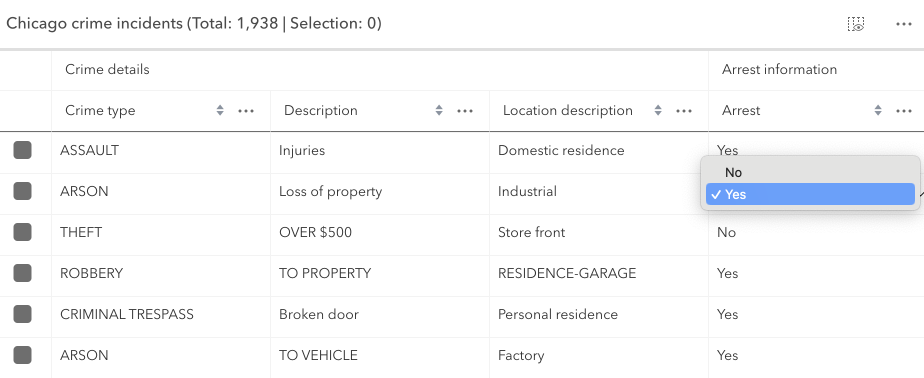
* Indicates whether editing is enabled on the data within the feature table. Double-clicking in a cell will enable editing for that value.
*
* Editing permissions can be separated into the following levels of priority:
*
* 1. [FeatureLayer.editingEnabled](https://developers.arcgis.com/javascript/latest/references/core/layers/FeatureLayer/#editingEnabled) - This is derived from the layer's [FeatureLayer.editingEnabled](https://developers.arcgis.com/javascript/latest/references/core/layers/FeatureLayer/#editingEnabled) property. This must always be `true` for editing to be enabled.
* 2. [Field](https://developers.arcgis.com/javascript/latest/references/core/layers/support/Field/) - This is derived from the [FeatureLayer](https://developers.arcgis.com/javascript/latest/references/core/layers/FeatureLayer/). It takes what is set in the [Field.editable](https://developers.arcgis.com/javascript/latest/references/core/layers/support/Field/#editable) property. This must always be `true` for editing to be enabled, although it can be overridden to `false` (not vice-versa) via a [field column template](https://developers.arcgis.com/javascript/latest/references/core/widgets/FeatureTable/support/FieldColumnTemplate/#editable).
* 3. [FeatureTable](https://developers.arcgis.com/javascript/latest/references/core/widgets/FeatureTable/) - The [FeatureTable.editingEnabled](https://developers.arcgis.com/javascript/latest/references/core/widgets/FeatureTable/#editingEnabled) property must be set on the table in order for any type of editing to be enabled.
* 4. [Template](https://developers.arcgis.com/javascript/latest/references/core/widgets/FeatureTable/support/FieldColumnTemplate/#editable) - The editable permissions on a field can be configured by setting the
* [FieldColumnTemplate.editable](https://developers.arcgis.com/javascript/latest/references/core/widgets/FeatureTable/support/FieldColumnTemplate/#editable) property of the [FieldColumnTemplate](https://developers.arcgis.com/javascript/latest/references/core/widgets/FeatureTable/support/FieldColumnTemplate/).
*
* > [!WARNING]
* >
* > If the service's field is not editable, it is not possible to override its permissions using any of the options above.
* > [FieldColumnTemplate.editable](https://developers.arcgis.com/javascript/latest/references/core/widgets/FeatureTable/support/FieldColumnTemplate/#editable) can never override what is set on the layer, field, or table.
*
* 
*
* @default false
* @since 4.16
* @see [Editing within the FeatureTable](https://developers.arcgis.com/javascript/latest/references/core/widgets/FeatureTable/FeatureTableViewModel/#editing-in-featuretable)
* @see [Sample - FeatureTable with editing enabled](https://developers.arcgis.com/javascript/latest/sample-code/widgets-featuretable-editing/)
* @see [Sample - FeatureTable with related data](https://developers.arcgis.com/javascript/latest/sample-code/widgets-featuretable-relates/)
*/
accessor editingEnabled: boolean;
/**
* A reference to the selection manager currently in use by the table.
*
* @internal
*/
get effectiveSelectionManager(): SelectionManager;
/**
* The total number of records displayed in the table's current view. Normally, this is equivalent to [size](https://developers.arcgis.com/javascript/latest/references/core/widgets/FeatureTable/FeatureTableViewModel/#size) for default configurations.
* If [paginationEnabled](https://developers.arcgis.com/javascript/latest/references/core/widgets/FeatureTable/FeatureTableViewModel/#paginationEnabled) is true, `effectiveSize` reflects the total number of visible rows for the current page.
* This value is usually equivalent to [pageSize](https://developers.arcgis.com/javascript/latest/references/core/widgets/FeatureTable/FeatureTableViewModel/#pageSize) unless viewing the last page of data. The last page may display less features
* than the maximum number for a single page. This property also takes into account all [active filters](https://developers.arcgis.com/javascript/latest/references/core/widgets/FeatureTable/FeatureTableViewModel/#activeFilters) and the current value
* of [maxSize](https://developers.arcgis.com/javascript/latest/references/core/widgets/FeatureTable/FeatureTableViewModel/#maxSize).
*
* @since 4.31
*/
get effectiveSize(): number;
/**
* A flattened array of all [field columns](https://developers.arcgis.com/javascript/latest/references/core/widgets/FeatureTable/FieldColumn/) within the table, including nested columns.
*
* @since 4.33
*/
get fieldColumns(): FieldColumn[];
/**
* Indicates whether the table only displays rows that are considered selected. Row selection can be modified by adding or removing associated object IDs from [FeatureTable.highlightIds](https://developers.arcgis.com/javascript/latest/references/core/widgets/FeatureTable/#highlightIds). This will cause the store to fetch fresh features to ensure the expected sort order is honored.
*
* @default false
* @since 4.30
*/
accessor filterBySelectionEnabled: boolean;
/**
* Set this property to filter the features displayed in the table. It accepts a [Geometry](https://developers.arcgis.com/javascript/latest/references/core/geometry/Geometry/), e.g. [Extent](https://developers.arcgis.com/javascript/latest/references/core/geometry/Extent/), and uses it as a spatial filter. When modifying this property, the FeatureTable will completely refresh and re-query for all features.
*
* @since 4.19
* @see [Sample - FeatureTable using a map](https://developers.arcgis.com/javascript/latest/sample-code/widgets-featuretable-map/)
* @example
* // Listen for when the view is updated. If so, pass the new
* // view.extent into the table's filterGeometry.
*
* await whenOnce(() => featureLayer.loaded);
*
* reactiveUtils.when(
* () => view.stationary === false && !!view.extent,
* () => {
* // Filter and show only the visible features in the feature table
* featureTable.viewModel.filterGeometry = view.extent;
* },
* { initial: true }
* );
*/
get filterGeometry(): GeometryUnion | null | undefined;
set filterGeometry(value: ((ExtentProperties & { type: "extent" }) | (MultipointProperties & { type: "multipoint" }) | (PointProperties & { type: "point" }) | (PolygonProperties & { type: "polygon" }) | (PolylineProperties & { type: "polyline" }) | (MeshProperties & { type: "mesh" })) | null | undefined);
/**
* A flattened array of all [group columns](https://developers.arcgis.com/javascript/latest/references/core/widgets/FeatureTable/Grid/GroupColumn/) within the table.
*
* @since 4.33
*/
get groupColumns(): GroupColumn[];
/**
* Convenience property indicating the data set contains contingent values. This includes contingent values in a related table.
*
* @default false
* @since 5.0
*/
get hasContingentValues(): boolean;
/**
* Indicates there are unsaved edits and that they are invalid. This includes invalid pending edits in a related table.
*
* @default false
* @since 5.0
*/
get hasInvalidPendingEdits(): boolean;
/**
* Indicates there are unsaved edits. This includes edits in a related table.
* This does not account for whether the edits are valid or not.
*
* @default false
* @since 5.0
*/
get hasPendingEdits(): boolean;
/**
* A collection of string [field.names](https://developers.arcgis.com/javascript/latest/references/core/layers/support/Field/) that are to remain hidden within the table. By default fields such as `CreationDate`, `Creator`, `EditDate`, `Editor`, and `GlobalID` do not show. If these fields are needed, set them via [TableTemplate.columnTemplates](https://developers.arcgis.com/javascript/latest/references/core/widgets/FeatureTable/support/TableTemplate/#columnTemplates). In this case, it is also required that the column template's [FieldColumnTemplate.visible](https://developers.arcgis.com/javascript/latest/references/core/widgets/FeatureTable/support/FieldColumnTemplate/#visible) property is set to `true`.
*
* @default true
* @since 4.16
* @see [TableTemplate](https://developers.arcgis.com/javascript/latest/references/core/widgets/FeatureTable/support/TableTemplate/)
* @see [viewModel: { // autocasts as new FeatureTableViewModel layer: featureLayer, tableTemplate: tableTemplate //autocasts as new TableTemplate](https://developers.arcgis.com/javascript/latest/references/core/widgets/FeatureTable/support/FieldColumnTemplate/)}
* @example
* const featureTableVM = new FeatureTableViewModel({
* layer: featureLayer,
* hiddenFields: ["Primary_Type", "incident_date"], // will not show these two fields within the table
* },
* container: document.getElementById("tableDiv")
* });
* @example
* // Set this syntax if needing to display a default hidden field, e.g. 'CreationDate`
* const featureTableVM = new FeatureTableViewModel({
* layer: featureLayer,
* tableTemplate: { // autocasts to TableTemplate
* customTemplates: [ // takes an array of FieldColumnTemplate and GroupColumnTemplate
* { //autocasts to FieldColumnTemplate
* type: "field",
* fieldName: "CreationDate",
* label: "Date created",
* visible: true
* }]
* },
* container: document.getElementById("tableDiv")
* });
*/
get hiddenFields(): Collection<string>;
set hiddenFields(value: ReadonlyArrayOrCollection<string>);
/**
* Indicates whether to highlight the associated feature when a row is selected by checking the corresponding checkbox. This property is only applicable when working with a map and the [FeatureTable.view](https://developers.arcgis.com/javascript/latest/references/core/widgets/FeatureTable/#view) property is set.
* This property has no effect if [syncViewSelection](#syncViewSelection) is `true` or a custom [selectionManager](#selectionManager) has been provided.
*
* @default true
* @since 4.25
*/
accessor highlightEnabled: boolean;
/**
* This property accepts and returns a collection of feature object IDs. Use this to access and control which features are currently selected in the table and subsequently highlighted within the map. Once an application sets a collection of object IDs, the table will select the corresponding row and highlight its feature within the map.
*
* @since 4.25
* @see [highlightEnabled](https://developers.arcgis.com/javascript/latest/references/core/widgets/FeatureTable/FeatureTableViewModel/#highlightEnabled)
* @see [rowHighlightIds](https://developers.arcgis.com/javascript/latest/references/core/widgets/FeatureTable/FeatureTableViewModel/#rowHighlightIds)
* @see [Sample - FeatureTable using a map](https://developers.arcgis.com/javascript/latest/sample-code/widgets-featuretable-map/)
* @example
* // This example instantiates the table with highlighted features
* const featureTable = new FeatureTable({
* view: view,
* layer: featureLayer,
* container: "tableDiv",
* highlightIds
* });
*
* // Push the object ids into a collection and select
* featureTable.viewModel.highlightIds.push(2, 3, 4);
*
* // Listen for changes in the collection of highlighted features
* featureTable.viewModel.highlightIds.on("change", (event) => {
* console.log("features selected", event.added);
* console.log("features deselected", event.removed);
* });
*/
get highlightIds(): Collection<ObjectId>;
set highlightIds(value: ReadonlyArrayOrCollection<ObjectId>);
/**
* The user-provided number of total features accessed from the data source. This is used for initial load of the data store as opposed to querying a specified layer. Additionally, the table will query data counts to verify the data's integrity, or when requested via [refresh()](https://developers.arcgis.com/javascript/latest/references/core/widgets/FeatureTable/FeatureTableViewModel/#refresh).
*
* @since 4.31
*/
accessor initialSize: number | null | undefined;
/**
* Indicates the table is displaying an editable input in one of its cells.
*
* @since 4.33
*/
get isEditing(): boolean;
/**
* Indicates if the table is querying data. This is useful when determining if the table is busy. This can be especially helpful when the table is querying a large amount of features.
*
* @since 4.33
*/
get isQuerying(): boolean;
/**
* Indicates the table is querying or syncing data. This is useful when determining if the table is busy. This can be especially helpful when the table is querying a large amount of features.
*
* @since 4.31
*/
get isQueryingOrSyncing(): boolean;
/**
* Indicates if the table is syncing data. This is useful when determining if the table is busy.
*
* @since 4.33
*/
get isSyncing(): boolean;
/**
* Indicates the table is syncing attachment edits.
*
* @since 4.31
*/
get isSyncingAttachments(): boolean;
/**
* The associated [CatalogFootprintLayer](https://developers.arcgis.com/javascript/latest/references/core/layers/catalog/CatalogFootprintLayer/), [CSVLayer](https://developers.arcgis.com/javascript/latest/references/core/layers/CSVLayer/), [FeatureLayer](https://developers.arcgis.com/javascript/latest/references/core/layers/FeatureLayer/), [GeoJSONLayer](https://developers.arcgis.com/javascript/latest/references/core/layers/GeoJSONLayer/),
* [ImageryLayer](https://developers.arcgis.com/javascript/latest/references/core/layers/ImageryLayer/), [KnowledgeGraphSublayer](https://developers.arcgis.com/javascript/latest/references/core/layers/knowledgeGraph/KnowledgeGraphSublayer/), [SceneLayer](https://developers.arcgis.com/javascript/latest/references/core/layers/SceneLayer/), or [WFSLayer](https://developers.arcgis.com/javascript/latest/references/core/layers/WFSLayer/) containing
* the fields and attributes to display within the widget. The table's pagination defaults to `50` records at a time. It is possible to set the default pagination using the FeatureTable's [FeatureTable.pageSize](https://developers.arcgis.com/javascript/latest/references/core/widgets/FeatureTable/#pageSize) property.
*
* > [!WARNING]
* >
* > - Support for [CatalogFootprintLayer](https://developers.arcgis.com/javascript/latest/references/core/layers/catalog/CatalogFootprintLayer/) was added at version 4.30.
* > - Support for [GeoJSONLayer](https://developers.arcgis.com/javascript/latest/references/core/layers/GeoJSONLayer/), [CSVLayer](https://developers.arcgis.com/javascript/latest/references/core/layers/CSVLayer/), [ImageryLayer](https://developers.arcgis.com/javascript/latest/references/core/layers/ImageryLayer/), and [WFSLayer](https://developers.arcgis.com/javascript/latest/references/core/layers/WFSLayer/) was added at version 4.21.
* > - For an [ImageryLayer](https://developers.arcgis.com/javascript/latest/references/core/layers/ImageryLayer/) to work with FeatureTable, it must have mosaic dataset. Currently, Map and FeatureTable interaction for ImageryLayers is not supported.
*
* @see [FeatureTable.pageSize](https://developers.arcgis.com/javascript/latest/references/core/widgets/FeatureTable/#pageSize)
*/
accessor layer: FeatureTableSupportedLayer | null | undefined;
/**
* An array of layers listed within the [dropdown component](https://developers.arcgis.com/calcite-design-system/components/dropdown/) of the table's header. This component allows changing which table layer it should display. Typically, the dropdown component will display all supported layers within the [FeatureTable.view](https://developers.arcgis.com/javascript/latest/references/core/widgets/FeatureTable/#view) unless a specific set of layers is set. The table supports [CatalogFootprintLayer](https://developers.arcgis.com/javascript/latest/references/core/layers/catalog/CatalogFootprintLayer/), [CSVLayer](https://developers.arcgis.com/javascript/latest/references/core/layers/CSVLayer/), [FeatureLayer](https://developers.arcgis.com/javascript/latest/references/core/layers/FeatureLayer/), [GeoJSONLayer](https://developers.arcgis.com/javascript/latest/references/core/layers/GeoJSONLayer/), [ImageryLayer](https://developers.arcgis.com/javascript/latest/references/core/layers/ImageryLayer/), [KnowledgeGraphSublayer](https://developers.arcgis.com/javascript/latest/references/core/layers/knowledgeGraph/KnowledgeGraphSublayer/), [SceneLayer](https://developers.arcgis.com/javascript/latest/references/core/layers/SceneLayer/), and [WFSLayer](https://developers.arcgis.com/javascript/latest/references/core/layers/WFSLayer/) layers.
*
* @since 4.30
*/
accessor layers: FeatureTableSupportedLayer[] | null | undefined;
/** The [LayerView](https://developers.arcgis.com/javascript/latest/references/core/views/layers/LayerView/) displaying data for the table's associated [layer](https://developers.arcgis.com/javascript/latest/references/core/widgets/FeatureTable/FeatureTableViewModel/#layer). */
get layerView(): LayerView | null | undefined;
/**
* This property is applicable when working with layers that contain a large number of features, as it provides the ability to limit the displayed total feature count. If [paginationEnabled](https://developers.arcgis.com/javascript/latest/references/core/widgets/FeatureTable/FeatureTableViewModel/#paginationEnabled) is `true`, and `maxSize` is greater than the current value of [pageSize](https://developers.arcgis.com/javascript/latest/references/core/widgets/FeatureTable/FeatureTableViewModel/#pageSize), multiple pages usually display. If `maxSize` is less than [pageSize](https://developers.arcgis.com/javascript/latest/references/core/widgets/FeatureTable/FeatureTableViewModel/#pageSize), a single page shows the total number of features limited to `maxSize`.
*
* @since 4.31
*/
maxSize?: number | null;
/** Set this object to customize the feature table's menu content. */
accessor menuConfig: TableMenuConfig | null | undefined;
/**
* Controls whether the table allows multiple selected rows.
*
* @default true
* @since 4.30
*/
multipleSelectionEnabled: boolean;
/**
* This property can be used to determine how newly sorted columns are prioritized. By default, newly sorted columns are
* given the highest sort priority.
*
* @default "prepend"
* @since 4.33
*/
multipleSortPriority: GridMultiSortPriority;
/**
* Indicates whether sorting multiple columns is supported within the table. Use this in combination with the [FieldColumnTemplate.initialSortPriority](https://developers.arcgis.com/javascript/latest/references/core/widgets/FeatureTable/support/FieldColumnTemplate/#initialSortPriority) and [FieldColumnTemplate.direction](https://developers.arcgis.com/javascript/latest/references/core/widgets/FeatureTable/support/FieldColumnTemplate/#direction) properties to set sorting functionality for multiple columns.
*
* @default false
* @since 4.23
* @see [FieldColumnTemplate.initialSortPriority](https://developers.arcgis.com/javascript/latest/references/core/widgets/FeatureTable/support/FieldColumnTemplate/#initialSortPriority)
* @see [FieldColumnTemplate.direction](https://developers.arcgis.com/javascript/latest/references/core/widgets/FeatureTable/support/FieldColumnTemplate/#direction)
* @see [FeatureTable.sortColumn()](https://developers.arcgis.com/javascript/latest/references/core/widgets/FeatureTable/#sortColumn)
* @see [Sample - FeatureTable with editing enabled](https://developers.arcgis.com/javascript/latest/sample-code/widgets-featuretable-editing/)
* @see [Sample - FeatureTable](https://developers.arcgis.com/javascript/latest/sample-code/widgets-featuretable/)
* @example
* const featureTableVM = new FeatureTableViewModel({
* layer: featureLayer,
* multiSortEnabled: true,
* tableTemplate: { // autocastable to TableTemplate
* columnTemplates: [ // takes an array of FieldColumnTemplate and GroupColumnTemplate
*