@arcgis/core
Version:
ArcGIS Maps SDK for JavaScript: A complete 2D and 3D mapping and data visualization API
93 lines (91 loc) • 5.28 kB
TypeScript
import type Column from "./Grid/Column.js";
import type { Icon } from "@esri/calcite-components/components/calcite-icon";
import type { ColumnProperties } from "./Grid/Column.js";
import type { TextAlign } from "./Grid/types.js";
import type { FeatureTableSupportedLayer } from "./support/types.js";
export interface AttachmentsColumnProperties extends ColumnProperties, Partial<Pick<AttachmentsColumn, "layer" | "thumbnailAppearance" | "thumbnailCount" | "thumbnailIconScale" | "thumbnailsEnabled">> {
/**
* The [Calcite Icon](https://developers.arcgis.com/calcite-design-system/icons/) displayed within the [FeatureTable](https://developers.arcgis.com/javascript/latest/references/core/widgets/FeatureTable/) header for the attachments column.
*
* @default "attachment"
* @see [Calcite Icon Search](https://developers.arcgis.com/calcite-design-system/icons/)
* @see [Calcite Icon Search](https://developers.arcgis.com/calcite-design-system/icons/)
*/
icon?: Icon["icon"];
}
/**
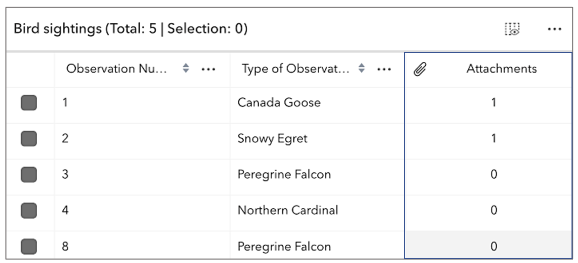
* The `AttachmentsColumn` class works with the [FeatureTable](https://developers.arcgis.com/javascript/latest/references/core/widgets/FeatureTable/) to display attachment counts for each feature in the table. If a feature has attachments and the table is configured to [enable Attachments](https://developers.arcgis.com/javascript/latest/references/core/widgets/FeatureTable/#attachmentsEnabled), the count is displayed in the cell. Whereas the cell is empty if the feature does not have attachments. This column is always appended to the end of the table.
*
* > [!WARNING]
* >
* > This class should be used for observing potential changes. It is designed
* > primarily to read and not interact directly with the attachment columns.
*
* 
*
* @since 4.30
* @see [FeatureTable](https://developers.arcgis.com/javascript/latest/references/core/widgets/FeatureTable/)
* @see [FeatureTableViewModel](https://developers.arcgis.com/javascript/latest/references/core/widgets/FeatureTable/FeatureTableViewModel/)
*/
export default class AttachmentsColumn extends Column {
constructor(properties?: AttachmentsColumnProperties);
/**
* The sanitized label displayed within the [FeatureTable](https://developers.arcgis.com/javascript/latest/references/core/widgets/FeatureTable/) header for the attachments column.
*
* @see [ArcGIS HTML Sanitizer](https://github.com/Esri/arcgis-html-sanitizer#readme)
* @see [ArcGIS Online supported HTML specification](https://doc.arcgis.com/en/arcgis-online/reference/supported-html.htm)
*/
get effectiveLabel(): string;
/**
* The [Calcite Icon](https://developers.arcgis.com/calcite-design-system/icons/) displayed within the [FeatureTable](https://developers.arcgis.com/javascript/latest/references/core/widgets/FeatureTable/) header for the attachments column.
*
* @default "attachment"
* @see [Calcite Icon Search](https://developers.arcgis.com/calcite-design-system/icons/)
* @see [Calcite Icon Search](https://developers.arcgis.com/calcite-design-system/icons/)
*/
accessor icon: Icon["icon"];
/**
* The associated [CatalogFootprintLayer](https://developers.arcgis.com/javascript/latest/references/core/layers/catalog/CatalogFootprintLayer/), [CSVLayer](https://developers.arcgis.com/javascript/latest/references/core/layers/CSVLayer/), [FeatureLayer](https://developers.arcgis.com/javascript/latest/references/core/layers/FeatureLayer/), [GeoJSONLayer](https://developers.arcgis.com/javascript/latest/references/core/layers/GeoJSONLayer/), [ImageryLayer](https://developers.arcgis.com/javascript/latest/references/core/layers/ImageryLayer/),
* [KnowledgeGraphSublayer](https://developers.arcgis.com/javascript/latest/references/core/layers/knowledgeGraph/KnowledgeGraphSublayer/), [SceneLayer](https://developers.arcgis.com/javascript/latest/references/core/layers/SceneLayer/), or [WFSLayer](https://developers.arcgis.com/javascript/latest/references/core/layers/WFSLayer/) containing the fields and attributes to display within the widget.
*
* @since 4.31
*/
accessor layer: FeatureTableSupportedLayer;
/**
* Indicates whether the attachments column is sortable.
*
* @default false
*/
get sortable(): boolean;
/**
* The text alignment of the attachments column.
*
* @default "center"
*/
get textAlign(): TextAlign;
/**
* Attempts to display attachment thumbnail previews as images instead of generic icons.
* Only applies if the attachment is an image, otherwise an icon is still used.
*
* @default "image"
*/
accessor thumbnailAppearance: "image" | "icon";
/**
* Controls the number of attachment thumbnail previews to display in each cell.
*
* @default 8
*/
accessor thumbnailCount: number;
/**
* Controls the scale of attachment thumbnail icons. Does not apply to images.
*
* @default "m"
*/
accessor thumbnailIconScale: "s" | "m" | "l";
/**
* Controls if attachments thumbnail previews are rendered in each cell. Otherwise, only the total attachment count is displayed.
*
* @default true
*/
accessor thumbnailsEnabled: boolean;
}