@arcgis/core
Version:
ArcGIS Maps SDK for JavaScript: A complete 2D and 3D mapping and data visualization API
53 lines (51 loc) • 3.4 kB
TypeScript
import type Column from "./Grid/Column.js";
import type { Icon } from "@esri/calcite-components/components/calcite-icon";
import type { ColumnProperties } from "./Grid/Column.js";
import type { ActionColumnCallback, ActionColumnDisabledFunction } from "./support/types.js";
export interface ActionColumnProperties extends ColumnProperties, Partial<Pick<ActionColumn, "callback" | "disabled">> {
/**
* Icon used by each action. Accepts Calcite UI icon strings.
*
* @default "pencil"
* @see [Calcite Icon Search](https://developers.arcgis.com/calcite-design-system/icons/)
* @see [Calcite Icon Search](https://developers.arcgis.com/calcite-design-system/icons/)
*/
icon?: Icon["icon"];
}
/**
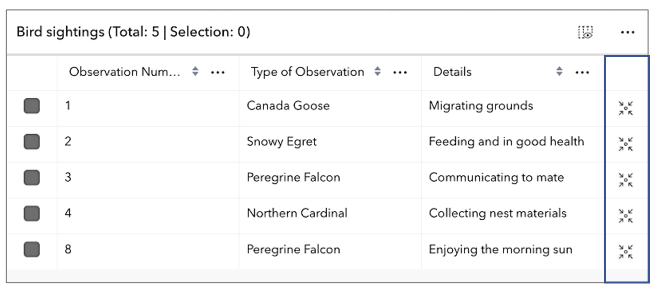
* The [ActionColumn](https://developers.arcgis.com/javascript/latest/references/core/widgets/FeatureTable/ActionColumn/) class works
* with the [FeatureTable](https://developers.arcgis.com/javascript/latest/references/core/widgets/FeatureTable/) and is designed specifically for
* displaying a singular [Calcite Action](https://developers.arcgis.com/calcite-design-system/components/action/) component for each row in the table.
* These actions can be configured with a specific icon. The callback function
* is invoked whenever the action is clicked. Actions can be configured to dynamically
* display based on provided conditions.
*
* 
*
* [](https://developers.arcgis.com/javascript/latest/sample-code/widgets-featuretable-row-highlights/)
*
* @since 4.30
* @see [FeatureTable](https://developers.arcgis.com/javascript/latest/references/core/widgets/FeatureTable/)
* @see [FeatureTableViewModel](https://developers.arcgis.com/javascript/latest/references/core/widgets/FeatureTable/FeatureTableViewModel/)
* @see [Sample - FeatureTable with custom content](https://developers.arcgis.com/javascript/latest/sample-code/widgets-featuretable-custom-content/)
* @see [Sample - FeatureTable with related records](https://developers.arcgis.com/javascript/latest/sample-code/widgets-featuretable-relates/)
* @see [Sample - FeatureTable with row highlights](https://developers.arcgis.com/javascript/latest/sample-code/widgets-featuretable-row-highlights/)
*/
export default class ActionColumn extends Column {
constructor(properties?: ActionColumnProperties);
/** Function invoked when an individual action is clicked or pressed. */
accessor callback: ActionColumnCallback;
/**
* Indicates if the action should appear disabled. This prevents interaction with the specific
* action component. This property accepts a boolean or a function that returns a boolean, therefore making it possible to dynamically disable actions based on a condition (e.g. if a row is selected).
*/
accessor disabled: ActionColumnDisabledFunction | boolean | null | undefined;
/**
* Icon used by each action. Accepts Calcite UI icon strings.
*
* @default "pencil"
* @see [Calcite Icon Search](https://developers.arcgis.com/calcite-design-system/icons/)
* @see [Calcite Icon Search](https://developers.arcgis.com/calcite-design-system/icons/)
*/
accessor icon: Icon["icon"];
}