@arcgis/core
Version:
ArcGIS Maps SDK for JavaScript: A complete 2D and 3D mapping and data visualization API
305 lines (302 loc) • 15.9 kB
TypeScript
import type Graphic from "../Graphic.js";
import type EsriMap from "../Map.js";
import type FormTemplate from "../form/FormTemplate.js";
import type Widget from "./Widget.js";
import type FeatureFormViewModel from "./FeatureForm/FeatureFormViewModel.js";
import type VisibleElements from "./FeatureForm/VisibleElements.js";
import type { Icon } from "@esri/calcite-components/components/calcite-icon";
import type { FormTemplateProperties } from "../form/FormTemplate.js";
import type { TimeZone } from "../time/types.js";
import type { FeatureFormViewModelEvents, FeatureFormViewModelProperties } from "./FeatureForm/FeatureFormViewModel.js";
import type { HeadingLevel } from "./support/types.js";
import type { VisibleElementsProperties } from "./FeatureForm/VisibleElements.js";
import type { WidgetProperties } from "./Widget.js";
export interface FeatureFormProperties extends WidgetProperties, Partial<Pick<FeatureForm, "disabled" | "feature" | "groupDisplay" | "headingLevel" | "layer" | "map">> {
/**
* The associated [template](https://developers.arcgis.com/javascript/latest/references/core/form/FormTemplate/) used for the form.
*
* The [FormTemplate](https://developers.arcgis.com/javascript/latest/references/core/form/FormTemplate/) is used to configure how the form should display and set any associated properties for the form, e.g. title, description, field elements, etc.
*
* @since 4.16
* @see [Sample - Update Feature Attributes](https://developers.arcgis.com/javascript/latest/sample-code/editing-groupedfeatureform/)
* @see [Sample - Advanced Attribute Editing](https://developers.arcgis.com/javascript/latest/sample-code/editing-featureform-fieldvisibility/)
* @example
* // Create the Form template and pass in elements
* const formTemplate = new FormTemplate({
* title: "Inspector report",
* description: "Enter all relevant information below",
* elements: [groupElement] // Add the grouped elements to the template
* });
*
* // Add a new feature form with grouped fields
* const form = new FeatureForm({
* container: "form",
* groupDisplay: "sequential", // only display one group at a time
* formTemplate: formTemplate // set it to template created above
* });
*/
formTemplate?: FormTemplateProperties | null;
/**
* Icon displayed in the widget's button.
*
* @default "form-field"
* @since 4.27
* @see [Calcite Icon Search](https://developers.arcgis.com/calcite-design-system/icons/)
* @see [Calcite Icon Search](https://developers.arcgis.com/calcite-design-system/icons/)
*/
icon?: Icon["icon"] | null;
/**
* The widget's default label.
*
* @since 4.11
*/
label?: string | null;
/**
* The timezone displayed within the form. If `unknown`, it first checks if the layer has a [FeatureLayer.preferredTimeZone](https://developers.arcgis.com/javascript/latest/references/core/layers/FeatureLayer/#preferredTimeZone). If so, it displays this. If not, it will default to UTC.
*
* @since 4.28
*/
timeZone?: TimeZone | null;
/**
* The view model for this widget. This is a class that contains all the logic
* (properties and methods) that controls this widget's behavior. See the
* [FeatureFormViewModel](https://developers.arcgis.com/javascript/latest/references/core/widgets/FeatureForm/FeatureFormViewModel/) class to access
* all properties and methods on the widget.
*/
viewModel?: FeatureFormViewModelProperties;
/**
* Defines which elements are visible in the widget.
*
* @since 4.33
*/
visibleElements?: VisibleElementsProperties;
}
export interface FeatureFormEvents extends FeatureFormViewModelEvents {}
/**
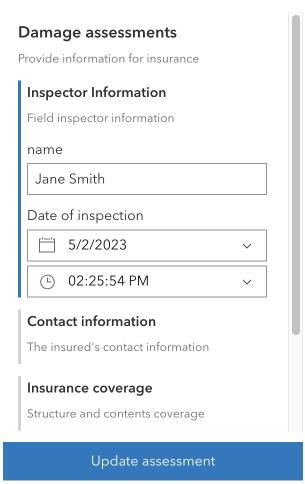
* The FeatureForm widget displays attributes of a feature. This widget
* renders [FeatureFormViewModel.inputs](https://developers.arcgis.com/javascript/latest/references/core/widgets/FeatureForm/FeatureFormViewModel/#inputs) based on the feature's attributes and whether the field allows editing. It is possible to configure [FormTemplate.elements](https://developers.arcgis.com/javascript/latest/references/core/form/FormTemplate/#elements) for [fields](https://developers.arcgis.com/javascript/latest/references/core/form/elements/FieldElement/) and [groups](https://developers.arcgis.com/javascript/latest/references/core/form/elements/GroupElement/) of other elements. The latter is useful for organizing how your form data displays. All of the properties and configurations set on the form are handled via the [formTemplate](https://developers.arcgis.com/javascript/latest/references/core/widgets/FeatureForm/#formTemplate) property.
*
* This widget is intended to be used with [FeatureLayer.applyEdits()](https://developers.arcgis.com/javascript/latest/references/core/layers/FeatureLayer/#applyEdits) method. This enables an end user to update a feature's attribute on an editable feature layer. The UI to submit and apply any updates should be wired up within the application's code.
*
* 
*
* > [!WARNING]
* >
* > **Known Limitations**
* >
* > This widget is not yet at full parity with the functionality provided in the 3.x
* > [AttributeInspector](https://developers.arcgis.com/javascript/3/jsapi/attributeinspector-amd.html)
* > widget. There is currently no support for editing attachments or related records solely within this widget, although it is possible to edit attachments and relationship data via the [Editor](https://developers.arcgis.com/javascript/latest/references/core/widgets/Editor/) widget. Please refer to the [Editor](https://developers.arcgis.com/javascript/latest/references/core/widgets/Editor/) documentation for any known limitations regarding this.
*
* @deprecated since version 5.0. Use the [Feature Form](https://developers.arcgis.com/javascript/latest/references/map-components/components/arcgis-feature-form/) component instead. For information on widget deprecation, read about [Esri's move to web components](https://developers.arcgis.com/javascript/latest/components-transition-plan/).
* @since 4.9
* @see [Sample - Update Feature Attributes](https://developers.arcgis.com/javascript/latest/sample-code/editing-groupedfeatureform/)
* @see [Sample - Update FeatureLayer using ApplyEdits](https://developers.arcgis.com/javascript/latest/sample-code/editing-applyedits/)
* @see [Sample - Advanced Attribute Editing](https://developers.arcgis.com/javascript/latest/sample-code/editing-featureform-fieldvisibility/)
* @see [FeatureFormViewModel](https://developers.arcgis.com/javascript/latest/references/core/widgets/FeatureForm/FeatureFormViewModel/)
* @see [FormTemplate](https://developers.arcgis.com/javascript/latest/references/core/form/FormTemplate/)
* @see [DefaultUI](https://developers.arcgis.com/javascript/latest/references/core/views/ui/DefaultUI/)
* @see [FeatureLayer](https://developers.arcgis.com/javascript/latest/references/core/layers/FeatureLayer/)
* @see [Editor](https://developers.arcgis.com/javascript/latest/references/core/widgets/Editor/)
* @example
* const featureForm = new FeatureForm({
* container: "formDiv",
* map: map, // Required if using Arcade expressions that use the global $map variable
* feature: graphic,
* formTemplate: template
* });
*/
export default class FeatureForm extends Widget {
/**
* @deprecated
* Do not directly reference this property.
* Use EventNames and EventTypes helpers from \@arcgis/core/Evented
*/
"@eventTypes": FeatureFormEvents;
/**
* @example
* // Typical usage
* const featureForm = new FeatureForm({
* container: "formDiv", // HTML div
* map: map, // Required if using Arcade expressions that use the global $map variable
* feature: graphic, // Pass in feature
* // Specify the form's template for how it is configured
* formTemplate: template
* });
*/
constructor(properties?: FeatureFormProperties);
/**
* When `true`, sets the widget to a disabled state so the user cannot interact with it.
*
* @default false
* @since 4.25
*/
accessor disabled: boolean;
/**
* The associated feature containing the editable attributes.
* A common way to access this is via the [MapView.hitTest()](https://developers.arcgis.com/javascript/latest/references/core/views/MapView/#hitTest)
* or [SceneView's](https://developers.arcgis.com/javascript/latest/references/core/views/SceneView/#hitTest) `hitTest()`
* method.
*
* @example
* // Check if a user clicked on an incident feature.
* view.on("click", function(event) {
* view.hitTest(event).then(function(response) {
* // Display the attributes of selected incident feature in the form
* if (response.results[0].graphic && response.results[0].graphic.layer.id == "incidentsLayer") {
* formVM.feature = result.results[0].graphic
* }
* });
* });
*/
accessor feature: Graphic | null | undefined;
/**
* The associated [template](https://developers.arcgis.com/javascript/latest/references/core/form/FormTemplate/) used for the form.
*
* The [FormTemplate](https://developers.arcgis.com/javascript/latest/references/core/form/FormTemplate/) is used to configure how the form should display and set any associated properties for the form, e.g. title, description, field elements, etc.
*
* @since 4.16
* @see [Sample - Update Feature Attributes](https://developers.arcgis.com/javascript/latest/sample-code/editing-groupedfeatureform/)
* @see [Sample - Advanced Attribute Editing](https://developers.arcgis.com/javascript/latest/sample-code/editing-featureform-fieldvisibility/)
* @example
* // Create the Form template and pass in elements
* const formTemplate = new FormTemplate({
* title: "Inspector report",
* description: "Enter all relevant information below",
* elements: [groupElement] // Add the grouped elements to the template
* });
*
* // Add a new feature form with grouped fields
* const form = new FeatureForm({
* container: "form",
* groupDisplay: "sequential", // only display one group at a time
* formTemplate: formTemplate // set it to template created above
* });
*/
get formTemplate(): FormTemplate | null | undefined;
set formTemplate(value: FormTemplateProperties | null | undefined);
/**
* String indicating the
* [groupDisplay](https://developers.arcgis.com/javascript/latest/references/core/widgets/FeatureForm/#groupDisplay) and how they will be displayed to the end user. This only applies if using [grouped field elements](https://developers.arcgis.com/javascript/latest/references/core/form/elements/GroupElement/) configured in the Editor's [layer infos](https://developers.arcgis.com/javascript/latest/references/core/widgets/Editor/types/#LayerInfo).
*
* **Possible Values**
*
* Value | Description |
* ----- | ----------- |
* all | All groups will be expanded.
* sequential | A single group will be expanded at a time.
*
* @default "all"
* @since 4.10
* @see [Sample - Update Feature Attributes](https://developers.arcgis.com/javascript/latest/sample-code/editing-groupedfeatureform/)
*/
accessor groupDisplay: "all" | "sequential";
/**
* Indicates the heading level to use for the [FormTemplate.title](https://developers.arcgis.com/javascript/latest/references/core/form/FormTemplate/#title) of the form.
* By default, the title is rendered as a level 2 heading (e.g. `<h2>Form title</h2>`).
* In addition, group element labels default to a level 3 heading (e.g. `<h3>Group element label</h3>`).
* Depending on the widget's placement
* in your app, you may need to adjust this heading for proper semantics. This is
* important for meeting accessibility standards.
*
* @default 2
* @since 4.20
* @see [Heading Elements](https://developer.mozilla.org/en-US/docs/Web/HTML/Element/Heading_Elements)
* @example
* // form title will render as an <h3>
* // group element labels will render as an <h4>
* featureForm.headingLevel = 3;
*/
accessor headingLevel: HeadingLevel;
/**
* Icon displayed in the widget's button.
*
* @default "form-field"
* @since 4.27
* @see [Calcite Icon Search](https://developers.arcgis.com/calcite-design-system/icons/)
* @see [Calcite Icon Search](https://developers.arcgis.com/calcite-design-system/icons/)
*/
get icon(): Icon["icon"];
set icon(value: Icon["icon"] | null | undefined);
/**
* The widget's default label.
*
* @since 4.11
*/
get label(): string;
set label(value: string | null | undefined);
/**
* Layer containing the editable feature attributes.
* If this layer is not specified, it is the same as the
* [graphic's layer](https://developers.arcgis.com/javascript/latest/references/core/Graphic/#layer).
*
* @example
* const form = new FeatureForm({
* container: "formDiv", // HTML div
* layer: featureLayer // Feature layer
* });
*/
accessor layer: FeatureFormViewModel["layer"];
/**
* A reference to the associated [Map](https://developers.arcgis.com/javascript/latest/references/core/Map/).
*
* > [!WARNING]
* >
* > This property is required if working with [Arcade expressions](https://developers.arcgis.com/javascript/latest/arcade/) in the `FeatureForm` that make use of the `$map` global variable.
*
* @since 4.27
*/
accessor map: EsriMap | null | undefined;
/**
* The timezone displayed within the form. If `unknown`, it first checks if the layer has a [FeatureLayer.preferredTimeZone](https://developers.arcgis.com/javascript/latest/references/core/layers/FeatureLayer/#preferredTimeZone). If so, it displays this. If not, it will default to UTC.
*
* @since 4.28
*/
get timeZone(): TimeZone;
set timeZone(value: TimeZone | null | undefined);
/**
* The view model for this widget. This is a class that contains all the logic
* (properties and methods) that controls this widget's behavior. See the
* [FeatureFormViewModel](https://developers.arcgis.com/javascript/latest/references/core/widgets/FeatureForm/FeatureFormViewModel/) class to access
* all properties and methods on the widget.
*/
get viewModel(): FeatureFormViewModel;
set viewModel(value: FeatureFormViewModelProperties);
/**
* Defines which elements are visible in the widget.
*
* @since 4.33
*/
get visibleElements(): VisibleElements;
set visibleElements(value: VisibleElementsProperties);
/**
* Returns all of the field values, regardless of update status.
*
* @returns An object of key-value pairs of field names with their values.
* @see [@submit](https://developers.arcgis.com/javascript/latest/references/core/widgets/FeatureForm/#event-submit) event
* @see [submit()](https://developers.arcgis.com/javascript/latest/references/core/widgets/FeatureForm/#submit) method
* @example
* function updateFeature() {
* // Get the updated field values
* const attributes = form.getValues();
* // Call applyEdits on the featurelayer
* layer.applyEdits({
* // Pass in the updated field values
* updateFeatures: [{ attributes }]
* });
* }
*/
getValues(): any;
/**
* Fires the [@submit](https://developers.arcgis.com/javascript/latest/references/core/widgets/FeatureForm/#event-submit) event.
*
* @example
* // Listen for when 'submit' is called on the FeatureForm.
* // Once it is fired, update the feature.
* form.on("submit", updateFeature);
* // When the DOM's button (btnUpdate) is clicked,
* // execute the 'submit()' method.
* on(dom.byId("btnUpdate"), "click", form.submit());
*/
submit(): void;
}